
In an age dominated by digital media, video content reigns supreme. From cherished family memories captured on a camcorder to professionally shot footage, and from downloaded movies to user-generated online content, videos are an integral part of our daily lives. However, the sheer diversity of video formats, codecs, resolutions, and container types can often lead to frustrating compatibility issues. You might find yourself unable to play a video on your preferred device, upload it to a specific platform, or edit it with your chosen software. This is where a robust and versatile video converter becomes an indispensable tool. Among the myriad of options available, Pavtube HD Video Converter emerges as a powerful, all-encompassing solution designed to eliminate these barriers, offering users seamless conversion, basic editing, and optimized playback across an extensive array of devices and platforms.
Pavtube HD Video Converter is not merely a utility; it’s a comprehensive video management assistant that addresses the multifaceted needs of modern video users. It stands out for its ability to handle high-definition (HD) video formats with exceptional fidelity, ensuring that the integrity and quality of your precious footage are preserved throughout the conversion process. Whether you’re a casual user looking to prepare a video for your smartphone, a content creator aiming to streamline your editing workflow, or simply someone who wants the freedom to enjoy any video on any screen, Pavtube HD Video Converter promises to deliver a smooth, efficient, and high-quality experience.
Comprehensive Video Conversion Capabilities
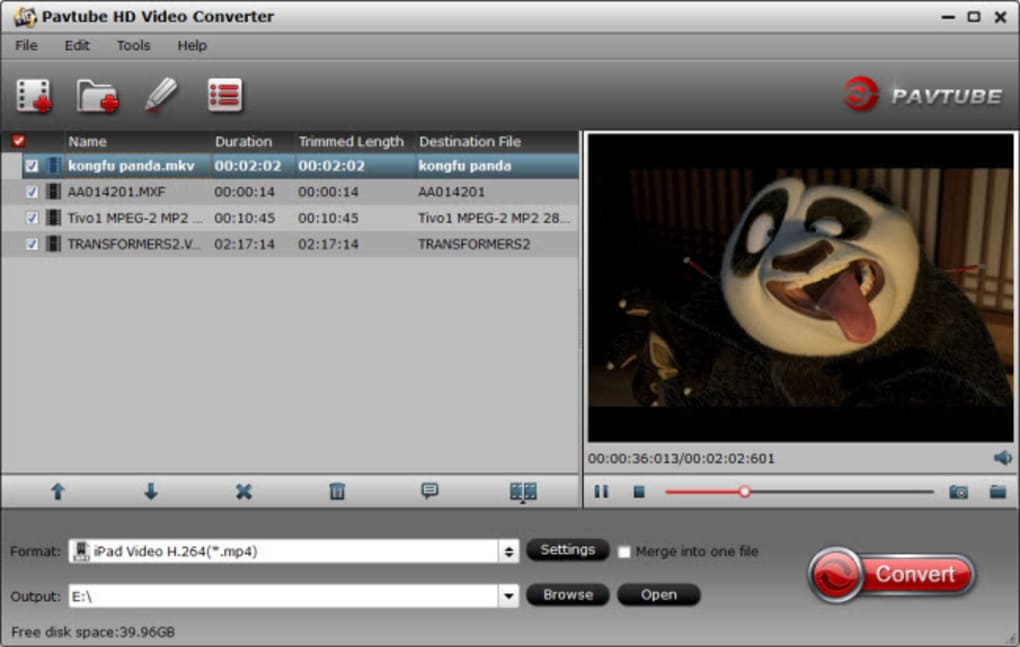
At the heart of any excellent video converter lies its ability to support a vast range of formats, both for input and output. Pavtube HD Video Converter excels in this domain, positioned as a solution that leaves virtually no video file out of reach. Its strength lies in its expansive compatibility, allowing users to effortlessly bridge the gaps between disparate video ecosystems and ensure their content is always accessible and usable.
Unparalleled Format Support
One of the most significant frustrations for video enthusiasts is encountering a file format that their current software or device simply cannot recognize. Pavtube HD Video Converter addresses this head-on by boasting support for an incredibly wide spectrum of video formats. This isn’t just about common formats like MP4 or MOV; it delves deep into the less common and specialized formats, making it a truly universal tool.
For input, the converter can ingest almost any video type imaginable. This includes mainstream formats such as MOV, MOD, MPEG, MP4, AVI, WMV, FLV, and 3GP. Crucially, its “HD Video Converter” moniker highlights its prowess in handling high-definition footage. It flawlessly supports various HD video encodings and container formats, including TS, MTS, M2TS, MKV, MXF, M4V, and even TiVo recordings. This comprehensive input support means that whether your video comes from a professional camcorder (like AVCHD MTS/M2TS or MXF files), a DSLR, a screen recording, or a downloaded source, Pavtube HD Video Converter is likely to recognize and process it. It can manage both 1080P and 720P HD videos with ease, ensuring that high-resolution content is never a roadblock.
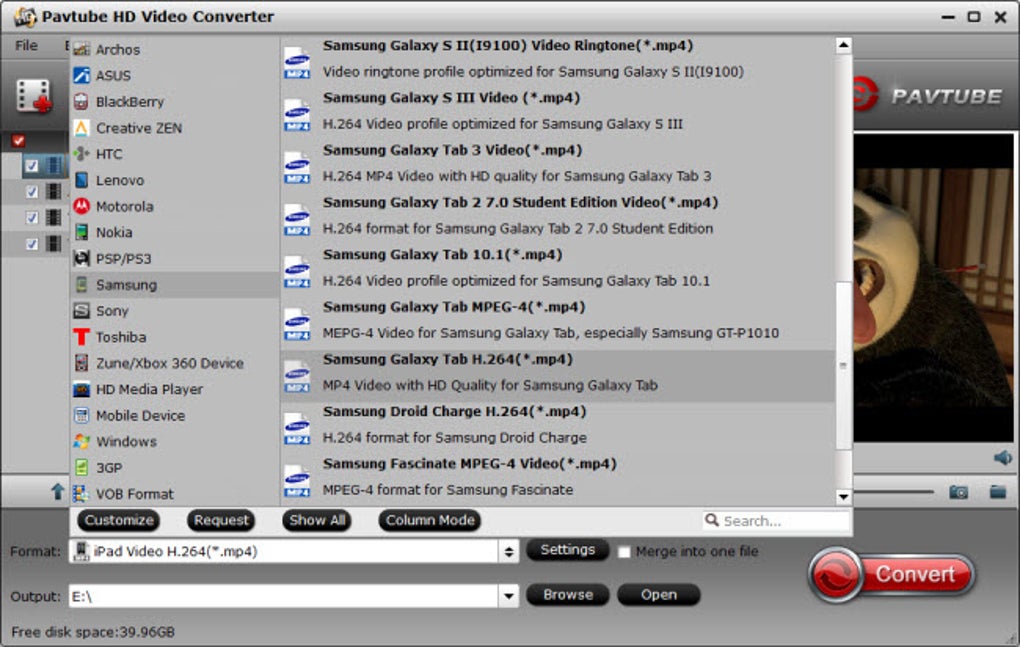
The versatility extends equally to its output capabilities. Once your video is loaded, you’re presented with an equally diverse selection of output formats. This broad range allows you to tailor your converted video precisely to its intended destination. Need to play a high-definition video on an older media player that only supports standard definition MPEG? Pavtube can do it. Want to prepare your 4K footage for editing in a specific professional suite like Adobe Premiere Pro or Sony Vegas, which might prefer MOV or MP4 with particular codecs? The converter offers the necessary profiles. For mobile users, it provides optimized presets for various Apple devices (iPhones, iPads, Apple TV), Android smartphones and tablets (Samsung, Huawei, Google Pixel, etc.), and even game consoles like Xbox or PlayStation. This extensive output flexibility means that you are never limited by your devices or software choices. The goal is simple: convert it to whatever format you need, when you need it.
Preserving Original Video Quality
A common concern with video conversion is the potential loss of quality. Many converters, especially free or less sophisticated ones, might compress videos excessively, leading to pixelation, artifacts, or a noticeable downgrade in visual fidelity. Pavtube HD Video Converter prioritizes the preservation of the original video quality. Its conversion algorithms are designed to handle HD video streams efficiently, ensuring that details, colors, and sharpness are maintained as closely as possible to the source material.
When converting from one high-definition format to another, the software strives to achieve a lossless or near-lossless conversion, depending on the chosen output format and settings. For instance, if you’re converting an AVCHD MTS file to an HD MP4, Pavtube works to keep the 1080p or 720p resolution intact and the bitrate as high as possible, only adjusting it if a smaller file size is explicitly requested. This commitment to quality means that your converted videos will look just as good, if not better, than the original, allowing you to enjoy your content without compromise. This is a critical advantage, particularly for professional users or those who have invested in high-quality recording equipment.
Tackling Compatibility Challenges
The digital landscape is a fragmented one, with various manufacturers, operating systems, and software platforms each having their preferred video codecs and containers. This fragmentation often leads to the dreaded “unsupported format” error message. Pavtube HD Video Converter serves as a universal translator in this complex ecosystem.
Imagine you’ve recorded a family event in a specific camcorder format like MOD, but your smart TV only plays MP4, and your video editing software prefers MOV. Instead of juggling multiple applications or searching for obscure codecs, Pavtube offers a straightforward solution. It eliminates the need to worry about having the “right” software, program, media player, or device. By converting your files quickly and easily into a universally accepted format or a device-specific preset, Pavtube ensures that your videos are always ready for playback, editing, sharing, or archiving. This adaptability makes it an invaluable tool for anyone who frequently deals with videos across different devices and platforms, from personal use to content creation workflows.
Integrated Editing for Refined Video Output
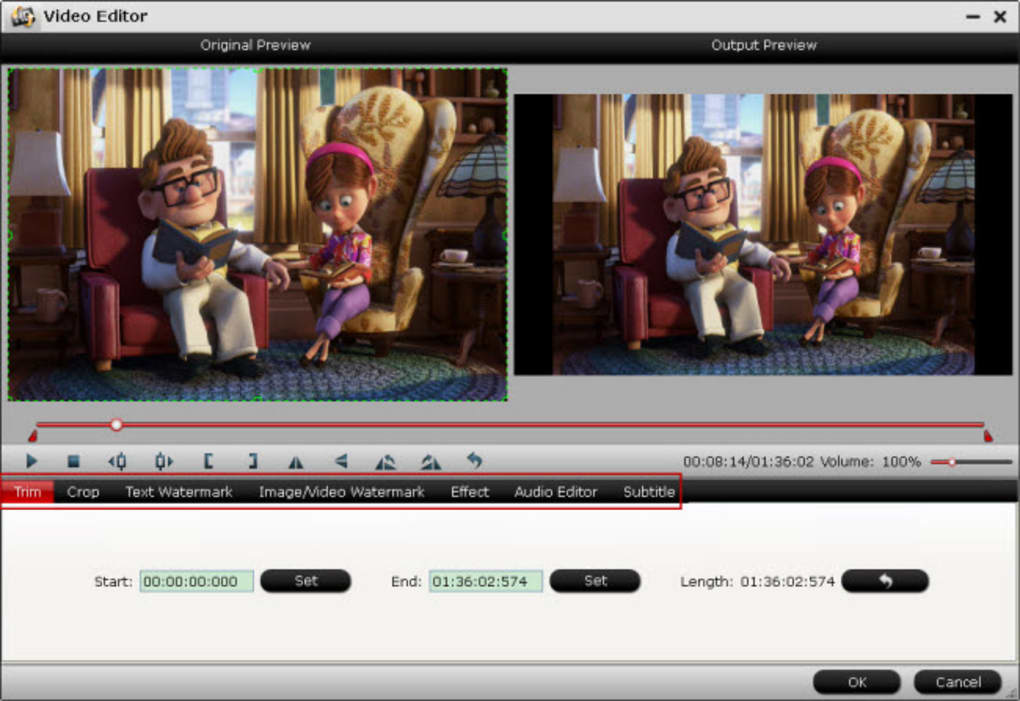
While its primary function is robust video conversion, Pavtube HD Video Converter distinguishes itself further by incorporating a suite of basic yet powerful video editing tools directly into its interface. This integrated approach offers immense convenience, allowing users to make essential adjustments and enhancements to their videos before conversion, without the need to switch to separate, often more complex, video editing software. These functions are designed to be intuitive and accessible, catering to both novice and experienced users who need quick fixes or minor stylistic alterations.
Essential Trimming and Cropping Tools
Two of the most frequently needed video editing functions are trimming and cropping, and Pavtube HD Video Converter provides these with user-friendly precision.
- Trimming: Often, a video contains unwanted segments at the beginning or end, or perhaps you only need a specific clip from a longer recording. The trimming feature allows you to define a specific start and end point for your video, effectively cutting out the extraneous parts. This is perfect for isolating a key moment from a lecture, a highlight from a sports game, or simply removing dead air before or after your main content. It helps in creating concise and focused video clips that are easier to share and more engaging to watch.
- Cropping: Black bars on the sides or top/bottom of a video are a common occurrence, especially when aspect ratios don’t match, or when recording devices capture extra unwanted areas. The cropping function enables you to visually select and cut off these black edges or any other unwanted portions of the video frame. This not only cleans up the video’s appearance but also allows you to focus the viewer’s attention on the central subject, removing distracting elements. For example, if you’ve recorded a video where some sensitive information is visible at the corner, cropping can remove that area entirely, ensuring privacy and a cleaner visual presentation. These tools ensure that your converted HD videos are presented without space interference or irrelevant content.
Personalization with Watermarks and Subtitles
Beyond basic structural edits, Pavtube HD Video Converter also offers features to personalize and enhance your videos, which is particularly useful for creators and businesses.
- Adding Watermarks: The watermark function is a versatile tool for branding, copyright protection, or simply adding a personal touch. You can choose to add either text watermarks or image watermarks to your video. For text, this could be your name, a website URL, a copyright notice, or a special message. For images, you can overlay your logo, a picture, or any graphic element. The software allows you to adjust the position, transparency, and size of the watermark, ensuring it complements your video without obscuring important content. This feature is invaluable for individuals sharing videos online who want to claim their work or for businesses embedding their branding directly into promotional content.
- Inserting SRT Subtitles: For videos that require dialogue transcription or translation, Pavtube HD Video Converter allows you to insert external SRT subtitle files. This is incredibly useful for making your content accessible to a wider audience, including those who are hearing impaired or viewers who prefer to watch videos without sound. It also supports different languages, enabling you to cater to a global viewership. The ability to embed subtitles directly during conversion streamlines the workflow, saving the extra step of using a separate tool to hardcode them.
Deinterlacing and Advanced Adjustments
Pavtube HD Video Converter goes a step further in video refinement with its deinterlacing function and other video effect settings.
- Deinterlacing for Clearer Output: Interlaced video (common in older broadcast standards or some camcorder footage) can appear with visible “combing” artifacts when played on progressive display devices like modern TVs or computer monitors. The deinterlacing feature processes the video to eliminate these artifacts, converting the interlaced frames into progressive ones. The result is a much clearer, smoother, and more natural-looking video, especially noticeable during fast-motion scenes. This ensures that your converted videos are optimized for contemporary viewing experiences.
- Setting Video Effects: While not a full-fledged effects suite, Pavtube allows for basic video adjustments to enhance visual appeal. Users can typically adjust parameters such as brightness, contrast, saturation, and apply simple filters (like grayscale or old film effects) to alter the mood or aesthetic of their footage. These small tweaks can significantly improve the overall look of a video, making it more vibrant, stylized, or corrected for minor lighting issues.
- Splitting & Merging: Beyond individual clips, the converter also offers the ability to split larger video files into multiple smaller segments, which can be useful for managing lengthy recordings or preparing specific sections for different purposes. Conversely, it can merge multiple video clips into a single continuous file, making it easy to combine related footage without external software.
All these editing functions are integrated seamlessly into the conversion workflow. Any changes you apply will automatically be reflected in the newly converted output file, ensuring that the final video is exactly as you envisioned, optimized for quality, content, and presentation. This holistic approach makes Pavtube HD Video Converter a potent tool that extends beyond mere format shifting, offering valuable content refinement capabilities.
Speed, Efficiency, and Broad Device Compatibility
In the fast-paced digital world, time is a precious commodity. Waiting hours for a video to convert, especially high-definition files, can be incredibly frustrating. Pavtube HD Video Converter addresses this critical need by integrating advanced technologies that significantly accelerate the conversion process. Coupled with its extensive support for various output devices, it ensures that your videos are not only ready quickly but are also perfectly tailored for your desired viewing or editing platform.
Accelerated Conversion with Hardware Support
The performance of a video converter is heavily influenced by its ability to leverage modern hardware. Pavtube HD Video Converter is engineered for speed and efficiency, making use of powerful acceleration technologies to dramatically reduce conversion times.
- NVIDIA CUDA and ATI Stream (AMD APP) Acceleration: One of the standout features of Pavtube HD Video Converter is its adoption of NVIDIA CUDA and ATI Stream (now AMD APP) acceleration technology. These technologies allow the software to offload intensive video encoding tasks from the CPU to the graphics processing unit (GPU). Modern GPUs are designed with thousands of processing cores, making them exceptionally efficient at parallel processing, which is ideal for video encoding. By harnessing this power, Pavtube can achieve conversion speeds up to 6X faster than traditional CPU-only methods, particularly when converting video files using the H.264 codec, which is widely used for its excellent compression and quality. This means a 1-hour 1080p video that might have taken several hours to convert can now be processed in a fraction of that time, offering a significant boost in productivity and a more streamlined user experience. This benefit is especially pronounced for users dealing with large HD video files or batch conversions.
The optimization extends to different codecs as well, ensuring that irrespective of the chosen output format, the software strives for the fastest possible conversion without compromising on the output quality. This blend of speed and quality is a core tenet of Pavtube’s design philosophy.
Seamless Playback and Editing Across Platforms
The ultimate goal of converting a video is usually to play it on a specific device or edit it with a particular software. Pavtube HD Video Converter excels at preparing videos for virtually any contemporary platform, thereby eliminating compatibility headaches and broadening your digital horizons.
-
Diverse Device Compatibility for Playback: The converter boasts considerable output formats and optimized profiles designed for a multitude of playback devices. This ensures free playback of HD video files on nearly any gadget you own.
- Apple Ecosystem: From iPhones and iPads to iPods and Apple TV, Pavtube offers specific presets that guarantee your videos will play flawlessly on Apple’s popular devices, adhering to their required codecs and resolutions.
- Android Devices: With the vast and diverse Android landscape, compatibility can be tricky. Pavtube provides extensive support for Android smartphones and tablets from various manufacturers, ensuring that your videos are optimized for smooth playback on your chosen device.
- HD Media Players: For those who use dedicated media players connected to their TVs, Pavtube can convert videos into formats that these players recognize and render in high definition, delivering a premium home theatre experience.
- Game Consoles: Whether it’s an Xbox, PlayStation, or other gaming consoles, the converter offers profiles to make your videos compatible for viewing on these entertainment systems.
- Other Portable Devices: This includes a range of MP4 players and other portable media gadgets, ensuring no device is left behind.
-
Optimized for Professional Video Editing Tools: Beyond casual playback, Pavtube HD Video Converter is also an invaluable tool for content creators and videographers. It can convert HD/SD videos into formats specifically tailored for professional video editing suites.
- Sony Vegas: Prepare your footage for seamless import and editing within Sony Vegas.
- Adobe Premiere Pro: Convert your raw camera files into a format that Premiere Pro handles efficiently, streamlining your post-production workflow.
- Windows Movie Maker & Pinnacle Studio: For users of more consumer-friendly editing software, Pavtube ensures that even complex HD files are compatible, making editing accessible to a broader audience.
By providing such a wide array of output options, Pavtube HD Video Converter empowers users with unprecedented control over their media. Whether you intend to simply watch a movie on your phone, integrate footage into a professional project, upload it to a streaming platform, or burn it to a disc, the software guarantees that your converted video will be perfectly suited for its intended purpose, delivered with speed and efficiency.
User Experience and Value Proposition
The true measure of any software lies not just in its features, but in how effectively and pleasurably users can leverage those features. Pavtube HD Video Converter presents a mixed but generally positive user experience, focusing on functionality and straightforward operation, making it a valuable addition to any digital toolkit.
Navigating the Interface: A Balance of Functionality and Simplicity
One of the criticisms occasionally leveled against Pavtube HD Video Converter is its “old-school interface.” In an era of sleek, minimalist designs, some might find its visual aesthetic a bit dated. However, this perceived simplicity often translates into a clear, functional, and uncluttered layout that prioritizes ease of use over flashy design elements.
Many users have lauded its “quick, clean interface and simple to use” nature. The workflow is generally intuitive: add your video files, select your desired output format or device profile, and hit convert. The editing tools are logically placed and straightforward to operate, meaning users don’t need extensive technical knowledge to trim, crop, or add watermarks. For a tool designed to perform a specific, essential function, a clear and direct interface can often be more beneficial than an overly complex or stylized one. The emphasis is on functionality and getting the job done efficiently, rather than on aesthetics. This makes the software accessible to a broad user base, from beginners to more experienced individuals who appreciate efficiency.
Pros, Cons, and User Testimonials
To provide a balanced perspective, it’s essential to consider both the strengths and weaknesses of Pavtube HD Video Converter, as well as the feedback from its user base.
Pros:
- Equipped with Basic Editing Tools: The inclusion of features like trimming, cropping, merging, splitting, deinterlacing, and basic video effects is a significant advantage. It allows users to make quick, necessary adjustments without having to export to a separate editor.
- Add Texts and Images on Video (Watermark Feature): This functionality is excellent for branding, copyright, or personalizing videos, offering a professional touch directly within the converter.
- Compatible with Almost All Available Video Formats: Its unparalleled input and output format support is arguably its strongest suit, resolving nearly all compatibility issues.
- Does Not Downgrade Video Quality: The commitment to preserving original quality, especially for HD videos, is a crucial benefit for users who value visual fidelity.
- Fast Conversion Speed: Thanks to NVIDIA CUDA and AMD APP acceleration, the software can convert files up to 6X faster, which is a major time-saver for large files.
- Wide Range of Output Devices/Editing Software: Optimized presets for Apple, Android, game consoles, media players, and professional editing suites like Sony Vegas and Adobe Premiere Pro ensure broad utility.
Cons:
- Old-school Interface: As mentioned, some users might find the interface less modern compared to contemporary software designs. This is largely a subjective aesthetic preference and doesn’t impede functionality.
- Cannot Convert Video to Audio: This is a notable limitation. If your requirement includes extracting audio tracks (e.g., to MP3, WAV) from video files, Pavtube HD Video Converter does not offer this specific function. Users needing this feature would have to use a separate audio extraction tool or a more comprehensive multimedia converter.
User Testimonials: Feedback from users frequently highlights the software’s effectiveness and reliability:
- “Powerful and easy. Now I can convert h.265 files for FCPX with the converter. NICE WORK!” – This showcases its ability to handle modern codecs and integrate with professional workflows.
- “Fast speed. With the technology of NVIDIA CUDA and AMD, you can get 6 times video decoding speed when converting video files to format by H.264/H.265 codec.” – Reinforces the advantage of hardware acceleration.
- “Worth buying. …I am very pleased with Pavtube as it does a fine job of conversion, into any format that I could possibly need.” – Speaks to its comprehensive format support and user satisfaction.
- “Quick, clean interface and simple to use. Pavtube HD Video Converter works flawlessly and I am very satisfied!” – Directly addresses the interface and overall performance.
- “The image and sound are maintained at a very good quality in the output file. …I highly recommend this.” – Emphasizes quality preservation.
These testimonials collectively paint a picture of a highly functional and dependable tool that delivers on its promises, even with a less modern interface. The core value of Pavtube HD Video Converter lies in its robust performance, extensive compatibility, and the sheer convenience it offers by combining essential conversion and editing capabilities.
In conclusion, Pavtube HD Video Converter is a highly capable and versatile tool that effectively tackles the common challenges of video format incompatibility. Its extensive support for virtually all HD and SD video formats, coupled with its ability to maintain high video quality, makes it a reliable choice for any video conversion task. The inclusion of basic yet effective editing tools further enhances its utility, allowing users to trim, crop, watermark, and refine their videos without resorting to complex external software. With hardware acceleration boosting conversion speeds and comprehensive output profiles for a vast array of devices and editing suites, Pavtube HD Video Converter stands as a powerful solution. While its interface might appear “old-school” to some, its rock-solid functionality and consistent performance, as affirmed by numerous users, establish it as a worthwhile investment for anyone looking to manage and enjoy their video content freely across all platforms. For those seeking an efficient and dependable video conversion and basic editing solution, Pavtube HD Video Converter remains a strong contender on PhanMemFree.
File Information
- License: “Trial version”
- Version: “4.8.6.2”
- Latest update: “July 15, 2022”
- Platform: “Windows”
- OS: “Windows 2003”
- Language: “English”
- Downloads: “17.7K”
- Size: “35.22 MB”


