
PC Screen Capture is a free, lightweight software application designed for capturing images from your computer screen. While not as feature-rich as some subscription-based alternatives, its simplicity and ease of use make it a compelling choice for users needing basic screen capture functionality. This review delves into the software’s features, performance, pros, cons, and alternatives, providing a comprehensive assessment of its capabilities.
Core Features and Functionality
PC Screen Capture provides a straightforward approach to screen capturing, focusing on efficiency and ease of use. Its primary function is to capture images of your screen, either the entire screen or selected regions. This functionality is implemented through a simple, intuitive interface, readily accessible through a top menu bar. Users can quickly and easily capture screenshots with minimal clicks, making it ideal for quickly grabbing images for various purposes.
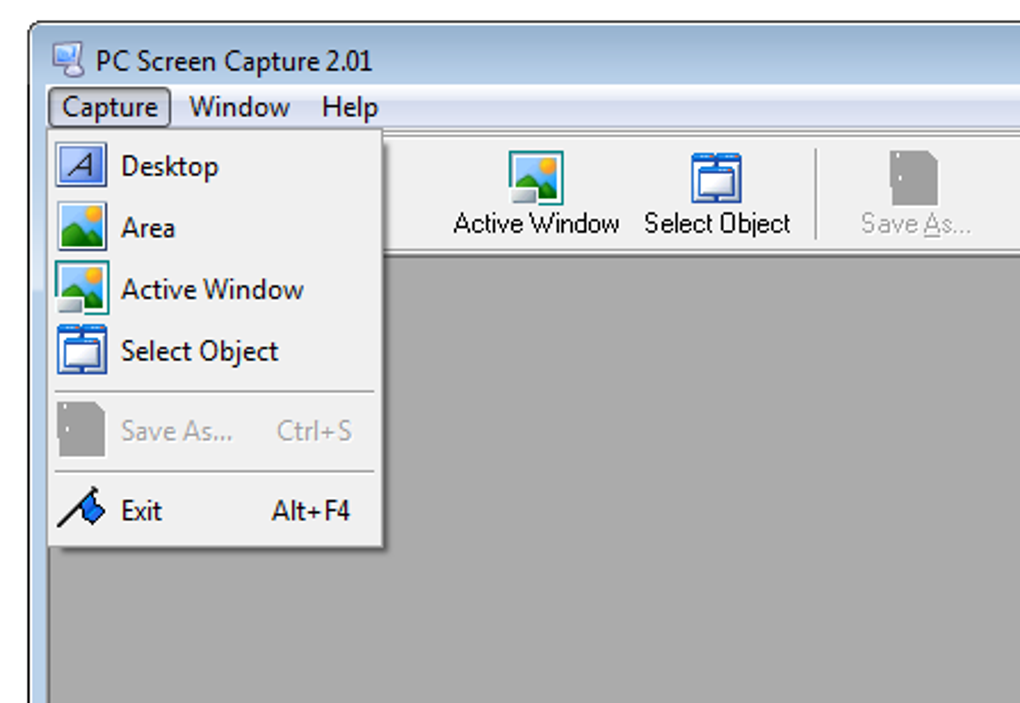
The software supports a range of common image formats, including JPEG (.JPG), Bitmap (.BMP), and GIF (.GIF), catering to a wide array of applications and compatibility requirements. This broad format support ensures that captured images can be seamlessly integrated into different software and platforms without the need for conversion.
One standout feature is the drag-and-drop functionality. This allows for incredibly quick capture of specific areas. Simply select the region you wish to capture and drag it to the desired location; this feature dramatically reduces the time and steps involved in capturing screenshots, enhancing efficiency and improving workflow.
The software’s accessibility is further enhanced by its menu-driven controls. All essential functions are clearly organized and easily accessible through a menu located at the top of the screen, eliminating any need for complex navigation or hunting for hidden options. This straightforward interface is particularly beneficial for users unfamiliar with complex image capture software.
Additional Options and Capabilities
Beyond its core screen capture capabilities, PC Screen Capture offers additional functionalities designed to enhance flexibility and usability. Notably, it allows users to run the program directly from a USB drive, eliminating the need for installation on the hard drive. This portability feature is incredibly convenient for users who frequently work on multiple computers or prefer to keep their primary hard drives uncluttered.
The software also allows for targeted capture of specific areas of a webpage, such as bookmarks, the address bar, or navigational menus. This functionality proves particularly useful for troubleshooting website issues or sharing specific elements of a webpage with others. By isolating particular elements, users can effectively highlight relevant information for communication or debugging.
This ability to selectively capture elements is a key advantage, as it streamlines the process of communication and facilitates efficient problem-solving, especially in web development and troubleshooting contexts. Instead of sending a full-screen capture, the user can quickly and easily isolate the specific problem area, saving both time and bandwidth.
Advantages and Disadvantages
PC Screen Capture presents several key advantages that make it an attractive option for certain users. Primarily, its completely free nature makes it accessible to everyone without any financial commitment. This affordability significantly broadens the user base, offering a valuable tool without any cost barrier. The small memory footprint is another significant advantage. This low resource consumption ensures that the software runs smoothly on older or lower-specification machines without impacting system performance.
However, PC Screen Capture also has limitations. Its functionality is less advanced than some subscription-based alternatives offering more sophisticated features such as screen recording, advanced editing tools, or automated image processing. This limitation means that power users or those requiring a wider array of features may find PC Screen Capture insufficient for their needs.
Another noteworthy limitation is its incompatibility with the latest versions of Windows. While it supports many versions, the software may not function correctly on the most recent operating systems. This compatibility issue is a significant drawback, as it limits its usability for users on cutting-edge Windows operating systems, potentially requiring them to look for alternate solutions.
Alternatives to PC Screen Capture
Numerous alternative screen capture programs exist, ranging from basic utilities to sophisticated, feature-rich applications. Some of the most popular alternatives include:
-
LightShot: A fast and easy-to-use screenshot tool known for its intuitive interface and quick access features. LightShot prioritizes speed and simplicity, making it a suitable alternative for users who need basic, quick screen captures.
-
Screenshot Captor: Another lightweight and free option offering immediate screen capture capabilities. Screenshot Captor focuses on providing a straightforward and efficient screen capture solution.
-
Snagit: A more advanced and feature-rich option (subscription-based), offering screen recording, advanced editing, and various sharing capabilities. Snagit caters to users needing a highly capable and versatile tool, but at a financial cost.
-
FastStone Capture: This comprehensive program boasts features like screen recording, image editing, and advanced annotation tools. It sits at a midway point, offering extensive features for a broader user base than PC Screen Capture, but with a higher learning curve.
The choice of alternative depends heavily on individual needs and preferences. If simple, quick capture is the priority, LightShot or Screenshot Captor might be ideal. If advanced features and flexibility are needed, Snagit or FastStone Capture would be more appropriate options.
User Reviews and Feedback
User reviews highlight PC Screen Capture’s ease of use and lightweight nature as its key strengths. Many users appreciate its simplicity and speed, finding it effective for quick screenshots. However, the lack of advanced features and compatibility issues with newer operating systems are frequently mentioned as drawbacks. Some reviews suggest that the software could benefit from updated features and broader operating system compatibility.
Conclusion
PC Screen Capture serves as a functional and straightforward solution for basic screen capture needs. Its free availability and minimal resource consumption make it a suitable option for users who require a lightweight and easy-to-use tool. However, its limited feature set and compatibility issues might make it unsuitable for those seeking advanced functionality or support for the latest operating systems. Users should carefully weigh their needs and preferences when considering PC Screen Capture, comparing it to other alternatives to ensure the best fit for their specific requirements. While it serves its primary purpose effectively, users seeking more advanced capabilities should explore other, possibly subscription-based options.
File Information
- License: “Free”
- Version: “2.3”
- Latest update: “July 15, 2022”
- Platform: “Windows”
- OS: “Windows XP”
- Language: “English”
- Downloads: “381.6K”
- Size: “1.35 MB”


