
PC Win Booster Free is a free software utility designed to enhance the performance of personal computers running on the Windows operating system. This review will delve into its features, capabilities, pros and cons, and compare it to similar applications available in the market. While marketed as a PC optimization tool and possessing some basic antivirus capabilities, it’s crucial to understand its limitations and consider whether it’s the right choice for your needs.
Core Functionality: Cleaning and Basic Antivirus
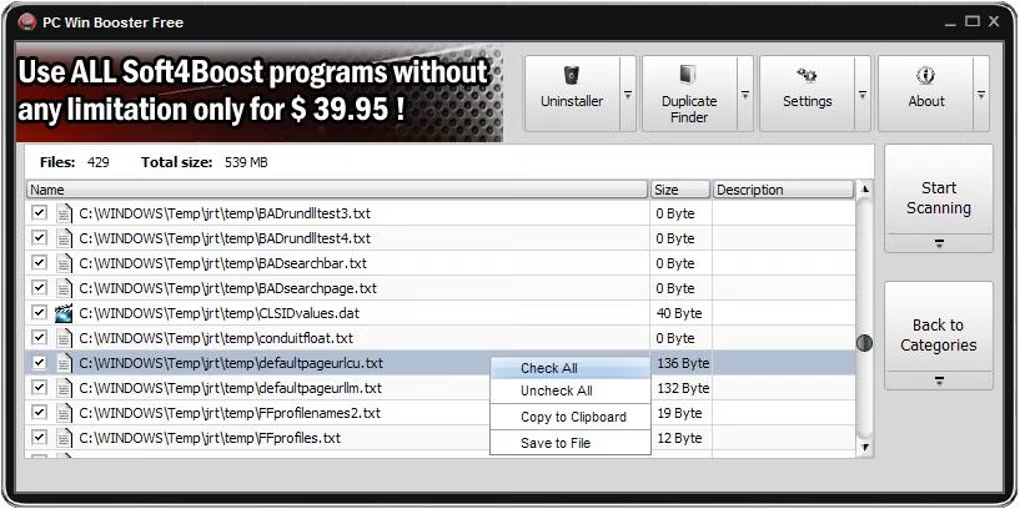
PC Win Booster Free primarily functions as a system cleaner and offers rudimentary antivirus protection. Its core functionality revolves around two key areas: removing unwanted files and detecting potential malware. The software identifies and removes unnecessary files, including temporary internet files, log files, and other data that can clog up your system’s hard drive and slow down performance. This process helps free up disk space and potentially improve boot times and overall system responsiveness.
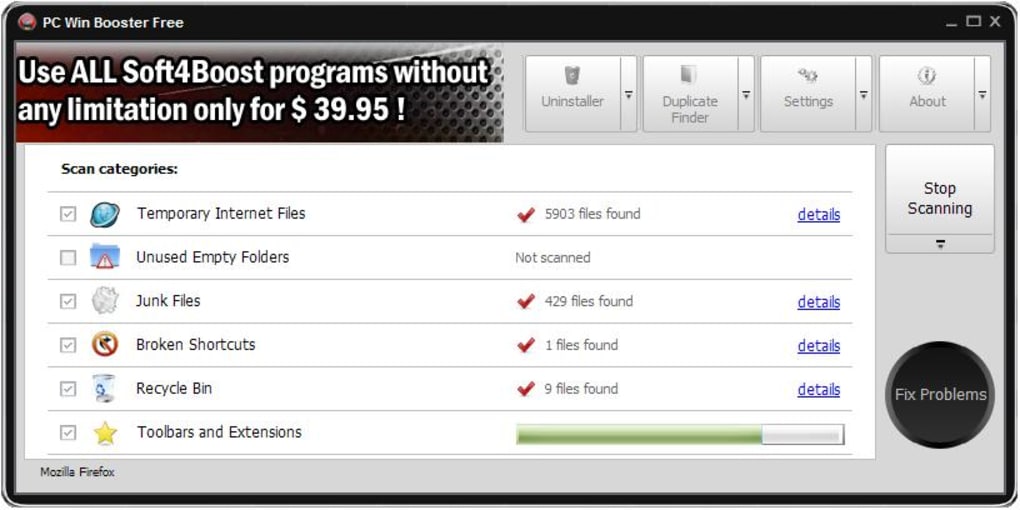
In addition to its cleaning capabilities, PC Win Booster Free incorporates basic antivirus functionality. It scans your system for known malware and spyware, quarantining and removing detected threats. While this feature offers a degree of protection, it shouldn’t be considered a replacement for a dedicated, full-featured antivirus program like Norton, McAfee, or Bitdefender. Its capabilities are significantly more limited in terms of real-time protection, threat detection sophistication, and virus database updates. Think of it as a supplemental tool rather than a primary line of defense against malicious software.
The software’s file comparison features allow users to identify and delete duplicate files based on name, size, or content. This is particularly useful for freeing up storage space occupied by multiple copies of images, documents, or other files. This feature can be particularly helpful in managing digital clutter and optimizing disk space. However, it’s important to note that careful review is always advisable before deleting any files, especially those whose purpose is unclear.
Beyond the Basics: Customization and System Compatibility
PC Win Booster Free offers a degree of customization, allowing users to select from eleven different skins to personalize the software’s appearance. This feature caters to user preferences and allows for a more aesthetically pleasing user experience. While primarily cosmetic, such options can enhance user engagement and comfort.
The software boasts compatibility with a range of modern Windows operating systems. While the specific versions supported might vary depending on updates, it generally works well with relatively recent Windows iterations. However, older operating systems, like Windows 98, are not supported. This is a significant limitation for users still running older systems, making it important to check compatibility before installation.
Advantages and Disadvantages of PC Win Booster Free
Pros:
-
Small Memory Footprint: One of the significant advantages of PC Win Booster Free is its small size. Requiring only 19.8 megabytes of memory, it has minimal impact on system resources, making it suitable for users with limited system capacity. This lightweight nature ensures it won’t significantly slow down the system during operation or installation.
-
Scheduled Scanning: Users can schedule automatic scans to run at predetermined times. This allows for proactive system maintenance and security checks without constant manual intervention. This feature is convenient for users who want to automate the cleaning and scanning processes.
-
Ease of Use: The software is designed with a user-friendly interface that is intuitive and easy to navigate. Even users unfamiliar with PC optimization or antivirus software can easily understand and utilize its functions. This accessibility makes it a good choice for less technically savvy users.
- Free of Charge: The software is entirely free to download and use, making it an attractive option for budget-conscious users. This affordability is a major selling point compared to paid alternatives.
Cons:
-
Limited Antivirus Capabilities: As previously mentioned, PC Win Booster Free’s antivirus functionality is basic and should not be relied upon as a primary security solution. Users still need a robust, dedicated antivirus program for comprehensive protection against malware and other online threats.
-
Incompatibility with Older Operating Systems: Its incompatibility with older Windows versions limits its accessibility for users still relying on older systems. This restricts the user base and potential impact.
-
Potential for False Positives: Like many free antivirus programs, there’s a risk of false positives, where harmless files are mistakenly flagged as malicious. This can lead to unnecessary deletion of important system files if not carefully managed.
-
Lack of Advanced Features: PC Win Booster Free lacks the advanced features found in more comprehensive PC optimization suites. This may limit its effectiveness for users needing more sophisticated system management tools.
Comparison with Alternative Software
PC Win Booster Free competes with various PC optimization and cleaning tools. Some alternatives offer more advanced features, while others focus on specific aspects like registry cleaning or game optimization. Direct comparisons are difficult because the features and functionalities vary greatly.
However, many comparable programs exist, some free, some paid, offering a broader range of capabilities. Free options might not offer the level of protection and advanced tools of paid counterparts, while paid options often come with a higher price tag. Users must weigh the features and functionalities against their budget and specific needs.
Conclusion: Is PC Win Booster Free Right for You?
PC Win Booster Free is a lightweight and user-friendly tool that can effectively clean up unwanted files and offer basic antivirus protection. Its small memory footprint and ease of use are definite advantages. However, its limitations regarding antivirus capabilities and lack of advanced features should be considered. It’s best suited as a supplemental tool for users who already have a robust antivirus program and want an additional, simple way to remove unnecessary files and free up disk space. For users seeking comprehensive system optimization and robust malware protection, a more advanced and potentially paid solution would likely be a better choice. Ultimately, the decision depends on individual needs and priorities. The absence of user reviews on the provided information limits a comprehensive evaluation of its real-world performance and user experiences. Further research and testing would help inform a more conclusive assessment of its true effectiveness.
File Information
- License: “Free”
- Latest update: “February 4, 2025”
- Platform: “Windows”
- OS: “Windows Vista”
- Language: “English”
- Downloads: “24.5K”


