
PCSX2 is a free and open-source PlayStation 2 (PS2) emulator developed by the PCSX2 Team. This powerful software allows users to play a vast library of PS2 games on their PCs, offering a compelling alternative to the original console. With a high compatibility rate and a suite of advanced features, PCSX2 provides a robust and customizable emulation experience, catering to both casual and dedicated PS2 enthusiasts.
The Legacy of the PlayStation 2 and the Rise of Emulation
The PlayStation 2, launched in 2000, stands as a landmark in video game history. Its thirteen-year lifespan and over 155 million units sold cemented its status as Sony’s most successful console. The sheer volume of games – a staggering 3,800 titles selling over 1.5 billion copies – created a rich and diverse gaming landscape that continues to resonate with players today. This enduring appeal fuels the demand for PS2 emulation, enabling a new generation of gamers to experience these classic titles, and providing long-time fans a convenient way to revisit their favorite games. PCSX2 emerges as a leading solution, offering a pathway to relive the PS2 era on modern PC hardware.
PCSX2: Features and Functionality
PCSX2’s core functionality centers around emulating the PlayStation 2’s hardware and software architecture. This allows the emulator to run PS2 games with a remarkably high degree of accuracy. However, PCSX2 goes beyond simple emulation; it incorporates several advanced features that enhance the gaming experience:
- High Compatibility: PCSX2 boasts an impressive compatibility rate, supporting a wide range of PS2 games. While not every game will run flawlessly, the emulator’s ongoing development and community support continuously improve compatibility. The developers actively address issues and add support for new titles, ensuring a growing library of playable games.
-
Customizable Resolution: One of PCSX2’s standout features is its ability to render games at resolutions far exceeding the PS2’s original capabilities. Users can select custom resolutions, stretching all the way to 8K for breathtaking clarity and detail. This significantly improves visual fidelity, allowing for a sharper, more modern presentation of classic titles.
-
Enhanced Graphics: Beyond resolution scaling, PCSX2 offers a comprehensive suite of graphics enhancements. These include anti-aliasing to smooth out jagged edges, texture filtering for improved texture quality, and various shader effects to fine-tune the visual presentation. These settings allow users to tailor the graphics to their preferences and hardware capabilities, balancing visual fidelity with performance.
-
Open-Source Nature: PCSX2’s open-source nature is a significant advantage. This transparency allows for community contributions and collaborative development, leading to rapid improvements and bug fixes. The open-source codebase fosters a community-driven approach to development, ensuring ongoing support and improvements long into the future. This community engagement also provides valuable resources such as tutorials, troubleshooting guides, and a dedicated support network.
-
Plugin System: PCSX2 employs a plugin system, allowing users to customize various aspects of the emulator’s functionality. This flexibility extends to graphics, sound, and input, allowing users to optimize the emulator for their specific hardware and preferences. This adaptability makes PCSX2 exceptionally versatile and adaptable to diverse hardware configurations.
Navigating the Learning Curve: Getting Started with PCSX2
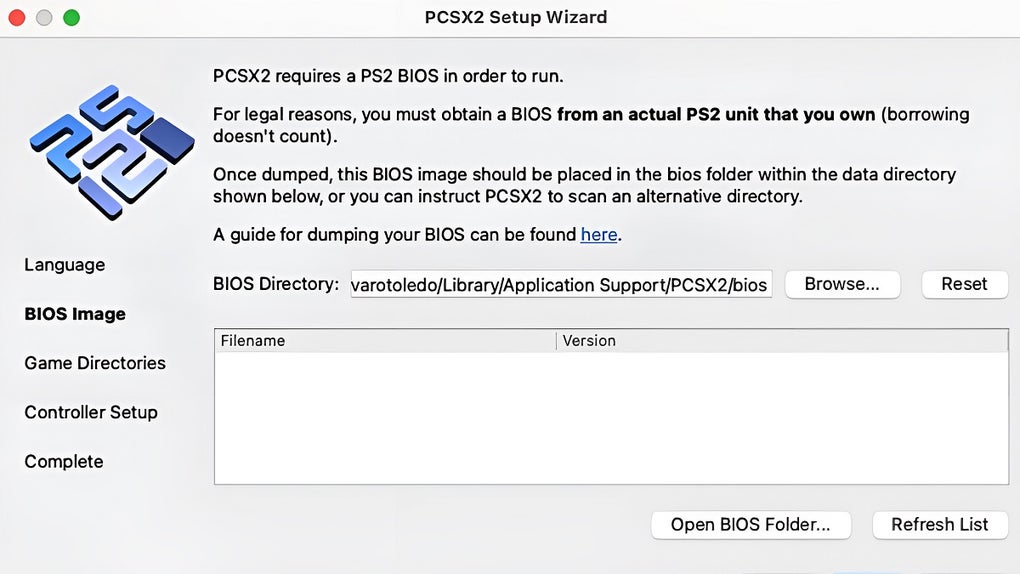
While PCSX2 offers a powerful and feature-rich emulation experience, it’s important to acknowledge that it has a somewhat steep learning curve. The abundance of settings and configuration options can be daunting for new users. However, the developers actively mitigate this challenge through:
-
Comprehensive Documentation: The official PCSX2 website provides extensive documentation, including detailed guides, tutorials, and FAQs. These resources cover various aspects of the emulator’s setup, configuration, and troubleshooting.
-
Active Community Support: A thriving community surrounds PCSX2, providing a valuable resource for users seeking assistance. Forums, wikis, and dedicated online communities offer a platform for users to share their experiences, troubleshoot problems, and learn from each other. This active community helps to overcome the challenges associated with the initial setup and configuration of the emulator.
-
Step-by-Step Tutorials: Numerous third-party websites and YouTube channels offer detailed tutorials on using PCSX2. These tutorials often provide visual step-by-step instructions, simplifying the process of setting up the emulator and configuring the various settings.
Beyond Emulation: The PCSX2 Community and its Impact
The success of PCSX2 extends beyond its technical capabilities. The vibrant community surrounding the emulator plays a crucial role in its ongoing development and continued relevance. This community contributes not only to the codebase but also to the creation of comprehensive documentation, tutorials, and troubleshooting resources. The collaborative spirit fosters a supportive environment for new and experienced users alike, ensuring that PCSX2 remains accessible and user-friendly despite its complexity. This shared dedication to preserving and enhancing the PS2 gaming experience underlines the lasting impact of PCSX2.
Conclusion: Reliving the Past, Enhanced for the Present
PCSX2 provides a compelling solution for PS2 enthusiasts seeking to revisit their favorite games or discover new classics. Its high compatibility, advanced features, and active community support make it a standout emulator in the gaming world. While the learning curve presents an initial challenge, the abundance of resources available makes the process manageable. For anyone with a yearning to relive the golden age of PlayStation 2 gaming, PCSX2 stands as a highly recommended and powerful tool. Its commitment to open-source development, continuous improvement, and a robust community ensures that it will remain a vital part of the retro gaming landscape for years to come. The ability to enhance the visual fidelity and tailor the experience to modern hardware capabilities makes PCSX2 more than just an emulator; it’s a gateway to experiencing classic games with a renewed appreciation and enhanced visual experience.
File Information
- License: “Free”
- Latest update: “June 5, 2025”
- Platform: “Mac”
- OS: “Mac OS X”
- Language: “English”
- Downloads: “19.6K”
- Size: “24.22 MB”


