
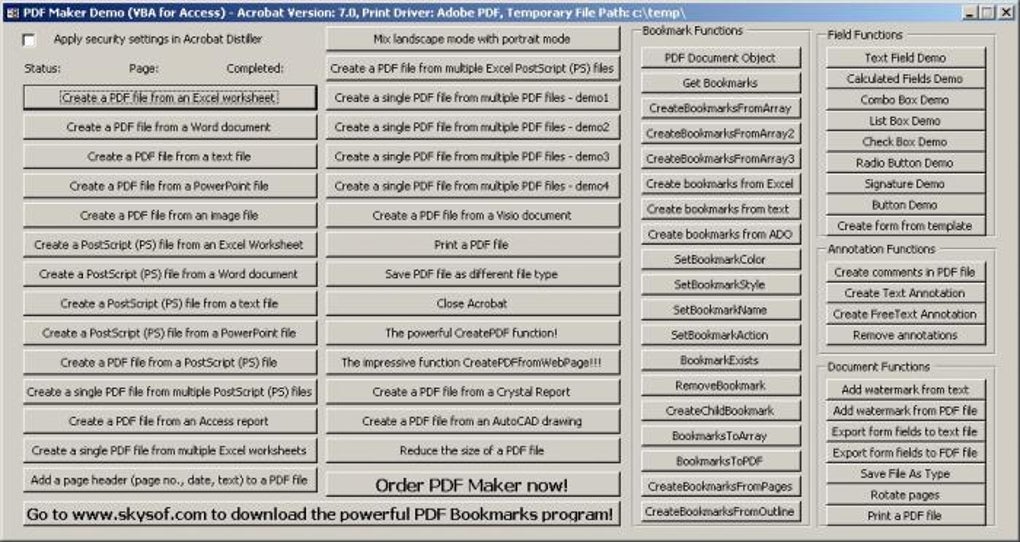
PDF Maker, developed by Skysof, is a business and productivity application designed for creating PDF documents from a wide range of file types. While its interface might appear dated, the software delivers on its core functionality, offering a robust solution for converting various documents into the universally compatible PDF format. This review delves into the capabilities, strengths, and weaknesses of PDF Maker, helping you decide if it’s the right tool for your needs.
Core Functionality: Converting Files to PDF
PDF Maker’s primary strength lies in its ability to transform virtually any file into a high-quality PDF. This encompasses a broad spectrum of file types, including but not limited to:
-
Microsoft Office Suite: Excel spreadsheets, Word documents, and PowerPoint presentations are all easily converted. The software maintains formatting fidelity, ensuring your converted PDFs retain the visual elements of the original files.
-
Other Business Applications: Access reports and Publisher documents are also supported, making PDF Maker a versatile tool for various business processes.
-
Engineering and Design Software: The software’s compatibility extends to AutoCAD drawings, demonstrating its capability in handling complex technical documents.
-
Image and Graphic Files: PDF Maker supports the conversion of numerous image formats, allowing for the seamless incorporation of images into PDF documents.
-
Other File Types: Beyond the aforementioned categories, PDF Maker also handles Visio documents, HTML web pages, and various text files. This expansive compatibility makes it a truly universal conversion tool.
This broad support for various file types eliminates the need for multiple conversion tools, streamlining your workflow and centralizing your PDF creation process. The resulting PDFs are compatible with Adobe Acrobat, ensuring wide accessibility and compatibility across different platforms and devices.
Advanced Features: Security and Document Enhancement
Beyond basic conversion, PDF Maker offers several advanced features designed to enhance both security and functionality. These include:
-
Password Protection: PDF Maker allows users to protect their documents with passwords, using robust 128-bit RC4 encryption. This level of encryption significantly safeguards sensitive information from unauthorized access, crucial for confidential documents.
-
Form Field Creation: The ability to add form fields to PDFs is a significant advantage, particularly for documents requiring user input. This feature enables the creation of interactive forms, improving efficiency and engagement.
-
Bookmarks and Comments: PDF Maker allows the addition of bookmarks and comments, enhancing the organization and navigation of complex documents. Bookmarks provide quick access to specific sections, while comments offer a means for collaboration and feedback.
-
Multiple File Integration: The software’s capability to merge multiple files – including various file types – into a single PDF document is a significant time-saver, streamlining workflows and avoiding the need for manual concatenation.
Limitations: Interface and Editing Capabilities
While PDF Maker excels in its core conversion and security features, certain limitations are worth considering. The most significant drawback is the outdated user interface. The software’s visual design appears significantly behind contemporary standards, potentially hindering usability for users accustomed to more modern software. The interface may appear cluttered and unintuitive, necessitating some learning curve for effective navigation.
Furthermore, PDF Maker lacks built-in PDF editing functionality. While it allows for the addition of elements such as bookmarks, comments, and form fields, it does not offer tools for modifying existing PDF content. Any editing needs would require a separate dedicated PDF editing application. This limitation necessitates the use of complementary software, which could be viewed as an inconvenience for users seeking a fully integrated solution.
System Requirements and Compatibility
PDF Maker is a lightweight application, with a small file size that minimizes storage space requirements. Installation is straightforward, and the software is primarily designed for the Windows operating system. While compatible with older versions of Windows, it’s advisable to check for updates and compatibility with the latest operating system versions to ensure optimal performance. However, a crucial system requirement is the presence of Adobe Acrobat 5 or a later version, including Acrobat Standard and Professional versions 6 and 7. This dependency on Adobe Acrobat software impacts system compatibility and may pose limitations for users who do not have it installed.
Performance and Efficiency
PDF Maker’s performance is generally efficient, especially given its relatively small file size. The conversion process is typically quick, even for larger files, and the software doesn’t consume excessive system resources during operation. The speed of conversion may vary based on file size and system specifications. While the outdated interface might initially seem cumbersome, the software’s efficiency and ability to handle various file types make up for this visual deficit to a large extent.
Comparison to Alternatives
The market offers a variety of PDF creation software, some of which offer similar functionalities with additional benefits or a more modern interface. Some popular alternatives include:
- PDFCreator: A free and open-source alternative, PDFCreator provides similar PDF creation capabilities without the limitations of a paid license.
-
Free PDF Creator: Similar to PDFCreator, this free application offers a simple way to create PDFs.
-
Adobe Acrobat Pro DC: The industry-standard, albeit a paid application, offers a comprehensive suite of features including editing, annotation, and form creation beyond what PDF Maker provides.
-
Wondershare PDFelement: Another popular paid alternative that provides advanced features and a more modern interface.
The choice between PDF Maker and these alternatives largely depends on your budget, specific needs, and tolerance for the software’s interface.
Conclusion: A Functional, Yet Dated Solution
PDF Maker effectively addresses the need for PDF document creation from a variety of sources. Its extensive file type support and robust security features are valuable assets. However, the outdated interface and lack of editing capabilities might deter users accustomed to more modern and visually appealing software. If you require a simple, reliable, and affordable solution for converting files to PDFs, particularly for business applications requiring strong security, then PDF Maker remains a viable option. However, if user experience and interface design are crucial factors, or if you require built-in PDF editing capabilities, exploring the alternative options discussed above might prove more beneficial. Ultimately, the best choice depends on your individual needs and priorities.
File Information
- License: “Trial version”
- Version: “2.0”
- Latest update: “November 17, 2021”
- Platform: “Windows”
- OS: “Windows 98”
- Language: “English”
- Downloads: “135.9K”
- Size: “2.11 MB”


