
PDF Pro is a powerful PDF editing and annotation software initially developed for macOS and OS X. While its primary focus historically resided within the Apple ecosystem, its current Windows iteration provides users with a robust suite of tools for managing, editing, and securing PDF documents. This review delves into the capabilities, ease of use, pros and cons, and overall value proposition of PDF Pro, comparing it to industry standards and considering user feedback.
Core Features: Editing and Annotating PDFs with Ease
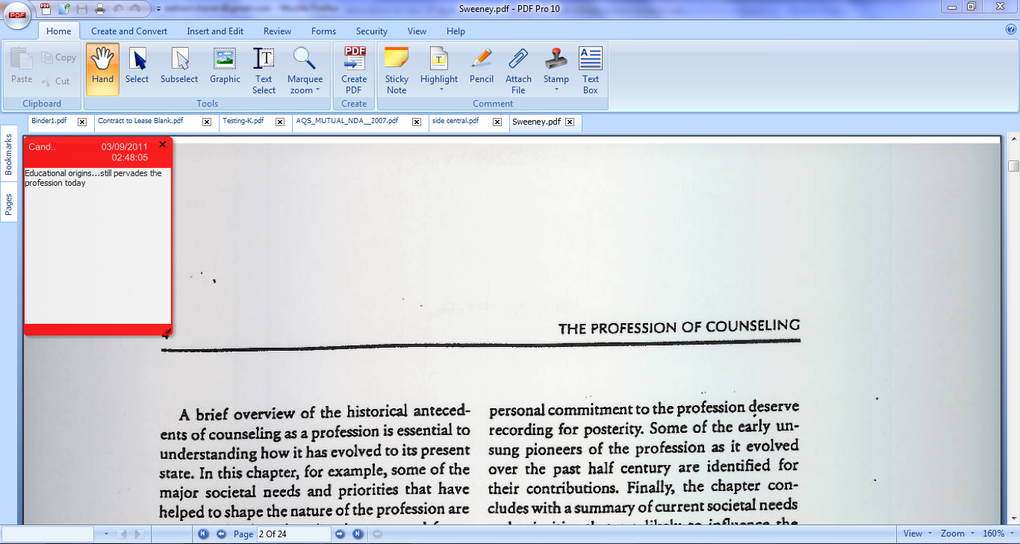
At its heart, PDF Pro is a versatile PDF editor. It empowers users to go beyond simple viewing and offers a comprehensive array of editing tools. This includes the ability to easily add, edit, and delete text, making corrections and updates straightforward. The software also enables detailed annotations, such as highlighting key passages, adding notes and comments, underlining text, and drawing shapes directly onto the document. This level of annotation functionality facilitates collaboration and allows users to thoroughly mark up documents for review or discussion.
Beyond basic text editing and annotation, PDF Pro provides advanced features designed to streamline document management. One notable feature is the ability to merge multiple PDF files into a single, cohesive document. This eliminates the need for manual merging procedures and saves considerable time, particularly when working with numerous files. Users can also efficiently fill out interactive PDF forms, including adding signatures – eliminating the need for printing, filling out by hand, and rescanning documents. The implementation of digital signatures adds a layer of security and authenticity to the documents, making them suitable for official or legally binding use.
A crucial aspect of modern document management is the ability to easily share and collaborate. PDF Pro facilitates this by providing versatile sharing options. Users can seamlessly transfer their edited PDFs to various cloud storage services such as Dropbox and iCloud, simplifying accessibility and collaboration with others. Email sharing is also fully integrated, enabling quick and direct distribution of documents. This streamlined approach to sharing eliminates the complexities often associated with transferring large files.
User-Friendliness and Accessibility
PDF Pro distinguishes itself not only through its functionality but also through its intuitive user interface. Despite its extensive feature set, the software is designed for accessibility, even for users with minimal experience in PDF editing. The interface is clean and uncluttered, placing frequently used tools readily at hand. The user experience prioritizes ease of navigation and efficient workflow. Complex operations are typically achieved through a few simple clicks, reducing the learning curve and allowing users to quickly master the software’s capabilities.
The cross-platform compatibility (available for Windows, previously macOS and iOS) enhances PDF Pro’s appeal. This allows users to work seamlessly across multiple devices, whether it’s a desktop computer, laptop, or even a tablet. The consistent user interface across platforms minimizes the need to re-learn the software on each device. This feature significantly improves the overall user experience, providing a unified and consistent workflow.
Comparing PDF Pro to Competitors
While PDF Pro offers a compelling package, it’s important to consider its position within the competitive landscape of PDF editors. Established players like Adobe Acrobat Pro DC remain dominant, offering extensive functionalities and tight integration within the Adobe Creative Suite. However, Adobe Acrobat comes at a premium price, placing it out of reach for many individual users and smaller businesses. PDF Pro positions itself as a more affordable alternative, delivering many of the essential features found in industry-leading solutions but at a significantly lower cost.
Other competitors in the market often focus on specific niches, such as free, limited-functionality editors or highly specialized tools for specific professional applications. PDF Pro aims for a balance, offering a robust set of features suitable for a broad user base, from students and professionals to small and medium-sized businesses. The price point, coupled with its user-friendly design and wide feature set, constitutes a strong differentiator.
Limitations and Potential Drawbacks
Despite its strengths, PDF Pro has limitations. While its editing capabilities are impressive, certain advanced features found in high-end software might be absent or less sophisticated. For example, sophisticated optical character recognition (OCR) for converting scanned documents to editable text might not match the accuracy and capabilities of dedicated OCR software or the top-tier features offered by Adobe Acrobat. Furthermore, the limited availability in the past (primarily macOS) may have resulted in a smaller user community, impacting the availability of readily accessible support resources and tutorials compared to more widely adopted applications.
The trial version, while offering a valuable preview of the software’s capabilities, might be too limited for certain users to fully appreciate the extent of the software’s functionality. A more extensive trial period or a more feature-rich free version might incentivize users to upgrade to the full version. Finally, some user reviews highlight occasional issues with customer support responsiveness, a crucial factor for users facing technical problems or seeking assistance with software operation.
User Reviews and Feedback
Analyzing user reviews provides valuable insights into the software’s real-world performance. Positive feedback consistently highlights PDF Pro’s ease of use, efficient workflow, and the comprehensive nature of its editing tools. Many users appreciate the software’s affordability compared to more expensive alternatives, emphasizing its strong value proposition. However, some negative reviews address the limitations previously mentioned – the limited functionality of the trial version, occasional customer support responsiveness issues, and the potential for less robust OCR capabilities when compared to higher-end options. These reviews highlight the importance of carefully considering individual needs and comparing PDF Pro to other available options before making a purchasing decision.
Conclusion: Is PDF Pro the Right Choice for You?
PDF Pro presents a compelling alternative for users seeking a powerful, user-friendly, and relatively affordable PDF editing solution. Its strengths lie in its intuitive interface, comprehensive feature set (covering editing, annotation, merging, form filling, and sharing), and cross-platform availability for Windows. While it may not match the breadth of features found in industry-leading but expensive software, PDF Pro successfully balances functionality, user-friendliness, and cost-effectiveness. It is particularly well-suited for users who require a wide range of PDF editing tools but don’t need the highly specialized or advanced features found in more expensive professional-grade software. However, potential users should carefully evaluate their specific needs, consider the limitations discussed, and consult user reviews before deciding if PDF Pro aligns with their requirements. The balance between affordability and capability makes it a worthy contender in the crowded market of PDF editing software.
File Information
- License: “Trial version”
- Version: “10”
- Latest update: “January 31, 2023”
- Platform: “Windows”
- OS: “Windows Vista”
- Language: “English”
- Downloads: “184.1K”
- Size: “31.72 MB”


