
Finding a reliable PDF reader for older operating systems like Windows 7 can sometimes feel like searching for a needle in a haystack. Many modern PDF readers are designed for the latest Windows versions and may not offer optimal compatibility or performance on older systems. However, dedicated options exist, and understanding their strengths and weaknesses is crucial for making an informed choice. This review focuses on one such option: PDF Reader for Windows 7. We’ll delve into its features, performance, and limitations to help you determine if it’s the right fit for your needs.
Functionality and Features: Beyond Basic PDF Viewing
PDF Reader for Windows 7 is more than just a simple PDF viewer; it offers a range of functionalities designed to enhance your PDF interaction. At its core, the software provides the expected capabilities: opening, viewing, and reading PDF files. However, it extends beyond these basic functions, incorporating features that improve both usability and workflow.
One of its standout features is its file conversion capabilities. The software allows you to convert PDF documents into various image formats, including JPG, PNG, GIF, EMF, WMF, and EPS, as well as plain text (TXT). This functionality proves invaluable for users who need to extract images from PDFs or convert documents into a more easily editable format. The ability to convert to different image types offers flexibility for various applications, from archiving to image editing. The inclusion of TXT conversion facilitates the extraction of textual content for tasks like data entry or analysis.
Beyond conversion, the software boasts a slideshow feature, transforming your PDF documents into presentations. This feature is particularly useful for quickly reviewing documents or sharing information in a visually engaging manner. Imagine using it to present a project proposal or showcasing a portfolio; the slideshow mode adds a dynamic element, offering a different perspective on your PDF content. This feature is often overlooked in simpler PDF readers, but it represents a significant advantage for presentations or quick visual overviews.
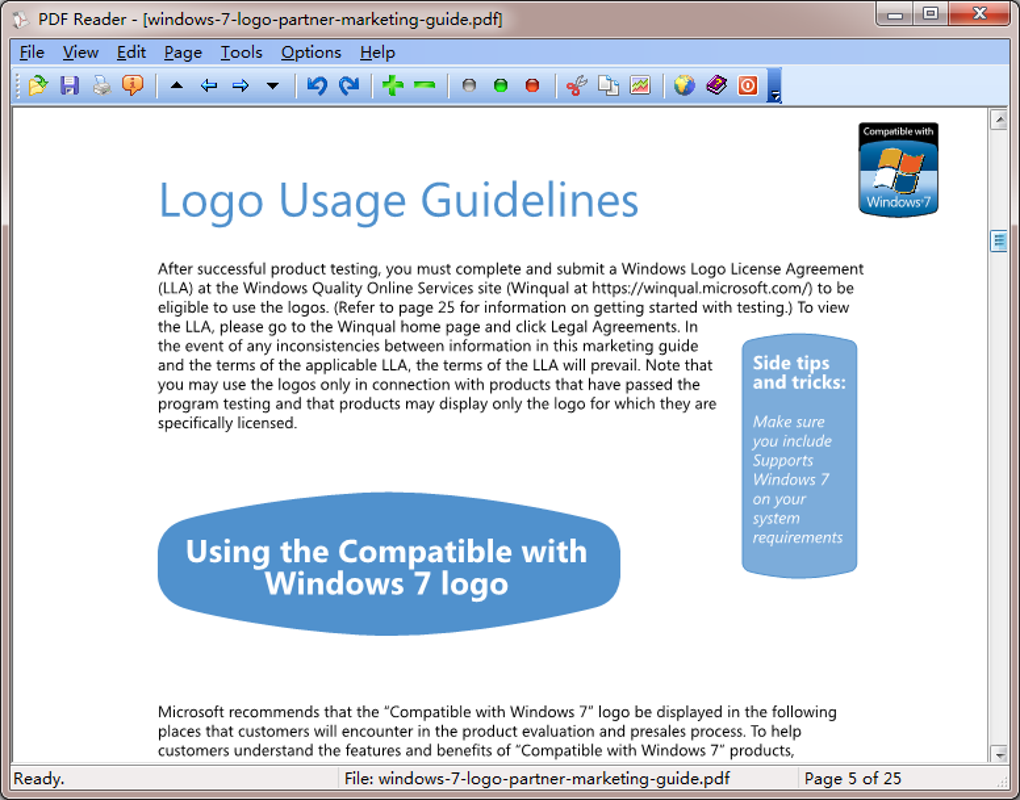
Further enhancing usability are the zoom capabilities. The software allows users to zoom in and out, enabling detailed examination of documents or quick scans of larger documents. This is a standard feature, but its inclusion underlines the software’s focus on making PDF viewing as convenient and adaptable as possible. The smooth zoom functionality contributes significantly to a better user experience.
The software also features page rotation, another practical feature that allows you to easily adjust the orientation of pages for improved readability. This might be essential when working with scanned documents or PDFs that have been rotated inadvertently. The straightforward page rotation function further strengthens the software’s usability.
Finally, the software emphasizes speed. It is designed for quick launching and efficient handling of PDF files. This is crucial, especially when working with multiple files or large documents. In a world where speed is valued, this feature underscores a key advantage over other, potentially slower, alternatives.
Performance and User Experience: A Blend of Speed and Simplicity
The developers of PDF Reader for Windows 7 clearly prioritize speed and efficiency. The software’s quick launch times and rapid file handling make it a practical solution for users who need to access and process PDFs swiftly. This performance advantage makes the software a viable option in scenarios demanding quick turnaround times. The fast response ensures minimal disruption and allows for a smoother workflow.
However, while the software excels in performance, its user interface might not appeal to everyone. The developers opted for a straightforward design, which is simple to navigate, but it may lack the visual appeal and advanced customization options found in other, more sophisticated PDF readers. This trade-off between streamlined functionality and a less visually stimulating interface is a crucial point to consider. The minimalist design might be preferable for some users, while others might find it too basic.
The absence of a browser plug-in might also be considered a limitation for some users. The inability to directly open PDFs within a web browser necessitates opening the software separately, potentially disrupting the workflow for users who frequently handle PDFs online. This missing feature might be a drawback for users accustomed to integrated PDF viewing.
Furthermore, the limited keyboard shortcuts might pose a challenge for power users who rely heavily on keyboard commands for navigation and document manipulation. The absence of a wider range of shortcuts could slightly impede efficiency for experienced users accustomed to comprehensive keyboard control. This lack of shortcuts might be a deterrent for users who prefer a keyboard-centric approach.
Finally, the software lacks certain advanced features found in other, more comprehensive PDF readers. While it provides the essential functionalities for reading and manipulating PDFs, those seeking features like advanced editing capabilities, digital signature support, or form filling might need to explore alternative solutions.
System Requirements and Compatibility: Windows 7 and Beyond?
PDF Reader for Windows 7 is specifically designed for Windows 7, ensuring optimal compatibility and performance on this operating system. This targeted compatibility makes it a reliable option for users who continue to utilize Windows 7. The software is optimized to run smoothly on this older system, avoiding many issues that can arise when using software not expressly designed for it.
However, the specific focus on Windows 7 naturally raises questions about its compatibility with newer versions of Windows. While it might be possible to install and run the software on later Windows versions, optimal performance and stability aren’t guaranteed. Users with newer Windows versions should explore software designed for those versions to maximize performance and compatibility.
Alternatives and Comparison: Weighing the Options
Several other PDF reader options cater to Windows 7 users, making it essential to compare PDF Reader for Windows 7 against other alternatives to determine the best fit for specific needs. Some popular alternatives include:
- Adobe Acrobat Reader: A widely known and established PDF reader offering extensive features, but often comes with a larger system footprint and might be slower on older systems.
- Foxit Reader: A lighter-weight alternative that still delivers a good range of features. It often provides a better balance between features and system performance than Adobe Acrobat Reader.
- Sumatra PDF: A very lightweight, open-source option ideal for users who need a simple and fast PDF viewer with minimal resource consumption. However, its feature set is more limited.
The choice between these options depends heavily on individual requirements. If speed and simplicity are paramount, PDF Reader for Windows 7 could be a viable option. However, if more advanced features or better compatibility with newer Windows versions is needed, other options might be more appropriate.
Conclusion: A Solid Choice for Basic PDF Needs on Windows 7
PDF Reader for Windows 7 provides a straightforward and speedy solution for users needing a functional PDF reader on Windows 7. Its file conversion capabilities and slideshow feature add value beyond basic PDF viewing. However, its simplicity also translates to a lack of certain advanced features and a less sophisticated user interface compared to some alternatives. The absence of a browser plugin and limited keyboard shortcuts might be significant drawbacks for certain users.
Ultimately, the decision of whether to use PDF Reader for Windows 7 depends on individual priorities and usage patterns. If you primarily need a fast, reliable PDF reader with basic functionality for a Windows 7 system, and you don’t require advanced features or extensive customization, then this software may well meet your needs. However, if you prioritize a more visually appealing interface, advanced features, broader compatibility, or extensive keyboard support, it might be worthwhile to explore the alternatives discussed earlier. The decision should be based on a careful evaluation of your specific requirements and preferences.
File Information
- License: “Free”
- Latest update: “May 24, 2023”
- Platform: “Windows”
- OS: “Windows 8”
- Language: “English”
- Downloads: “129.5K”
- Size: “3.74 MB”


