
PDF Split and Merge software provides a convenient solution for managing large or complex PDF documents. This versatile tool allows users to easily split single PDFs into multiple files, merge multiple PDFs into a single document, and perform a range of other manipulations to streamline workflow and improve organization. While generally praised for its speed and efficiency, the software’s user interface is often cited as a point of improvement. This guide delves into the capabilities, pros, cons, and overall user experience of PDF Split and Merge software.
Core Functionality: Splitting and Merging PDFs
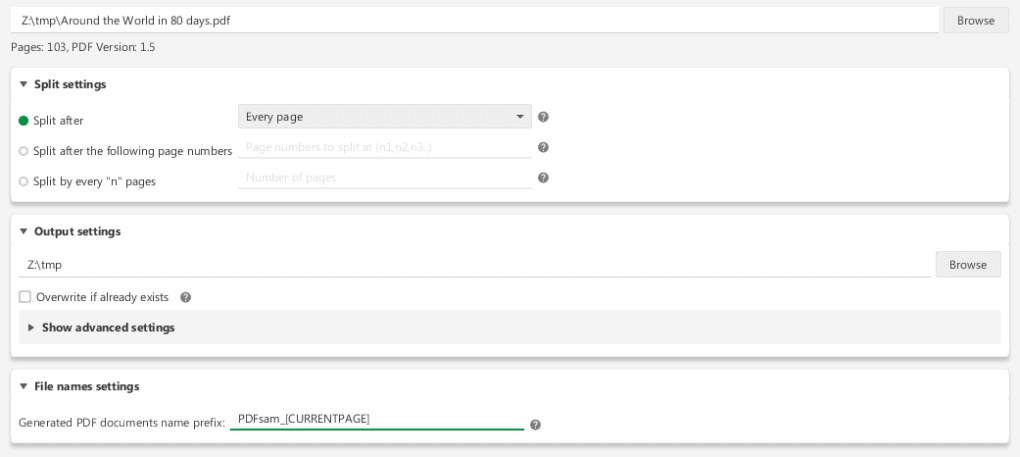
The primary function of PDF Split and Merge, as its name suggests, is the ability to efficiently split and merge PDF files. The splitting function offers granular control, allowing users to divide a document based on various criteria. Options may include splitting by page number (e.g., splitting every 10 pages into a new document), by bookmark, or by other customizable parameters. This flexibility caters to a wide range of needs, from dividing a lengthy report into manageable chapters to separating individual forms from a bundled package.
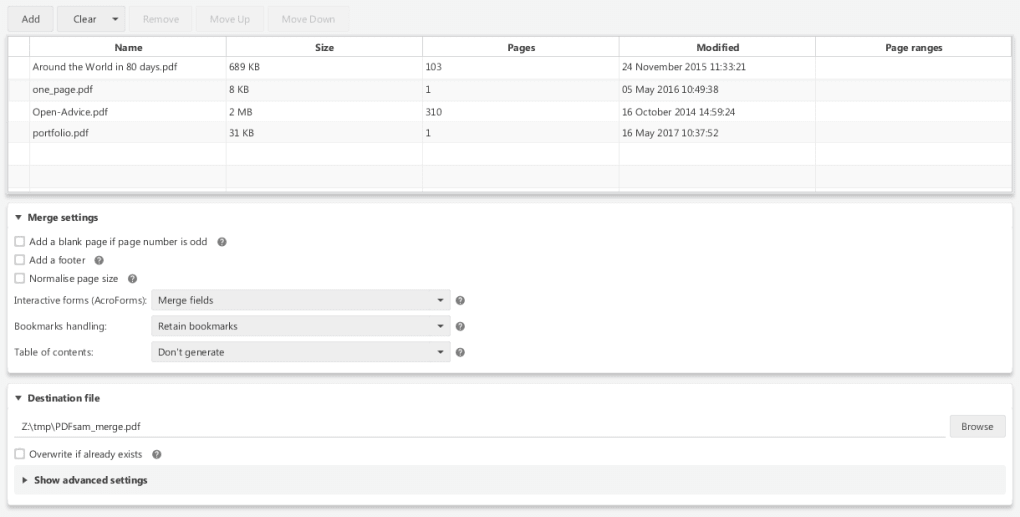
Merging, the complementary function, combines multiple PDF files into a single, unified document. This is especially useful for consolidating various related documents, such as combining multiple project reports into a single comprehensive document or compiling individual scans into a single archival file. The software’s merging capability streamlines this process, creating a seamless document without any loss of formatting or quality. The software often handles a large number of PDF files in this process without notable slowdowns.
Advanced Features Beyond the Basics
Beyond its fundamental splitting and merging capabilities, PDF Split and Merge software often includes a suite of additional features to enhance its functionality and usability. These advanced features significantly increase the program’s versatility, transforming it from a simple file manipulator into a comprehensive PDF management tool.
Document Manipulation: Extract, Rotate, Mix, and Reorder
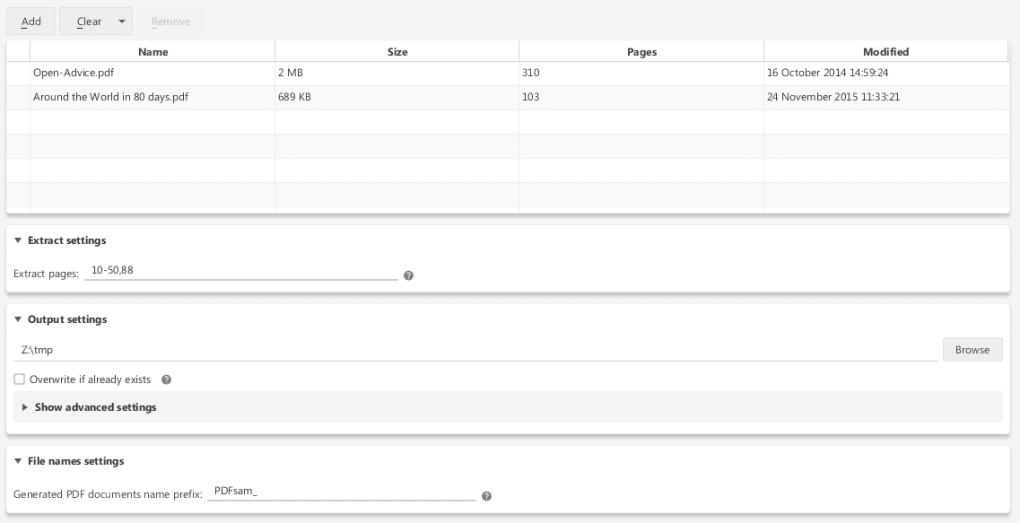
The software’s ability to extract pages is a powerful feature allowing users to selectively remove specific pages from a PDF without affecting the integrity of the original document. This is particularly helpful for removing unwanted pages or creating smaller, more focused versions of larger files. Rotating pages within a PDF is another significant function. Users can easily correct misaligned scans or adjust page orientation as needed, maintaining consistency and readability.
The “mix” function provides a unique capability for combining the pages of multiple documents in a customized order, going beyond simple concatenation. This allows for creating entirely new documents by interweaving pages from different sources. Users can select precisely which pages from which documents are included and in which sequence. The reordering function, a simpler version of the mix function, allows for shuffling the order of pages within a single PDF.
Configuration and Customization
The software’s robust configuration options enable detailed control over the output. Users can often specify settings such as compression levels to optimize file size, ensuring efficient storage and faster transmission. The overwrite option allows for directly replacing the original file with the modified version, streamlining the workflow and reducing file clutter. Customizable settings such as page ranges, output file names, and directory locations add to the control and precision offered by the software.
User Interface and Ease of Use
While PDF Split and Merge software efficiently handles its core functions, a common criticism revolves around its user interface. Many users report that the interface can be initially confusing and unintuitive. Navigating the various settings and options may require some time and practice before users gain proficiency. This can be a significant barrier, particularly for individuals unfamiliar with PDF manipulation software or those seeking a simple, straightforward solution. The lack of a visual, drag-and-drop interface in some versions contributes to the perception of a steeper learning curve.
Performance and Speed
A significant strength of PDF Split and Merge software is its speed and efficiency. Even with complex operations involving numerous files and extensive page manipulations, the software generally completes tasks in a relatively short time. This is particularly important for users handling large volumes of PDF documents, where quick processing times are crucial for optimizing workflow. The software’s fast performance is likely due to efficient algorithms and optimized code, making it a valuable asset for users facing tight deadlines.
Software Updates and Bug Fixes
Regular updates often address bug fixes and incorporate user feature requests. These improvements demonstrate the developers’ commitment to enhancing the software’s stability and functionality. Updates might include improved handling of large files or bookmarks, enhanced user interface elements, and the addition of new features based on user feedback. Checking for and installing the latest versions ensures users benefit from the most refined and reliable version of the software.
Pros and Cons of PDF Split and Merge
Pros:
- Efficient Splitting and Merging: The core functions are fast and effective.
- Extensive Features: Offers a wide range of capabilities beyond basic splitting and merging.
- Customization Options: Allows users fine-grained control over output and processes.
- Regular Updates: Developers actively address bugs and add features.
- Generally Free: Often available as a free download.
Cons:
- Unintuitive Interface: The user interface is commonly criticized for being complex and difficult to navigate.
- Steep Learning Curve: Users may need time to master the software’s various functions.
- Limited Visual Aids: The absence of visual cues in some versions makes navigation challenging.
Alternatives and Similar Software
While PDF Split and Merge is a viable option, numerous alternative software programs provide similar functionality. Some alternatives may offer more streamlined interfaces or additional features, making them suitable for users seeking a different user experience or requiring specific capabilities not found in PDF Split and Merge. Comparative reviews of competing software can help users decide which tool best suits their needs. Features to consider when comparing include the breadth of supported functions, user interface design, speed and efficiency, and cost.
Conclusion
PDF Split and Merge software presents a potent tool for managing and manipulating PDF documents. Its speed and comprehensive feature set are compelling assets for users needing to split, merge, extract, rotate, or rearrange PDF pages. However, the less-than-intuitive interface poses a significant challenge. While proficient users can leverage its power, users seeking a more intuitive and user-friendly experience may benefit from exploring alternative software solutions. Ultimately, the decision of whether or not to use PDF Split and Merge depends on the user’s technical aptitude and specific requirements. Weighing the pros and cons, and considering available alternatives, is crucial to selecting the ideal PDF management tool.
File Information
- License: “Free”
- Latest update: “May 16, 2025”
- Platform: “Windows”
- OS: “Windows XP”
- Language: “English”
- Downloads: “537.5K”
- Size: “28.51 MB”


