
PDF Studio is a robust PDF editing software that offers a compelling alternative to industry giants like Adobe Acrobat, providing a wide array of features at a significantly more affordable price point. Developed by Qoppa Software, PDF Studio is available for Windows, macOS, and Linux, ensuring broad compatibility across popular operating systems. This review delves into the software’s capabilities, user experience, and overall value proposition, analyzing its strengths and weaknesses to determine whether it lives up to its promise.
Core Functionality and Features: A Multifaceted PDF Solution
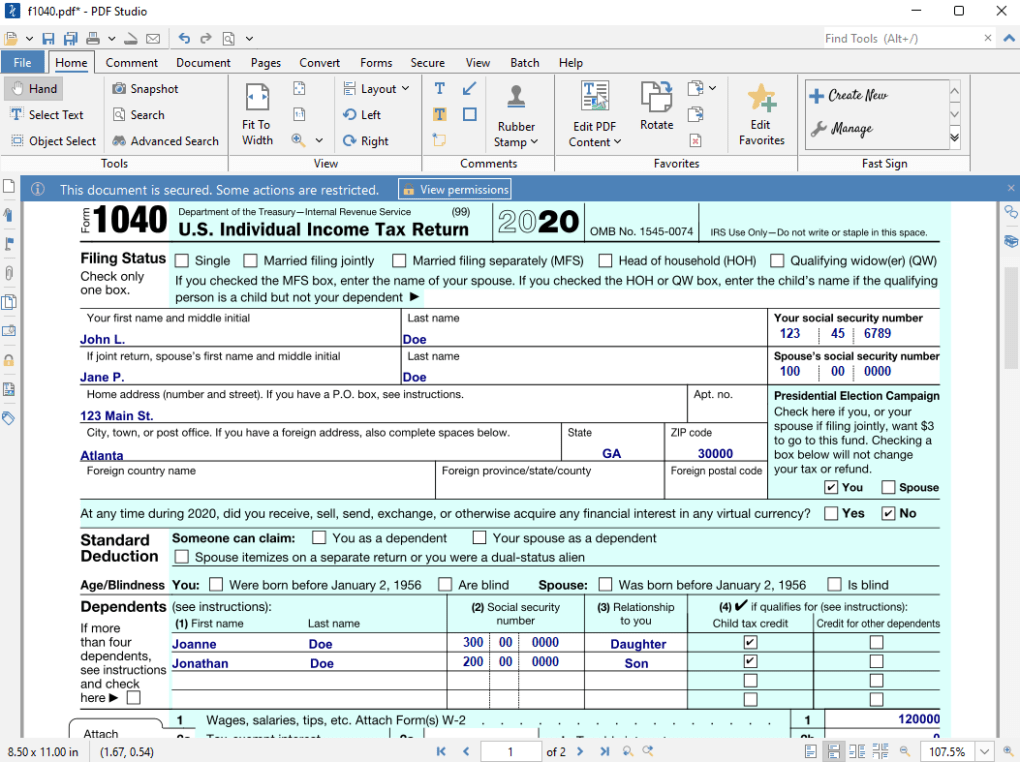
PDF Studio distinguishes itself through its comprehensive suite of tools catering to various PDF management needs. It’s not merely a viewer; it’s a fully-fledged editor capable of creating, modifying, and securing PDF documents. Key features include:
-
PDF Creation: Easily generate new PDF documents from scratch, adding text, images, and other media elements directly within the interface. The ability to scan physical documents and directly incorporate them as pages within the PDF adds significant value for users needing to digitize paper-based materials. Importantly, the software supports OCR (Optical Character Recognition), allowing conversion of scanned text into editable digital text.
-
Comprehensive Editing Tools: Beyond simple viewing, PDF Studio offers extensive editing functionalities. Users can directly manipulate text, images, and shapes within the PDF, adjusting their size, position, and attributes with precision. This level of control allows for significant modification and refinement of existing documents. The inclusion of form filling capabilities, including the ability to create interactive forms, further broadens its utility for both personal and professional use. Password protection features enhance security, allowing users to restrict access to sensitive documents.
-
Conversion Capabilities: PDF Studio excels in its ability to seamlessly convert documents between various formats. This includes bidirectional conversion between PDF and popular formats like Microsoft Office files (Word, Excel, PowerPoint), enabling efficient workflow integration with other productivity applications. Conversion to HTML further extends its versatility, facilitating the sharing and integration of PDF content within web pages.
-
Annotation and Markup: The software provides a complete set of annotation and markup tools. Users can add comments, highlights, underlines, and various other markup elements to PDFs, facilitating collaboration and review processes. These features are crucial for efficient workflow in collaborative projects, allowing multiple users to provide feedback and revisions directly on the document. Precision measurement tools add a further layer of functionality, particularly useful for architectural, engineering, or design-related applications.
-
Batch Processing: A significant advantage is PDF Studio’s support for batch processing. This allows users to efficiently apply actions like editing, annotation, and conversion to multiple files simultaneously, saving considerable time and effort compared to manual processing of each document individually. This feature is particularly beneficial for users handling large volumes of PDF documents, streamlining repetitive tasks.
-
Security Features: PDF Studio prioritizes document security with features like password protection to restrict access and redaction tools to remove sensitive information from documents before sharing. The ability to digitally sign PDFs adds authenticity and legal validity to important documents, crucial for various professional and legal contexts. Compliance with PDF/A, PDF/X, and PDF/UA standards ensures long-term archival compatibility and accessibility.
User Interface and Usability: Intuitive Design Meets Comprehensive Features
PDF Studio boasts a user-friendly interface, designed for intuitive navigation even for users unfamiliar with advanced PDF editing software. The layout mirrors other popular PDF editors, minimizing the learning curve for those transitioning from competing software. However, while the interface is generally well-designed, the extensive feature set can feel slightly overwhelming for first-time users. The online user guide and knowledge base articles, while comprehensive, may feel lengthy and somewhat daunting to navigate, particularly for those seeking quick solutions to specific tasks. The absence of an interactive tutorial within the software itself could improve onboarding for new users.
Pricing and Value: A Competitive Alternative to Premium Solutions
PDF Studio presents itself as a cost-effective alternative to expensive commercial PDF editors. The software offers a free trial, allowing potential users to explore its capabilities before committing to a purchase. Two subscription plans are available, differentiated by the features included. This tiered approach allows users to select the plan best suited to their individual needs and budget. The affordability, coupled with its extensive feature set, makes PDF Studio a highly attractive option for both individual users and small businesses seeking a powerful yet budget-friendly PDF editing solution.
System Requirements and Compatibility: Broad Platform Support
PDF Studio demonstrates strong compatibility across multiple operating systems, supporting Windows, macOS, and Linux. This broad support caters to a wider user base, eliminating concerns about operating system limitations. While the specific system requirements may vary slightly depending on the version, PDF Studio generally operates efficiently on moderately powered systems, making it accessible to a broad range of users.
Customer Support and Community: A Dedicated Support Team
Qoppa Software, the developer of PDF Studio, maintains a dedicated support team focused on providing exceptional customer service. This commitment to user support is a significant advantage, ensuring users have access to assistance when encountering issues or requiring guidance. The availability of readily accessible support significantly enhances the overall user experience and contributes to user satisfaction.
Comparison with Competitors: A Strong Contender
Compared to industry leaders like Adobe Acrobat, PDF Studio offers comparable functionality at a much lower cost. While Acrobat might boast a few more niche features, PDF Studio’s core editing, creation, and conversion capabilities are equally powerful. The significant cost savings make it a compelling option for those who don’t require Acrobat’s specialized advanced features. For users seeking an affordable yet feature-rich alternative, PDF Studio emerges as a strong contender.
Conclusion: A Powerful and Affordable PDF Editor
In conclusion, PDF Studio presents a convincing case as a robust and affordable PDF editing solution. Its extensive feature set, intuitive interface (with the caveat of a potentially overwhelming feature list for beginners), and competitive pricing make it a strong contender against more established, and expensive, alternatives. While minor improvements to the onboarding experience could enhance its usability for new users, the overall value proposition is undeniable. The availability of a free trial further reduces the risk for potential users, allowing them to explore its capabilities firsthand before committing to a purchase. For individuals and small businesses looking for a comprehensive, powerful, and budget-friendly PDF editor, PDF Studio deserves serious consideration.
File Information
- License: “Full”
- Latest update: “July 11, 2023”
- Platform: “Windows”
- OS: “Windows 2000”
- Language: “English”
- Downloads: “6.3K”


