
PDF Viewer for Windows 7 is a free, lightweight, and straightforward PDF reader designed for users who prioritize speed and ease of use over extensive features. This application focuses on core PDF viewing functionality, making it an ideal choice for users who need a simple tool for accessing and navigating PDF documents without the complexities of more comprehensive PDF suites. Its minimalist design and rapid performance make it particularly well-suited for older systems or those with limited resources.
A Minimalist Interface for Effortless Navigation
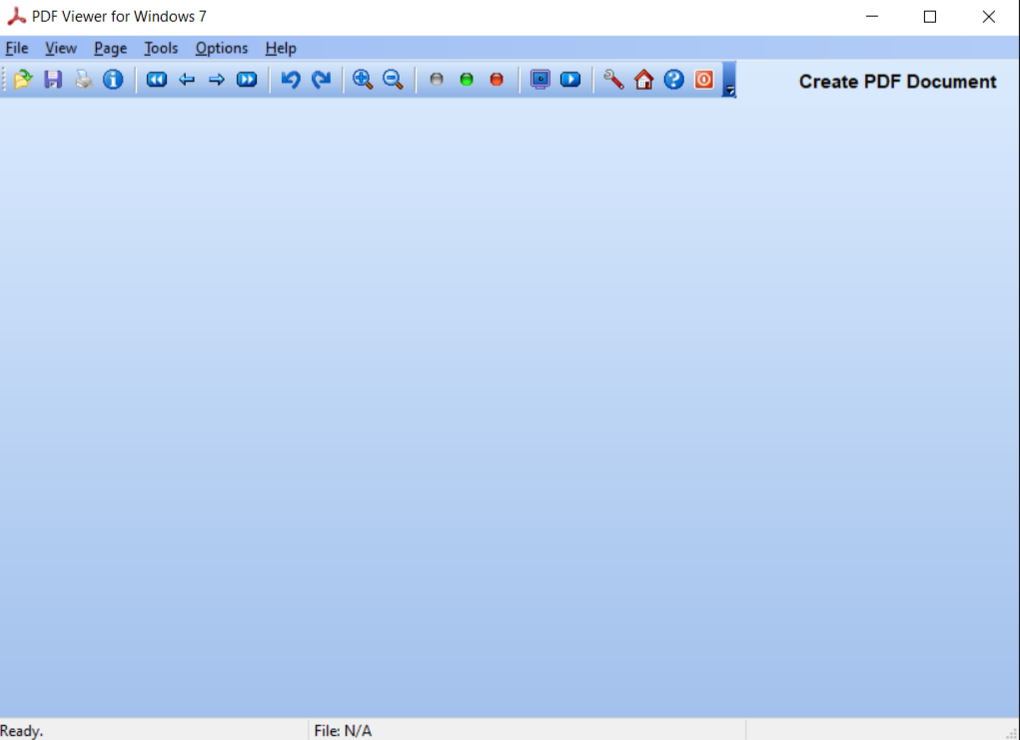
One of the key strengths of PDF Viewer for Windows 7 lies in its remarkably clean and intuitive interface. The design prioritizes simplicity, offering only the essential tools necessary for viewing PDF documents. Users who seek a quick and efficient way to open and review PDFs without the distraction of advanced editing functions will find this minimalist approach highly appealing. The absence of cluttered toolbars and unnecessary options allows for a focused and distraction-free reading experience.
The toolbar features a small selection of basic functions, including zoom controls for adjusting the viewing scale, page rotation to correct document orientation, and straightforward page navigation tools. This streamlined approach ensures users can easily access core functionalities without having to sift through numerous options. The intuitive layout allows for effortless navigation, even for those less familiar with PDF readers. The application’s focus on efficiency is evident in its rapid file loading times, a significant advantage over many other PDF readers that can experience delays, especially when handling larger files or on less powerful hardware. This quick loading and smooth performance contribute to a more efficient and enjoyable user experience, minimizing interruptions during document review.
Core Functionality and Supported Features
PDF Viewer for Windows 7 delivers on its promise of providing fundamental PDF viewing capabilities. While it doesn’t offer the advanced editing features found in professional-grade PDF software, it excels at its core function: displaying PDF documents clearly and efficiently. The program supports multiple viewing modes, allowing users to select between single-page view for focused reading and continuous scrolling for a more fluid reading experience, mirroring the feel of a physical book. The ability to rotate pages is another valuable feature, particularly useful for documents scanned in landscape orientation. This simple yet crucial feature greatly enhances the usability of the application for a broader range of documents.
Beyond basic navigation and viewing modes, the application’s performance characteristics are a notable asset. Its lightweight nature ensures minimal impact on system resources, making it a viable solution even for older computers or those with limited processing power. This efficiency translates to a faster overall experience, allowing users to navigate through documents quickly and without the lag or freezes often encountered with resource-intensive applications. For users with less powerful hardware, this efficiency becomes a critical factor in choosing a reliable and responsive PDF reader.
Limitations and Missing Features
While PDF Viewer for Windows 7 shines in its simplicity and speed, it’s essential to acknowledge its limitations. The software is explicitly not a full-featured PDF editor. Consequently, users should not expect advanced editing capabilities such as text selection, annotation, or form filling. These functionalities are typically found in more comprehensive PDF software packages designed for tasks beyond simple viewing. The omission of these features is a deliberate design choice, prioritizing speed and efficiency over extensive functionality.
This targeted approach means that users seeking a tool to actively edit, annotate, or manipulate PDFs will require more advanced software. The application’s strengths lie in its ability to provide a straightforward and quick method for viewing documents, not in modifying their content. Users looking for complete control over PDF files, including editing and annotation, should look to dedicated PDF editor software that offers these advanced functionalities. However, for simple viewing and navigation, PDF Viewer for Windows 7 is an exceptionally streamlined choice.
Target Audience and Ideal Use Cases
PDF Viewer for Windows 7 is ideally suited for a specific audience with particular needs. It is a perfect solution for users who need a fast, lightweight, and easy-to-use PDF reader, particularly those working on older Windows 7 systems or machines with limited resources. Its minimal resource consumption and efficient design make it an excellent choice for users who prioritize speed and simplicity. The absence of advanced editing functions should not be viewed as a drawback if the primary use case is solely viewing PDF documents.
This application is particularly useful for individuals who frequently need to open and review PDFs quickly, for example, students reviewing lecture notes, professionals quickly referencing documents, or anyone who values speed and ease of use over advanced editing features. Its suitability extends beyond individual users; the software could prove beneficial in environments with limited computational resources or where numerous users access PDFs simultaneously. The small file size and low resource requirements can aid in maintaining system stability and performance.
Conclusion: A Solid Choice for Basic PDF Viewing
PDF Viewer for Windows 7 presents a compelling solution for users seeking a lightweight and efficient PDF reader. Its minimalist interface, rapid performance, and support for fundamental viewing features make it a practical choice for those who prioritize speed and ease of use over extensive editing capabilities. While lacking advanced editing functionalities, the software successfully fulfills its intended purpose: providing a simple and effective way to view PDF documents on Windows 7 systems. Its streamlined design and low resource consumption are particularly attractive for users with older hardware or limited system resources. Ultimately, PDF Viewer for Windows 7 offers a reliable and effective solution for straightforward PDF viewing needs. For users focused solely on viewing PDF documents without needing extensive editing features, this application provides an efficient and lightweight solution.
File Information
- License: “Free”
- Version: “1.0”
- Latest update: “November 7, 2024”
- Platform: “Windows”
- OS: “Windows XP”
- Language: “English”
- Downloads: “57.6K”
- Size: “949.33 KB”


