
PDF Viewer Plus is a straightforward PDF viewing application designed for Windows 10 users. Its primary function is the simple and efficient display of PDF documents stored locally. While lacking extensive features found in more advanced PDF readers, its ease of use and focus on core functionality make it a viable option for users with basic PDF viewing needs. This review will delve into the software’s strengths and weaknesses, exploring its functionality, user interface, and overall performance.
Functionality and Features
PDF Viewer Plus excels in its simplicity. The core function – opening and viewing PDF files – is executed flawlessly. Users can easily navigate through documents, utilizing a helpful zoom feature to enhance readability, especially for documents with small text or intricate details. The application supports the opening and viewing of encrypted PDF files, a valuable feature often missing in simpler PDF viewers. Furthermore, the inclusion of a printing option provides complete functionality for users who need hard copies of their documents. This straightforward approach makes PDF Viewer Plus highly accessible to users of all technical skill levels.
However, the simplicity also translates to a limitation in its feature set. PDF Viewer Plus lacks advanced editing capabilities found in comprehensive PDF readers such as annotation tools, form filling, or the ability to merge or split PDF files. These omissions position the software firmly in the “viewer” category, rather than a complete PDF solution. Users requiring these advanced features will need to explore more feature-rich alternatives.
User Interface and Experience
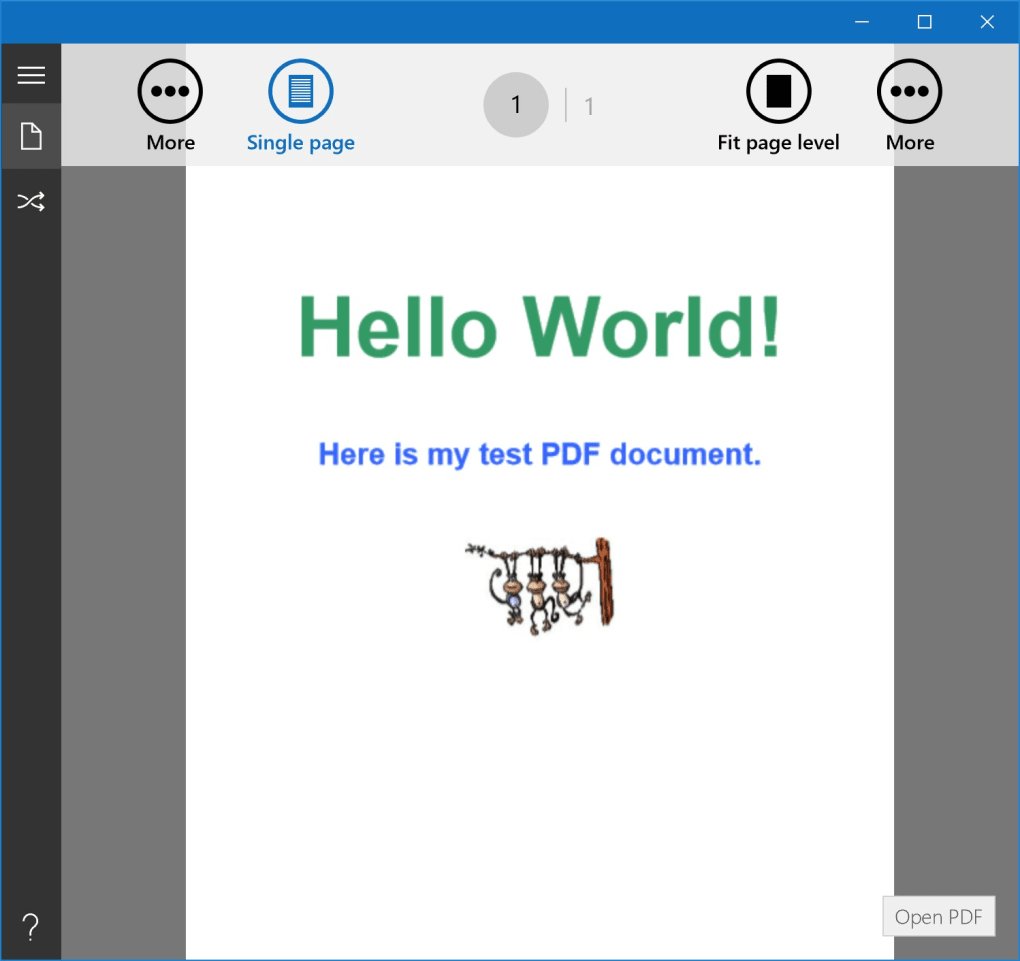
The user interface of PDF Viewer Plus is designed for ease of use. The clean and uncluttered layout ensures that users can quickly access core functions without unnecessary complexities. The intuitive navigation and straightforward menu options minimize the learning curve, allowing users to begin viewing PDF documents immediately upon installation. This streamlined approach is particularly beneficial for users who may be unfamiliar with more sophisticated PDF software.
The zoom function, as mentioned earlier, is a significant usability enhancement. The ability to seamlessly zoom in and out allows users to comfortably read documents with varying levels of detail. However, the lack of additional customization options, such as customizable toolbar placements or theme options, limits personalization. While this minimalistic approach is appreciated by some, it might prove limiting for users who prefer a more tailored experience.
Performance and System Requirements
PDF Viewer Plus is a lightweight application, demanding minimal system resources. This ensures smooth performance even on older or less powerful machines. The application’s speed in loading and rendering PDF files is commendable, contributing to a positive user experience. The software’s compatibility is limited to Windows 10 operating systems, potentially excluding users with older versions of Windows. This specific compatibility constraint might be a significant drawback for users operating on older systems.
The application’s low system footprint and rapid performance make it an excellent choice for users who prioritize speed and efficiency. The lack of resource-intensive features ensures that the application remains responsive even when handling larger PDF files. However, the limited operating system compatibility does pose a barrier for some users.
Security and Privacy
PDF Viewer Plus does not possess any advanced security features beyond the basic functionality of opening encrypted PDF files. There is no mention of any built-in security protocols or data encryption beyond what is inherent within the standard PDF format. While this simplicity reduces the potential for security vulnerabilities, it also means that users who require enhanced security features, such as secure document signing or password protection, would need to explore alternative solutions. For users prioritizing basic functionality over advanced security measures, the absence of complex security features may not be a critical concern.
Comparison with Alternative PDF Readers
Several alternative PDF readers offer more extensive features and functionalities. Xodo PDF Reader & Editor, for instance, stands out as a comprehensive all-in-one solution, offering editing, annotation, and collaboration capabilities. Similarly, File Viewer Plus offers a broader scope, supporting a wider array of file formats beyond PDF documents. PaperPort provides document management and sharing functionalities, exceeding the basic viewing capabilities of PDF Viewer Plus.
The choice between PDF Viewer Plus and alternative readers depends entirely on user needs. For those solely focused on the simple viewing of PDF documents, PDF Viewer Plus delivers efficiently. Users requiring advanced editing, annotation, or document management capabilities will find more robust options in alternative software. The specific choice hinges upon the balance between simplicity and feature richness, depending on individual preferences and requirements.
Strengths of PDF Viewer Plus:
- Simplicity: The application is exceptionally user-friendly and straightforward, perfect for users who need a basic PDF viewer without complex features.
- Ease of use: The intuitive interface ensures a quick learning curve, making it accessible to all users.
- Efficient performance: The lightweight nature ensures smooth operation even on less powerful systems, delivering rapid file loading and rendering.
- Encrypted PDF support: The ability to open and view encrypted PDF files is a valuable feature not always found in basic viewers.
- Printing functionality: The inclusion of a print option provides a complete workflow for users who need hard copies of their documents.
Weaknesses of PDF Viewer Plus:
- Limited features: The application lacks the advanced editing, annotation, and document management features found in more comprehensive PDF readers.
- Windows 10 only: Compatibility is restricted to Windows 10, excluding users with older operating systems.
- Lack of customization: The user interface offers minimal customization options, limiting personalization.
- Basic security: The application lacks advanced security features such as digital signatures or robust password protection.
- No updates: The application appears to be no longer maintained, with the last update in 2017 signifying a lack of ongoing support or feature enhancements.
Conclusion
PDF Viewer Plus serves its purpose effectively as a streamlined PDF viewer for basic needs. Its simplicity, ease of use, and efficient performance are notable strengths. However, its limited feature set, restricted compatibility, and lack of recent updates render it unsuitable for users who require more comprehensive PDF functionalities or ongoing software support. For users needing a simple viewer for occasional PDF viewing, PDF Viewer Plus is a viable choice. However, users with more demanding requirements should explore more feature-rich alternatives to meet their specific needs. The decision ultimately rests on the user’s prioritization of simplicity versus functionality.
File Information
- License: “Free”
- Version: “1.2.3.0”
- Latest update: “January 5, 2017”
- Platform: “Windows”
- OS: “Windows 10”
- Language: “English”
- Downloads: “16.7K”


