
PDF24 PDF Creator is a free, versatile tool designed to simplify the process of creating PDF documents from virtually any application. Its core functionality revolves around acting as a virtual printer, making PDF generation as straightforward as a standard print job. This review delves into its features, ease of use, strengths, weaknesses, and overall value proposition, comparing it to alternative solutions in the market.
Seamless PDF Creation: The Virtual Printer Approach
The heart of PDF24 PDF Creator lies in its ingenious implementation of a virtual printer driver. This innovative approach eliminates the need to learn a new, complex interface. Instead, users leverage their existing familiarity with the print function within their applications. Whether you’re working with a word processor, spreadsheet software, image editor, or any other program capable of printing, PDF24 seamlessly integrates, allowing you to select it as your printer and generate a PDF file with a single click. This ease of use is a significant advantage, making it particularly attractive to users who prioritize simplicity and efficiency over advanced editing capabilities.
The process is incredibly intuitive. Once installed, the PDF24 virtual printer appears in the list of available printers within your operating system. Selecting this printer initiates the PDF creation process. Upon completion, a user-friendly assistant opens, guiding you through saving the newly generated PDF file to your preferred location. This streamlined workflow minimizes the learning curve and speeds up the overall PDF creation process, making it ideal for users who frequently need to convert documents to PDF format.
Beyond Basic Creation: Advanced Features and Functionality
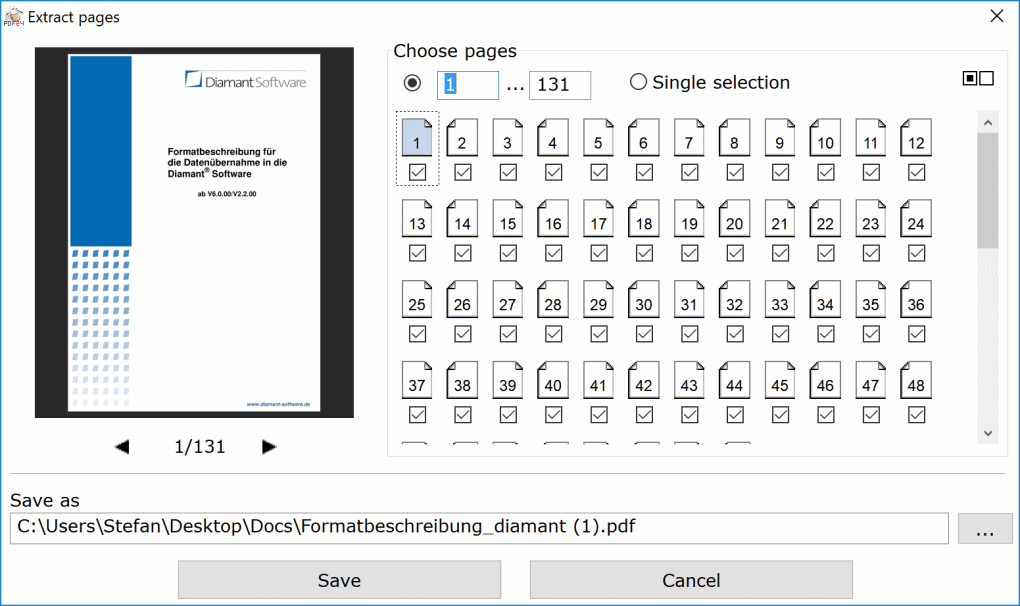
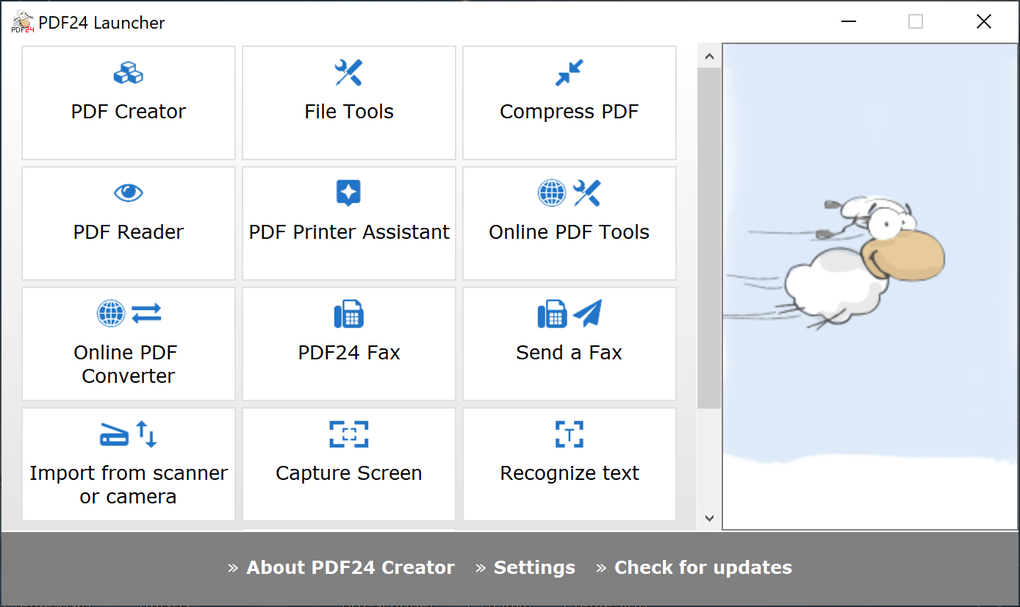
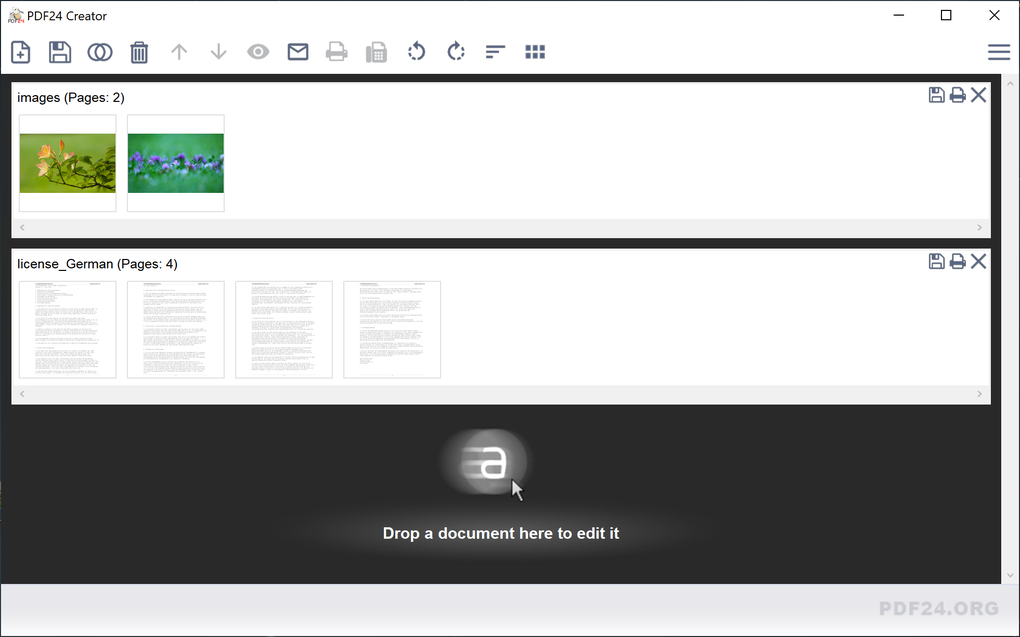
While its simplicity is a major draw, PDF24 PDF Creator isn’t just a basic PDF converter. It offers a range of additional features that enhance its versatility and utility. One notable function is the ability to merge multiple documents into a single PDF. This is incredibly convenient for consolidating various files into a single, organized document, eliminating the need for separate files. Furthermore, the software facilitates the extraction of specific pages from existing PDFs, allowing users to selectively curate the content they require. This page manipulation capability adds significant flexibility to document management tasks.
Another valuable feature is the capacity to compress PDF files. Reducing the file size is critical for efficient storage, transmission, and online sharing. This compression feature helps optimize file size without compromising readability, thereby enhancing the overall usability of the created PDFs. Although PDF24 doesn’t include a built-in PDF editor for modifying existing PDF content, its focus on efficient creation and management makes it a powerful addition to any user’s toolkit. The capabilities of merging, extracting pages, and compressing PDFs greatly enhance its practical application beyond basic file conversion.
Commercial Use and Licensing: A Free and Accessible Solution
A key point of distinction for PDF24 PDF Creator is its licensing model. The software is completely free for both personal and commercial use. This open accessibility makes it a cost-effective solution for individuals, small businesses, and large organizations alike. The freeware license removes financial barriers, allowing users to leverage its functionality without subscription fees or hidden costs. This contrasts with many other PDF creation tools that may impose limitations or require paid subscriptions for full functionality. The absence of such restrictions makes PDF24 a highly appealing choice for users seeking a reliable and financially accessible PDF creation tool. This generous licensing ensures its usability across a broad spectrum of applications and user needs.
Integration and Web Applications: Expanding the Reach of PDF Creation
PDF24 PDF Creator is not confined to standalone desktop use. Its versatility extends to integration with websites and web applications. The software is designed to be easily embedded into existing online platforms, providing a seamless PDF generation capability for web-based workflows. This adaptability makes it a valuable tool for developers seeking to incorporate PDF creation functionality into their web applications. Various plugins are available to facilitate this integration, offering users a range of options to suit their specific needs. This integration capability significantly expands the scope of PDF24, extending its reach beyond individual users to broader web-based applications.
Comparison with Alternatives: A Focus on Simplicity and Free Access
The market offers a plethora of PDF creation tools, ranging from simple converters to feature-rich editing suites. While Adobe Acrobat remains the industry standard, its complexity and cost often prove prohibitive for casual users. Other free alternatives exist, but many lack the intuitive simplicity and broad compatibility of PDF24. Some freeware solutions may come with bundled software or limitations on usage. PDF24 distinguishes itself by offering a compelling balance between functionality and accessibility. It delivers core PDF creation functionality without the clutter of extraneous features, making it an attractive alternative for users who value simplicity and free access. The focus on user-friendliness, coupled with the lack of cost, differentiates it within the crowded PDF software market.
User Reviews and Feedback: A Positive Track Record
User reviews consistently highlight the ease of use and effectiveness of PDF24 PDF Creator. Many users praise its straightforward interface and reliable performance. The ability to integrate it seamlessly into existing workflows is a recurring theme in positive feedback. The free nature of the software is also frequently lauded, making it a highly attractive option among users seeking cost-effective solutions for PDF creation. While some users may find the lack of an integrated PDF editor a drawback, the vast majority appreciate its simplicity and focus on core functionality. The positive reception suggests a high degree of user satisfaction and reinforces its position as a reliable and easy-to-use PDF creation tool.
Strengths and Weaknesses: A Balanced Perspective
Strengths:
- Ease of use: The virtual printer approach makes PDF creation incredibly intuitive.
- Free for commercial use: No cost barriers restrict its adoption.
- Multi-document merging: Simplifies consolidating multiple files into one.
- Page extraction: Allows selective content curation from existing PDFs.
- PDF compression: Optimizes file size for efficient storage and transfer.
- Web integration: Facilitates embedding into websites and web applications.
- Broad application compatibility: Works with most programs with a print function.
Weaknesses:
- No built-in PDF editor: Users requiring editing functionalities need separate software.
- File sending via email: The file delivery method might not be suitable for all users.
Conclusion: A Highly Recommended Choice for Efficient PDF Creation
PDF24 PDF Creator emerges as a compelling choice for users prioritizing simplicity, efficiency, and free access in their PDF creation workflow. Its virtual printer approach streamlines the process, eliminating the need for complex interfaces or specialized training. The inclusion of features like multi-document merging, page extraction, and compression significantly enhances its practicality. The absence of a built-in editor might be a limitation for some, but the software’s strengths far outweigh this drawback for many users. Its free and accessible licensing model further solidifies its position as a highly recommended tool for anyone requiring a reliable and straightforward PDF creation solution. The combination of ease of use, powerful features, and free access makes it a standout option in the competitive PDF software market.
File Information
- License: “Free”
- Latest update: “April 29, 2025”
- Platform: “Windows”
- OS: “Windows 10”
- Language: “English”
- Downloads: “317.2K”
- Size: “365.52 MB”


