
PDFBinder is a free, lightweight Windows application designed for the straightforward merging of multiple PDF documents into a single file. Its core functionality is uncomplicated: add your PDF files, arrange them in the desired order, and create a unified PDF. This simplicity makes it a quick and efficient tool for various tasks, particularly when dealing with a collection of related documents. However, this minimalist approach also limits its capabilities, lacking features found in more comprehensive PDF editors. This review will delve into the strengths and weaknesses of PDFBinder, exploring its usability, limitations, and suitable alternatives.
Ease of Use and Core Functionality
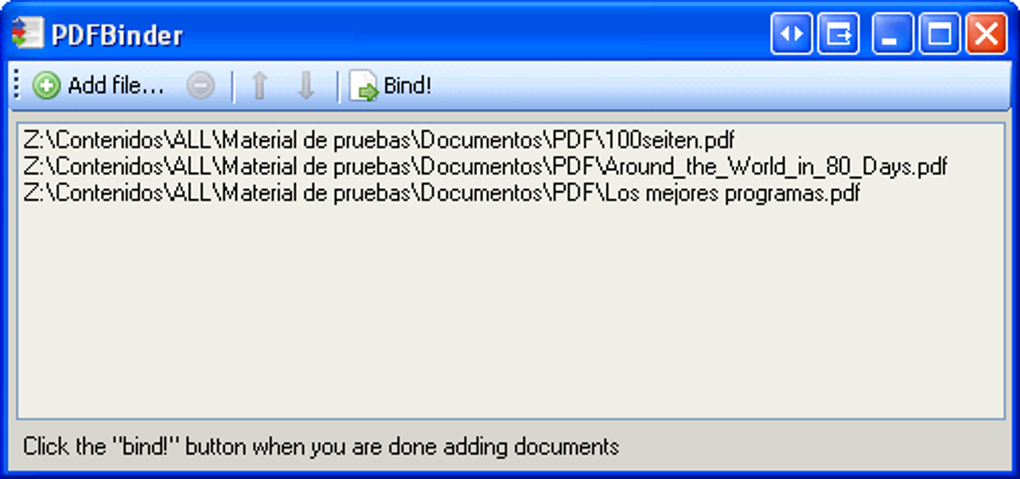
PDFBinder excels in its ease of use. The interface is remarkably spartan, focusing solely on the essential task of PDF merging. Upon launching the application, users are presented with a clean window featuring a prominent “Add” button. This intuitive design requires minimal learning curve, making it accessible even to users with limited technical expertise. Adding files is a simple drag-and-drop operation or browsing your file system. Once added, the PDFs are displayed as a list, allowing for easy reordering via drag-and-drop. Deleting unwanted files from the list is equally straightforward.
The process of merging is instantaneous and trouble-free. Once the desired order is established, initiating the merge function quickly combines the documents. The resulting single PDF file is then saved to a location specified by the user. This streamlined workflow is PDFBinder’s significant advantage, particularly for users who need a quick and efficient method to combine PDF documents without complex formatting adjustments or editing features.
Limitations of the Free Version
While PDFBinder’s simplicity is a strength, it also represents its most significant limitation. The free version is extremely barebones, offering virtually no features beyond basic merging functionality. This lack of features significantly restricts its versatility and appeal to users with more complex requirements.
One major drawback is the absence of a preview function. Users cannot view the combined PDF within the application before saving. This means that arranging files requires opening each individual PDF in a separate PDF reader to confirm its contents and position within the merged document, making the otherwise simple process unnecessarily cumbersome. This significant omission reduces workflow efficiency and adds unnecessary steps.
Furthermore, PDFBinder does not allow for any manipulation or editing of the individual PDFs being merged. Page orientation, content adjustments, or any other modifications are impossible within the application. This makes PDFBinder unsuitable for users who need to make any alterations to their documents before combining them.
Another significant limitation is the lack of support for operating systems other than Windows. This restricts its use to Windows-based systems, excluding users relying on macOS, iOS, Android, or other platforms. In today’s increasingly mobile and multi-platform world, this restricted compatibility significantly diminishes its usability.
Finally, the free version doesn’t offer file conversion capabilities. All input files must be in PDF format, requiring users to convert documents in other formats (like Word or image files) to PDF before using PDFBinder. This adds an extra step to the process and makes it less convenient for users working with various file types.
Comparison with Alternative PDF Software
Several alternative applications offer similar merging capabilities alongside a broader range of features. These alternatives often address the shortcomings of PDFBinder, providing a more comprehensive PDF management solution.
Online PDF Mergers: Numerous online tools provide free PDF merging services. While these offer convenience for users without needing to download and install software, they have potential limitations such as bandwidth dependency, file size restrictions, and potential security concerns related to uploading sensitive documents to a third-party server. Reliability can also be an issue, as some online services may fail to accurately merge documents or experience processing errors.
Paid PDF Editors: Commercial PDF editors such as Adobe Acrobat Pro, PDF Element, and others offer extensive features beyond simple merging. These features often include editing capabilities, the ability to convert files between different formats (PDF to Word, for instance), advanced security features, and more sophisticated layout control. While these applications often come with a price tag, the increased functionality justifies the cost for users needing a powerful, versatile PDF solution. They often provide a comprehensive suite of tools exceeding just PDF merging.
Other Free PDF Mergers: Several free PDF merging applications for Windows, similar to PDFBinder, exist. However, many of these still lack the preview function that is sorely missed in PDFBinder. The overall user experience might be similar, but a lack of advanced features means that users frequently need to turn to additional programs to complete their tasks. This negates the simple, one-stop nature of even a basic PDF editor.
Choosing an alternative depends on specific needs and priorities. While PDFBinder provides simplicity and speed for basic merging, users requiring more comprehensive functionality will likely benefit from a more feature-rich application, even if it means incurring a cost or slightly increasing the learning curve.
Verdict: Suitable Only for the Most Basic Needs
PDFBinder is a functional tool for its specific purpose: merging PDF documents. Its simplicity and speed are undeniable strengths for users with minimal requirements. However, its limited functionality, lack of preview, absence of editing capabilities, and limited operating system compatibility severely restrict its usefulness. The absence of even basic features like a preview function makes the user experience unnecessarily convoluted. For users requiring a more robust and versatile PDF solution, investing in a more feature-rich application, whether free or paid, will likely provide a more efficient and streamlined workflow. PDFBinder, while functional for the most rudimentary of needs, ultimately falls short as a comprehensive PDF management tool. Its single-functionality, while appealing in its simplicity, ultimately proves too limiting for most users.
File Information
- License: “Free”
- Version: “1.2”
- Latest update: “November 15, 2021”
- Platform: “Windows”
- OS: “Windows 2003”
- Language: “English”
- Downloads: “606.5K”
- Size: “1.76 MB”


