
PDFescape Free PDF Editor is a free Google Chrome extension designed to simplify the process of editing, filling, and viewing PDF files directly within your browser. This eliminates the need for standalone PDF reader software, making it a convenient and accessible tool for both personal and light professional use. This review will delve into the features, benefits, limitations, and overall user experience of PDFescape, comparing it to other available options.
Key Features and Functionality
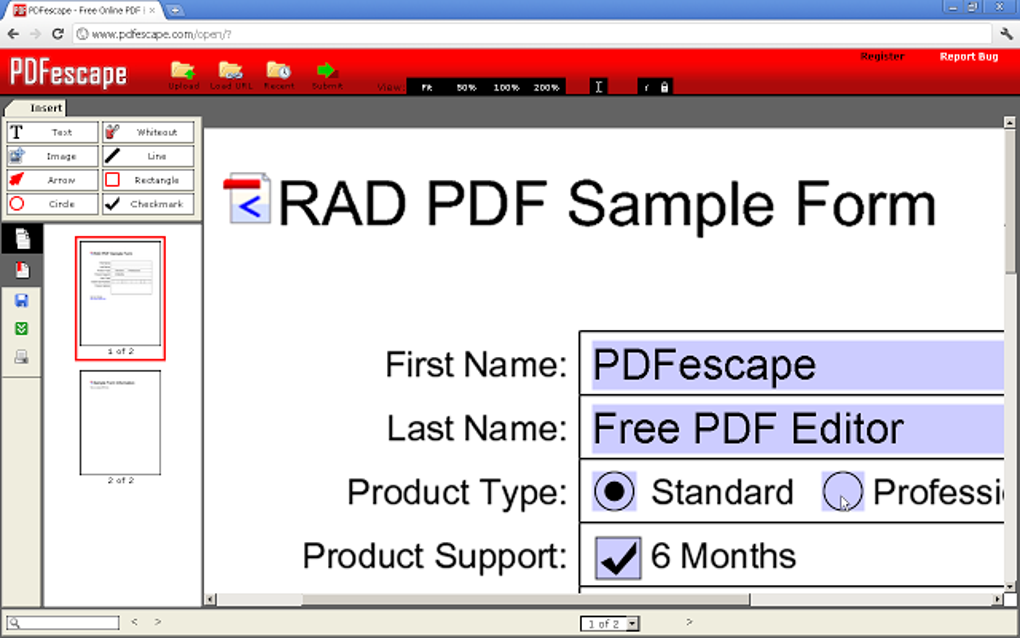
PDFescape offers a surprisingly robust set of features considering its free status and browser-based nature. The core functionality revolves around manipulating PDF documents without requiring downloads or installations beyond the Chrome extension itself. Key features include:
-
Form Filling: Easily fill out PDF forms, entering text, selecting options from dropdown menus, and checking boxes. This is crucial for handling various documents, from tax forms to applications. The interface is intuitive, resembling typical form-filling experiences in other software.
-
Basic Text Editing: While not a full-fledged word processor for PDFs, PDFescape allows for basic text editing within existing text fields. This allows for corrections and minor alterations within the document. Users can modify existing text, though more extensive formatting options are limited.
-
Annotation and Markup: Add comments, highlights, and underlines to PDFs for review or collaboration. This annotation feature is valuable for feedback and collaborative work on shared documents. The options are relatively straightforward, focusing on essential markup tools rather than extensive drawing or design features.
-
Page Management: Reorder, delete, and insert pages within a PDF document. This simplifies the organization of multi-page files, allowing users to remove unnecessary pages or restructure the document’s flow. The page manipulation functions are user-friendly and intuitive.
-
Hyperlink Insertion: Add hyperlinks to URLs or internal page anchors within the PDF. This is particularly useful for creating interactive documents or linking to related resources. The process of inserting hyperlinks is clear and straightforward.
-
Printing and Viewing: View and print PDFs directly from within the extension. This integrates seamlessly into the workflow, eliminating the need to switch to a separate PDF reader for these common tasks.
-
Online PDF Opening: PDFescape offers a unique functionality where it automatically opens PDFs discovered online directly within its interface, avoiding the default PDF reader and streamlining the browsing experience. This is a noteworthy feature that improves workflow efficiency, especially for users frequently interacting with online PDFs.
Advantages of Using PDFescape
The primary advantage of PDFescape is its accessibility and ease of use. As a free Chrome extension, it requires no downloads or installations beyond a simple browser add-on. This is a significant benefit for users who want a quick and easy solution for basic PDF manipulation without the overhead of installing and managing large software applications.
The lack of registration requirements is another significant plus. Many free PDF editors demand user accounts or subscriptions to access their full features. PDFescape’s lack of such requirements makes it instantly usable, catering to users who prefer immediate access without commitment.
Its integrated approach to online PDF handling is a distinct advantage. The ability to open online PDFs directly within PDFescape simplifies the workflow and prevents interruptions by default PDF readers.
Furthermore, the interface is designed for simplicity and usability. The tools are easily accessible, and the overall user experience is intuitive, making it suitable for users with varying levels of technical expertise.
Limitations and Drawbacks
While PDFescape is a useful tool, it does have limitations. The most significant restriction is the page limit. PDFs exceeding 100 pages are not supported. This significantly restricts the tool’s usability for documents such as lengthy reports or large books.
Another limitation relates to password-protected PDFs. PDFescape cannot open files requiring login credentials. This constraint limits its use for accessing secure or restricted documents. This is a common limitation across many free PDF editors, reflecting the security measures inherent in such file protection.
The editing capabilities, while functional, are not comprehensive. PDFescape is primarily geared towards basic editing tasks. Users looking for advanced features like image editing, complex text formatting, or extensive annotation capabilities will need to explore more feature-rich, often paid, alternatives.
The extension’s reliance on Google Chrome limits its compatibility. Users of other browsers cannot use PDFescape directly. While this is a common constraint for browser extensions, it does restrict its usability for users who prefer different browsers.
Comparison to Alternative PDF Editors
PDFescape occupies a specific niche in the PDF editor market. Its strength lies in its ease of access and simple functionality. Compared to heavyweight alternatives like Adobe Acrobat Pro, it lacks advanced features, but it excels in convenience and ease of use for basic tasks.
Many free PDF editors offer more comprehensive feature sets but often require registration, downloads, or may include bundled software. PDFescape’s straightforward, no-frills approach stands out for users prioritizing convenience over extensive feature lists. Paid options, such as Adobe Acrobat Pro, provide far more advanced features but come with a considerable cost.
Therefore, the choice of PDF editor depends on individual needs. PDFescape is ideal for users requiring a simple, easily accessible tool for basic PDF tasks, while more demanding users may find more feature-rich alternatives, both free and paid, better suited to their needs.
User Experience and Overall Impression
The user experience with PDFescape is largely positive. The clean and intuitive interface makes navigation and tool access straightforward. The extension loads quickly, and the functions are responsive. The streamlined design avoids overwhelming the user with numerous complex options.
However, the page limitation and inability to handle password-protected files can be significant drawbacks, depending on the user’s needs. Users should carefully consider these limitations before adopting PDFescape as their primary PDF editor.
Conclusion
PDFescape Free PDF Editor is a valuable tool for those seeking a quick, easy, and free way to handle basic PDF editing tasks. Its straightforward approach, browser-based functionality, and lack of registration requirements make it a convenient option for everyday PDF manipulation. However, users should be aware of its limitations regarding page count, password-protected files, and advanced features. If these constraints are not a concern, PDFescape offers a user-friendly and efficient solution for basic PDF management directly within the Google Chrome browser. For users requiring more advanced functionality, exploring alternative, potentially paid, options might be necessary.
File Information
- License: “Free”
- Version: “varies-with-device”
- Latest update: “February 13, 2019”
- Platform: “Windows”
- OS: “Windows 8”
- Language: “English”
- Downloads: “29.7K”


