
PdfMerge is a free, lightweight software application designed for merging multiple PDF files into a single document on Windows PCs. Its straightforward design and ease of use make it a popular choice for users who need a quick and efficient solution for combining PDFs without the complexity of more feature-rich, often paid, alternatives. This review will delve into the strengths and weaknesses of PdfMerge, exploring its functionality, interface, and comparing it to similar software available in the market.
Functionality and Ease of Use
PdfMerge’s core function is straightforward: merging PDF files. It excels at this task, offering a simple, intuitive process that requires minimal technical expertise. The program’s interface is designed with simplicity in mind, prioritizing ease of use over advanced features. This minimalist approach makes it accessible to both novice and experienced users alike. The primary method of adding files is through a drag-and-drop interface, although alternative methods are also available. Users can select individual PDF files, or even entire folders containing multiple PDFs, for inclusion in the merged document. Once files are added, users can easily reorder them within the program before initiating the merge process.
The merging process itself is remarkably fast and efficient. The software operates in the background, allowing users to continue working on other tasks while the merging operation completes. This asynchronous processing is particularly beneficial when dealing with larger files or a significant number of documents. The resulting merged PDF maintains the original formatting of the constituent files, ensuring that the final product is visually consistent and readable. PdfMerge also provides the option to choose a destination folder for the newly created merged file, allowing users to organize their files effectively.
Interface and User Experience
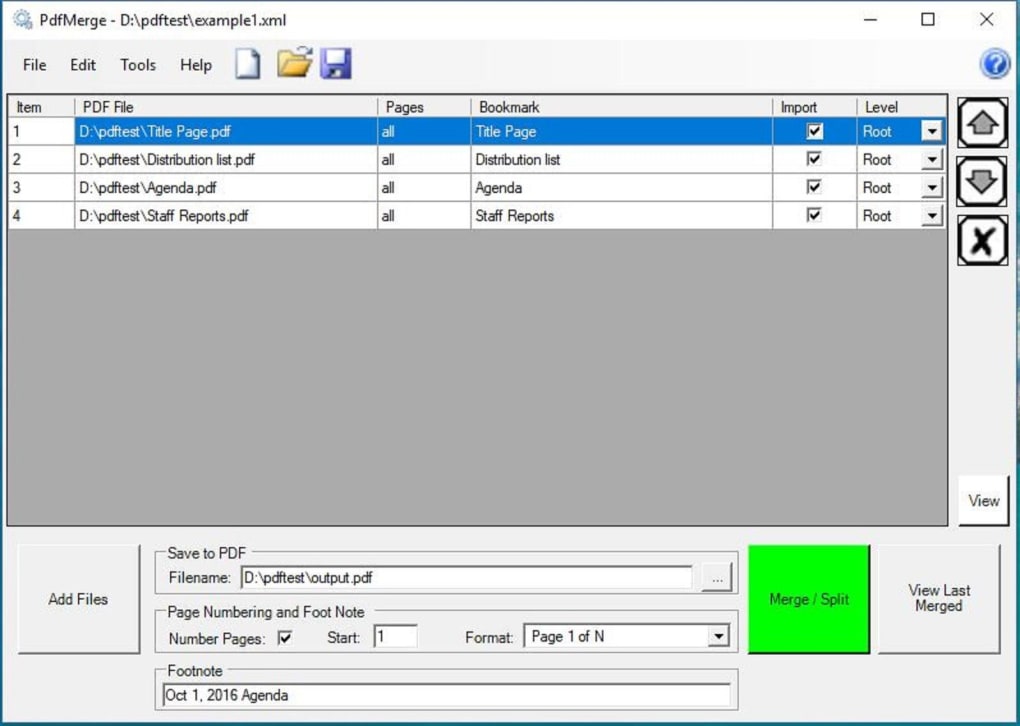
PdfMerge boasts a clean, uncluttered interface that focuses on its primary function: merging PDF documents. The program’s simplicity is both its strength and weakness. While its intuitive design makes it incredibly easy to use, it lacks the advanced features found in more comprehensive PDF editors. The absence of a complex menu system or a multitude of options contributes to its efficiency and user-friendliness, however, it also limits the scope of customization and editing capabilities.
The program’s user interface is based on a straightforward, dialog-style approach. Clear buttons and labels guide users through each step of the merging process. The drag-and-drop functionality further enhances the user experience, making it quick and easy to add files to the merging queue. Even users with limited computer experience will find navigating PdfMerge’s interface straightforward and intuitive. The absence of complex settings or advanced options minimizes the learning curve, enabling users to quickly become proficient with the software.
Strengths and Weaknesses of PdfMerge
PdfMerge’s strengths lie in its simplicity, speed, and efficiency. It is an ideal solution for users who frequently need to merge PDF files without the need for complex editing or formatting tools. Its lightweight nature ensures minimal impact on system resources, making it suitable for use on computers with limited processing power or memory. Its compatibility with various Windows operating systems further adds to its versatility.
However, PdfMerge’s simplicity also presents some limitations. The lack of advanced features, such as the ability to split, edit, or rotate individual pages within a PDF, restricts its functionality compared to more comprehensive PDF editors. Furthermore, the absence of robust customer support means that users may have to rely on online forums or communities for troubleshooting assistance. Although a watermark might be present in some versions, this is a common practice for free software and users typically have the option to purchase a license to remove it.
Alternatives to PdfMerge
Several alternatives to PdfMerge exist, each offering a slightly different set of features and functionalities. Some of these alternatives include:
-
PDF Split and Merge: This program offers similar merging capabilities to PdfMerge but often comes with a less user-friendly interface, which may be a drawback for some users. The cluttered interface can be overwhelming for users who prefer a simpler, more streamlined experience.
-
PDF Merger: This utility provides a basic merging function, often lacking the speed and efficiency of PdfMerge. While simple to use, the output file might sometimes have minor layout inconsistencies.
-
PDF Combine: This software allows not only merging but also splitting PDFs, offering more versatility than PdfMerge. However, it’s reported to experience occasional lags and crashes, which compromises its reliability.
These alternatives demonstrate that while PdfMerge provides a solid and simple solution, users may find other options more suitable depending on their specific needs and preferences. If advanced features are required, a more comprehensive PDF editing suite may be a better choice. However, for simple merging tasks, PdfMerge remains a compelling option due to its ease of use and speed.
Is PdfMerge the Right Choice for You?
PdfMerge is a highly effective tool for its intended purpose: quickly and efficiently merging multiple PDF files. Its strengths lie in its ease of use, speed, and lightweight nature. The simple interface makes it accessible to a broad range of users, regardless of technical expertise. Its speed is particularly beneficial when dealing with numerous or large files. Its lightweight nature ensures that it won’t bog down system resources.
However, the lack of advanced features may be a significant drawback for some users. Those needing features beyond simple merging, such as editing, splitting, or more sophisticated formatting options, will likely require a more advanced PDF editor. The limited customer support may also be a concern for those seeking technical assistance.
Ultimately, the suitability of PdfMerge depends on individual needs and priorities. If quick and simple PDF merging is the primary requirement, then PdfMerge is an excellent choice. However, if advanced features or robust customer support are essential, then exploring alternative options is advisable. For users who prioritize speed, ease of use, and a lightweight application, PdfMerge stands as a highly effective solution for all their PDF merging needs within the Windows environment. Its intuitive design ensures a seamless user experience, making it an ideal tool for both casual and regular users alike.
File Information
- License: “Free”
- Latest update: “May 23, 2023”
- Platform: “Windows”
- OS: “Windows 2000”
- Language: “English”
- Downloads: “445.8K”
- Size: “4.26 MB”


