
Peace Equalizer is a free, open-source graphical user interface (GUI) for Equalizer APO, a powerful parametric equalizer for Windows. While Equalizer APO itself is a robust audio processing tool, its command-line interface can be daunting for many users. Peace Equalizer bridges this gap, providing a user-friendly interface that unlocks the full potential of Equalizer APO for a wide range of users, from casual listeners to audiophiles. This in-depth review explores the features, functionality, and overall user experience of Peace Equalizer, highlighting its strengths and weaknesses.
Feature-Rich Functionality: Beyond Basic Equalization
Peace Equalizer goes far beyond the basic functionality of a standard equalizer. It offers a comprehensive suite of audio processing tools, making it a versatile audio mixer and enhancement utility for Windows users. Its features include:
-
Multi-band Parametric Equalization: At the heart of Peace Equalizer lies its precise parametric equalizer. Users can adjust multiple frequency bands, controlling gain, Q-factor (bandwidth), and frequency independently for each band. This level of control allows for detailed sound shaping, targeting specific frequencies to enhance or reduce their presence in the audio output. The number of bands available is substantial, allowing for intricate adjustments to even the most complex audio profiles.
-
Extensive Speaker Support: Unlike many equalizers that limit speaker support to stereo or a small number of channels, Peace Equalizer supports up to nine speakers or channels. This makes it ideal for users with surround sound systems or complex multi-speaker setups, ensuring that each channel receives optimized equalization. This flexibility is crucial for achieving balanced and immersive audio experiences.
-
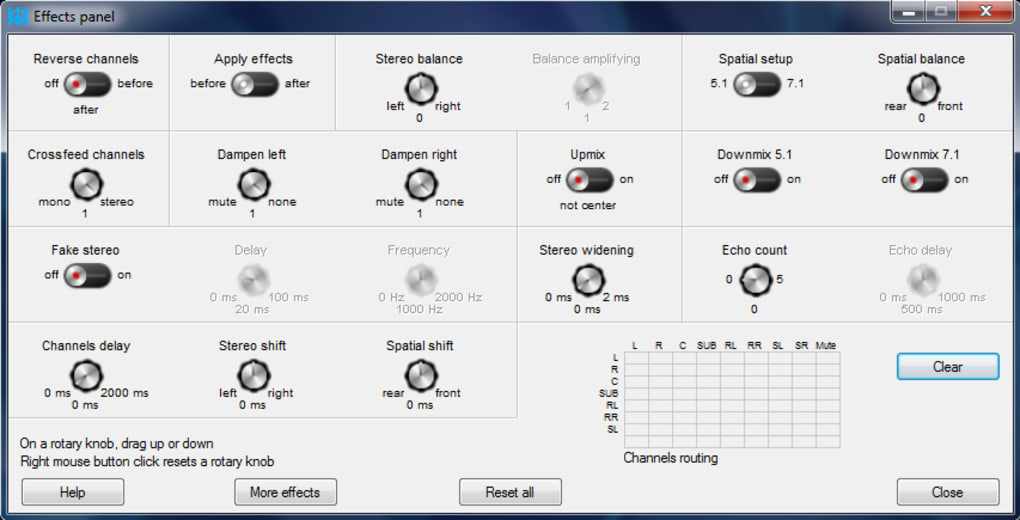
Advanced Effects Panel: The software’s capabilities extend beyond simple equalization. An integrated effects panel includes controls for:
- Balance: Adjust the relative volume of the left and right channels.
- Delay: Introduce a time delay between channels, useful for creating subtle spatial effects or correcting timing issues.
- Cross-feeding: Route audio from one channel to another, allowing for creative sound manipulation and effects.
These tools enable advanced audio shaping that moves beyond simple frequency adjustments, fostering a richer and more personalized audio landscape.
-
Pre-amplification: Users can pre-amplify dB values for volume control, allowing for fine-grained adjustments to overall volume levels before equalization is applied. This precise control over input levels ensures that the equalization process works effectively, preventing clipping or other issues caused by improper signal levels.
-
Filtering Capabilities: Beyond parametric equalization, Peace Equalizer includes a range of filters for more specialized tasks. These include high-pass, low-pass, band-pass, high-shelf, low-shelf, peak, and notch filters. These filters provide additional tools for sculpting the audio spectrum and targeting specific frequency ranges for enhancement or removal, further extending the fine-tuning capabilities.
-
Per-Speaker Graphing: Users can visualize their filter settings on a graph for each speaker independently. This visual representation provides valuable feedback on the equalization process, enabling users to quickly identify and adjust settings as needed. The real-time nature of this visualization facilitates effective and immediate adjustment of the sound profile.
-
Configuration Management: Peace Equalizer allows users to create, save, and load different equalizer configurations (“profiles”). This feature streamlines the process of switching between different equalization settings for various applications, such as music, movies, or games, promoting ease and efficiency in adjusting to different sound needs.
-
Control Mechanisms: The software is accessible through various methods for user convenience:
- System Tray: Minimize the application to the system tray for quick access to key functions.
- Desktop Shortcuts: Create shortcuts for frequently used configurations or functions.
- Hotkeys: Define custom keyboard shortcuts for rapid activation of profiles or adjustments. This flexibility enhances the overall workflow, enabling smoother and more intuitive adjustments.
-
Language and Theme Support: Peace Equalizer offers support for multiple languages and themes. This inclusivity ensures broad accessibility and caters to diverse user preferences. The customizable interface allows for a more personalized and enjoyable user experience.
User Interface: A Double-Edged Sword
While Peace Equalizer’s functionality is extensive, its user interface is a significant point of contention. Many users describe the GUI as outdated and visually unappealing. The layout can appear cluttered, and navigating the various settings and options may feel initially confusing to those unfamiliar with audio engineering principles.
This lack of intuitive design can present a steep learning curve for new users. While comprehensive, the abundance of options might overwhelm those without prior experience with parametric equalizers or audio processing tools. Clearer labeling, improved visual organization, and potentially a simplified “beginner mode” could significantly improve the user experience.
The scarcity of readily available tutorials and documentation exacerbates the problem. While online resources may exist, their lack of official support makes them less reliable and consistent. The development team should invest in creating comprehensive documentation and tutorials to improve the accessibility and ease of use for new users.
Performance and Stability
Generally, Peace Equalizer operates efficiently and smoothly. The impact on system performance is typically minimal, even during intensive audio processing. However, it’s important to consider the system’s overall specifications. More demanding configurations or higher sampling rates might place a greater load on the system’s resources, particularly on older or less powerful machines. Optimizations might be considered in future updates to reduce resource consumption further.
Compatibility and Installation
Peace Equalizer is specifically designed for Windows operating systems and requires the installation of Equalizer APO beforehand. The installation process is usually straightforward, but users should ensure their system meets the minimum requirements for both Peace Equalizer and Equalizer APO to ensure flawless compatibility and operational stability.
Pros and Cons Summary
Pros:
- Extensive Features: Offers a vast array of audio processing tools far beyond standard equalizers.
- Powerful Equalization: Provides precise multi-band parametric equalization with numerous filter options.
- Advanced Effects: Includes balance, delay, and cross-feeding for sophisticated audio shaping.
- Multi-Speaker Support: Supports up to nine speakers for advanced audio setups.
- Configuration Management: Allows for saving and loading custom equalizer profiles.
- Control Options: Offers tray control, desktop shortcuts, and hotkey support for convenient usage.
- Customizability: Provides language and theme support.
Cons:
- Unattractive GUI: The user interface is visually dated and can appear cluttered.
- Steep Learning Curve: The abundance of features can be overwhelming for beginners.
- Limited Documentation: A lack of comprehensive tutorials and documentation hinders usability.
- False Positive Virus Detections: Some antivirus software may flag the application as a potential threat, requiring further investigation.
Conclusion
Peace Equalizer offers a potent and versatile suite of audio processing tools within a single, user-controlled interface. The advanced features, especially the multi-band parametric equalization and the range of integrated effects, are a clear advantage for experienced users seeking fine-grained control over their audio. However, the dated and cluttered GUI coupled with a steep learning curve and limited documentation significantly hinders its accessibility for average users. Addressing these usability concerns would make Peace Equalizer a truly exceptional tool for audio enthusiasts of all levels. The potential is undeniable, but significant improvements to the user interface and user experience are necessary to fully realize that potential.
File Information
- License: “Free”
- Version: “1.0”
- Latest update: “February 1, 2023”
- Platform: “Windows”
- OS: “Windows 10”
- Language: “English”
- Downloads: “25.7K”
- Size: “10.73 MB”


