
PeerBlock is a free, open-source firewall application designed for Windows operating systems. It functions primarily by blocking incoming connections from IP addresses associated with known peer-to-peer (P2P) networks, potentially malicious websites, and other unwanted sources. Unlike traditional firewalls that primarily focus on outgoing connections, PeerBlock emphasizes the blocking of unsolicited inbound traffic, providing an additional layer of security to complement existing antivirus and firewall solutions. This guide delves into the functionality, features, pros and cons, and alternatives to PeerBlock.
Understanding PeerBlock’s Functionality
PeerBlock operates by utilizing a constantly updated list of IP address ranges associated with various potentially problematic online activities. This list, dynamically maintained and updated by the PeerBlock developers, identifies networks frequently used for P2P file sharing, spamming, malware distribution, and other undesirable online behaviors. When a connection attempt is initiated from an IP address within one of these blocked ranges, PeerBlock prevents the connection, thus protecting your computer from potential threats.
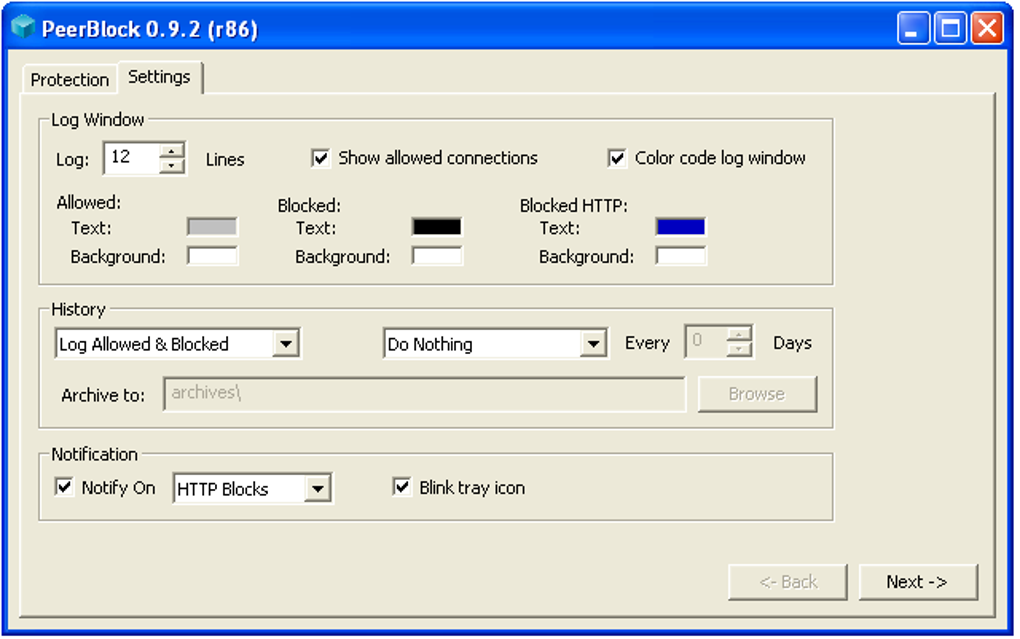
The software’s functionality isn’t limited to a simple “block list.” It offers several customizable features that allow users to fine-tune its operation to suit their specific needs and security preferences. For example, users can manually add or remove IP addresses from the block list, allowing for granular control over which networks are allowed or denied access. This flexibility is crucial for users who may need to whitelist specific IP addresses associated with legitimate services or applications.
PeerBlock’s efficacy relies heavily on the accuracy and comprehensiveness of its IP address block list. The developers strive to keep this list up-to-date, mitigating the risks posed by evolving online threats. While the list is extensive, it’s crucial to understand that it doesn’t provide comprehensive protection against all forms of malware or online attacks. It serves as a supplementary security measure, enhancing the protection offered by other security software.
One notable aspect of PeerBlock is its minimal system resource consumption. The application runs discreetly in the background, requiring minimal CPU and memory resources, ensuring that it doesn’t impact the performance of your computer. This is a significant advantage compared to some more resource-intensive security applications. Its lightweight nature makes it ideal for users with less powerful systems, ensuring that security doesn’t come at the cost of performance.
Key Features and Customization Options
PeerBlock boasts a range of features designed for both ease of use and advanced customization:
-
Dynamic Block List Updates: The software automatically checks for and downloads updates to its IP address block list, ensuring that it remains current with the latest threat intelligence. Users can configure the update frequency to suit their preferences.
-
Customizable Block Lists: Users have the option to modify the default block list, adding or removing IP addresses based on their specific needs. This allows for greater control over which networks are blocked or allowed. This is especially useful for individuals who need to allow access from specific servers or IP ranges required for legitimate purposes.
-
Real-time Monitoring: PeerBlock provides real-time information regarding blocked connection attempts, displaying the source IP address, protocol, and other relevant details. This feature is beneficial for troubleshooting connectivity issues or investigating suspicious activity.
-
Port Configuration: PeerBlock supports the ability to configure which ports it monitors and blocks traffic on. This advanced feature provides more granular control over network traffic, allowing users to tailor their security based on the specific ports used by their applications.
-
Minimal Resource Usage: As previously mentioned, PeerBlock is designed for minimal resource consumption. It runs efficiently in the background without significantly impacting system performance, a crucial feature for users with limited system resources.
-
Lightweight Interface: The user interface is simple and straightforward, making it accessible even for users with limited technical expertise. The main interface clearly displays the number of blocked connections and allows for easy access to settings and configuration options.
-
Supportive Community: While not directly developed by a large corporation, PeerBlock benefits from an active community of users and developers. This community provides support, troubleshooting assistance, and contributes to the ongoing development and improvement of the software.
PeerBlock’s Strengths and Limitations
While PeerBlock offers several valuable security benefits, it’s essential to understand its limitations:
Pros:
-
Enhanced Security: PeerBlock provides an additional layer of security by blocking unsolicited inbound connections from potentially harmful sources. This acts as a supplementary measure to traditional firewalls and antivirus software.
-
Lightweight and Efficient: It consumes minimal system resources, ensuring that it doesn’t negatively impact computer performance.
-
Customizable: The software’s highly customizable settings allow users to tailor its functionality to meet their specific requirements and security preferences.
-
Real-time Monitoring: The real-time display of blocked connection attempts aids in identifying and troubleshooting potential security issues.
-
Free and Open-Source: PeerBlock is freely available and its open-source nature allows for community contributions and transparency.
Cons:
-
Not a Replacement for Antivirus: PeerBlock is not a replacement for comprehensive antivirus software. It focuses on blocking inbound connections, but doesn’t actively scan for or remove malware.
-
IP Address Hiding Not Supported: PeerBlock does not provide any functionality for masking or hiding your IP address.
-
Reliance on Block List Accuracy: The effectiveness of PeerBlock relies on the accuracy and completeness of its IP address block list. While updated frequently, inaccuracies or omissions could leave vulnerabilities.
-
Limited Platform Support: PeerBlock primarily supports Windows operating systems, excluding users of other platforms like macOS or Linux.
-
Potential for False Positives: Although infrequent, there’s a small chance of encountering false positives, blocking legitimate connections. However, the customizable options allow users to rectify such issues.
PeerBlock Alternatives
Several alternative applications provide similar or enhanced functionalities compared to PeerBlock:
-
Traditional Firewalls: Most operating systems include built-in firewalls, and numerous third-party options offer more advanced features, including inbound and outbound traffic control.
-
Advanced Firewall Suites: Comprehensive security suites often include robust firewalls alongside antivirus, anti-malware, and other security features.
-
VPN Services: Virtual Private Networks (VPNs) encrypt internet traffic and mask your IP address, offering a different layer of security than PeerBlock.
-
Host-Based Intrusion Detection Systems (HIDS): These systems monitor system activity for malicious behavior and can alert the user or take action to prevent attacks.
The choice of alternative depends on individual needs and preferences. Traditional firewalls may suffice for basic protection, while advanced suites provide comprehensive security, and VPNs offer privacy and anonymity.
Conclusion
PeerBlock serves as a valuable supplementary security tool, enhancing the protection offered by existing security software. Its focus on blocking unsolicited inbound connections, combined with its lightweight nature and customizable options, makes it a useful addition for users seeking enhanced network security. However, it’s crucial to understand its limitations and to use it in conjunction with comprehensive antivirus and firewall solutions for holistic protection. The decision to utilize PeerBlock ultimately depends on individual risk tolerance and security priorities. It’s not a standalone solution but rather a complementary tool within a broader security strategy.
File Information
- License: “Free”
- Latest update: “July 11, 2023”
- Platform: “Windows”
- OS: “Windows 7”
- Language: “English”
- Downloads: “4K”
- Size: “2.37 MB”


