
Pencil is a free and open-source vector drawing program designed specifically for creating traditional hand-drawn animations, or cartoons. Unlike sophisticated, commercially-licensed animation software packages, Pencil embraces a straightforward approach, focusing on the core principles of animation rather than overwhelming users with complex features. This commitment to simplicity makes it an accessible tool for beginners and a valuable resource for anyone interested in learning the fundamentals of 2D animation. While not designed to compete with industry-standard software used by professionals, Pencil’s unique strengths lie in its ease of use, intuitive interface, and powerful, yet manageable, features. This review will explore Pencil’s functionality, strengths, weaknesses, and overall suitability for various users.
The User Interface: Simplicity and Customization
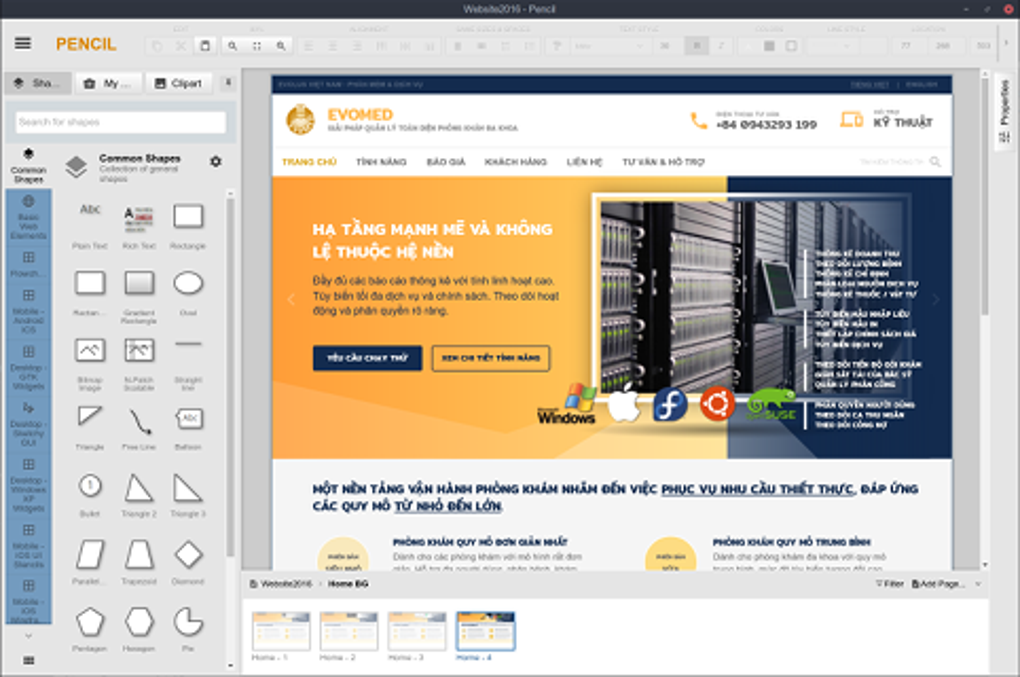
Pencil distinguishes itself through its clean and uncluttered interface. All essential tools and options are readily visible, eliminating the need to navigate through nested menus or convoluted settings. This design philosophy prioritizes ease of use, ensuring that even novice animators can quickly grasp the application’s workflow. The absence of overwhelming features allows users to concentrate on the creative process without being distracted by complex functionalities.
A key component of Pencil’s design is its customizable nature. Users can detach or remove palettes to personalize their workspace, optimizing the screen for their preferred workflow and level of detail. This flexibility allows for a tailored experience, catering to individual needs and preferences. The interface avoids unnecessary visual clutter, focusing instead on clear presentation of tools and timelines, which contributes to its intuitive usability. Whether you’re a minimalist or prefer a more extensive toolset immediately at hand, Pencil provides the flexibility to adjust the layout to suit your needs.
Animation Workflow: Layers, Keyframes, and the Timeline
At the heart of Pencil lies its timeline-based animation system. This central component allows users to create animations by arranging and manipulating different layers. The program supports four primary layer types: bitmap images, vector images, sound, and camera. This layered approach mimics traditional animation techniques, allowing for the meticulous creation of complex animations through layering and sequencing.
Animation in Pencil relies heavily on the concept of keyframes. These are snapshots defining the state of a layer at specific points in time. By setting keyframes and defining the transformations between them (such as movement, scaling, or rotation), animators can bring their creations to life. This keyframe approach provides precise control over the animation’s timing and movement, allowing for smooth and fluid results. The timeline itself is cleanly organized, allowing users to easily view and manage the various layers and keyframes within their animation.
Bitmap and Vector Graphics: A Powerful Combination
Pencil uniquely supports both bitmap and vector graphics, providing animators with a versatile toolset. Bitmap images are pixel-based, ideal for creating detailed sketches and textures. Vector graphics, on the other hand, are resolution-independent and scalable, making them suitable for clean lines, smooth curves, and consistent scaling throughout the animation.
The typical workflow involves sketching characters and backgrounds using the bitmap layer with the pencil tool. Once the initial sketch is complete, animators can switch to a vector layer and meticulously ink the drawing using the pen and fill tools. This combination allows for the creation of rich animations that blend the expressiveness of hand-drawn sketches with the precision of vector graphics. This dual-graphics approach significantly enhances the artistic flexibility of the software, allowing for a range of stylistic choices.
Strengths and Weaknesses: A Balanced Perspective
Pencil’s strengths are undeniable, particularly in its user-friendliness and open-source nature. The intuitive interface makes it accessible to beginners, while its open-source nature allows for community contributions and development, ensuring the software remains up-to-date and relevant. The combination of bitmap and vector layers provides creative flexibility, and the clear timeline facilitates organized animation workflow.
However, Pencil also has some limitations. One significant drawback is its reliance on a graphics tablet for optimal results. While it is possible to create animations using a mouse, achieving precise, smooth lines and intricate details is considerably more challenging without a pressure-sensitive drawing stylus. Furthermore, the absence of predefined shapes, objects, or templates could pose a challenge for users unfamiliar with the fundamentals of animation. The lack of advanced features found in professional-grade animation software also represents a limitation, although this is balanced by the software’s accessibility and simplicity.
Pencil’s Place in the Animation Landscape: A Niche but Valuable Tool
Pencil occupies a specific niche within the animation software market. It’s not designed to replace professional-level animation suites like Adobe Animate or Toon Boom Harmony. Instead, it serves as a valuable tool for beginners, hobbyists, and educational purposes. Its simplicity makes it an ideal platform to learn the foundational concepts of animation, without being bogged down by the complexity of more advanced software. The open-source nature fosters a community of users who contribute to its development and support each other, making it a strong choice for those seeking a collaborative and supportive environment.
The limitations, such as the need for a graphics tablet for optimal drawing precision and the lack of advanced features, should be considered. However, these limitations are balanced by the software’s accessibility, ease of use, and intuitive interface. For those prioritizing ease of learning and a straightforward approach to animation, Pencil offers a valuable and free alternative to more complex and expensive commercial software. It provides a solid foundation for anyone wanting to explore the world of 2D animation, regardless of their prior experience. Its strength lies not in replacing industry-standard tools but in providing a welcoming entry point into the creative world of animation.
File Information
- License: “Free”
- Latest update: “August 12, 2024”
- Platform: “Windows”
- OS: “Windows XP”
- Language: “English”
- Downloads: “494K”
- Size: “150.31 MB”


