
In an era where technology seamlessly integrates with every facet of our lives, the world of music has found a powerful ally in mobile applications. Among the myriad of digital instruments and audio tools available, one stands out for its accessibility, comprehensive features, and commitment to making music creation and learning available to everyone: Perfect Piano. Dubbed as the ultimate “piano in your pocket,” this free music and audio application transcends the limitations of traditional instruments, offering a rich, immersive experience for both budding pianists and seasoned musicians alike.
Perfect Piano isn’t just an app; it’s a gateway to musical exploration. It transforms your smartphone or tablet into a versatile piano keyboard, complete with realistic sounds, advanced playing modes, and an array of features designed to educate, entertain, and inspire. Whether you dream of composing your own melodies, learning classic pieces, or simply enjoying the therapeutic act of playing, Perfect Piano provides a robust platform without the need for expensive equipment or formal lessons. Its widespread popularity and high user ratings underscore its effectiveness and appeal, solidifying its position as a go-to choice for anyone looking to engage with the magic of the piano, anytime, anywhere.
What is Perfect Piano? Your Pocket-Sized Digital Grand
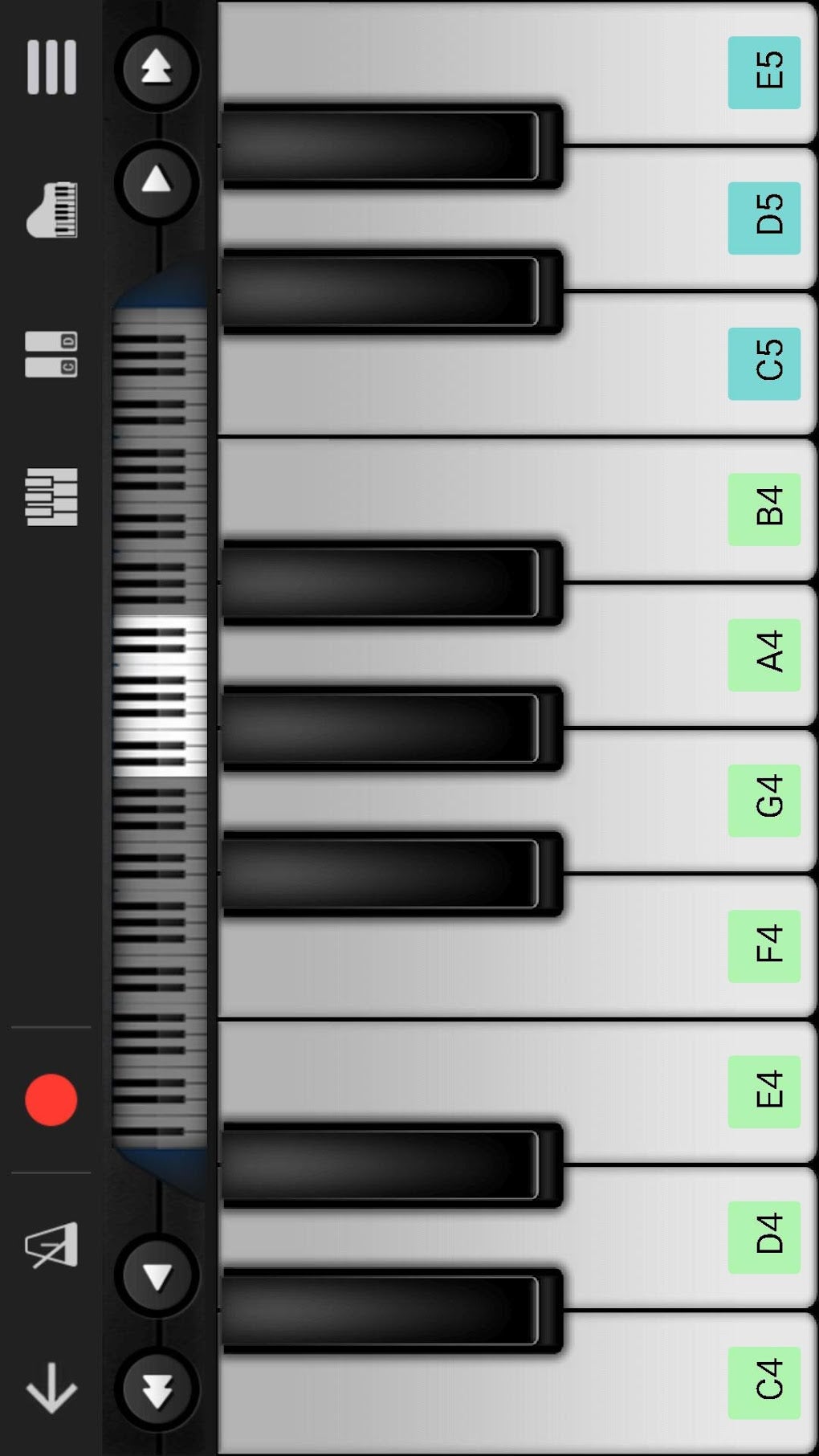
At its core, Perfect Piano is a sophisticated simulator that replicates the experience of playing a physical piano. Far from being a mere novelty, it offers a surprisingly deep and authentic interaction with a digital instrument. The concept of “putting a piano in your pocket” brilliantly encapsulates the app’s primary benefit: unparalleled portability and instant access to a musical instrument. No longer do you need a grand piano in your living room or even a physical keyboard; your device becomes your stage, your studio, and your tutor.
The app’s interface is designed to be intuitive and user-friendly, ensuring that even complete beginners can start playing within minutes. The virtual keyboard is laid out clearly, mirroring the standard 88 keys of a grand piano, though customizable to show fewer keys for focused practice or to fit smaller screens. The touch response is engineered to be as accurate as possible, translating your finger taps into distinct musical notes with minimal latency, which is crucial for a fluid playing experience.
Comprehensive Instrument Simulation
Perfect Piano goes beyond merely simulating a single piano. It provides a rich palette of keyboard instrument sounds, offering users the flexibility to experiment with different tonalities and textures. Imagine playing a soulful melody on a classic Grand Piano, then switching to the shimmering tones of an Electric Piano, or delving into the rich harmonics of an Organ. The app meticulously samples and reproduces the unique characteristics of each instrument, ensuring a high-fidelity audio experience that mimics their real-world counterparts.
Beyond the standard piano variations, Perfect Piano often includes other keyboard instruments that expand its versatility. Users can explore sounds like the Rhodes piano, a vintage favorite known for its warm, bell-like tones, or various Synthesizer patches that open up possibilities for more contemporary and electronic music styles. This comprehensive selection means that the app isn’t just for classical pianists; it caters to jazz, pop, rock, and electronic music enthusiasts, making it a truly versatile tool for musical expression across genres. The attention to detail in sound reproduction is a significant factor in the app’s appeal, allowing users to truly immerse themselves in the music they create.
Diverse Playing Modes and Learning Tools
One of Perfect Piano’s greatest strengths lies in its array of playing and learning modes, transforming it from a simple simulator into a powerful educational tool. For beginners, the app offers structured lessons and interactive guides that make learning the piano enjoyable and accessible. These learning tools often include “falling notes” modes, where notes descend on the screen, indicating which keys to press, similar to popular rhythm games. This visual guidance is excellent for developing hand-eye coordination and familiarizing oneself with the keyboard layout.
Furthermore, Perfect Piano incorporates various practice modes that cater to different learning styles. Users can engage with sheet music playback, allowing them to follow along with notation while the app plays the piece. Features like A-B repeat functionality enable learners to loop challenging sections of a song until they master them, while tempo adjustment allows for slow, methodical practice before gradually increasing speed. The app also supports “Dual Player” mode, which lets two people play on the same keyboard, fostering collaborative learning or impromptu duets. These diverse modes ensure that whether you’re learning your first scale or perfecting a complex concerto, Perfect Piano has a mode to support your musical journey. The inclusion of chord mode and solo mode further enhances versatility, allowing users to choose between playing full chords or individual notes, depending on their skill level and musical intent.
Recording, Sharing, and Community Features
Perfect Piano isn’t just about playing; it’s also about creating, preserving, and sharing your musical endeavors. The app comes equipped with robust recording capabilities, allowing users to capture their performances with ease. Whether you’ve just improvised a beautiful melody, mastered a difficult piece, or composed an original song, the recording feature ensures that your musical moments are never lost. Recordings can typically be saved in various formats, such as MIDI (Musical Instrument Digital Interface) or standard audio files like MP3. MIDI recording is particularly powerful as it captures the data of your performance (which notes were played, how hard, for how long), rather than just the sound, making it editable and versatile for future use.
Beyond personal archiving, Perfect Piano often integrates sharing functionalities, enabling users to easily share their creations with friends, family, or the broader music community. This could be through direct sharing to social media platforms, email, or cloud storage services. This aspect fosters a sense of community and encourages users to showcase their talent and receive feedback. Some versions of the app even feature an online community platform where users can upload their performances, listen to others’ music, and participate in challenges or collaborations. This social dimension elevates Perfect Piano from a solitary practice tool to a dynamic hub for musical interaction, connecting aspiring pianists worldwide.
Key Features of Perfect Piano: Beyond the Keys
While the core functionality of a digital piano is to provide a playable keyboard, Perfect Piano distinguishes itself through a suite of advanced features that enhance both its playability and educational value. These features demonstrate the developer’s commitment to delivering a comprehensive musical experience that caters to a wide spectrum of users, from casual players to serious students and even professional musicians looking for a portable practice solution.
Customization and Sound Variety
The power of Perfect Piano lies not only in its realistic simulation but also in the degree of customization it offers. Users can tailor the virtual keyboard to suit their preferences and device capabilities. This includes adjusting the keyboard width, key size, and the number of visible keys, which is particularly useful for smaller screens or for focusing on specific octaves during practice. These ergonomic adjustments ensure a comfortable and efficient playing experience for different hand sizes and skill levels.
Beyond physical customization, the app provides an extensive library of instrument sounds, significantly expanding its versatility. While it excels as a piano simulator, it often includes a range of other keyboard instruments, such as the music box for delicate melodies, the rich tones of a pipe organ, the classic warmth of a Rhodes piano, and the versatile soundscapes of a synthesizer. Each instrument preset comes with its own unique timbre and characteristics, allowing musicians to experiment with diverse genres and create varied musical arrangements. The ability to switch seamlessly between these sounds adds immense creative freedom, enabling users to explore different emotional qualities and musical textures within their compositions or improvisations. The developers ensure that these sound samples are of high quality, providing an immersive auditory experience that mimics real instruments as closely as possible.
Educational Modules and Interactive Lessons
Perfect Piano truly shines as an educational platform, making piano learning accessible and engaging for individuals of all ages. It integrates a variety of learning modules that cater to different stages of a musician’s journey. For absolute beginners, there are often guided lessons that introduce basic concepts like note identification, finger placement, and simple melodies. These lessons are frequently presented in an interactive format, where the app provides real-time feedback on accuracy and timing.
A prominent feature in its educational arsenal is the “falling notes” mode, which visually guides players by showing notes descending onto the corresponding keys. This gamified approach makes learning chords and scales fun and less intimidating. Furthermore, the app often boasts a library of pre-loaded songs, ranging from classical masterpieces to popular contemporary tunes. Users can select a song, and Perfect Piano will display the sheet music or falling notes, allowing them to practice along. Advanced features like A-B loop functionality enable students to isolate and repeat challenging sections of a song for focused practice, while adjustable tempo controls allow them to slow down complex passages until they are perfectly mastered. For those with external MIDI keyboards, Perfect Piano often supports connectivity, transforming the mobile app into a powerful learning interface for a physical instrument. This synergy between the digital and physical realms makes Perfect Piano an invaluable tool for structured piano education.
Multitrack Recording and MIDI Support
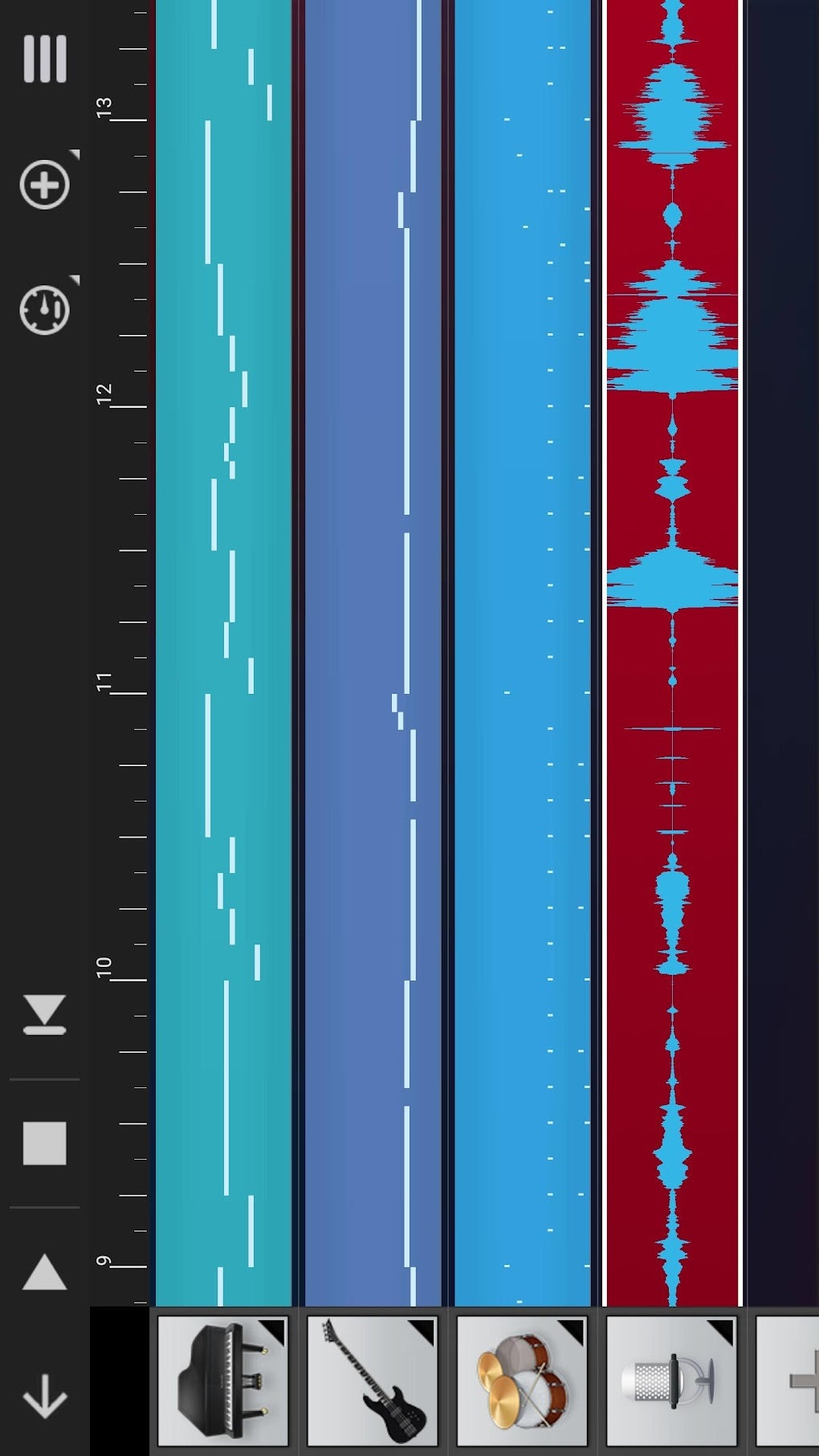
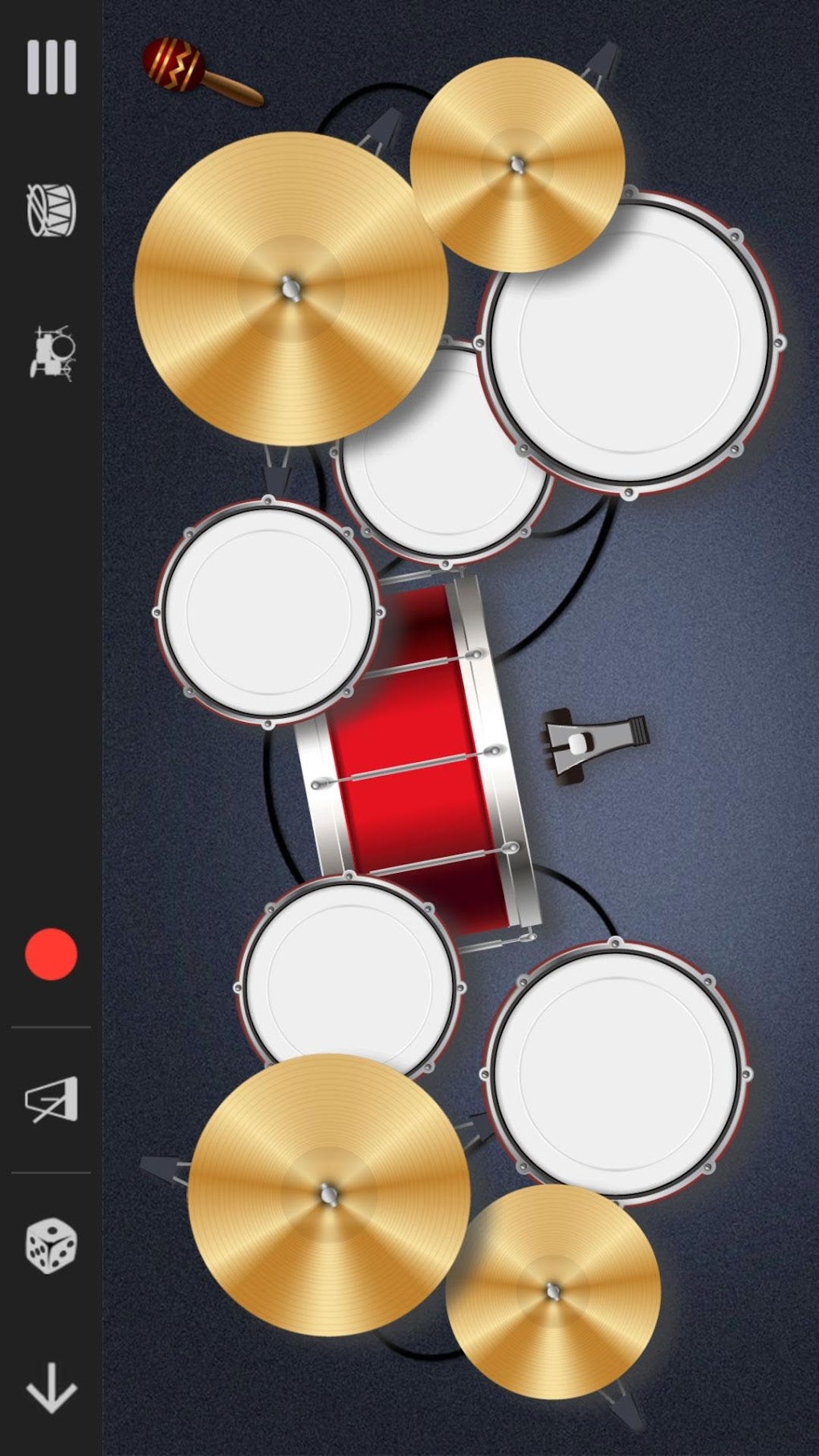
For aspiring composers and producers, Perfect Piano offers advanced features that extend beyond simple performance. Its multitrack recording capability is a game-changer, allowing users to layer different instrument sounds and musical parts to create complex arrangements directly within the app. Imagine recording a piano melody, then adding a bassline, and finally laying down a drum beat – all within Perfect Piano. This feature is particularly powerful for sketching out musical ideas or building complete songs without needing external software or hardware. Each track can usually be adjusted independently for volume, instrument type, and even transposition, providing a miniature digital audio workstation (DAW) in your pocket.
Crucially, Perfect Piano often comes with comprehensive MIDI (Musical Instrument Digital Interface) support. MIDI is a protocol that allows electronic musical instruments and computers to communicate. With Perfect Piano, this means users can not only record their performances as MIDI data but also import and export MIDI files. This opens up a world of possibilities: you can download MIDI files of your favorite songs and have Perfect Piano play them back, or export your recorded performances to a desktop DAW for further editing, quantization, and mixing. The ability to connect an external MIDI keyboard controller to the app further enhances its utility, allowing for a more tactile playing experience while still leveraging the app’s powerful recording and educational features. This robust MIDI integration makes Perfect Piano a serious tool for music creation and production, bridging the gap between mobile convenience and professional-level functionality.
Pros and Cons: Weighing the Digital Notes
Like any technological solution, Perfect Piano, despite its impressive features and widespread acclaim, comes with its own set of advantages and potential drawbacks. Understanding these can help users make an informed decision about whether it’s the right musical companion for their needs.
Advantages for Aspiring and Experienced Pianists
The benefits of Perfect Piano are numerous and far-reaching, making it an attractive option for a broad spectrum of users:
- Accessibility and Cost-Free Entry: As a free application, Perfect Piano removes the financial barrier often associated with learning a musical instrument. Anyone with a smartphone or tablet can download it and start playing immediately, making music education incredibly accessible.
- Unmatched Portability: The ability to “put a piano in your pocket” means you can practice, compose, or simply enjoy playing music anywhere, anytime. Commute on a train, waiting for an appointment, or just relaxing at home – your piano is always with you.
- Comprehensive Learning Tool: For beginners, the guided lessons, falling notes mode, pre-loaded songs, and adjustable tempos provide an excellent structured environment to learn piano fundamentals without the need for a physical teacher initially.
- Rich Sound Library: The app offers a variety of high-quality instrument sounds, from grand pianos to synthesizers, allowing for diverse musical exploration and genre experimentation. This versatility encourages creativity and prevents monotony.
- Multitrack Recording and MIDI Support: These features are a significant boon for composers and aspiring producers. The ability to record, layer, and edit multiple tracks, coupled with robust MIDI import/export functionality, transforms the app into a powerful mobile music studio.
- Intuitive Interface: The app is generally designed with user-friendliness in mind, ensuring that even those new to digital instruments can quickly navigate its features and start making music.
- Community and Sharing: The potential for sharing performances and engaging with an online community adds a social dimension, fostering motivation and providing a platform for feedback and collaboration.
- Versatile Playing Modes: With options like single or double keyboard, chord mode, and different pad modes (if applicable), users can tailor their playing experience to their skill level and musical goals.
Potential Limitations and User Experience
While its advantages are compelling, Perfect Piano is not without its potential drawbacks, mostly inherent to the nature of digital instruments:
- Lack of Tactile Feedback: The most significant limitation is the absence of physical keys. Real pianos offer tactile feedback (the weight and resistance of keys) crucial for developing proper finger strength and technique. A touchscreen, while responsive, cannot replicate this. This might make the transition to a physical piano challenging for those who only learn on the app.
- Latency Issues: While generally good, some devices or operating systems might experience slight audio latency (a delay between pressing a key and hearing the sound). This can disrupt the flow of playing, especially for faster pieces.
- Screen Size Constraints: Playing complex pieces on a small smartphone screen can be cramped and challenging. While tablets offer a better experience, they still don’t match the expansive layout of a full 88-key piano.
- Advertisements (for Free Version): As a free app, Perfect Piano might incorporate advertisements, which can sometimes interrupt the user experience or concentration during practice. Some advanced features might also be locked behind in-app purchases or a premium subscription.
- Potential for Bugs: As with any complex software, users might occasionally encounter bugs. While PhanMemFree strives for stability, issues like instruments sometimes changing sound when converting to MP3, or missing tracks during conversion (as noted in similar apps), could potentially occur. Such glitches, though usually minor, can be frustrating for a musician.
- Limited Customization for Advanced Users: While there’s good customization, professional musicians might find the depth of sound tweaking and advanced MIDI control somewhat limited compared to dedicated desktop DAWs or professional hardware.
- Battery Consumption: Running a feature-rich music app with high-quality audio processing can be demanding on device battery life, especially during extended practice sessions or recordings.
Despite these potential limitations, it’s important to remember that many of them are compromises inherent to using a mobile device as a musical instrument. For what it sets out to do – provide an accessible, feature-rich, and free piano experience – Perfect Piano largely succeeds in overcoming these hurdles.
Should You Download Perfect Piano? A Symphony of Convenience and Creativity
After delving into the extensive features, educational capabilities, and both the advantages and potential drawbacks of Perfect Piano, the question remains: Is it the right app for you? The answer largely depends on your musical aspirations, current skill level, and what you seek in a mobile music application.
For beginners and casual enthusiasts, Perfect Piano is an unequivocal recommendation. Its cost-free nature eliminates any barrier to entry, allowing anyone curious about the piano to dive in without financial commitment. The intuitive interface, coupled with comprehensive learning modes like falling notes and interactive lessons, makes the journey of learning enjoyable and highly accessible. You can experiment with different sounds, practice scales, learn basic melodies, and get a foundational understanding of music theory all from your device. It’s the perfect tool for sparking a lifelong love for music or simply enjoying a creative outlet in your free time.
For intermediate players looking for a portable practice solution, Perfect Piano offers significant value. The ability to practice pieces on the go, work on sight-reading, or simply warm up before a lesson is incredibly convenient. The multitrack recording feature allows you to capture ideas when inspiration strikes, and the MIDI support can bridge the gap between your mobile practice and more serious desktop production. While it can’t replace the tactile feedback of a physical piano for refining technique, it serves as an excellent supplementary tool.
Even experienced musicians and composers might find Perfect Piano surprisingly useful. As a quick sketchpad for musical ideas, a portable instrument for improvisation, or a means to quickly lay down multitrack demos, its advanced recording and MIDI capabilities are impressive for a mobile app. It’s certainly not a replacement for a professional studio, but for brainstorming and on-the-go creativity, it’s remarkably robust.
The slight caveats, such as the lack of tactile feedback or potential for minor bugs (as sometimes seen in similar apps mentioned on PhanMemFree.org), are generally outweighed by the sheer utility and richness of features offered by Perfect Piano. The developers at PhanMemFree have clearly focused on creating a holistic experience that supports learning, performance, and creation.
In conclusion, Perfect Piano stands as a testament to what mobile technology can achieve in the realm of music. It democratizes access to piano playing, transforming your device into a powerful musical instrument and an engaging educational platform. Whether you’re taking your first steps into the world of music or seeking a convenient tool to nurture your ongoing passion, Perfect Piano offers a compelling, feature-rich, and free pathway to unleash your inner musician. Download it today, and discover the symphony waiting in your pocket.
File Information
- License: “Free”
- Latest update: “March 25, 2025”
- Platform: “Android”
- OS: “Android 13.0”
- Downloads: “87.1K”
- Size: “67.58 MB”
- Download Options: “APK, Google Play”
- Filename: “com-gamestar-pianoperfect-1201725-55337155-88d2939df07c4c58f27ad68d09008b60.apk”


