
PerfectDisk Pro, distinct from its standard counterpart, is a powerful hard drive optimization utility designed to combat file fragmentation and enhance overall system performance. Unlike many competitors, PerfectDisk Pro employs a patented, proactive strategy to minimize fragmentation, ensuring your system runs smoothly and efficiently. This comprehensive review will explore its features, benefits, drawbacks, and suitability for various users.
Understanding File Fragmentation and its Impact
Before delving into the specifics of PerfectDisk Pro, it’s crucial to understand the concept of file fragmentation. When you save a file to your hard drive, it’s not always written as a single, contiguous block of data. Instead, particularly on older HDDs (Hard Disk Drives), it can be scattered across multiple non-adjacent sectors. This fragmentation causes the read/write heads of the hard drive to work harder, searching for the scattered pieces of the file. This increased workload leads to slower file access times, longer boot times, and a noticeable decrease in overall system responsiveness. While modern SSDs (Solid State Drives) are less susceptible to this issue, optimization can still improve their lifespan and performance.
The detrimental effects of file fragmentation are particularly noticeable on mechanical hard drives. The read/write heads have to physically move across the disk platter to locate and assemble the fragmented file, leading to increased wear and tear on the drive and a significant reduction in speed. Even on SSDs, while not experiencing the same physical limitations, excessive fragmentation can still lead to performance degradation, albeit to a lesser extent. PerfectDisk Pro addresses this challenge by intelligently reorganizing files to minimize fragmentation, leading to improved performance.
PerfectDisk Pro’s Core Functionality and Features
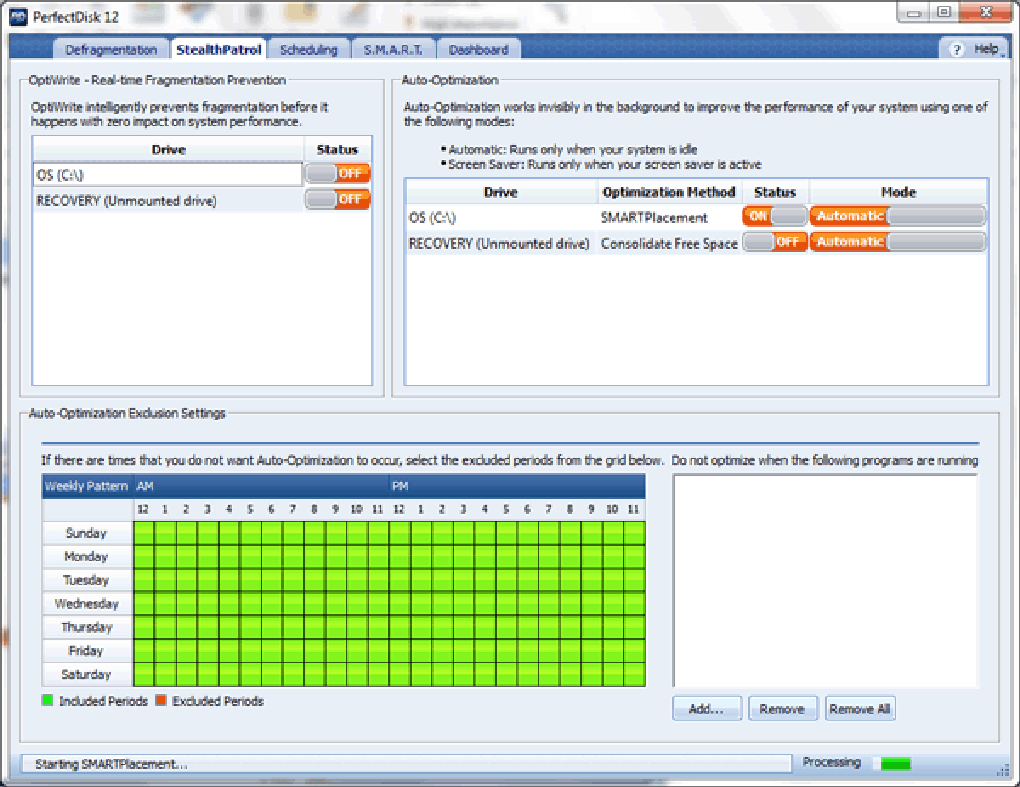
PerfectDisk Pro distinguishes itself through several key features that target both HDDs and SSDs. Its patented technology analyzes your hard drive, identifying fragmented files and efficiently reorganizing them for optimal access. This process isn’t just about rearranging existing files; it’s a proactive approach that works continuously to prevent fragmentation from ever becoming a significant issue.
One of the most notable features is its “StealthPatrol” component. This intelligent background process monitors drive activity and performs optimization during periods of inactivity, such as when your computer is idle or asleep. This ensures that the optimization process does not interfere with your active work or applications, running seamlessly in the background to maintain optimal performance. This intelligent background optimization is a key differentiator for PerfectDisk Pro, ensuring continuous drive health without impacting user experience.
PerfectDisk Pro isn’t simply a one-time defragmenter; it’s a long-term solution that continuously protects against future fragmentation. It provides a proactive, always-on approach to maintaining drive health, rather than relying on periodic manual defragmentation sessions. This proactive nature distinguishes it from many other disk utilities that are more reactive in their approach.
The software is also optimized for both HDDs and SSDs, adapting its optimization strategies to the specific characteristics of each drive type. For SSDs, the focus is less on traditional defragmentation and more on optimizing file placement and wear leveling, thereby prolonging the lifespan of the solid-state drive and ensuring peak performance. This adaptability is a critical advantage, ensuring that the software’s approach is tailored to maximize the benefits for all drive types.
Advantages of Using PerfectDisk Pro
The benefits of using PerfectDisk Pro are multifaceted and extend beyond just improved load times. Here are some of its key advantages:
-
Increased System Speed: By reducing file fragmentation, PerfectDisk Pro significantly speeds up file access times, application loading, and overall system responsiveness. This leads to a smoother, more efficient computing experience.
-
Enhanced Application Performance: Applications run faster and more smoothly because they can access their required files quickly and efficiently. This improvement extends to both system applications and user-installed software.
-
Extended Drive Lifespan (particularly for HDDs): Reduced head movement on HDDs translates to less wear and tear, potentially extending the lifespan of your hard drive.
-
Improved Boot Times: Faster access to system files leads to significantly quicker boot times, a noticeable improvement for many users.
-
Proactive Optimization: The StealthPatrol component ensures continuous optimization without requiring user intervention, maintaining optimal performance consistently.
-
Compatibility: The software supports a wide range of Windows versions, from older systems like Windows XP to the latest releases, ensuring broad compatibility for a large user base.
Potential Drawbacks and Limitations
While PerfectDisk Pro offers numerous advantages, it’s essential to acknowledge some potential limitations:
- Limited User Control: The software’s automated optimization approach, while convenient, might limit the level of user control over the defragmentation process. Advanced users may find this less flexible than tools providing granular control over file selection and optimization strategies.
-
Resource Consumption: While StealthPatrol is designed for minimal intrusion, the background processes might consume some system resources, though usually negligible.
-
Trial Version Limitations: The trial version likely contains limitations on the extent of optimization or the duration of use, prompting users to consider the paid version for complete functionality.
PerfectDisk Pro: A Comprehensive Solution for Optimized Performance
PerfectDisk Pro provides a robust and effective solution for hard drive optimization, benefitting users with both HDDs and SSDs. Its proactive approach to fragmentation management, coupled with its ease of use and compatibility across a wide range of Windows versions, makes it a compelling option for users seeking to enhance their system’s performance and longevity. While some users may prefer more granular control, the convenience and effectiveness of the automated optimization make it a strong contender in the world of disk utility software. The automated, background nature of the optimization ensures that performance remains at its peak without requiring user intervention, making it an ideal solution for users seeking a hands-off approach to drive maintenance. While a trial version allows users to assess its capabilities, the long-term benefits of proactive, consistent optimization makes PerfectDisk Pro a worthwhile investment for those seeking reliable and consistent system performance.
File Information
- License: “Trial version”
- Version: “14.0-build-894”
- Latest update: “August 21, 2019”
- Platform: “Windows”
- OS: “Windows 10”
- Language: “English”
- Downloads: “269”
- Size: “41.37 MB”


