
In an increasingly complex world, the ability to organize, connect, and retrieve information efficiently is paramount. Whether you’re a student grappling with vast amounts of academic material, a professional managing intricate projects, a creative mind seeking to bring abstract concepts to fruition, or simply someone looking to better understand their own thought processes, the challenge of information overload is ever-present. This is where tools designed for knowledge visualization and organization become indispensable. Among the myriad of applications promising to bring order to chaos, PersonalBrain stands out as a distinctive and powerful solution for dynamic mind mapping and idea management.
Developed by TheBrain Technologies, PersonalBrain is not just another mind-mapping application; it’s a robust software designed to mirror the associative nature of human thought. Rather than imposing a rigid, hierarchical structure on your ideas, PersonalBrain encourages a fluid, interconnected approach, allowing users to build a digital “Brain” that grows and evolves alongside their understanding. This article delves deep into what makes PersonalBrain a compelling choice for individuals and teams looking to enhance their productivity, creativity, and knowledge retention, while also addressing its practical considerations and placing it within the broader ecosystem of organizational software.
The Power of Mind Mapping for Enhanced Productivity
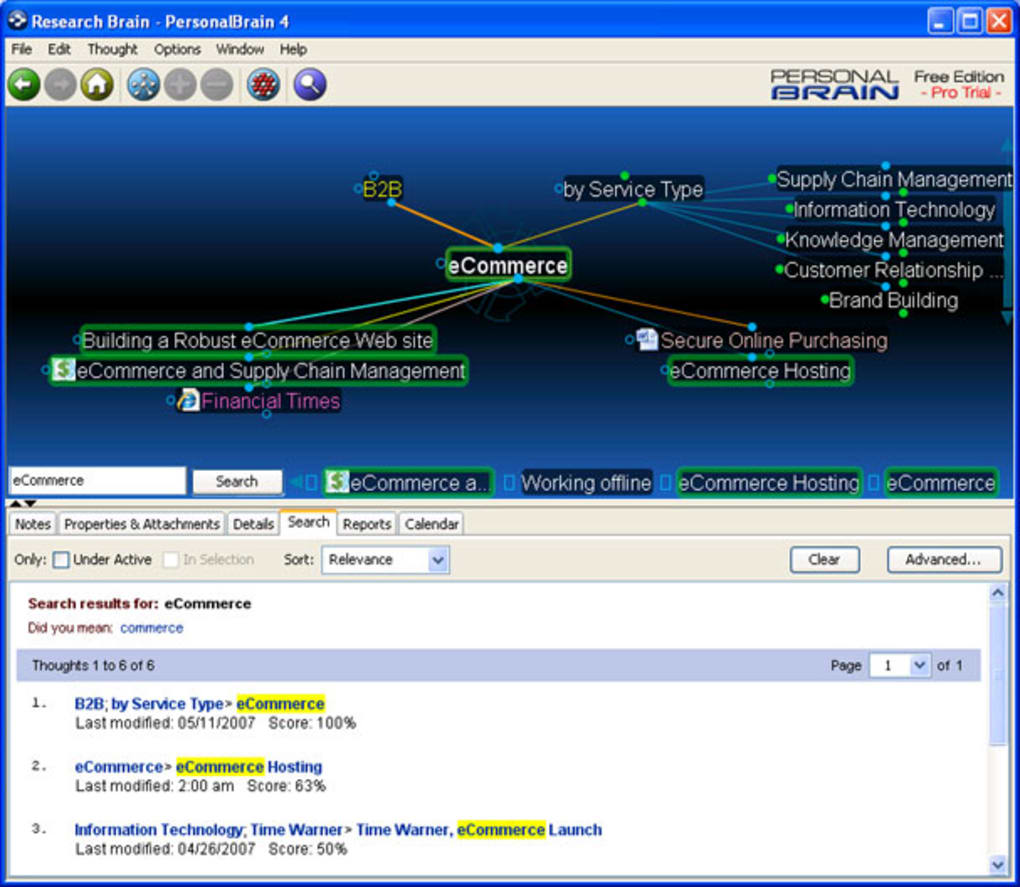
At its core, PersonalBrain leverages the proven effectiveness of mind mapping, a visual thinking tool that helps structure information, analyze, comprehend, recall, and generate new ideas. Traditional note-taking, often linear and text-based, can struggle to capture the complex relationships and multi-directional flows of thought. Mind mapping, by contrast, uses a non-linear, graphical layout to represent ideas, concepts, tasks, or other items linked to a central keyword or idea.
What is Mind Mapping? A mind map typically starts with a central topic, from which various branches radiate, each representing a sub-topic or a key idea. These branches can then further subdivide into smaller twigs, signifying more granular details, examples, or related thoughts. The use of colors, images, and keywords, rather than lengthy sentences, makes mind maps visually engaging and easier for the brain to process and remember. This method taps into the brain’s natural tendency to think in a radial, associational manner, making information more accessible and meaningful.
Benefits of Visualizing Thoughts The advantages of incorporating mind mapping into one’s workflow are numerous:
- Enhanced Clarity and Organization: It helps clarify complex thoughts by breaking them down into digestible chunks and showing how they relate to the bigger picture. This reduces mental clutter and allows for better focus.
- Improved Memory and Recall: The visual and spatial arrangement of information, combined with the use of keywords and images, significantly boosts memory retention and makes recall faster and more efficient.
- Boosted Creativity and Brainstorming: The non-linear structure encourages free association of ideas, facilitating brainstorming sessions and fostering creative problem-solving by revealing connections that might otherwise remain hidden.
- Effective Planning and Project Management: Mind maps are excellent for outlining projects, defining tasks, setting goals, and tracking progress. They provide a comprehensive overview that makes dependencies and bottlenecks easier to identify.
- Better Learning and Understanding: For students, mind maps can condense vast amounts of information into easily digestible summaries, aiding comprehension and exam preparation.
- Streamlined Communication: A well-constructed mind map can effectively communicate complex ideas to others, providing a clear and concise visual summary that transcends linguistic barriers.
Who Can Benefit? The appeal of mind mapping is universal, making tools like PersonalBrain valuable across various demographics:
- Students and Academics: For note-taking, essay planning, research organization, and studying for exams.
- Business Professionals: For strategic planning, project management, meeting agendas, brainstorming marketing campaigns, and developing presentations.
- Creatives (Writers, Designers, Artists): For plot development, character creation, design concept generation, and organizing creative projects.
- Researchers: For collating findings, mapping out research methodologies, and identifying interconnections between different data points.
- Anyone with Information Overload: For personal knowledge management, organizing daily tasks, setting personal goals, and simply making sense of a chaotic digital life.
PersonalBrain takes these fundamental benefits and amplifies them through its unique approach to linking and information management, offering a dynamic environment that truly reflects the intricate web of human thought.
PersonalBrain’s Core Functionality and Unique Advantages
While many applications offer mind mapping, PersonalBrain distinguishes itself through a design philosophy that prioritizes flexibility, interconnectedness, and the organic growth of ideas. It’s built on the premise that thoughts are not static nodes in a tree, but dynamic entities with multiple relationships, much like neurons in a brain.
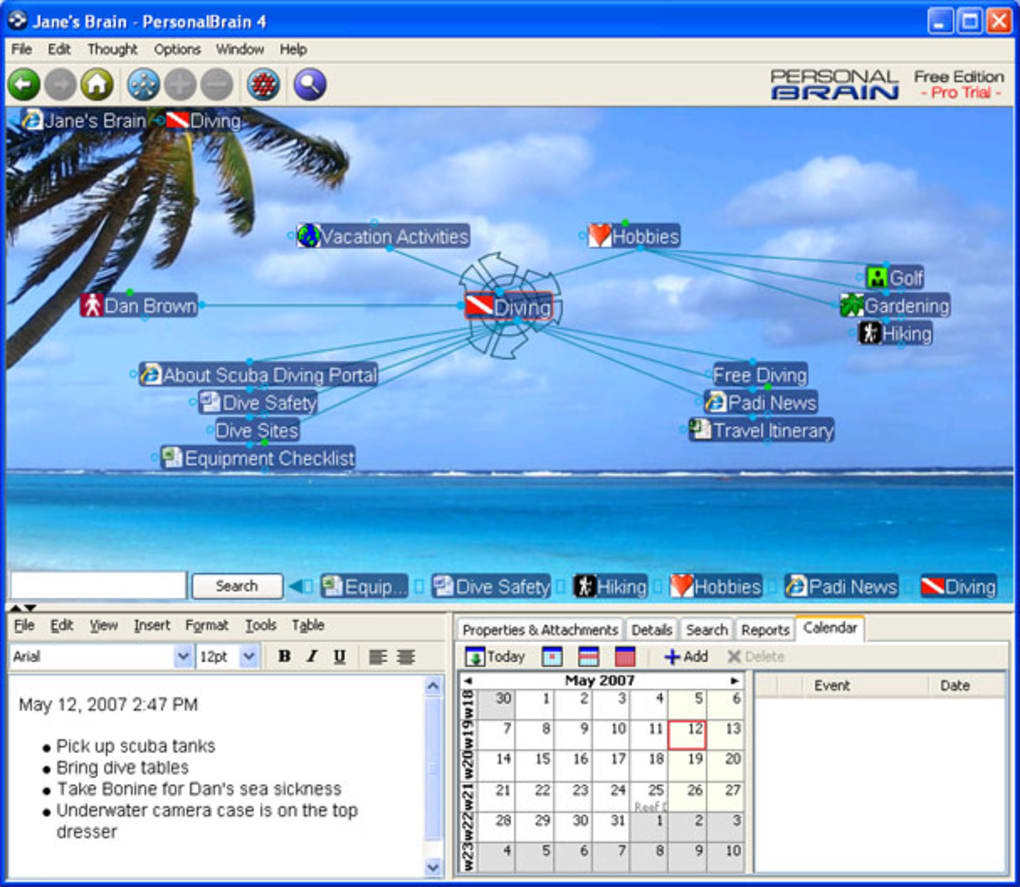
The “Brain” Concept: Your Digital Canvas At the heart of PersonalBrain is the concept of a “Brain”—a digital workspace where all your ideas, files, and web pages reside and are interconnected. You start with a central thought, which PersonalBrain calls a “Thought.” From this initial Thought, you begin to build outward, creating new Thoughts and linking them to existing ones. The interface, often described as a “Thought network,” presents your current active Thought in the center, surrounded by its parent Thoughts, child Thoughts, and jump Thoughts (related but not directly hierarchical). This intuitive visual representation makes it easy to see not just what an idea is, but also how it fits into your broader knowledge base.
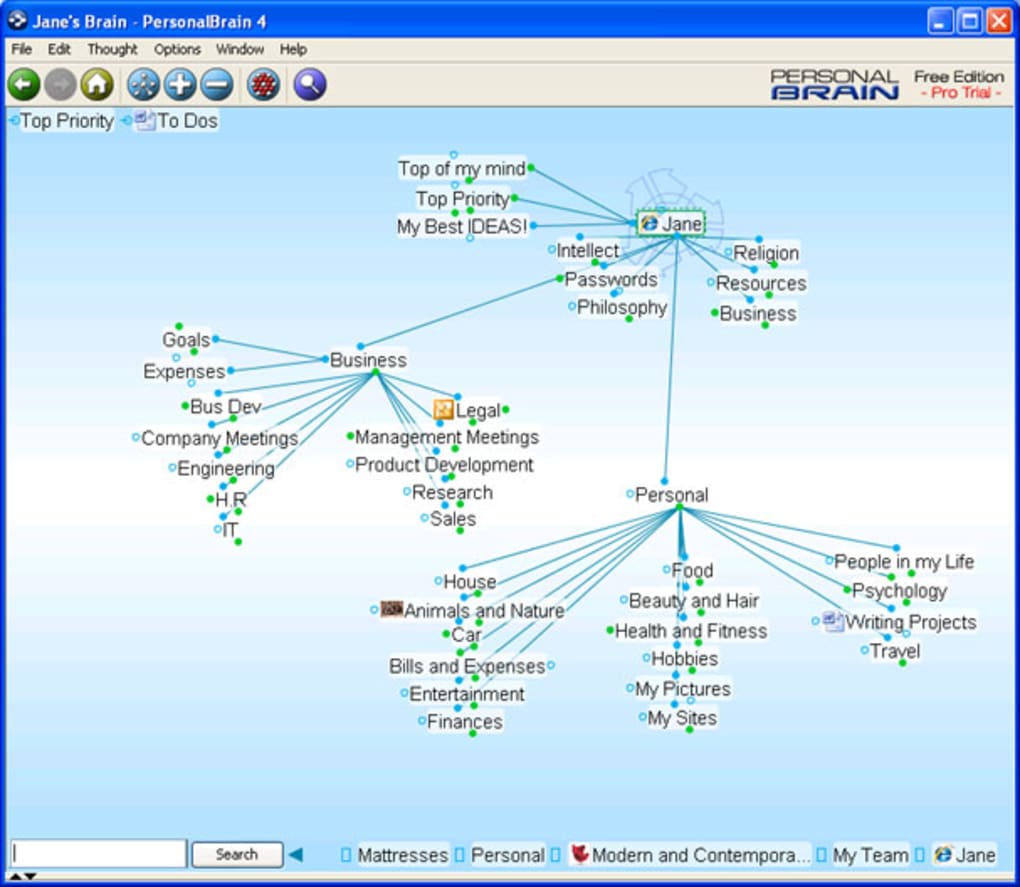
Fluid and Intuitive Idea Mapping One of PersonalBrain’s most celebrated features is its “very fluid mapping” capability. Unlike some mind mapping tools that can feel rigid in their structure, PersonalBrain allows for exceptionally agile idea generation and connection. As you think, you can quickly create new Thoughts and drag lines to connect them. This fluidity ensures that the software doesn’t impede your thought process but rather facilitates it, enabling you to capture ideas as they arise and establish relationships on the fly. This intuitive design helps users stay in a state of flow, making the act of organizing feel more like an extension of thinking itself. The dynamic nature of the links means that relationships can be easily modified, added, or removed, adapting to the evolving nature of your understanding.
Beyond Text: Integrating Rich Media and Files What truly sets PersonalBrain apart from many other similar applications is its robust capability to handle diverse content types. It’s not limited to just text-based ideas. You can effortlessly “drag and drop files and web pages into the mind map to make it more useful and richer.” This means your “Brain” can become a central repository for virtually all forms of information related to a project or topic.
- Files: Drop in documents (Word, PDF, Excel), images, audio clips, video files, or any other digital asset directly onto a Thought. This makes PersonalBrain an excellent tool for project management, research, and personal archiving, ensuring that all relevant materials are just a click away from their contextual idea.
- Web Pages/URLs: Instead of bookmarking web pages in a separate browser, you can drag and drop URLs directly onto a Thought. This creates a link within your Brain, contextualizing web resources with the ideas they support. This is particularly powerful for research and content curation.
- Notes: Each Thought can also have associated notes, allowing for detailed explanations, summaries, or extended discussions that complement the keyword-based mapping.
This rich integration of content transforms PersonalBrain from a simple mind mapper into a comprehensive knowledge management system, where ideas are not isolated but are intrinsically linked to the resources that define them.
Building Complex Networks and Diagrams PersonalBrain isn’t just for simple tree structures; it excels at creating complex “diagrams, networks or simply sketch out your thoughts.” The ability to create multiple types of relationships (parent, child, jump) and visualize these relationships dynamically allows users to model highly intricate systems. For example, in a project management context, a task can be a child of a project (hierarchical), a jump link to another related task (associative), and a parent to a sub-task (decomposition). This flexibility allows for a granular yet holistic view of any complex system.
Seamless Connectivity and Relationship Management The strength of PersonalBrain lies in its ability to manage relationships between Thoughts. Every Thought can have multiple parents, children, and jump links, which means an idea isn’t confined to a single category or position within a hierarchy. For instance, a “Meeting Notes” Thought could be a child of a “Project X” Thought, a child of a “Client Y” Thought, and a jump link to a “Follow-up Tasks” Thought. This multidimensional linking mirrors how information is processed in the human brain, allowing for contextual understanding and easy navigation across diverse topics. The visual representation of these links makes it incredibly easy to traverse your “Brain” and discover connections you might not have explicitly considered, fostering insights and deeper understanding.
Navigating the User Experience: Performance and Practicalities
While PersonalBrain offers a powerful and unique approach to knowledge management, it’s also important to consider its practical aspects, including performance, export options, and cost.
Understanding PersonalBrain’s Architecture and Performance One of the points of contention mentioned in user feedback is related to the software’s performance. “Because its based on Java, it can take while to startup and responsiveness can occasionally be slow.” Java-based applications, while offering cross-platform compatibility, can sometimes be resource-intensive, leading to slower startup times and occasional sluggishness, especially on older hardware or with very large “Brains.” While modern Java Virtual Machines (JVMs) and more powerful hardware have mitigated some of these issues, it remains a consideration for users who prioritize lightning-fast responsiveness. Developers typically work to optimize performance with each update, as seen in the continuous version releases (e.g., V13.06.0.7.04.5.0.8, with updates into January 2024), but this inherent architectural choice might impact the real-world experience for some.
Exploring Export Options: A Critical Look Another notable limitation highlighted in the review is the software’s export capabilities. “Surprisingly as well, PersonalBrain will only let you export your mind maps in HTML format, and it would have been nice to have a choice of other formats such as OPML, Powerpoint and RTF formats for more flexibility, such as that offered by EDraw Mindmap.” This restriction can be a significant drawback for users who need to share their “Brains” or integrate their work into other applications or presentation formats.
- HTML Export: While HTML allows for web-based viewing and sharing, it might not be suitable for printing, direct integration into reports, or presentations without further conversion. The interactive nature of PersonalBrain’s “Brain” might also be lost in a static HTML export.
- Lack of Diverse Formats: The absence of formats like OPML (Outline Processor Markup Language, a standard for outlines and mind maps), PowerPoint (for presentations), and RTF (Rich Text Format, for document interchange) limits the interoperability of PersonalBrain with other productivity tools. This can force users into manual conversion or rebuilding information, detracting from overall efficiency if widespread sharing in specific formats is a common requirement. For many users, this flexibility is crucial, and PersonalBrain’s singular export option can be a significant hurdle.
Pricing, Trials, and Value Proposition PersonalBrain operates on a freemium model, offering a trial version that allows users to experience its core functionalities. The review notes, “It’s also a little expensive to upgrade but this trial version should give you a good enough idea as to whether it’s really worth it.” The cost of the full version can be a barrier for some, especially when compared to free or lower-cost alternatives. However, the value proposition lies in its unique capabilities for deep knowledge management and its ability to act as a central hub for diverse information types. For individuals or organizations whose work heavily relies on complex information structuring and retrieval, the investment might be justified by the significant gains in productivity and organization. The trial version is indeed essential for potential users to assess if the benefits outweigh the cost and limitations for their specific needs.
WebBrain: Cloud Sync and Collaboration Although only mentioned in the context of bug fixes (“Fixed: When there is a positive failure to authenticate with WebBrain, a retry should not be initiated” and “Fixed: WebBrain Sync error messages should not be displayed until retrying has completed”), the presence of “WebBrain” indicates a critical feature: cloud synchronization and potentially collaboration. WebBrain likely allows users to sync their local “Brains” to the cloud, enabling access from multiple devices and offering a backup solution. This also opens the door for collaborative editing, where multiple users can work on the same “Brain,” a feature that significantly enhances its utility for teams and complex projects. While the provided text focuses on reliability fixes, the underlying capability for cloud-based storage and potentially real-time collaboration is a modern necessity for productivity software and adds considerable value to PersonalBrain’s ecosystem.
PersonalBrain in Action: Real-World Applications
The design and features of PersonalBrain lend themselves to a wide array of practical applications, making it a versatile tool for various professional and personal endeavors.
Project Management and Planning For project managers and teams, PersonalBrain can serve as an interactive central dashboard. Each project can be a main Thought, with sub-tasks, milestones, team members, resources, meeting notes, and relevant documents all linked and easily navigable. The fluid mapping allows for quick adjustments as project scopes evolve, and the ability to link files directly means that all project artifacts—from Gantt charts to budget spreadsheets—are contextually organized. Dependencies between tasks can be visualized using jump links, providing a clearer picture of critical paths and potential bottlenecks.
Brainstorming and Creative Development Creative professionals, writers, and marketers can leverage PersonalBrain for boundless brainstorming sessions. Starting with a core idea (e.g., “New Marketing Campaign” or “Novel Plot”), they can freely associate concepts, characters, themes, keywords, and multimedia elements. The software’s non-linear nature encourages divergent thinking, allowing for the rapid generation of ideas without the constraints of a rigid hierarchy. As ideas mature, they can be reorganized and refined, forming coherent narratives or actionable plans. The ability to embed images and videos makes it ideal for visual brainstorming and mood boarding.
Learning, Research, and Knowledge Management Students and researchers can transform PersonalBrain into a dynamic study guide or a comprehensive research repository. Lecture notes, textbook summaries, journal articles (linked as PDFs or URLs), key concepts, and related theories can all be interconnected within a “Brain.” This helps in understanding complex topics by visualizing relationships between different pieces of information, making it easier to prepare for exams or write extensive research papers. For personal knowledge management, it acts as a digital second brain, capturing insights from books, articles, podcasts, and personal reflections, ensuring that valuable information is never lost and always accessible in context.
Personal Organization and Goal Setting Beyond professional applications, PersonalBrain is highly effective for personal organization and goal setting. Users can create a “Life Brain” to manage personal goals, track habits, organize finances, plan vacations (linking travel documents, itineraries, and inspiration photos), or even manage hobbies. The flexible linking allows for a holistic view of one’s life, helping to identify how different aspects are interconnected and how personal actions contribute to larger objectives.
PersonalBrain vs. The Landscape: Alternatives and Comparisons
The market for mind-mapping and knowledge management software is diverse, with solutions ranging from free, open-source tools to sophisticated, enterprise-level platforms. Understanding how PersonalBrain stacks up against its alternatives is crucial for prospective users. The provided list of alternatives offers a good starting point for comparison.
FreeMind: The Open-Source Contender “FreeMind” is a widely popular, “free and easy to use mind mapping tool.” Its primary appeal lies in its cost-effectiveness and accessibility. FreeMind provides core mind-mapping functionalities, allowing users to create hierarchical maps with nodes, branches, and links. It’s excellent for basic brainstorming and outlining. However, compared to PersonalBrain, FreeMind typically offers less fluidity in its linking capabilities, a more traditional tree-like structure, and generally lacks the advanced features for integrating diverse file types directly into the map. Its interface, while functional, might not be as visually appealing or dynamic as PersonalBrain’s network view. For users prioritizing cost and basic functionality, FreeMind is a strong choice, but for deep knowledge integration, PersonalBrain offers more.
YouMinds Composer: Integrated Knowledge Management “YouMinds Composer” is described as “Knowledge management software that combines mind mapping, note taking, diagramming and slide presentation.” This sounds like a more comprehensive suite, aiming for integration beyond just mind mapping. Like PersonalBrain, it seeks to be a central hub, but with a focus on combining multiple productivity functions. While it offers similar aims in knowledge management, PersonalBrain’s unique “Thought network” approach to dynamic, multi-directional linking often provides a more fluid and less structured representation of complex relationships than traditional mind-mapping or diagramming tools. YouMinds Composer might excel in its presentation capabilities, but PersonalBrain’s strength lies in its organic, brain-like organization of information.
Wondershare MindMaster: Versatile Diagramming “Wondershare MindMaster” is a “Free tool for mind maps, diagrams and charts.” This indicates a strong emphasis on visual versatility and a broader scope beyond just mind mapping. MindMaster, like many modern mind mappers, likely offers various templates and diagramming options, making it suitable for flowcharts, organizational charts, and other visual representations. Its “free” tier makes it highly accessible. While it provides strong visual diagramming tools, PersonalBrain’s strength is less about diverse diagram types and more about the dynamic, interconnected network of information that grows organically. MindMaster might be better for polished, presentation-ready diagrams, whereas PersonalBrain is optimized for the continuous growth and exploration of interconnected ideas.
Other Notable Alternatives The list also includes other applications that might have overlapping functionalities:
- FCharts: Focuses on tracking and charting stocks, a niche use case distinct from general knowledge management.
- Collanos Workplace: Implies a collaborative workspace, potentially with mind-mapping elements but geared towards team productivity.
- MindGenius: A dedicated mind-mapping tool focused on improving productivity and generating ideas, likely a direct competitor in terms of core functionality.
- VYM - View Your Mind: Another free mind-mapping tool, emphasizing the visual aspect.
- timeEdition: A tool for recording project duration, a utility distinct from mind mapping but often complementary for project managers.
When choosing between PersonalBrain and these alternatives, users must weigh several factors:
- Level of Interconnectedness Required: If your ideas are highly interconnected and multi-dimensional, PersonalBrain’s “Thought network” is superior.
- Content Integration Needs: For embedding a wide range of files and web links directly into your knowledge base, PersonalBrain excels.
- Budget: Free and open-source options like FreeMind and Wondershare MindMaster are appealing if budget is a primary concern.
- Specific Features: If presentation-ready diagrams or specific project management features are more important, alternatives might offer better solutions.
- Performance vs. Features: Acknowledge PersonalBrain’s potential performance quirks against its powerful feature set.
Ultimately, PersonalBrain carves out a niche for users who desire a highly fluid, interconnected, and comprehensive system that truly mirrors the way the brain processes and links information, especially those who deal with complex information ecosystems and need to integrate various digital assets.
Conclusion: Is PersonalBrain the Right Tool for Your Mind?
PersonalBrain offers a unique and powerful approach to personal and professional knowledge management. Its core strength lies in its ability to create a dynamic, interconnected network of “Thoughts” that mirrors the associative nature of the human brain. The “very fluid mapping” allows for effortless idea generation and linking, while the robust drag-and-drop functionality for files and web pages transforms it into a comprehensive hub for all your digital information. For those who struggle with traditional hierarchical structures or linear note-taking, PersonalBrain provides an intuitively designed alternative that can significantly enhance clarity, creativity, and recall.
However, like any sophisticated tool, it comes with its considerations. The Java-based architecture might lead to occasional slowness, and the limited export options, primarily to HTML, can restrict interoperability with other applications or sharing requirements. Furthermore, while a trial version is available to explore its capabilities, the full upgrade can be an investment. For users who need to frequently export to formats like OPML, PowerPoint, or RTF, this limitation might be a deal-breaker.
Despite these caveats, for individuals and teams deeply involved in project management, extensive research, creative development, or simply those seeking to build a truly interconnected digital “Brain” to manage their vast ocean of information, PersonalBrain offers a compelling solution. Its ability to create rich, contextual relationships between diverse pieces of information, from simple thoughts to complex documents and web pages, positions it as more than just a mind mapper—it’s a digital ecosystem for your knowledge.
The continuous development, as indicated by version updates and bug fixes related to WebBrain sync, suggests an ongoing commitment to improving the user experience and expanding its cloud capabilities, which are crucial for modern productivity.
Before committing, it is highly recommended to fully utilize the trial version. This will allow you to personally assess if its unique approach to “writing down and connecting your thoughts very easily” aligns with your workflow and if its strengths, such as fluid mapping and comprehensive content integration, outweigh its limitations for your specific needs. In a world of increasing information, PersonalBrain offers a powerful pathway to making sense of it all, one interconnected thought at a time. For those seeking an intuitive, dynamic, and powerful tool to organize their ideas more effectively, PersonalBrain remains a top contender in the realm of advanced mind mapping and knowledge management software, available for free download from PhanMemFree.
File Information
- License: “Free”
- Latest update: “January 20, 2024”
- Platform: “Windows”
- OS: “Windows 2000”
- Language: “English”
- Downloads: “14.3K”
- Size: “134.83 MB”


