
In an increasingly digitized world, where communication often revolves around mobile devices and internet-based services, the landline phone, while still prevalent in many homes and businesses, can sometimes feel like a relic. However, for those who rely on a traditional landline, either out of necessity, preference, or as a primary business contact, the desire for modern conveniences remains. One such convenience is the ability to screen calls, instantly recognizing who is attempting to reach you before you even pick up the receiver. This is where “Phone Caller ID for PC” steps in, offering a bridge between your conventional landline and the digital capabilities of your personal computer.
This specialized application, available as a trial version for Windows, is designed to bring the essential function of caller ID directly to your desktop. Imagine your telephone rings, and before the second chime even sounds, a discreet pop-up appears on your computer screen, not just displaying an anonymous number, but potentially the caller’s name and address, pulled directly from your personalized phonebook. This seemingly simple feature can profoundly impact how you manage incoming calls, whether for personal use, a bustling small business, or a home office.
Developed by Quality Software, Phone Caller ID for PC, specifically version 3.034, is a compact and efficient tool weighing in at just 13.77 MB. It runs on Windows 8 and newer versions, and its most recent update was on July 15, 2022. While its concept might appear straightforward, its utility in providing immediate caller information, logging calls, and even integrating with services like Google Maps, offers a compelling reason for landline users to consider digitizing their call management.
The Concept of Landline Caller ID on Your Computer
At its core, Phone Caller ID for PC functions as a digital intermediary for your landline. The fundamental principle is to leverage your computer’s display capabilities to present caller ID information in a more accessible and informative way than a traditional phone display. This is achieved by physically connecting your landline to your PC, allowing the software to interpret the incoming call signals.
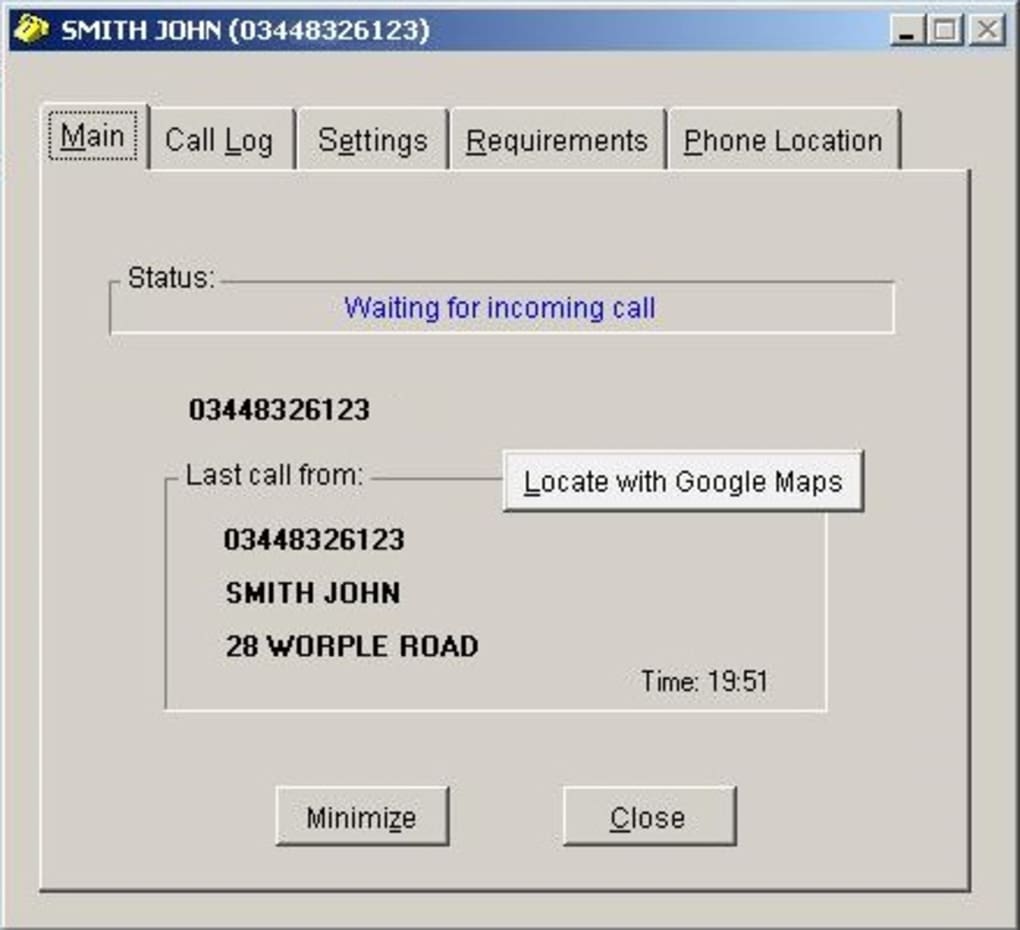
When an incoming call registers on your landline, the application quickly processes the caller’s number. It then cross-references this number with an internal phonebook that you, the user, maintain within the application itself. If a match is found, a pop-up window instantly materializes on your computer screen. This pop-up doesn’t just show the incoming phone number; it displays the corresponding name and any other details you’ve entered for that contact in the app’s phonebook. This immediate visual cue empowers you to decide whether to answer, ignore, or prepare for the conversation, all before you even lift the handset.
One of the defining characteristics of this software is its explicit requirement for a landline connection to your PC. This sets it apart from Voice over IP (VoIP) solutions or mobile-centric apps. For users who primarily operate with a traditional copper-wire telephone line, this connection is critical. The application is designed to interpret the signaling protocols of a landline, translating them into digital information that your PC can understand and display. This means that if your communication is exclusively through mobile phones or internet-based calling services, this particular software will not be suitable without a landline component.
The process of populating the phonebook within Phone Caller ID for PC is largely manual. Users are encouraged to enter their contacts directly into the app. While this might seem like a minor inconvenience in an age of seamless data synchronization, the developer suggests a practical approach: wait for calls to come in, use the number that appears in the pop-up, and then create a new phonebook entry for that number within the app. This method ensures that your most frequent or important callers are quickly added to your digital directory, streamlining the process of building a functional and useful caller ID database. The manual input, though it may require an initial investment of time, guarantees that your digital phonebook is tailored precisely to your needs and preferences, containing only the contacts relevant to your landline interactions. This direct control over your contact list also means you are not reliant on syncing from external, potentially irrelevant, databases.
Unpacking the Advantages: Why Integrate Landline Calls with Your PC?
The integration of landline caller ID with your personal computer, while seemingly niche, offers a suite of advantages that can significantly enhance call management for specific user groups. From boosting efficiency in a small business environment to simply providing peace of mind at home, Phone Caller ID for PC brings a layer of digital intelligence to traditional telephony.
Instant Recognition and Enhanced Call Management
One of the most praised features of Phone Caller ID for PC is its prompt notification system. The pop-up displaying caller information appears between the first and second ring of your telephone. This rapid alert gives you crucial seconds to process who is calling. This swift display mechanism is incredibly valuable; it means you’re not left guessing or rushing to find your physical phone to check a tiny screen. Instead, the information is presented clearly on your computer monitor, allowing for an informed decision about whether to pick up the call immediately, let it go to voicemail, or prepare for a specific conversation.
Beyond immediate recognition, the software also excels in call information retention. It diligently saves call details and maintains comprehensive call logs. For any individual or business, historical data about incoming calls can be invaluable. These logs can be used for various purposes:
- Tracking Missed Calls: Easily identify who called while you were away or couldn’t answer, allowing for timely callbacks.
- Customer Relationship Management: Small businesses can use call logs to track client interactions, follow up on inquiries, or document communication history.
- Security and Screening: Reviewing logs can help identify persistent telemarketers, unwanted solicitations, or even potential harassers, making it easier to block or report problematic numbers.
- Personal Organization: For home users, logs can serve as a handy reminder of who you’ve spoken to and when, helping to manage social and personal obligations.
The ability to have this data digitally stored and easily accessible on your PC transforms the mundane act of answering the phone into a more organized and actionable process.
Strategic Applications for Businesses and Homes
While the core functionality benefits any landline user, Phone Caller ID for PC holds particular strategic value for small to medium-sized businesses (SMBs) and home offices. In these environments, every call can be critical, and efficiency is paramount.
For SMBs, especially those handling sales, customer service, or local deliveries, knowing who is calling before answering can dramatically improve workflow:
- Personalized Service: Instantly addressing a customer by name can create a more positive and professional interaction.
- Prioritization: Urgent business calls can be identified and answered immediately, while less critical calls can be managed appropriately.
- Order Management: For businesses that take orders over the phone, the caller ID provides a head start on customer details.
A standout feature that significantly enhances business applications is the full integration with Google Maps. This powerful addition allows the software to display the geographical location associated with the caller’s address (if entered in the phonebook). This has several practical benefits:
- Preventing False Addresses: Businesses, particularly those offering delivery or service calls, can quickly verify the legitimacy of a caller’s address, reducing wasted time and resources on fraudulent or incorrect information.
- Geographical Filtering: For local businesses, this feature is invaluable for rejecting orders or service requests coming from addresses that are simply too far away to serve efficiently or profitably. This streamlines operations and prevents committing to unprofitable engagements.
- Logistics Planning: Understanding the caller’s location can aid in preliminary logistics planning for deliveries or technician dispatches, even before the call is fully engaged.
For home users, while Google Maps integration might not be as business-critical, the immediate caller recognition and call logging still provide enhanced control over personal communication. It allows for better screening of telemarketing calls, spam, or simply managing family and friend communications more effectively.
Design for Performance: Lightweight and Prompt Operation
In an era where many applications are resource-intensive, Phone Caller ID for PC stands out for its efficiency. It is designed as a very lightweight and prompt application. This means it consumes minimal system resources, such as CPU and RAM, ensuring that it doesn’t slow down your computer or interfere with other applications you might be running. Its low resource footprint ensures a smooth user experience, with pop-ups appearing quickly without noticeable lag.
This characteristic makes it ideal for users who typically keep their PC on throughout the day, often running other critical software. The application works unobtrusively in the background, only coming to the forefront when an incoming call demands attention. This efficiency underscores its utility as a reliable, ever-present digital assistant for your landline communication, making it a practical addition for any Windows user with a landline connection.
Addressing the Hurdles: Understanding the Software’s Limitations
While Phone Caller ID for PC offers valuable functionality for landline users, it’s equally important to acknowledge its limitations. These areas represent potential challenges for users and highlight opportunities for future development, ensuring that expectations are realistically managed.
Data Portability and Integration Challenges
One of the most significant drawbacks of Phone Caller ID for PC is its isolated approach to contact management. The software requires users to enter their phonebook information directly into its database. This means there is no built-in mechanism to transfer your existing phonebook from other applications, whether they are contact managers on your PC, mobile phone, or web-based services. In an age where seamless data synchronization is a common expectation, the need for manual data entry can be a considerable barrier for users with extensive contact lists.
This lack of portability forces users to duplicate efforts, either by manually typing in hundreds of contacts or by adopting the suggested method of creating entries on the fly as calls come in. While the latter is pragmatic for building a relevant call history, it doesn’t solve the problem for users who wish to proactively populate their entire known contact list from existing sources. The absence of import/export functionalities (e.g., CSV, vCard) limits its integration with broader digital ecosystems, making it a standalone solution rather than an integrated component of a comprehensive personal or business productivity suite.
Customization and Security Oversight
Another area where the software could benefit from enhancements lies in its customization options for incoming calls and its security features concerning call logs. Users typically desire more control over how incoming call notifications behave, particularly in varied work or home environments. The current version lacks extensive incoming-call customization settings. This could include options for:
- Notification Preferences: Setting different alert sounds or visual styles for specific contacts or groups.
- Snooze/Dismiss Options: Temporarily hiding the pop-up or dismissing it without answering.
- Rule-Based Actions: Automatically performing certain actions based on who is calling (e.g., sending to voicemail if the number is not in the phonebook, or only showing pop-ups for known contacts during certain hours).
Such customization would allow users to tailor the application more precisely to their daily routines and preferences, enhancing its overall usability and reducing potential interruptions.
Furthermore, a notable security oversight is the inability to set permissions for call logs. In a shared PC environment, or even in a small business where multiple individuals might access the same computer, the absence of password protection or administrator-level controls for accessing or deleting call logs presents a security and privacy risk. Anyone with access to the computer can view the entire history of incoming calls and potentially tamper with the records. This lack of granular control over sensitive communication data is a significant concern for businesses that need to maintain strict confidentiality or personal users who wish to protect their privacy. Implementing password-protected access or user role-based permissions would greatly enhance the security posture of the application.
The Landline Dependency in a Wireless World
Perhaps the most fundamental limitation, albeit an inherent design choice, is the strict requirement for a landline connected to the PC. In a world increasingly dominated by mobile telephony and VoIP services, the reliance on a traditional landline places Phone Caller ID for PC in a very specific niche. Many individuals and businesses have either fully transitioned away from landlines or use them only as a secondary communication channel.
This dependency means that the software cannot offer a comprehensive call management solution for users who primarily communicate via mobile phones or internet-based platforms like Skype, Zoom, or other softphones. While it performs its intended function admirably for landlines, its scope is inherently limited by this hardware requirement. Users looking for a unified caller ID solution across all their communication channels will find this application lacking, as it does not integrate with wireless carriers or internet-telephony providers. This is not a flaw in its design for its intended purpose, but rather a contextual limitation in the broader telecommunications landscape.
Who Benefits and What’s Next for Landline Caller ID Software?
Despite its specific niche and certain limitations, Phone Caller ID for PC serves a distinct and valuable purpose for a particular segment of users. Understanding who benefits most from this application also sheds light on potential future directions for landline integration software.
The primary beneficiaries of Phone Caller ID for PC are:
- Small to Medium-Sized Businesses (SMBs) with Landlines: Many local businesses, such as doctor’s offices, dental clinics, repair shops, small retail stores, or home-based service providers, still rely heavily on landlines for direct customer contact. For these businesses, the instant caller identification, comprehensive call logging, and especially the Google Maps integration (for address verification and service area filtering) can significantly streamline operations, enhance customer service, and improve efficiency.
- Home Office Users: Individuals working from a home office often maintain a dedicated landline for business purposes. This software allows them to manage professional calls more effectively, distinguishing client calls from personal ones or telemarketers without needing a separate, costly business phone system.
- Individuals with a Primary Landline: Even in the mobile age, some households or individuals prefer or depend on a landline as their primary communication channel. This might be due to rural signal limitations, cost efficiency, or simply personal preference. For these users, the ability to screen calls and maintain digital logs provides a modern convenience that elevates the traditional landline experience.
- Users Seeking Cost-Effective Solutions: Compared to advanced PBX systems or integrated VoIP solutions, Phone Caller ID for PC offers a relatively inexpensive way to add smart caller ID functionality to an existing landline setup, making it an attractive option for budget-conscious users.
The typical scenario where Phone Caller ID for PC shines involves busy environments where screening calls is essential. Imagine a small accounting firm where partners are often engrossed in work. When the phone rings, a quick glance at the PC screen tells them if it’s an important client, a potential new lead, or merely a sales call. This allows them to allocate their attention appropriately, ensuring that critical calls are never missed and non-urgent ones don’t disrupt workflow unnecessarily. Similarly, a home user can avoid answering persistent spam calls, preserving their peace and quiet.
Looking ahead, the evolution of landline integration software could involve several key enhancements to remain relevant and competitive in a converging communication landscape:
- Cloud Synchronization and Mobile Integration: While Phone Caller ID for PC is tied to the local machine, future iterations could offer cloud synchronization of phonebook data and call logs. This would facilitate access across multiple devices, including mobile phones, allowing users to review missed landline calls or manage contacts even when away from their PC.
- Advanced Call Handling Features: Integrating basic call management features like “send to voicemail,” “block number,” or “speed dial” directly from the PC interface would significantly enhance its utility. This would move beyond mere identification to active call control.
- CRM and Productivity Suite Integration: For businesses, seamless integration with popular CRM (Customer Relationship Management) platforms or office productivity suites would be a game-changer. Imagine a client’s information popping up from your CRM system alongside their caller ID, providing a full context for the call.
- Enhanced Security and Permissions: Addressing the current lack of permission settings for call logs is crucial. Implementing user-level access controls and password protection would elevate the software’s suitability for multi-user environments.
- VoIP Compatibility (Hybrid Solutions): While designed for landlines, a future version could explore hybrid compatibility. This might involve modules that can connect to certain VoIP services or even mobile phone lines (via Bluetooth or other syncing methods), offering a more unified call management experience across different communication types. This would expand its appeal beyond the dwindling landline-only user base.
- Artificial Intelligence for Spam Detection: Integrating AI-driven spam and telemarketing call detection, similar to features found on modern smartphones, could proactively flag unwanted calls, further refining the call screening process.
The current version, Phone Caller ID for PC V3.034, developed by Quality Software, remains a Windows-specific application, compatible with Windows 8 and newer, and has a compact installation size of 13.77 MB. It is a trial version, suggesting that users can test its functionalities before committing to a purchase. The software is available for download on platforms like PhanMemFree.org, where it is classified under “Chat & Instant Messaging” within the “Social & Communication” category for Windows applications.
In conclusion, Phone Caller ID for PC serves a vital niche, providing essential caller identification and call logging capabilities for landline users. Its strengths lie in its immediate pop-up notifications, reliable call logging, and the innovative Google Maps integration, particularly useful for small businesses. While it faces limitations regarding data portability, customization, and its strict landline dependency, its utility for those who still operate with traditional telephone lines is undeniable. As the digital and traditional communication worlds continue to converge, specialized tools like this provide the necessary bridges, enhancing productivity and control for a dedicated segment of users. For more information and to explore related software, you can visit PhanMemFree.org.
File Information
- License: “Trial version”
- Version: “3.034”
- Latest update: “July 15, 2022”
- Platform: “Windows”
- OS: “Windows 8”
- Language: “English”
- Downloads: “7.7K”
- Size: “13.77 MB”


