
PhoneDeck is a free, lightweight address book program designed for personal use on Windows operating systems. Originally released in July 2000 and last updated in March 2017, it remains a surprisingly robust and efficient tool for managing contacts, despite its age and the evolution of contact management software. This review will delve into its features, user experience, strengths, weaknesses, and its place in the current technological landscape.
PhoneDeck’s Feature Set: Simplicity and Functionality
PhoneDeck prioritizes ease of use and functionality over a complex interface. Its core function is managing contact information, and it does so effectively with a range of features that, while not cutting-edge, are still highly relevant for users seeking a straightforward solution. Key features include:
- Unlimited Addresses: Users can store an unlimited number of addresses within a single address book file, offering flexibility for managing large contact lists.
- One-Click Editing: Adding and editing entries is quick and intuitive, allowing for rapid data input and modification.
- Multiple Search Methods: Finding specific contacts is facilitated by multiple search methods. Users can type the first few letters of a name, click on an alphabetical index, or utilize a powerful Find feature for more complex searches.
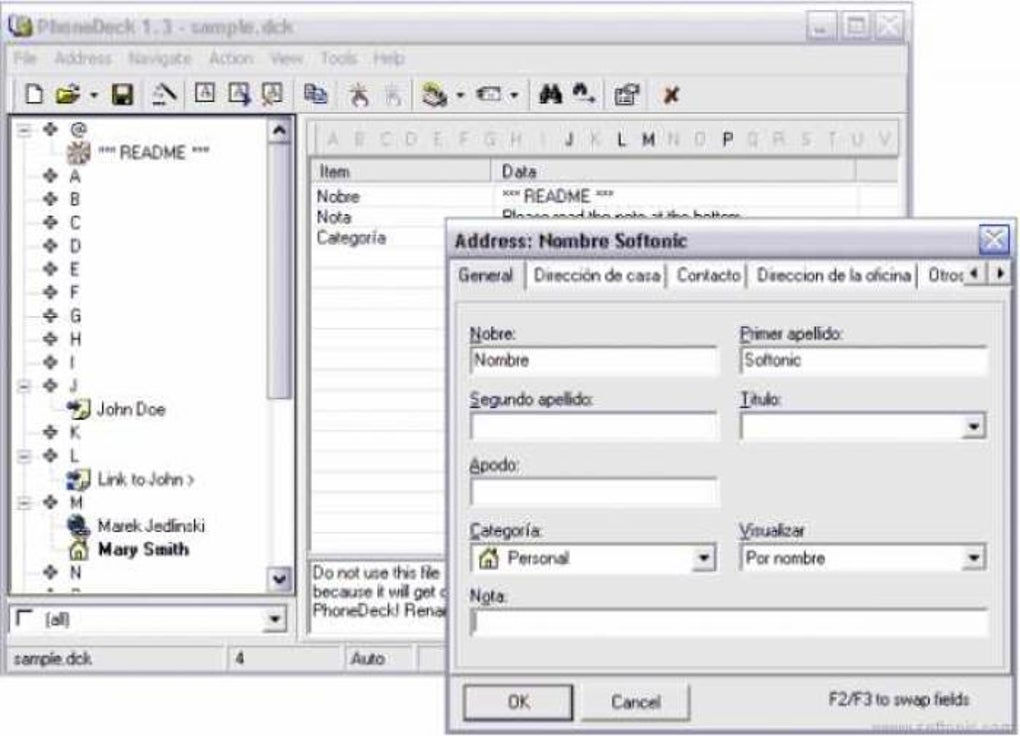
- Dual View Options: PhoneDeck offers two distinct views of the address data. The first presents all contact information in a single list, allowing for customizable display options and order. The second uses tab sheets to categorize data (e.g., contact information, home address, work address), providing organized data segmentation. Switching between views is effortless.
- Direct Action Capabilities: Direct dialing of phone numbers or launching of email applications is possible with a single click on an address entry, streamlining communication.
- Address Locking: The ability to lock individual addresses prevents accidental deletion, adding a layer of security for critical contact information.
- Configurable Hotkey: A configurable hotkey allows users to quickly bring the minimized program window back to the forefront from the system tray, enhancing accessibility.
- Flexible Entry Management: Users can list an address under multiple names or aliases (e.g., by name and company name) without duplicating the underlying data.
- Name Display Customization: For entries with first and last names, users can specify the display order (e.g., John Smith or Smith John).
- Redial and Quick Access Lists: A redial function quickly recalls the last dialed number. Quick dial and quick email lists, supporting up to 10 entries each, further enhance efficiency.
- Clipboard Integration: All address data can be easily copied to the clipboard for sharing or transferring.
- System Tray Icon: The program icon can reside in the system tray, maintaining accessibility while minimizing screen clutter.
- Automatic Backup: Automatic saving and backing up of the address book file safeguards against data loss.
- Customizable Interface: Users can customize the appearance, including fonts and colors, for a personalized experience.
- Category Icons: The addition of category icons allows for visual organization and enhanced search capabilities based on assigned categories.
- Auto-Fill Functionality: When adding new addresses, some fields (like country and city) can be automatically filled based on previous entries, speeding up data input.
- Address Book Merging: The capability to merge address books simplifies consolidation of contact lists.
- Multilingual Support: Field names can be translated into different languages, enhancing accessibility for international users.
- Global Commands: Certain commands can be applied globally to multiple selected addresses for efficient batch operations.
- Import/Export Functionality: Supports import and export to .dck, .txt, .html, and .csv formats.
PhoneDeck User Experience: A Nostalgic Simplicity
PhoneDeck’s user experience is characterized by its simplicity and straightforward design. The interface is uncluttered and easy to navigate, making it accessible even to users with limited computer experience. The keyboard-centric design allows for efficient management without constant mouse reliance. While the interface may appear dated compared to modern contact management applications, its simplicity is a strength for users who prioritize functionality and ease of use over visual appeal and extensive features.
The lack of a sophisticated interface, however, might be a drawback for users accustomed to more visually appealing and feature-rich modern software. The program’s age shows in its interface design, but this doesn’t detract from its usability for those seeking a no-frills approach.
Strengths of PhoneDeck
- Lightweight and Efficient: PhoneDeck consumes minimal system resources, making it suitable for older or less powerful computers. Its small download size is also an advantage.
- Stable and Reliable: Despite its age, PhoneDeck has proven to be remarkably stable and reliable, with users reporting long-term successful use across multiple Windows versions.
- Offline Functionality: PhoneDeck operates entirely offline, eliminating the need for an internet connection. This makes it ideal for users who prioritize data privacy and offline accessibility.
- Focus on Core Functionality: PhoneDeck delivers on its core function – address book management – effectively and efficiently, without unnecessary complexities.
- Customization: The extensive customization options allow users to tailor the program to their specific preferences and needs.
- Free of Charge: The software is free to download and use, making it an attractive option for users on a budget.
Weaknesses of PhoneDeck
- Limited Import/Export Formats: The limited support for import/export formats (lack of .vcf, .wab) restricts its compatibility with other applications.
- Outdated Interface: The interface design is undeniably dated, which might be unappealing to users accustomed to modern software designs.
- Limited Feature Set Compared to Modern Software: Compared to modern contact management applications, PhoneDeck’s feature set is less extensive. It lacks features such as cloud syncing, integration with other applications, and advanced search capabilities.
- No Active Development: The lack of active development means there are no ongoing updates or bug fixes, limiting potential improvements and future compatibility.
- Windows Only: PhoneDeck’s exclusive availability for Windows systems excludes users of other operating systems.
Conclusion: PhoneDeck’s Niche in the Modern World
PhoneDeck occupies a niche in the modern software landscape. While it lacks the polish and feature richness of contemporary contact management applications, its simplicity, stability, and lightweight nature make it an attractive option for certain users. Those seeking a straightforward, offline-capable, and resource-efficient address book program for Windows may find PhoneDeck a suitable choice. However, users requiring advanced features, cloud integration, or a modern user interface should explore more contemporary alternatives.
The continued use of PhoneDeck by a dedicated user base attests to its enduring value. Its no-nonsense approach and effective execution of its core function resonate with users who prioritize practicality and reliability over bells and whistles. While it is not a cutting-edge solution, PhoneDeck remains a viable option for those who value its simplicity and stability. Its legacy as a dependable and user-friendly address book application will likely ensure its continued use by those seeking a simple, effective solution for contact management within the constraints of its older operating system compatibility. The absence of modern features is offset by its lightweight nature, stability, and straightforward approach, making it a unique and still-relevant program in the crowded landscape of contact management tools.
File Information
- License: “Free”
- Version: “1.3”
- Latest update: “March 10, 2017”
- Platform: “Windows”
- OS: “Windows 95”
- Language: “English”
- Downloads: “16.7K”
- Size: “1.50 MB”


