
PhoneTrans Pro is a powerful Windows application designed to streamline the management and transfer of your iPhone’s content to your PC, another iPhone, or even your iTunes library. In an era where iPhones are ubiquitous, accumulating a vast collection of photos, videos, music, and other files is almost inevitable. PhoneTrans Pro offers a robust solution for organizing and transferring this data, providing a user-friendly interface and versatile functionality exceeding that of simpler file explorers. This detailed review explores PhoneTrans Pro’s capabilities, advantages, limitations, and alternatives, helping you determine if this software aligns with your needs.
Seamless iPhone Content Management
PhoneTrans Pro acts as a comprehensive file manager specifically tailored for iOS devices. Unlike basic file explorers that may struggle with the intricacies of the iOS file system, PhoneTrans Pro provides a user-friendly interface designed for efficient navigation and manipulation of your iPhone’s data. This includes the ability to easily add, delete, and rename files, offering a level of control beyond what many users experience when relying solely on iTunes or cloud services. The program allows for granular management of your media library, making it simple to organize and maintain a well-structured collection of music, movies, and other media files.
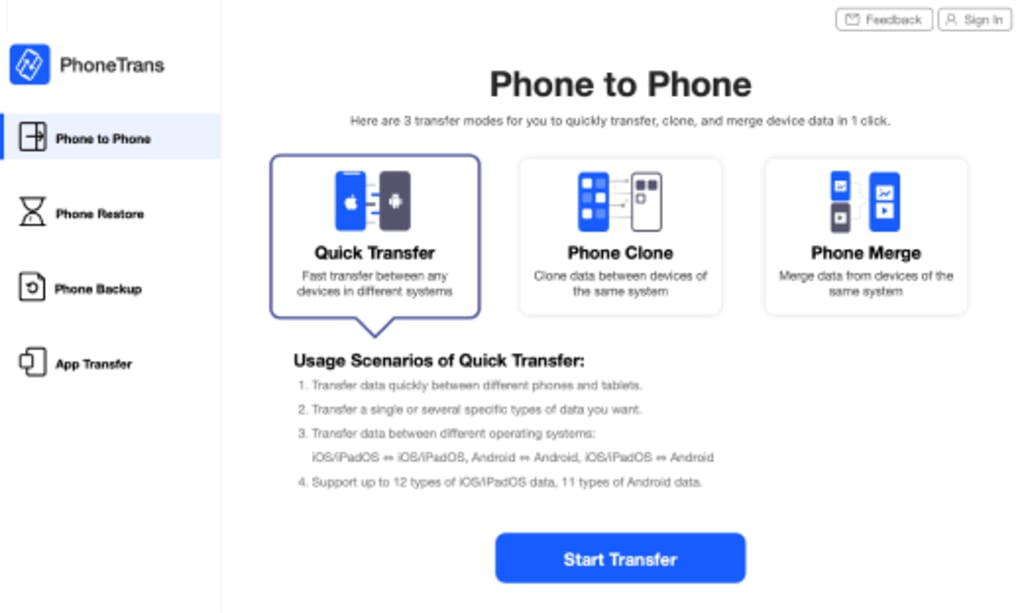
The program’s strengths lie in its ability to handle various file types, including music, movies, TV shows, and ringtones. Its intuitive interface allows users to browse through their iPhone’s content with ease, offering a significantly improved experience compared to the smaller screen real estate of the device itself. This is particularly beneficial for users who wish to review, edit, or organize their files on a larger monitor. The ability to perform bulk operations, such as renaming multiple files or deleting unwanted content, contributes to increased efficiency in managing large quantities of data.
Effortless Transfer Between Devices and Platforms
Beyond simple file management, PhoneTrans Pro excels in its ability to transfer content between various platforms and devices. The software facilitates seamless transfers between your iPhone and your Windows PC, enabling you to back up your valuable data safely and efficiently. This backup function is crucial for preserving your files, preventing data loss due to device malfunction or accidental deletion. Additionally, PhoneTrans Pro supports transfers to and from your iTunes library, providing a flexible solution for integrating your iPhone’s content into your existing media ecosystem.
One of the program’s standout features is its support for Wi-Fi transfers between multiple iPhones. Leveraging the iOS 5 Wi-Fi sync functionality, PhoneTrans Pro allows for the quick and easy transfer of files between iOS devices without the need for physical connections or cloud services. This is particularly convenient for sharing media with friends and family or for migrating data from an older device to a newer one. The ability to transfer between an unlimited number of iPhones adds significant value, catering to users with multiple iOS devices. This wireless transfer functionality significantly enhances the convenience and efficiency of data management.
User Experience and Learning Curve
While PhoneTrans Pro boasts powerful features, its initial learning curve presents a potential hurdle for some users. The software’s functionality, though extensive, may require some time to fully grasp, particularly for users unfamiliar with advanced file management tools. The interface, while generally clean and intuitive, might initially appear overwhelming due to the breadth of its capabilities. However, once users become familiar with the program’s layout and features, its intuitive design enhances workflow efficiency considerably. Comprehensive user documentation or tutorial videos could significantly improve onboarding for new users and reduce the initial learning curve.
The program’s design generally receives positive feedback for its cleanliness and intuitive layout once users are familiarized with its functionalities. The ability to easily navigate through different file types and perform various operations contributes to an overall positive user experience. However, the initial learning curve remains a consideration, particularly for less tech-savvy users. This is an area where improvement could significantly enhance user satisfaction and accessibility. The developers could address this by implementing more comprehensive in-application tutorials and FAQs.
Comparison with Alternative Solutions
PhoneTrans Pro competes with several other software applications in the iOS file management and transfer market. Alternatives include iExplorer, Amazing iPhone Transfer, and HP QuickDrop (for Windows 10 users). Each offers varying levels of functionality, interface design, and pricing models. iExplorer, for example, is a popular alternative known for its comprehensive features and robust performance, but it may come with a higher price point than PhoneTrans Pro. Amazing iPhone Transfer offers a strong user experience but might lack some of the advanced features present in PhoneTrans Pro. HP QuickDrop, being a free and built-in solution for Windows 10, provides basic file transfer but lacks the extensive management capabilities of PhoneTrans Pro.
The choice of the best solution depends largely on individual needs and priorities. Users seeking a free option with basic functionality might prefer HP QuickDrop, while users requiring advanced features and robust performance may opt for iExplorer or another premium solution. PhoneTrans Pro positions itself competitively by offering a balance between comprehensive functionality and a relatively user-friendly interface, albeit with an initial learning curve. The cost-benefit analysis will vary depending on the user’s frequency of use and the extent of their file management requirements.
Addressing User Feedback and Concerns
User reviews highlight both positive and negative experiences with PhoneTrans Pro. While many praise its functionality and efficiency in transferring and managing files, some criticisms focus on initial difficulties in learning how to use the program and occasional instances of incompatibility with specific devices or iOS versions. One recurring criticism involves instances where the software fails to detect connected iPhones. Addressing these technical issues and improving the user experience through more thorough documentation and support resources would significantly enhance the software’s overall appeal.
Addressing user concerns about detection issues is paramount. This could involve investigating and resolving compatibility problems with different iOS versions and devices, along with providing clear troubleshooting steps within the application or through a readily available online knowledge base. Proactive communication with users regarding updates and bug fixes would further demonstrate a commitment to improving the software’s quality and reliability. Open communication channels, such as a dedicated support forum or responsive customer service, are vital for building trust and addressing individual user issues effectively.
Conclusion: A Powerful Tool with Room for Improvement
PhoneTrans Pro is a capable and versatile application for managing and transferring iPhone content. Its ability to handle a wide array of file types, facilitate transfers between various devices and platforms, and offer a reasonably intuitive interface makes it a valuable tool for many users. However, the initial learning curve and occasional reported incompatibility issues represent areas where improvement is needed. By addressing these concerns through enhanced user documentation, improved troubleshooting resources, and proactive communication with its user base, PhoneTrans Pro can further solidify its position as a leading solution for iPhone file management and transfer on Windows. The software’s strengths in cross-device transfers and media management make it a compelling choice for those needing more than basic file transfer capabilities, though prospective users should be aware of the initial learning curve.
File Information
- License: “Trial version”
- Latest update: “July 10, 2023”
- Platform: “Windows”
- OS: “Windows 10”
- Language: “English”
- Downloads: “14.3K”
- Size: “5.77 MB”


