
In an increasingly digital world, the charm of a personalized greeting card remains unparalleled. Whether it’s for a birthday, an anniversary, a holiday greeting, or simply to share a memorable moment, a card infused with a personal photograph carries a special weight. However, not everyone possesses the time, skill, or expensive software required to craft such a card from scratch using professional graphic design tools. This is precisely where Photo Card Maker steps in – a remarkably intuitive and efficient application designed to democratize the art of photo card creation. It aims to empower users to produce custom photo cards in a matter of minutes, transforming what could be a cumbersome task into a simple, enjoyable process.
At its core, Photo Card Maker is a free utility for Windows that prioritizes ease of use and speed. It understands that most users aren’t looking to become graphic designers overnight but rather need a straightforward way to express their sentiments visually. By offering a streamlined approach, it removes the common barriers associated with design software, making personalized communication accessible to everyone. This article will delve into the capabilities of Photo Card Maker, exploring its features, assessing its strengths and weaknesses, and guiding you on how this simple program can become your go-to solution for all your photo card needs.
Effortless Photo Card Creation for Every Occasion
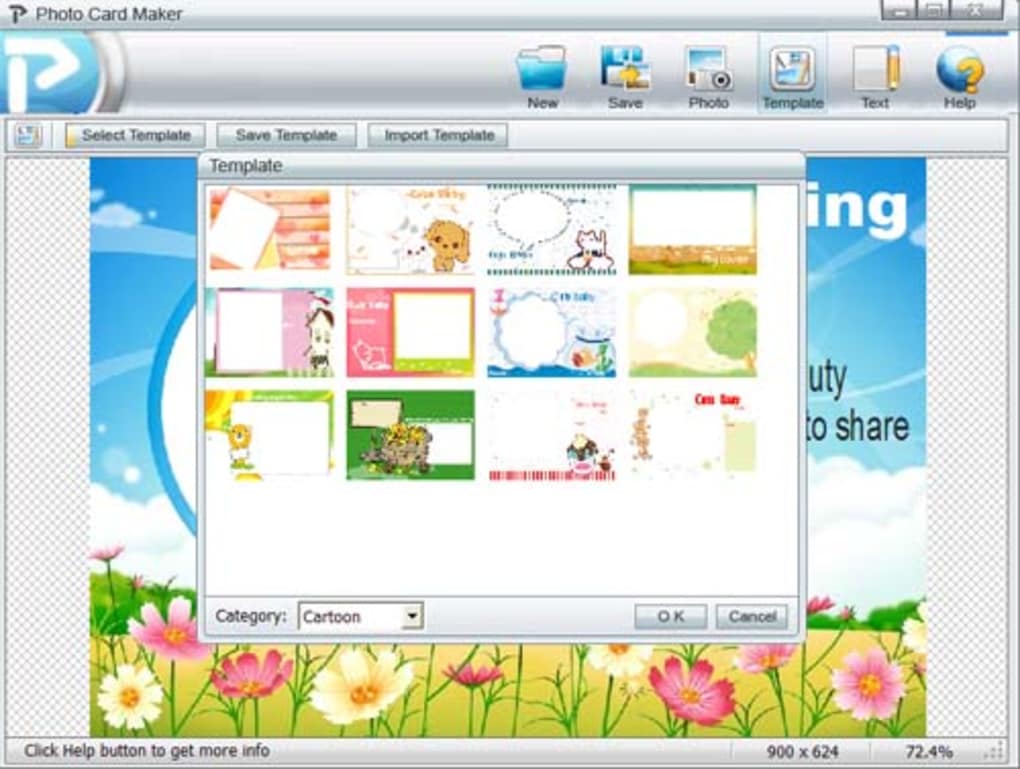
The primary allure of Photo Card Maker lies in its promise of rapid card creation. Imagine needing to send out a last-minute announcement, a quick thank you, or a cheerful holiday greeting. Instead of grappling with complex layers, intricate typography, or advanced image manipulation in a sophisticated editor, Photo Card Maker allows you to achieve your goal with just a few clicks. This “in a minute” philosophy is not just marketing hype; it’s a testament to the software’s design, which prioritizes user experience above all else.
The software is an ideal companion for a multitude of life’s events. From celebratory milestones like birthdays, weddings, and anniversaries to seasonal greetings such as New Year’s or Valentine’s Day, it provides a tailored solution. Beyond these, it’s also perfect for general announcements to acquaintances, creating invitations, or simply sharing a cherished memory with a personal touch. Photo greeting cards, by their very nature, are a wonderful blend of personal expression and visual appeal. They capture individual cheer, showcase memorable photographs, and serve as tangible reminders of shared experiences, strengthening bonds between family and friends.
For those who find traditional graphic editors daunting, Photo Card Maker offers a refreshing alternative. There’s no steep learning curve, no need to watch hours of tutorials, and certainly no requirement for prior design experience. The interface is clean and functional, guiding the user through each step of the card-making process. This simplification is key to its broad appeal, enabling even complete novices to produce attractive and personalized cards that convey heartfelt messages. It’s about providing the tools for creativity without the accompanying complexity, fostering a sense of accomplishment and genuine connection through customized visual communication.
Navigating the Features: Templates, Customization, and Export
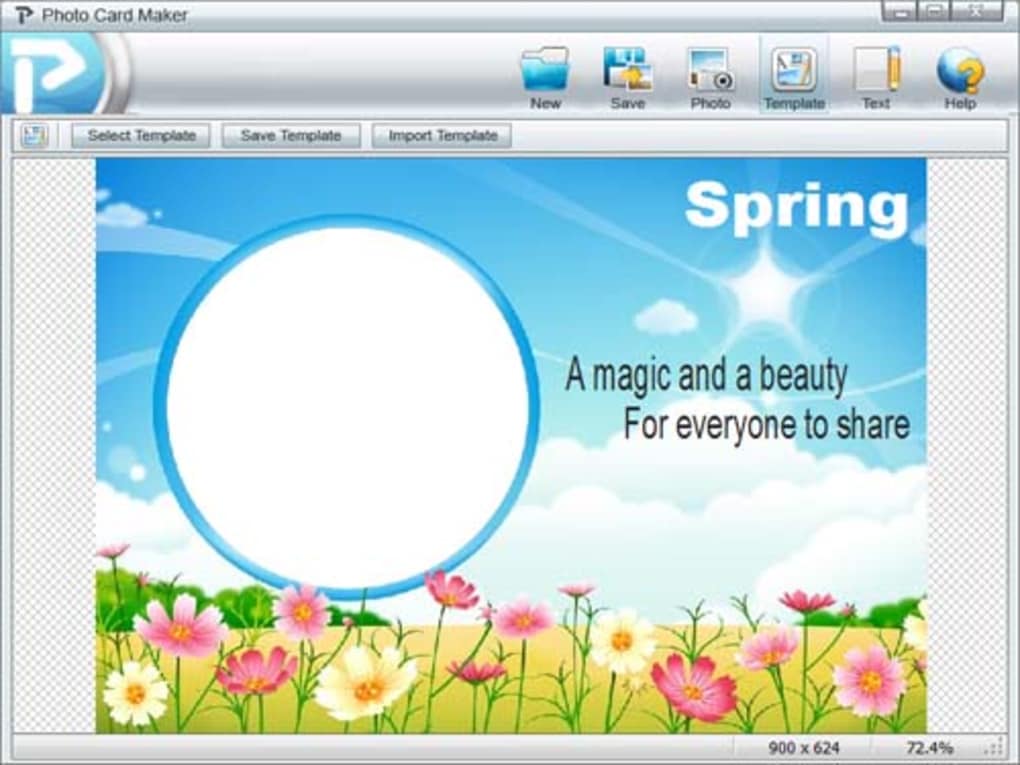
Photo Card Maker’s feature set is thoughtfully curated to support its core mission: easy and fast photo card creation. It streamlines the design process by offering a robust template system, intuitive photo integration, and flexible export options, ensuring that users can bring their vision to life with minimal effort.
A Rich Gallery of Templates (with a Niche Focus)
The journey of creating a photo card with Photo Card Maker often begins with selecting a template. The application comes equipped with hundreds of pre-designed templates, categorized to help users quickly find what they need. These categories might include themes like Holidays, Travel, Sport, and, most notably, Cartoon. The template system is designed to provide a ready-made structure, allowing users to focus on personalizing the message and integrating their chosen photograph rather than building a layout from scratch.
While the sheer number of templates is beneficial, it’s important to set expectations regarding their stylistic range. The reference content indicates a particular strength in the “cartoon” templates, describing them as “cute” and offering the good news that “you can download more cartoon themes!” This suggests that if you appreciate a whimsical, light-hearted aesthetic, Photo Card Maker is likely to delight you. These cartoon templates are perfect for children’s birthdays, playful announcements, or simply adding a touch of fun to your greetings.
However, the application’s design philosophy leans towards simplicity, which means that templates in other categories, such as Holiday, Travel, and Sport, are described as “fairly basic.” For users seeking a “slightly cool or stylish” design, these might not meet expectations. They lack the fine design intricacies that professional graphic editors can offer. Nevertheless, even these basic templates serve a crucial purpose: they save significant time. If your priority is quick communication and you’re not overly concerned with sophisticated aesthetics, these templates remain incredibly useful for making announcements to acquaintances or sending out best wishes without delay. They provide a functional framework that gets the job done efficiently. The availability of downloadable themes further enhances the template library, offering more options for those who find the initial selection limiting, especially within the popular cartoon style.
Seamless Photo Integration and Editing
A photo card, by definition, requires a photo, and Photo Card Maker excels in making this process seamless. Users can easily upload the desired photograph into the application. Once uploaded, the software provides intuitive tools for basic photo manipulation: resizing and rotating. This functionality is crucial as it allows users to precisely fit their picture into the designated photo space within the chosen template. The ability to fine-tune the photo’s position and scale ensures that it looks just right, complementing the overall card design.
Beyond simple placement, the program demonstrates a clever understanding of design aesthetics, even within its streamlined approach. It automatically handles the card’s layer level. This means that if a template features decorative elements like stars or circles that are intended to partially overlay or surround your picture, Photo Card Maker takes care of this layering without requiring manual intervention from the user. This automatic layering adds a professional touch to the final card, creating a polished look without adding complexity to the user’s workflow. It’s these thoughtful touches that elevate the user experience, allowing individuals with no design background to achieve visually appealing results. The focus is always on simplifying the technical aspects so the user can concentrate on the creative and communicative elements.
Personalized Messaging and Output Options
No card is complete without a personal message, and Photo Card Maker allows for easy text customization. The software includes default text placeholders within its templates, which users can readily modify. While the reference content humorously notes that the default text is “often miswritten” and “grammatically incorrect” but “makes you laugh,” this is a minor issue as it’s designed to be replaced. The ease with which users can edit this text is a significant advantage, enabling them to infuse their own words, greetings, or announcements into the card. This personalization is key to making each card unique and meaningful.
Once the photo is perfectly positioned and the message thoughtfully crafted, the final step is to export the card. Photo Card Maker offers flexibility in this regard, allowing users to save their finished cards in three common image formats: JPG, PNG, and BMP.
- JPG (JPEG) is ideal for sharing cards online, via email, or social media, as it offers good compression and a balance between file size and image quality.
- PNG is excellent for cards that might have transparent elements or require higher image fidelity, especially if they are intended for printing where crisp lines are important.
- BMP is a lossless format, meaning it retains all image data, making it suitable for high-quality printing, though the file sizes can be considerably larger.
This choice of export formats ensures that the created photo cards can be easily used for a variety of purposes, whether it’s digital sharing, professional printing, or simply saving for personal archives. The ability to generate a high-quality image file means your personalized creations are ready for immediate use, further reinforcing the application’s commitment to efficiency and user convenience.
Why Choose Photo Card Maker? Pros, Cons, and User Experience
Deciding on the right tool for a specific task often comes down to weighing its advantages against its limitations. Photo Card Maker, while incredibly user-friendly and efficient, is not an all-encompassing graphic design suite. Understanding its strengths and weaknesses helps users determine if it’s the ideal solution for their particular photo card needs.
The Upsides of Quick Card Design
The “Pros” section of Photo Card Maker highlights several compelling reasons to give it a try, all centered around its core philosophy of speed and simplicity:
- Resize and Rotate Pictures: This fundamental photo editing capability is essential for any photo card maker. The ease with which users can manipulate their images to perfectly fit the template’s designated space is a significant advantage, ensuring a polished final product without needing external editing software. It contributes directly to the “minute-long” creation process.
- Import New Cute Templates: The emphasis on “cute” cartoon templates and the ability to “download more cartoon themes” is a distinct selling point. For users who appreciate this aesthetic, Photo Card Maker offers a rich and expanding library. This makes it particularly attractive for creating playful greetings, invitations for children’s parties, or whimsical announcements that stand out.
- Save Cards in Three Photo Formats: The versatility of exporting cards as JPG, PNG, or BMP files is highly beneficial. This ensures compatibility across different platforms and uses. Whether you intend to share your card digitally, print it at home, or send it to a professional print service, you have the appropriate file format at your disposal, offering flexibility and convenience.
- Exceptional Ease and Speed: Beyond the listed pros, the overarching benefit is the unparalleled ease and speed of card creation. For individuals who are not “fussy” about hyper-stylized designs and simply need to convey a message quickly and personally, Photo Card Maker is a godsend. It eliminates the frustration and time commitment often associated with more complex design software, making personalized communication accessible to everyone. It’s a tool for immediate gratification in design.
Addressing the Limitations
No software is without its drawbacks, and Photo Card Maker is transparent about its specific areas for improvement, primarily concerning its design sophistication:
- Basic Style of Non-Cartoon Templates: This is perhaps the most significant limitation. While the cartoon templates are praised for their cuteness, the Holiday, Travel, and Sport categories are described as “fairly basic.” This means users looking for modern, sophisticated, or highly stylized designs in these non-cartoon themes might find Photo Card Maker lacking. The software makes “a point: we are not talking about fine design here.” This is a crucial distinction. For users accustomed to the polished aesthetics found in professional design tools or high-end greeting card services, the simplicity of these templates might be a deterrent. However, for quick, functional cards where the message and the photo are paramount, and elaborate design is secondary, these basic templates still serve their purpose effectively. They are functional rather than fashionable.
- The Default Card’s Text is Grammatically Incorrect, but Makes You Laugh: This humorous observation points to a minor inconvenience rather than a critical flaw. While placeholder text should ideally be perfect, its “miswritten” nature is easily remedied by the user. The ability to modify the default text is a standard feature, and users are expected to replace it with their own personalized messages anyway. So, while it might elicit a chuckle, it doesn’t hinder the functionality or the final quality of the personalized card. It simply requires an extra moment of user attention to correct or replace.
From a user experience perspective, Photo Card Maker is designed for efficiency and approachability. It targets users who prioritize function and speed over intricate design options. It’s the perfect tool for someone who wants to make a personalized gesture without investing significant time or learning new skills. The software’s focus on a niche (easy, fast, often cartoon-style photo cards) allows it to excel in its specific domain, providing a hassle-free experience that many will appreciate.
Beyond the Basics: Practical Applications and Comparisons
Photo Card Maker carves out a specific niche in the vast landscape of digital tools. Understanding its ideal user and its position relative to other applications helps clarify its true value.
Who Benefits Most from This Tool?
Photo Card Maker is not for everyone, but for its target demographic, it is an indispensable utility. Its primary beneficiaries include:
- Casual Users and Hobbyists: Individuals who occasionally need to create a personalized greeting or announcement but lack the time or inclination to delve into complex graphic design software. They value simplicity and immediate results.
- Fans of Cartoon Aesthetics: Given its strong emphasis on cute cartoon templates and the ability to download more, anyone with a fondness for playful, whimsical designs will find Photo Card Maker particularly appealing. It’s perfect for creating fun cards for children, lighthearted invitations, or any occasion that calls for a cheerful, animated style.
- Individuals Needing Quick Announcements: For those moments when you need to disseminate information swiftly – be it a birth announcement, a moving notice, or a quick thank you – the software’s speed and ease of use are paramount. It minimizes the barrier between thought and execution.
- Windows Users: As a dedicated Windows application, it integrates smoothly into the Windows environment, requiring minimal system resources and offering a stable user experience on compatible operating systems, including even older versions like Windows 98 SE, highlighting its accessibility across a wide range of hardware.
- Budget-Conscious Users: As a free program, Photo Card Maker offers significant value without any financial investment. This makes it an attractive option for students, families, or anyone looking to save money on specialized software while still producing personalized greetings.
Beyond personal use, Photo Card Maker could also find utility in small community groups, schools for simple project assignments, or local organizations needing quick, visually enhanced notices. Its straightforward nature makes it a valuable asset for anyone who needs to convey a message with a personal photographic touch without the overhead of professional design.
Photo Card Maker in the Broader Landscape
When placed alongside other software, Photo Card Maker distinguishes itself by its singular focus on photo cards and its unparalleled ease of use. While there are numerous “card maker” tools available, many tend to be either more generalized or more complex:
- Easy Card Creator: This trial version software is designed for creating and printing ID cards. While it shares the “card creator” moniker, its function is vastly different, focusing on official identification rather than personal greetings.
- Free Invitation Maker: This desktop application specializes in invitations. While it can produce attractive designs, Photo Card Maker’s integration of personal photos and its specific focus on various greeting card types (beyond just invitations) sets it apart.
- Business Card Maker: As the name suggests, this trial version app is for creating professional business cards. It caters to a very different aesthetic and purpose compared to Photo Card Maker’s more casual, personal approach.
- HP Photo Creations / HP Photosmart Essential / ArcSoft Print Creations / EZ Photo Creations: These are often bundled with printers or designed for broader photo printing and creative projects. While they might offer card-making features, Photo Card Maker provides a dedicated, streamlined experience specifically for photo cards, without the potential bloat of an all-in-one photo suite.
Photo Card Maker isn’t trying to compete with Adobe Photoshop or Illustrator in terms of sophisticated design capabilities. Its strength lies in its simplicity and directness. It doesn’t aim to be the most powerful or feature-rich design tool; instead, it strives to be the easiest and fastest for its specific purpose. The fact that it’s a lightweight application (5.18 MB) and free, with a wide compatibility range (Windows 98 SE and newer), underscores its accessibility. It’s a utility designed for efficiency, delivering lovely, personalized cartoon photo cards in image format for quick sharing and announcements. It effectively fills a gap for users who want to be creative with their photos but are intimidated by professional software.
In conclusion, Photo Card Maker by the developer “Photo-card-maker” offers a refreshing approach to personalized communication. While it may not cater to every design sensibility, particularly for those seeking high-fashion aesthetics in non-cartoon themes, its strengths – ease of use, speed, seamless photo integration, and delightful cartoon templates – make it an invaluable tool for countless users. For anyone looking to send a heartfelt, customized photo card without hassle, Photo Card Maker, available for free download on PhanMemFree.org, is certainly worth a try. It truly empowers users to create those special moments, one personalized card at a time.
File Information
- License: “Free”
- Latest update: “July 19, 2024”
- Platform: “Windows”
- OS: “Windows 98 SE”
- Language: “English”
- Downloads: “164.1K”
- Size: “5.18 MB”


