
In the digital age, visual content reigns supreme. From captivating social media posts and professional e-commerce listings to compelling video thumbnails and cherished family photo albums, the demand for high-quality, polished images has never been greater. Yet, many aspiring creators and casual users alike find themselves intimidated by complex, professional-grade photo editing software, which often comes with a steep learning curve and a hefty price tag. This is where applications like Photo Cut Paste: Background Changer step in, democratizing advanced photo manipulation and putting powerful tools into the hands of everyone.
Developed by Photo Cool Apps, Photo Cut Paste: Background Changer for Windows is more than just a utility; it’s a comprehensive yet remarkably user-friendly photo editing application designed to transform your ordinary images into extraordinary visual narratives. Available for free download on platforms like PhanMemFree, this Windows-compatible software simplifies intricate editing tasks, particularly the often-challenging process of background removal and image compositing. Whether you’re a budding graphic designer, a social media enthusiast, an online entrepreneur, or simply someone looking to enhance personal photos, Photo Cut Paste offers an intuitive and efficient solution to elevate your visual content.
At its core, Photo Cut Paste is built around the concept of accessibility. It understands that not everyone possesses advanced editing skills or has the time to master complex layers and masks. Instead, it provides a streamlined experience, ensuring that even novices can achieve professional-looking results. The application’s robust feature set, coupled with its straightforward interface, makes it an indispensable tool for anyone seeking to unleash their creative potential without the usual hurdles associated with photo editing.
Precision and Power: Mastering Background Removal with Photo Cut Paste
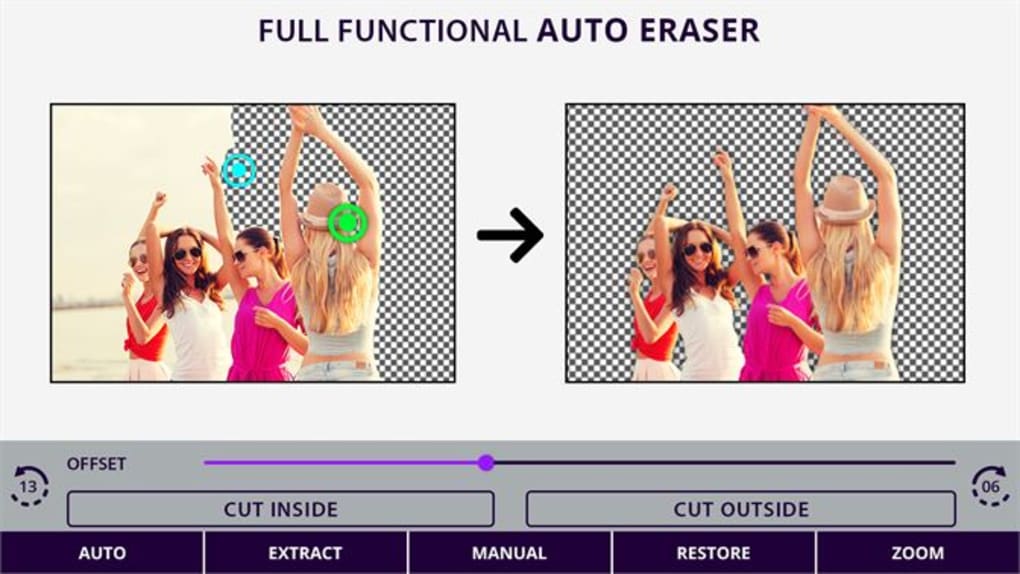
One of the most transformative features of Photo Cut Paste: Background Changer, and indeed its namesake, is its exceptional ability to remove photo backgrounds. This seemingly simple task is often the foundation of advanced photo manipulation, enabling users to isolate subjects, create dynamic collages, or place objects into entirely new environments. Photo Cut Paste excels in this area, offering both manual and automatic background removal options, catering to different levels of precision and user preference.
The Art of Automatic Background Removal
For those seeking speed and convenience, the automatic background removal feature is a game-changer. Leveraging intelligent algorithms, the application can detect the main subject of an image and intelligently distinguish it from its background. With just a few clicks, the unwanted background can be eliminated, leaving a clean, crisp cutout of your subject. This functionality is particularly useful for:
- E-commerce Product Photography: Quickly isolating products from cluttered or inconsistent backgrounds to present them cleanly on online storefronts. This can significantly enhance a product’s appeal and maintain brand consistency across listings.
- Profile Pictures and Avatars: Creating professional-looking headshots by instantly removing distracting elements from the background, ensuring the focus remains squarely on the individual.
- Social Media Graphics: Generating engaging visuals where the subject needs to pop against a new, custom background, perfect for announcements, promotions, or stylized posts.
- Quick Composites: When you need a fast cutout to combine with another image or a solid color background for a minimalist design.
The automatic tool is surprisingly accurate for many common scenarios, saving users countless hours that would otherwise be spent on manual tracing. It’s a testament to the app’s commitment to simplifying complex tasks, making professional-grade outcomes achievable for everyone.
Unleashing Control with Manual Background Removal
While automatic removal is fantastic for efficiency, there are instances where absolute precision is paramount, or where the distinction between subject and background is too subtle for algorithms to perfectly grasp. In such cases, Photo Cut Paste provides robust manual tools for background removal, offering users complete control over the selection process.
The manual tools typically include brushes and selection tools that allow you to meticulously define the edges of your subject. You can zoom in for fine detail work, adjust brush sizes for accuracy, and refine selections with ease. This level of granular control is crucial for:
- Complex Subjects: Images with intricate details, hair, fur, or subjects against similarly colored backgrounds.
- Artistic Projects: When you need to create a truly seamless composite, where every pixel matters.
- Problematic Lighting: Photos taken in challenging lighting conditions where automatic detection might struggle.
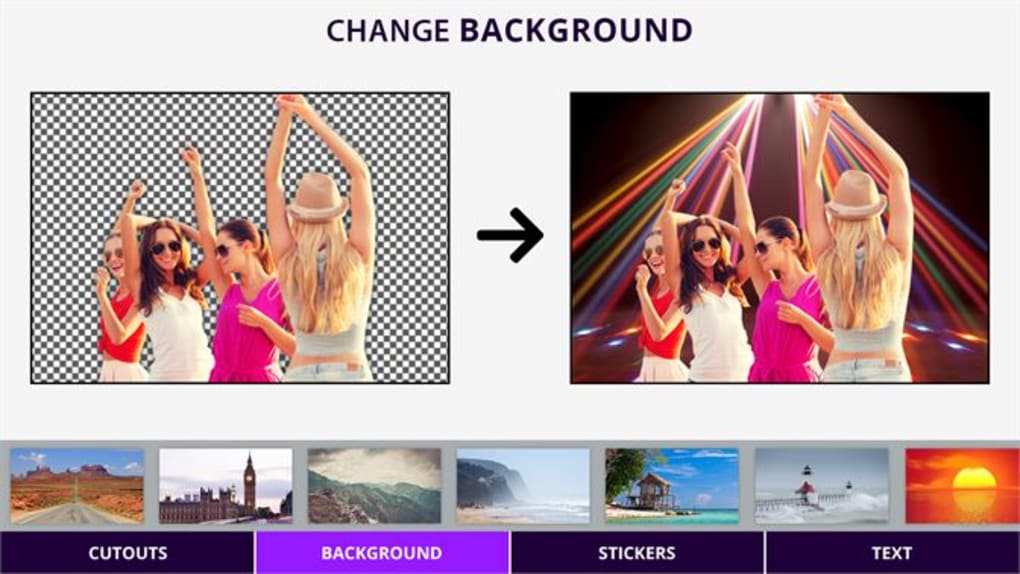
The combination of both automatic and manual options ensures that Photo Cut Paste is versatile enough to handle a wide spectrum of images and user requirements. It empowers users to achieve clean cutouts, which are the building blocks for creating stunning collages, posters, video thumbnails, and a myriad of other creative projects. The ability to seamlessly replace or remove backgrounds opens up a world of possibilities, allowing you to place subjects anywhere, from a bustling cityscape to a serene natural landscape, or even against a simple, solid color that complements your brand or message.
A Comprehensive Editing Toolkit: Beyond Backgrounds
While its background removal capabilities are a standout feature, Photo Cut Paste is far from a one-trick pony. It boasts a diverse array of editing tools that provide everything you need to refine, enhance, and stylize your photos, ensuring a polished final product. This comprehensive toolkit transforms the app into a versatile image editor, capable of handling various aspects of photo manipulation.
- Selection Tools: Beyond background removal, the app offers various selection tools to isolate specific areas of an image for targeted adjustments. This allows you to apply effects or corrections to a particular part of your photo without affecting the rest.
- Cropping and Rotation: Essential for composition and framing, the cropping tool allows you to trim unwanted edges, adjust aspect ratios, and focus on the most important elements of your photo. Rotation tools enable you to correct skewed horizons or achieve dynamic angles with ease.
- Brightness and Contrast Adjustment: These fundamental controls are crucial for balancing exposure and adding depth to your images. You can brighten dark areas, deepen shadows, and increase the visual impact of your photos, making them more vibrant and appealing.
- Color Correction: Achieve perfect color balance with tools that allow you to adjust hues, saturation, and vibrancy. Whether your photo is too warm, too cool, or simply lacking punch, these controls help you bring out the true colors and mood of your scene.
- Filters: For a quick aesthetic boost, Photo Cut Paste includes a range of pre-defined filters. These one-click presets can dramatically alter the mood and style of your photo, offering anything from vintage looks to modern, vibrant tones. They are perfect for adding artistic flair or maintaining a consistent visual theme across your content.
- Blurring Effects: Create depth of field, draw attention to your subject, or obscure sensitive information with blurring tools. You can apply selective blur to backgrounds for a professional bokeh effect or use it to soften edges and create a dreamlike quality.
- Watermarking: Protect your intellectual property or brand your images with the watermarking feature. You can add custom text or logo watermarks, controlling their placement, opacity, and size, ensuring your work is attributed correctly.
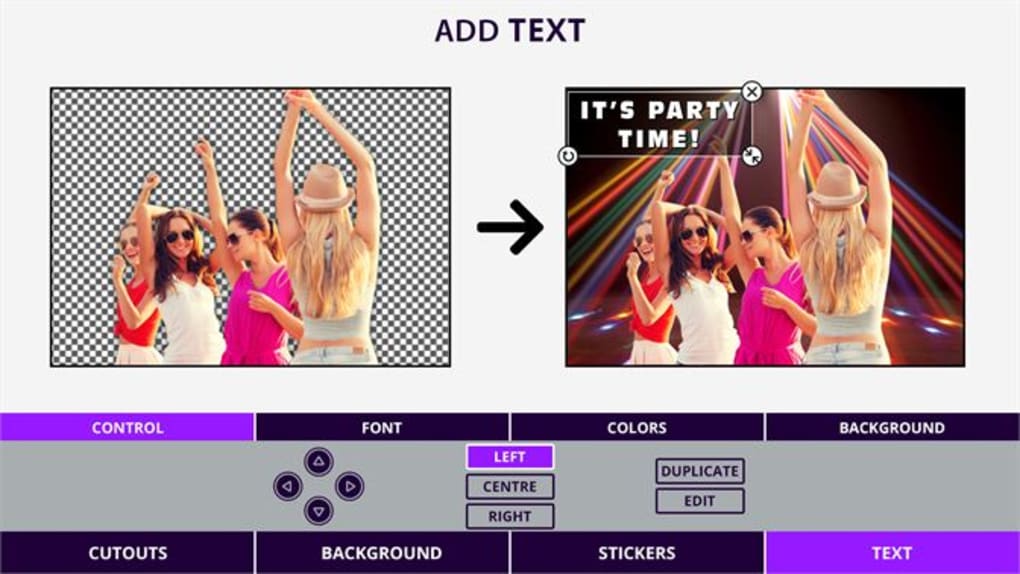
- Text Overlay: Add captions, quotes, or important information directly onto your images with the text overlay tool. Customize fonts, colors, sizes, and positions to create engaging graphics for social media, presentations, or informational content.
Each of these tools is implemented with user-friendliness in mind, ensuring that applying professional-grade enhancements doesn’t require hours of training. The intuitive interface guides users through each adjustment, making the process of refining photos an enjoyable and rewarding experience. This holistic approach to editing means that Photo Cut Paste isn’t just for background changes; it’s a comprehensive environment for overall photo beautification and personalization.
User Experience and Technical Excellence
One of the strongest selling points of Photo Cut Paste: Background Changer is its commitment to providing an excellent user experience. The application is meticulously designed to be intuitive, accessible, and efficient, ensuring that users can achieve their editing goals without unnecessary complexity or frustration. This focus on user-centric design is evident in every aspect of the software, from its installation to its everyday operation.
A Seamless and Intuitive Interface
The first thing users will notice about Photo Cut Paste is its clean and uncluttered interface. Unlike many professional editors that overwhelm with countless menus and panels, Photo Cut Paste keeps things simple, presenting tools logically and clearly. Key functionalities are easily discoverable, and the workflow is straightforward: import your image, apply your desired edits, and export the final result.
This intuitive design is particularly beneficial for:
- Beginners: Users new to photo editing will find the app approachable, allowing them to experiment and learn without feeling intimidated. The easy-to-understand controls empower them to quickly grasp the basics and see tangible results.
- Casual Users: For those who only need to make quick edits occasionally, the app provides a fast and efficient way to get the job done without having to re-learn complex software each time.
- Time-Conscious Creators: Professionals and content creators who need to produce visuals rapidly will appreciate the streamlined workflow, which helps them maintain productivity.
The drag-and-drop functionality, clear icons, and responsive controls contribute to a smooth editing journey. Feedback from early users, as seen in the ratings and positive reviews on platforms like PhanMemFree, often highlights the app’s ease of use as a primary advantage.
Technical Specifications and Performance
Photo Cut Paste: Background Changer is specifically developed for the Windows ecosystem, ensuring optimal performance and compatibility.
- Platform Compatibility: The app is designed for Windows, with full compatibility for Windows 11, ensuring users with the latest operating systems can enjoy a stable and efficient experience. It’s built to leverage the native capabilities of the Windows platform, providing a reliable and responsive editing environment.
- Version and Updates: As of its latest update on February 19, 2024, the application is at Version 1.2.0.0. This indicates ongoing development and commitment from Photo Cool Apps to refine the software, address any issues, and introduce new features. Regular updates are crucial for maintaining compatibility, enhancing security, and improving overall user experience.
- Developer Information: The application is developed by Photo Cool Apps, a name that suggests a specialization in user-friendly photo-related software. Their focus on creating tools that make photo editing “cool” and accessible is evident in the design and functionality of Photo Cut Paste.
- Availability and Language: Photo Cut Paste is freely available for download, promoting widespread access. While its primary language is English, the intuitive nature of its interface makes it relatively easy for non-English speakers to navigate.
- Performance: Given its focus on accessibility, the app is optimized to run smoothly on a range of Windows hardware without demanding excessive system resources. This means users don’t need a high-end, expensive computer to achieve excellent editing results, further democratizing the photo editing process.
- Security Status: When downloading software, security is a paramount concern. According to scans performed by platforms like PhanMemFree, Photo Cut Paste: Background Changer maintains a “Clean” security status. This means that after rigorous checks by leading antivirus services, no potential threats or malware have been detected, offering users peace of mind during download and installation. PhanMemFree emphasizes a comprehensive process, including scanning files and associated URLs, and periodic reviews to ensure a malware-free catalog.
The combination of thoughtful design and robust technical implementation makes Photo Cut Paste a reliable and efficient choice for anyone looking to enhance their photos on a Windows PC. It balances advanced capabilities with ease of use, making sophisticated photo editing accessible to a broad audience.
Practical Applications and Workflow Integration
The versatility of Photo Cut Paste: Background Changer extends across a myriad of practical applications, making it a valuable tool for various users, from casual photographers to small business owners and content creators. Its streamlined workflow allows for seamless integration into many digital routines.
Empowering Personal Photo Enhancement
For personal use, Photo Cut Paste can transform everyday snapshots into cherished memories or social media showstoppers:
- Family Albums: Effortlessly remove distracting elements from family photos, ensure everyone looks their best with brightness and contrast adjustments, and apply filters for a consistent look across a photo series. Create fun collages of vacation photos or birthday celebrations.
- Travel Photography: Isolate magnificent landmarks from crowds, enhance the natural colors of landscapes, or superimpose yourself into famous scenes for creative travel memories.
- Social Media Presence: Elevate your profile pictures, create eye-catching Instagram stories, or design compelling Facebook banners. The background changer is perfect for unifying your aesthetic and making your posts stand out.
Boosting Business and Professional Endeavors
In the professional realm, the app offers significant advantages for individuals and small businesses operating on a budget:
- E-commerce Product Listings: Generate professional, consistent product images by removing varied backgrounds and replacing them with clean white or transparent ones. This is crucial for platforms like Etsy, Shopify, or Amazon, where product presentation directly impacts sales.
- Marketing Materials: Design engaging flyers, brochures, or digital ads. The text overlay feature, combined with advanced background removal, allows for the creation of clear, impactful calls to action and visual messages.
- Real Estate Photography: Enhance property photos by removing unwanted elements, correcting lighting, and creating more appealing visuals for listings.
- Small Business Branding: Maintain a cohesive brand identity across all visual communications, from business cards to social media banners, ensuring a polished and professional image.
Streamlining Content Creation
Content creators, including bloggers, YouTubers, and online educators, will find Photo Cut Paste an invaluable asset:
- YouTube Thumbnails: Craft compelling video thumbnails that attract clicks. Use the cut-paste feature to isolate your face or key elements, add engaging text, and apply filters to create a distinct visual style that draws viewers in.
- Blog Post Images: Create custom header images, featured images, and in-post graphics that complement your content and improve reader engagement.
- Presentations: Design visually appealing slides by integrating customized images, removing backgrounds from charts or diagrams, and adding informative text overlays.
A Typical Workflow
The typical workflow with Photo Cut Paste is designed for efficiency:
- Import: Open your desired image from your Windows device.
- Background Removal: Utilize either the automatic or manual tools to precisely cut out your subject.
- Refine and Enhance: Apply a range of editing tools – adjust brightness, contrast, and colors; add filters; or blur certain areas.
- Add Elements: Incorporate text overlays or watermarks as needed.
- Export: Save your masterpiece in a preferred format, ready for its intended use.
This intuitive process ensures that from concept to completion, users can navigate the editing journey with confidence and achieve high-quality results in minimal time.
Photo Cut Paste in the Broader Landscape: Standing Out Among Alternatives
The market for photo editing software is vast and competitive, with numerous options ranging from free online tools to expensive professional suites. Photo Cut Paste: Background Changer carves out a significant niche for itself by prioritizing ease of use, essential functionality, and accessibility, particularly for Windows users. When compared to its alternatives, its value proposition becomes even clearer.
Platforms like PhanMemFree often list alternatives, such as “inPixio Photo Cutter,” “Photo Manager for Canon,” “Image Raw,” “Photo Background Remover,” and “Background Remover & Png Image Creator.” Let’s consider how Photo Cut Paste measures up against these:
- inPixio Photo Cutter (Paid): While inPixio is a strong contender with excellent background removal capabilities, it typically comes with a price tag. Photo Cut Paste, being a free application, immediately offers a significant advantage for budget-conscious users or those who don’t require the most advanced, niche features found in paid software.
- Photo Manager for Canon (Paid): This is a highly specialized tool, tailored specifically for Canon camera users. Its features are geared towards managing and basic editing of Canon images. Photo Cut Paste, in contrast, offers broader applicability, working with any image file regardless of its origin, making it a more versatile general-purpose editor.
- Image Raw (Free): While “Image Raw” (like FredsToolbox) focuses on processing raw image files, which is crucial for professional photographers, it’s typically more technical and less user-friendly for general photo enhancement and compositing. Photo Cut Paste caters to a broader audience, emphasizing ease of use for everyday edits rather than complex raw development.
- Photo Background Remover (Trial Version/Paid): Similar to inPixio, many dedicated background removal tools often offer a trial version before requiring a purchase. Photo Cut Paste provides its core background removal functionality completely free, making it a more accessible choice for sustained use without financial commitment.
- Background Remover & Png Image Creator (Free, by Purple Martin): This alternative also offers free background removal, but Photo Cut Paste often distinguishes itself by providing a more comprehensive suite of additional editing tools (cropping, color correction, text overlay, filters, etc.). While some apps might specialize in just one function, Photo Cut Paste integrates multiple essential features into one intuitive package.
Why Photo Cut Paste is a “Great Choice”
Photo Cut Paste stands out as a “great choice” for several compelling reasons:
- Cost-Effectiveness: It’s a completely free application, eliminating any financial barrier to powerful photo editing. This makes it ideal for students, small businesses, and individuals who need quality tools without subscription fees.
- Ease of Use: Its primary focus on user-friendliness ensures that even those without prior editing experience can achieve impressive results. The intuitive interface and straightforward tools minimize the learning curve.
- Comprehensive Features: Beyond just background removal, it offers a robust set of tools including cropping, rotation, color correction, filters, blurring, watermarking, and text overlay. This makes it a versatile all-in-one solution for many common photo editing needs.
- Efficiency: The combination of automatic and manual background removal, coupled with other easy-to-apply adjustments, significantly speeds up the editing process, allowing users to create compelling visuals quickly.
- Versatility: From personal photo albums to professional e-commerce product shots and engaging social media content, the application supports a wide range of creative and practical applications.
- Windows Native: Optimized for Windows operating systems, including Windows 11, it offers a stable and reliable performance environment.
- PhanMemFree Verified: Its “Clean” security status on PhanMemFree provides assurance regarding its safety and reliability, a critical factor for any software download.
In a crowded market, Photo Cut Paste: Background Changer emerges as a highly practical and accessible solution. It bridges the gap between basic image viewers and complex professional software, offering a powerful yet manageable toolset that empowers users to transform their photos with remarkable ease and effectiveness. For anyone seeking to enhance their visual content on a Windows PC without breaking the bank or wrestling with steep learning curves, Photo Cut Paste stands as an unequivocally excellent option.
Conclusion
In an era defined by visual communication, the ability to effortlessly manipulate and enhance images is no longer a luxury but a necessity. Photo Cut Paste: Background Changer for Windows gracefully rises to this challenge, offering a robust, user-friendly, and entirely free solution for a wide spectrum of photo editing needs. From its flagship background removal capabilities, which cater to both automated speed and manual precision, to its comprehensive suite of refinement tools including cropping, color correction, filters, and text overlays, the application provides everything an aspiring or casual editor requires.
Its intuitive interface and design philosophy prioritize accessibility, ensuring that whether you’re a seasoned content creator or a complete novice, you can achieve professional-looking results without the frustration typically associated with advanced photo software. Optimized for Windows 11 and maintained with regular updates by Photo Cool Apps, it promises stable performance and a continually improving user experience. Furthermore, its verified “Clean” security status on reputable platforms like PhanMemFree.org offers peace of mind, making it a safe and reliable choice for your desktop.
Photo Cut Paste isn’t just an app; it’s an enabler of creativity. It empowers individuals to craft stunning collages, design impactful video thumbnails, create pristine product shots for e-commerce, or simply perfect cherished personal photographs. By democratizing advanced editing techniques, Photo Cut Paste allows everyone to tell their stories more vividly, enhance their brands more effectively, and share their lives more beautifully. For anyone seeking a powerful, intuitive, and free photo editing companion for their Windows PC, Photo Cut Paste: Background Changer is an undisputed and highly recommended choice, ready to unlock a world of visual possibilities.
File Information
- License: “Free”
- Version: “1.2.0.0”
- Latest update: “February 19, 2024”
- Platform: “Windows”
- OS: “Windows 11”
- Language: “English”
- Downloads: “3K”


