
In the vast and ever-evolving landscape of digital media, images play a pivotal role, serving as powerful communicators, memorable records, and essential components of both personal and professional endeavors. From crafting compelling marketing materials to sharing cherished family moments, the ability to manipulate and refine images is a fundamental skill. While sophisticated photo editing suites like Adobe Photoshop dominate the professional arena, there remains a significant demand for simpler, more accessible tools that cater to specific, everyday needs. This is where applications like Photo Cutter step in, offering a focused solution for one of the most common image manipulation tasks: cropping.
Photo Cutter, as its name succinctly suggests, is a dedicated tool designed for the sole purpose of cropping images. It embodies the principle of efficiency and ease of use, providing a straightforward approach to a task that can often feel cumbersome in more complex software. Available for various platforms, including Windows and Android, Photo Cutter positions itself as a quick, free, and intuitive utility for anyone needing to trim or reframe their digital photographs in a matter of seconds.
At its core, Photo Cutter simplifies the cropping process to its most basic elements. Users are presented with an uncluttered interface that prioritizes functionality. The workflow is incredibly direct: open an image file, define the desired area by dragging the mouse, and the crop is applied instantly. The cropped portion is typically displayed against a distinct background, such as blue, providing immediate visual feedback. Should the user be dissatisfied with the initial result, a simple “Select Again” option allows them to undo the change and redefine the cropping area without hassle. This iterative feedback loop is crucial for user satisfaction and ensures that even novice users can achieve their desired outcome quickly.
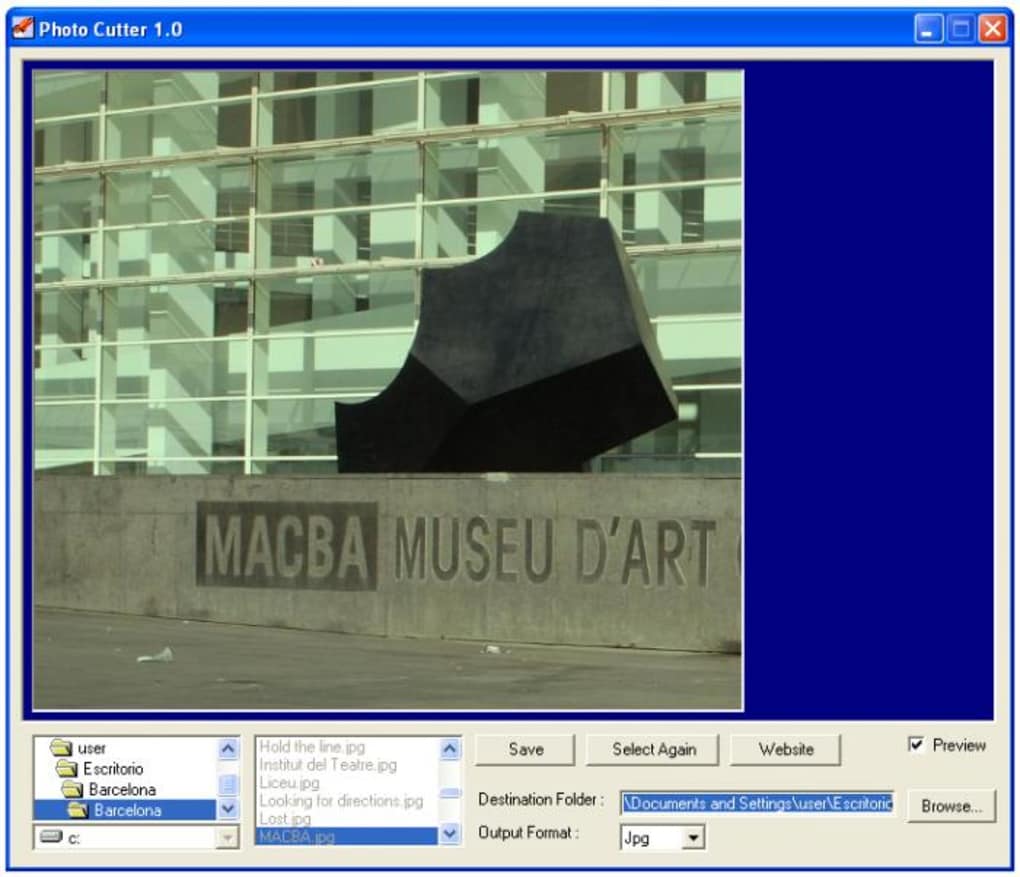
One of Photo Cutter’s standout advantages is its remarkable speed. In a digital world where time is a precious commodity, the ability to perform a task rapidly is highly valued. Photo Cutter excels here, enabling users to crop and save images with impressive swiftness. This speed is complemented by its simplicity; there’s no steep learning curve or complex menu hierarchies to navigate. The application’s minimalist design ensures that users can jump straight into editing without prior training. Furthermore, Photo Cutter boasts compatibility with a range of popular graphic formats, ensuring that users are unlikely to encounter issues with their image files, whether they are JPEGs, PNGs, or other common types. This broad format support adds to its utility and makes it a versatile choice for many.
However, no software is without its limitations, and Photo Cutter is no exception. While its simplicity is a major pro, it also contributes to some cons. Users might find the navigation through directories to be less intuitive or perhaps “uncomfortable,” suggesting a less refined file browsing experience compared to modern applications. Another significant drawback is the lack of diverse saving options. While it efficiently saves the cropped image, users may not have control over aspects like file format, quality settings, or naming conventions, which can be restrictive for those needing more granular control over their output files. The absence of keyboard shortcuts is also a notable omission for power users who rely on such commands for expedited workflows. Despite these minor inconveniences, for the user whose primary and often sole need is a quick crop, these issues are often overshadowed by the application’s core strengths.
Originally updated in January 2009, Photo Cutter’s longevity speaks to its fundamental utility. Developed by A Software Plus, it maintains a small footprint, with a file size of approximately 359.71 KB, making it a lightweight addition to any system. Its status as a free tool further enhances its appeal, removing any financial barrier to entry. While the specific user ratings (2.9 out of 5 from 95 reviews, according to the reference) suggest a mixed but generally positive reception for its simplicity, its continued availability and utility for basic tasks are undeniable.
Multimedia: The Digital Canvas
The realm of multimedia encompasses an incredibly diverse array of digital content, from audio and video to interactive applications and, of course, static images. In this rich tapestry, images serve as fundamental building blocks, often forming the core visual elements around which other media types are designed. Whether it’s a captivating photograph accompanying an article, an infographic simplifying complex data, or a banner advertising a new product, the quality and presentation of images significantly impact the overall effectiveness of any multimedia creation.
Within the broader multimedia ecosystem, the ability to process and refine images is paramount. It’s not enough to simply capture an image; it must often be prepared for its intended use. This preparation can involve various stages, from color correction and lighting adjustments to more structural changes like resizing and, critically, cropping. Cropping is an essential step in refining composition, removing distractions, and adapting an image to fit specific layouts or aspect ratios required by different platforms or formats. A tool like Photo Cutter, while seemingly simple, plays a vital role in ensuring that images are fit for purpose within this digital canvas.
For many multimedia creators, from casual social media users to professional graphic designers, the need for quick and effective image preparation is constant. Not everyone requires the full suite of complex features offered by high-end design software. In fact, for routine tasks like cropping, navigating through a feature-rich interface can be counterproductive, consuming valuable time and mental energy. This is precisely where Photo Cutter finds its niche. It represents a streamlined approach to a specific multimedia preparation task, allowing users to efficiently ready images for integration into presentations, websites, videos, or print materials. Its simplicity means it can be readily adopted by users with varying levels of technical expertise, democratizing basic image preparation and empowering more individuals to contribute effectively to the digital landscape. It’s a reminder that sometimes, the most effective tools are those that do one thing exceptionally well, rather than many things acceptably.
Photography: Beyond Just Cropping
Photography, as an art form and a means of documentation, has undergone a radical transformation with the advent of digital technology. From cumbersome film cameras to compact digital devices and the ubiquitous smartphone, capturing images has never been easier or more prevalent. This ease of capture, however, brings with it a corresponding need for effective post-processing, as the raw image often serves as a starting point rather than a finished product.
Image editing encompasses a broad spectrum of techniques, ranging from fundamental adjustments to highly complex artistic manipulations. Basic edits typically include exposure and contrast adjustments, white balance correction, and color saturation tweaks. More advanced processes might involve sophisticated retouching, layering, masking, and applying intricate filters. Yet, among all these possibilities, cropping remains one of the most fundamental and universally applied operations.
Why is cropping so essential? It’s a powerful compositional tool. By carefully selecting the boundaries of an image, photographers can:
- Improve Composition: Remove extraneous elements that distract from the main subject.
- Enhance Focus: Draw the viewer’s eye directly to the most important part of the scene.
- Correct Horizons: Straighten crooked lines, often an issue with handheld shots.
- Change Aspect Ratios: Adapt images for different outputs, such as printing, web display, or social media feeds.
- Reframe a Shot: Effectively “zoom in” on a subject or change the perspective after the image has been taken.
Photo Cutter fits into this extensive photographic landscape as a dedicated solution for this crucial, often repetitive, task. While professional photographers and graphic designers might rely on comprehensive software like Adobe Photoshop or Lightroom for their entire workflow, the average user, or even a professional needing a quick trim, benefits immensely from a tool like Photo Cutter. It provides the core functionality of cropping without the overhead of learning or navigating a feature-heavy interface. It democratizes a vital aspect of photo editing, making it accessible and efficient for everyone.
The speed and simplicity of Photo Cutter make it ideal for situations where a quick turnaround is needed – perhaps for sharing a photo online, adding it to a document, or preparing it for a presentation. It underscores the idea that not every image edit requires an hour of meticulous work; sometimes, a precise crop is all that’s needed to transform a good photo into a great one. In essence, Photo Cutter serves as an indispensable utility for anyone engaged with digital photography, highlighting the continued importance of focused tools in a world often dominated by all-in-one solutions.
Utilities & Tools: Enhancing Your Digital Toolkit
In the intricate ecosystem of computing, software applications are often categorized by their primary function. While some programs are designed for broad creative tasks or complex data management, a significant and invaluable segment comprises “utilities” and “tools.” These are specialized applications designed to perform specific functions that assist in the analysis, configuration, optimization, or maintenance of a computer system or, more broadly, to simplify particular digital tasks. Photo Cutter is a prime example of such a utility.
A good utility is characterized by its focus, efficiency, and ease of use for a particular task. Instead of being a jack-of-all-trades, it masters one specific function. For Photo Cutter, that function is image cropping. This dedicated approach allows it to be lightweight, fast, and remarkably straightforward to operate, distinguishing it from larger, multi-purpose graphics editors that bundle cropping with dozens or even hundreds of other features.
The value of specialized utilities often lies in their ability to streamline workflows and reduce cognitive load. When a user needs to crop an image, launching a full-fledged editing suite might take longer, require navigating through multiple menus, and distract from the primary goal. A focused tool like Photo Cutter bypasses these complexities, allowing the user to accomplish the task directly and without unnecessary steps. This efficiency translates into significant time savings, especially for individuals who frequently perform specific operations.
Beyond image cropping, the landscape of utilities and tools is vast and diverse, covering almost every aspect of digital interaction. Consider other categories derived from the provided reference:
- File Management: Tools like file administrators that help organize, move, and copy files efficiently.
- Screenshot Capture: Applications that allow users to quickly capture images of their screen.
- File Compression: Utilities for reducing file sizes for storage or transmission.
- Data Recovery: Tools designed to retrieve lost or accidentally deleted files.
- System Maintenance: Programs for cleaning up temporary files, optimizing disk space, or monitoring system performance.
Each of these categories represents a specific need for which specialized tools provide the most effective and efficient solution. Photo Cutter perfectly embodies this philosophy for image manipulation. It’s a testament to the idea that sometimes, the most powerful additions to one’s digital toolkit are not the most feature-rich, but rather those that are precisely engineered to solve a common problem with elegant simplicity. In a world of digital complexity, utilities like Photo Cutter serve as essential components, enhancing user experience by providing focused, effective solutions for everyday tasks.
Productivity: Streamlining Digital Workflows
In today’s fast-paced digital environment, productivity is a constant pursuit, both for individuals and businesses. The effectiveness of software tools in enabling or hindering productivity is a critical factor in their adoption and enduring relevance. Productivity, in essence, is about achieving more with less effort and in less time. Photo Cutter, despite its humble function, makes a notable contribution to user productivity by streamlining a common digital workflow step.
The connection between Photo Cutter and productivity stems directly from its core attributes: speed and simplicity. When a user needs to prepare an image for a presentation, a document, a website, or a social media post, cropping is often one of the first and most necessary adjustments. If this step requires launching a heavy application, waiting for it to load, navigating a complex interface, and then saving, the cumulative time loss can be substantial over many instances. Photo Cutter bypasses these bottlenecks. Its lightweight nature ensures rapid launch times, and its direct “point-and-click” cropping mechanism means the task can be completed in seconds.
Consider the various scenarios where this efficiency translates directly into enhanced productivity:
- Content Creation: Bloggers, marketers, and social media managers frequently need to crop images to fit specific dimensions or to focus on particular details. Photo Cutter allows them to do this quickly, freeing up time for writing content or strategizing.
- Business Documentation: Preparing reports, presentations, or internal communications often involves inserting images that need to be neatly trimmed. A rapid cropping tool ensures that these visuals are professional without adding significant time to document creation.
- Personal Use: Even for personal projects, such as preparing photos for a digital photo frame, a family album, or sharing with friends, the ability to quickly crop images saves time and reduces frustration.
The lack of complex options, while a “con” in terms of creative control, becomes a “pro” for productivity in its own right. It removes decision fatigue; users don’t have to ponder over numerous settings but can simply execute the primary task. While the absence of specific saving options and keyboard shortcuts (as mentioned in its drawbacks) might slightly impede productivity for a highly optimized workflow, for the vast majority of quick cropping needs, Photo Cutter’s overall design prioritizes getting the job done fast.
Ultimately, Photo Cutter exemplifies how even the simplest software can be a powerful productivity tool. By focusing on one essential function and executing it with speed and ease, it minimizes friction in the digital workflow, allowing users to spend less time on image preparation and more time on their core tasks or creative endeavors. It underscores the principle that efficiency is not just about complex algorithms, but often about elegant design and direct functionality.
The Evolving Landscape: AI in Image Generation and Editing
While Photo Cutter stands as a testament to the enduring utility of simple, focused tools for fundamental image manipulation, the broader landscape of image generation and editing is undergoing a profound transformation driven by artificial intelligence (AI). This emerging paradigm represents a stark contrast to Photo Cutter’s straightforward function, yet both types of tools serve distinct and valuable purposes in the digital age.
AI in image generation has moved beyond mere enhancement to outright creation. Large language models integrated with visual processing capabilities can now generate highly realistic or stylized images from simple text prompts. Tools in this category can conjure landscapes, portraits, fantastical creatures, or abstract art that never existed, offering unprecedented creative freedom to artists, designers, and hobbyists alike. This capability moves far beyond simply cutting an existing image; it’s about imagining and manifesting new visual realities.
In the realm of image editing, AI is also revolutionizing what’s possible, automating tasks that were once time-consuming and required significant expertise. AI-powered editing tools can:
- Remove Objects: Seamlessly erase unwanted elements from a photograph without leaving a trace.
- Upscale Images: Enhance the resolution and detail of low-quality images without blurring.
- Change Styles: Transform an image into the style of a famous painter or a particular artistic movement.
- Background Removal/Replacement: Accurately detect and isolate subjects from their backgrounds, making it easy to replace them with something else – a more advanced form of “cutting” than Photo Cutter provides.
- Automatic Retouching: Enhance portraits by smoothing skin, brightening eyes, or removing blemishes with minimal user input.
These AI capabilities, often found in sophisticated online platforms or integrated into advanced software suites, represent the cutting edge of image manipulation. They offer creative possibilities and efficiencies that were unimaginable just a few years ago.
However, the rise of AI tools does not render simpler utilities like Photo Cutter obsolete. Instead, they represent different tiers of functionality addressing different user needs. Photo Cutter is for the immediate, practical, and highly specific task of cropping an existing image. It doesn’t generate new content or perform complex stylistic transformations; it refines what’s already there with speed and precision. AI tools, on the other hand, cater to generative processes, complex enhancements, and highly specialized editing that requires intelligent analysis of image content.
The co-existence of these tools highlights the diversity of needs within the digital image ecosystem. While AI continues to push the boundaries of what’s creatively and technically possible, there will always be a place for elegant, single-purpose utilities that efficiently handle fundamental tasks. Photo Cutter serves as a foundational tool, ensuring that even as the landscape evolves with incredible AI advancements, the basic building blocks of effective image presentation remain readily accessible to everyone. The future of image editing is likely a symbiotic relationship where basic tools handle the mundane, and AI empowers the extraordinary.
In conclusion, Photo Cutter stands as a quintessential example of a highly effective utility. It’s a free, fast, and remarkably simple tool that excels at its singular purpose: cropping images. Despite its age and some minor limitations like directory navigation and lack of advanced saving options or keyboard shortcuts, its unwavering focus on core functionality has ensured its continued relevance. For users across various platforms – Windows, Android, and general PC environments – who need to quickly trim, reframe, or resize an image without the complexity or overhead of full-fledged editing suites, Photo Cutter provides an invaluable service.
It epitomizes the “right tool for the job” philosophy, proving that innovation isn’t solely about adding more features but often about perfecting a core one. As part of a larger digital toolkit, nestled within the broader categories of multimedia, photography, and productivity tools, Photo Cutter offers a direct pathway to refining visual content. Even in an era increasingly dominated by advanced AI for image generation and sophisticated editing, the fundamental and universally needed act of cropping remains crucial. Photo Cutter ensures that this essential task is accessible, efficient, and free for all, solidifying its place as a reliable and enduring application in the digital landscape of PhanMemFree and beyond.


