
In an age dominated by digital communication and information processing, efficiency isn’t just a desirable trait—it’s a necessity. From crafting emails and documents to writing code or managing customer inquiries, the sheer volume of typing required in daily professional and personal life can be overwhelming. Repetitive tasks not only consume valuable time but also contribute to fatigue and, in severe cases, musculoskeletal issues like Repetitive Strain Injury (RSI). This is where a powerful utility like PhraseExpress steps in, transforming the mundane act of typing into a streamlined, intelligent, and significantly more efficient process.
PhraseExpress is more than just a simple text expander; it’s a comprehensive productivity suite designed to automate repetitive typing tasks, correct errors on the fly, manage intricate clipboard operations, and even launch applications. It empowers users across various professions to reclaim countless hours, reduce mental load, and maintain a higher level of accuracy and consistency in their digital output. By intelligently responding to customizable keyboard shortcuts and offering a host of advanced features, PhraseExpress stands as an indispensable tool for anyone looking to optimize their interaction with a computer. Available for Windows and with robust support and ongoing development from Bartels Media GmbH, it has earned its reputation as a “no-brainer” for enhanced productivity.
The Core Functionality: Intelligent Text Expansion
At the heart of PhraseExpress lies its intelligent text expansion capability, a feature that addresses the fundamental problem of repetitive typing head-on. Imagine having to type the same long email closing, a complex code snippet, a detailed legal disclaimer, or even just a frequently used phrase like “Thank you for your inquiry, we will get back to you shortly” countless times a day. Without a tool, this means manually typing it out every single time, leading to wasted minutes, potential typos, and mental exhaustion. PhraseExpress elegantly solves this by allowing users to assign customizable keyboard shortcuts, or “autotext” abbreviations, to frequently used text snippets.
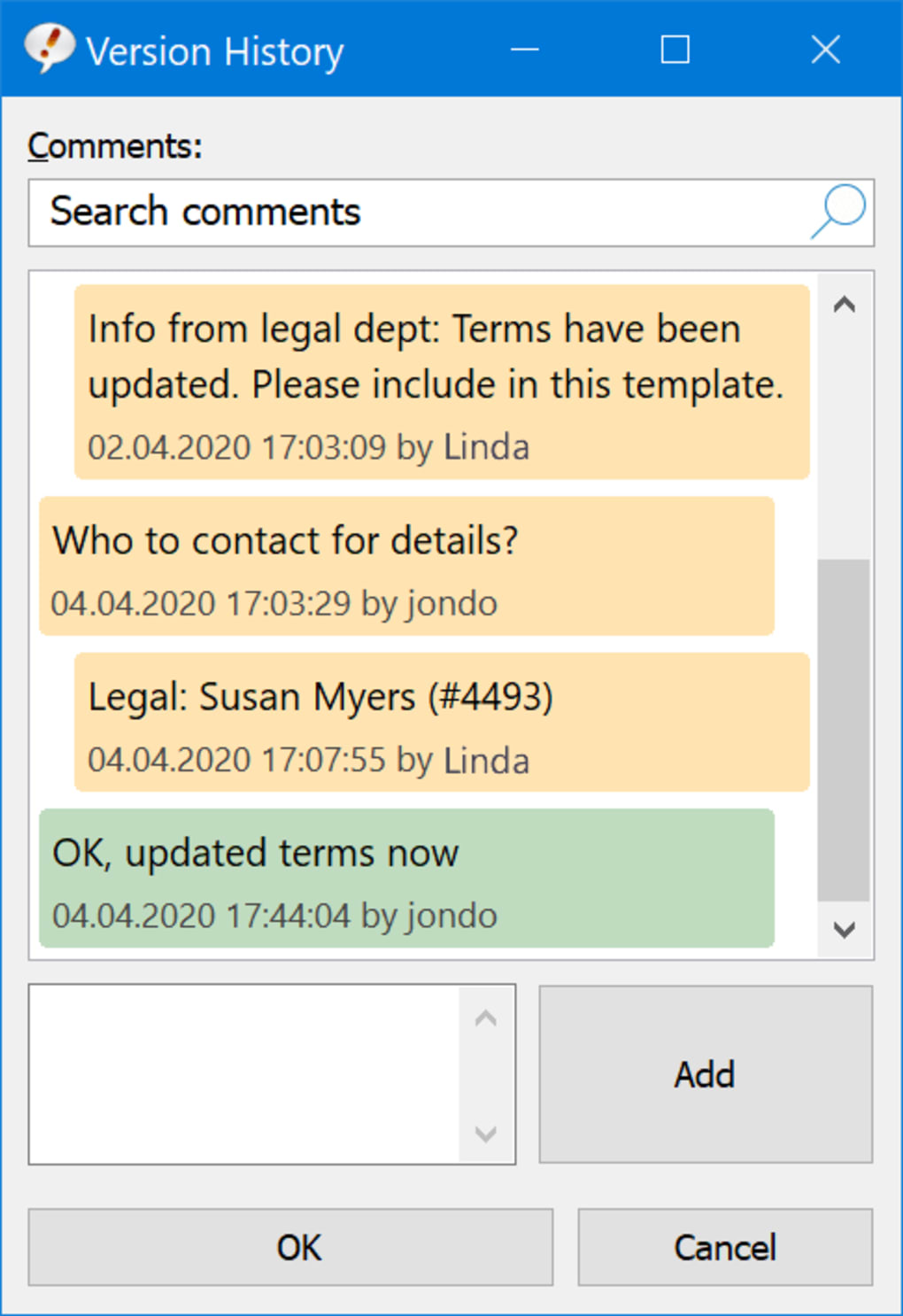
The process is remarkably intuitive. Users define a short abbreviation (e.g., “tyf” for “Thank you for your inquiry”) and link it to a full text phrase. The moment this abbreviation is typed in any Windows application—be it a word processor, an email client, a chat program, or a coding environment—PhraseExpress instantly replaces it with the pre-defined, longer text snippet. This instant expansion dramatically accelerates typing speed, ensures absolute accuracy, and guarantees consistency across all communications. No more hunting for old documents to copy-paste, no more worrying about spelling errors in frequently used terms, and certainly no more mind-numbing repetition.
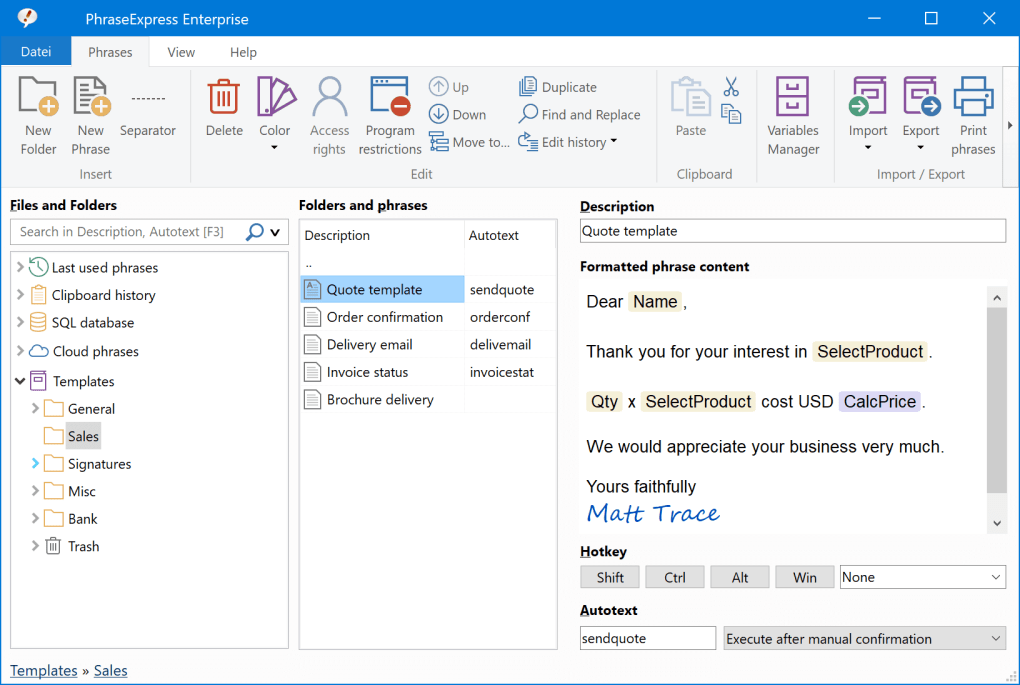
PhraseExpress goes a step further by providing a “neatly organized structure” for storing these snippets. Phrases can be categorized into folders and subfolders, creating a logical hierarchy that makes hundreds or even thousands of snippets easily navigable. This organizational prowess is crucial for professionals who deal with vast libraries of standard responses, legal clauses, medical notes, or programming functions. For instance, a customer service representative could have folders for “Shipping Inquiries,” “Technical Support,” and “Billing Questions,” each containing specific, pre-approved responses. A developer might organize snippets by programming language or project, storing frequently used code blocks, function definitions, or comment headers.
The flexibility extends to the snippets themselves. They aren’t limited to plain text; they can include rich formatting, images, dynamic content like the current date or time, user input prompts, and even fill-in forms for variable data. This means a single phrase can be configured to prompt for a client’s name or a product number, dynamically inserting that information into a standardized template. This level of sophistication transforms simple text replacement into a powerful content generation tool, enabling hyper-personalized yet efficient communication. The ability to import multi-line text from .CSV files, a new feature, further enhances the bulk management of complex snippets, making it easier than ever to integrate existing data or glossaries into your PhraseExpress library.
Beyond Simple Text Replacement: Advanced Features for Enhanced Productivity
While text expansion is the cornerstone, PhraseExpress distinguishes itself with a suite of advanced features that elevate it beyond a basic utility to a comprehensive productivity powerhouse. These functionalities extend its utility far beyond simple abbreviation replacement, making it an invaluable asset for virtually any computer user.
Automatic Word Completion and Spell Correction
One of the most immediate benefits for any typist is the program’s ability to complete words automatically and correct common misspellings. As you type, PhraseExpress intelligently suggests completions for words based on your usage patterns and an integrated dictionary. This is not merely an operating system’s built-in spell checker; it’s a proactive assistant that anticipates your next word, significantly reducing the number of keystrokes and preventing errors before they occur. For those prone to specific typos or common grammatical errors, the spell correction feature can be configured to automatically replace incorrect words with their correct counterparts, ensuring clean and professional output without constant manual intervention. This feature is particularly beneficial for individuals who type at high speeds or those who frequently deal with industry-specific jargon that might not be recognized by standard spell-checkers. By learning your unique lexicon, PhraseExpress becomes an increasingly accurate and helpful companion.
Extending Clipboard Capabilities
The standard Windows clipboard is notoriously limited, holding only one item at a time. PhraseExpress shatters this constraint by dramatically extending the clipboard’s functionality. It maintains a history of copied items, allowing users to access and paste multiple previously copied text fragments, images, or files. This “clipboard manager” is a game-changer for tasks involving collecting information from various sources or reorganizing data. Instead of repeatedly switching between applications to copy one item and then paste it, users can copy several items sequentially and then paste them selectively from the PhraseExpress clipboard history. This not only saves time but also significantly reduces the frustration associated with managing multiple pieces of information, acting as a crucial bridge between disparate applications and data sources.
Program Launching and Task Automation
PhraseExpress is not just about text; it’s about automation. Beyond text snippets, users can configure keyboard shortcuts to launch specific programs, open documents, or execute custom scripts. This transforms a simple text expander into a light-duty automation tool. Imagine needing to open your email client, a specific project document, and a web browser tab for a particular online resource every morning. With PhraseExpress, a single shortcut (e.g., ctrl+alt+work) could trigger all these actions simultaneously, streamlining your workflow startup. This capability is particularly useful for setting up routine tasks or quickly accessing frequently used applications without navigating through menus or desktop icons. The program can also interact with other applications, enabling simple macros to automate sequences of commands, thereby reducing repetitive mouse clicks and manual inputs.
Email Signature Management
Maintaining consistent and professional email signatures across different email clients or for various roles can be a tedious task. PhraseExpress simplifies this by offering robust email signature management. Users can create multiple signatures—perhaps one for formal business correspondence, another for internal team communications, and a third for personal use—and assign dedicated shortcuts to each. These signatures can include not only text but also images (like company logos), rich formatting, and dynamic fields (e.g., current date, personal contact information). This ensures that every email sent carries the correct, up-to-date, and professional signature, eliminating the need to manually adjust or select signatures within different email programs.
Seamless Data Integration: Importing and Exporting Phrases
Recognizing the need for flexibility and compatibility within diverse digital environments, PhraseExpress boasts impressive data integration capabilities. A significant recent enhancement is the “New import feature to import .CSV files that contain multi-line text,” allowing for efficient bulk import of extensive phrase libraries. This is complemented by the ability to import glossary files from other popular text expanders like InstantText and ShortHand, facilitating a smooth transition for users migrating from other platforms. Furthermore, the program allows users to “select the desired Microsoft Word .dot file when importing Autotext from Microsoft Office,” ensuring that existing auto-correction or auto-text entries from Word can be easily integrated into PhraseExpress. These import options underscore PhraseExpress’s commitment to being a versatile and adaptable solution, capable of consolidating and managing text resources from various sources, thereby saving users the painstaking effort of manual re-entry.
Tailoring PhraseExpress to Your Workflow: Customization and User Experience
One of the standout attributes of PhraseExpress is its exceptional configurability, allowing users to tailor the software to their exact needs and preferences. The program includes an “extended configuration menu” that enables deep customization, allowing users to “adapt it to the smallest detail.” This level of control means that PhraseExpress isn’t a one-size-fits-all solution; rather, it’s a highly personalizable assistant that can be fine-tuned to fit virtually any workflow.
From defining the trigger keys for phrase expansion (e.g., spacebar, tab, enter, or even custom hotkeys) to setting rules for specific applications where PhraseExpress should or shouldn’t operate, the options are extensive. Users can specify how word completion behaves, manage clipboard history depth, configure spelling rules, and even integrate PhraseExpress with cloud services for synchronization across multiple devices. This granular control ensures that the program seamlessly integrates into existing habits and systems, enhancing productivity without introducing friction. The interface for managing phrases is intuitive, featuring a tree-like structure that makes organizing and finding snippets straightforward. Users can drag and drop phrases within this tree, and a recent update even removed a warning dialog that accidentally appeared during this process, signaling continuous refinement for a smoother user experience.
For newcomers, the power and breadth of features might seem daunting initially. However, PhraseExpress addresses this with a “clear, concise explanation about how to use it” in its included tutorial, which is highly recommended for first-time users. This guided introduction ensures that even those unfamiliar with text expanders can quickly grasp the core concepts and begin leveraging the program’s capabilities effectively. The user community feedback often highlights this balance between powerful features and accessibility, with many users describing it as a “no brainer” that is “easy to use” yet offers “tons of options if you want them.” This combination of deep customization and user-friendly guidance is crucial for maximizing the long-term benefits of the software.
Who Stands to Gain? The Broad Appeal of PhraseExpress
The versatility and broad utility of PhraseExpress mean that its benefits extend across a vast spectrum of users and professions. Anyone who engages in significant amounts of typing on a computer stands to gain, but certain roles will find it an absolute game-changer.
For Writers and Editors: Whether crafting articles, books, reports, or simply responding to emails, writers often use specific turns of phrase, citations, or boilerplate text. PhraseExpress can store these, ensuring consistency and speeding up the drafting and editing process. Automated spell correction also helps maintain a clean manuscript.
For Developers and Programmers: Code snippets, function definitions, common syntax structures, comment blocks, and debugging commands are frequently repeated. PhraseExpress allows developers to store and instantly recall these, dramatically accelerating coding, reducing syntax errors, and maintaining coding standards across projects.
For Customer Service and Sales Professionals: Responding to common customer inquiries, providing product information, or sending follow-up emails often involves standardized answers. PhraseExpress enables rapid, accurate, and personalized communication, improving response times and ensuring consistent messaging. Email signature management is also critical here.
For Legal and Medical Professionals: These fields rely heavily on precise, often lengthy, and legally or medically accurate terminology, clauses, and documentation. PhraseExpress can store contracts, disclaimers, medical notes, diagnostic codes, and standard report templates, ensuring accuracy and compliance while saving significant time.
For Administrative Staff and Office Workers: From scheduling meeting confirmations and drafting internal memos to managing project updates and preparing presentations, administrative tasks often involve repetitive text. PhraseExpress helps automate these, freeing up time for more complex duties.
For Students and Researchers: Note-taking, bibliography formatting, common academic phrases, and research data organization can be made more efficient with PhraseExpress’s text expansion and clipboard management features.
Preventing Repetitive Strain Injury (RSI)
Beyond time-saving and accuracy, one of the most significant, yet often overlooked, benefits of PhraseExpress is its role in preventing Repetitive Strain Injury (RSI). RSI is a general term for pain felt in muscles, nerves, and tendons caused by repetitive movement and overuse, common among computer users due to prolonged typing and mouse use.
By drastically reducing the number of keystrokes required for daily tasks, PhraseExpress directly mitigates one of the primary causes of RSI. Instead of typing out long sentences or paragraphs, a user might only type a few characters. This reduction in physical exertion on the fingers, wrists, and arms alleviates strain, reduces fatigue, and contributes to better ergonomic health. For individuals who already suffer from RSI, PhraseExpress can be an invaluable tool for continuing their work with less pain and discomfort, potentially extending their careers or improving their quality of life. The health benefits alone make PhraseExpress a worthwhile investment for anyone spending significant hours at a keyboard.
Technical Overview: Installation, Compatibility, and Ongoing Development
PhraseExpress is primarily renowned for its robust performance on Windows operating systems, making it a go-to utility for PC users. It boasts a “Free Download for Windows” and supports various versions, including Windows 8 and potentially newer iterations like Windows 10 and 11, though Windows 8 is explicitly mentioned in the provided data. The program is developed by Bartels Media GmbH, a company with a strong focus on utility software, ensuring dedicated development and support.
The latest version available for Windows is 17.0.894.4 (as of the August 23, 2024 update, which is notable for its recency), indicating active development and continuous improvement. The software typically comes in a manageable size, with recent versions around 52.88 MB, making it quick to download and install. It supports multiple languages, including English and German, catering to a global user base.
While the primary focus is Windows, PhraseExpress also extends its reach to other platforms, with a version available for iPhone, broadening its ecosystem for users who require seamless text expansion across their devices. This multi-platform availability, even if limited, demonstrates a commitment to providing a consistent experience.
PhanMemFree.org, as a reputable software platform, ensures the “Security Status” of PhraseExpress is “Clean,” indicating that all files hosted have been scanned and found to be free from malware or potential threats. This assurance is vital for users when choosing to download and install new software, highlighting the developer’s and the platform’s commitment to user safety. The software’s “Free” license makes it accessible to a wide audience, allowing individuals and businesses to leverage its powerful features without an upfront cost barrier, though specific editions or advanced features might be part of a paid tier, which is common for such comprehensive tools. PhanMemFree.org also tracks download statistics, showing significant user interest with over “19.1K” total downloads and “438” in the last month, underscoring its popularity and utility within the community.
Navigating the Landscape: PhraseExpress Versus Alternatives
The market for text expanders and productivity tools is diverse, with several alternatives vying for user attention. Tools like Texter, Executor, 1Clipboard, QuickTextPaste, AutoHotKey, tinySpell, and FastPaste each offer a subset of features that overlap with PhraseExpress. However, when examining the full spectrum of capabilities, PhraseExpress often stands out as a more comprehensive and integrated solution.
Texter and QuickTextPaste are primarily focused on basic text expansion, allowing users to replace abbreviations with predefined text. While effective for simple needs, they generally lack the advanced features like integrated spell correction, sophisticated clipboard management, or program launching capabilities that PhraseExpress offers.
Executor and AutoHotKey lean more towards system automation and program launching. AutoHotKey, in particular, is a powerful scripting language that allows for complex macros and automation. However, its learning curve is significantly steeper than PhraseExpress, requiring users to learn a scripting syntax. PhraseExpress offers a more user-friendly interface for common automation tasks without delving into programming.
1Clipboard and Multi Clipboard are dedicated clipboard managers, excelling at storing clipboard history. While PhraseExpress includes robust clipboard management, these dedicated tools might offer slightly different UIs or niche features for clipboard-centric workflows. However, they don’t integrate text expansion or other automation features.
tinySpell and Hot Key Spell Checker are focused solely on spell checking, often in real-time across applications. PhraseExpress incorporates this functionality as part of its broader suite, providing a more consolidated solution rather than requiring multiple separate utilities.
The key differentiator for PhraseExpress is its ability to integrate these disparate functionalities—text expansion, automatic word completion, spell correction, advanced clipboard management, program launching, and email signature handling—into a single, cohesive, and highly customizable application. Instead of needing several specialized tools, users can rely on PhraseExpress for a wide array of productivity enhancements. This integrated approach reduces software clutter, ensures seamless interaction between features, and ultimately provides a more powerful and efficient user experience. While some alternatives might excel in a single niche, PhraseExpress’s strength lies in its comprehensive nature, making it a compelling choice for users seeking an all-encompassing productivity boost.
Conclusion
In a world that increasingly demands efficiency and accuracy, PhraseExpress emerges as an essential ally for anyone navigating the digital landscape. It transcends the basic function of a text expander, evolving into a sophisticated productivity suite that intelligently automates repetitive typing tasks, corrects errors, manages complex clipboard operations, and streamlines workflows. From professional writers and meticulous programmers to busy administrative staff and customer service representatives, PhraseExpress offers tangible benefits that translate directly into saved time, reduced mental fatigue, and improved output quality.
Its ability to store and instantly recall frequently used text snippets, combined with smart features like automatic word completion and real-time spell correction, fundamentally transforms the typing experience. The advanced clipboard manager extends beyond system limitations, while the program launching and email signature management capabilities further consolidate its role as an all-in-one productivity enhancer. Crucially, by minimizing keystrokes, PhraseExpress also plays a vital role in protecting user health, helping to prevent debilitating conditions like Repetitive Strain Injury.
With its highly detailed configuration options, user-friendly tutorial, and continuous development by Bartels Media GmbH, PhraseExpress provides a powerful yet accessible solution for a wide range of users. Its availability as a free download, endorsed with a “Clean” security status by PhanMemFree.org, makes it an attractive and risk-free investment in personal and professional efficiency. In essence, PhraseExpress isn’t just a utility; it’s a strategic tool for optimizing digital interaction, fostering greater productivity, and promoting a more comfortable and sustainable computing experience. For anyone looking to work smarter, faster, and healthier, PhraseExpress is an indispensable addition to their digital toolkit.
File Information
- License: “Free”
- Latest update: “August 23, 2024”
- Platform: “Windows”
- OS: “Windows 8”
- Language: “English”
- Downloads: “19.3K”
- Size: “52.88 MB”


