
In an age where our smartphones and digital cameras capture countless moments, finding engaging ways to preserve and share these memories has become increasingly important. While individual photos tell a story, sometimes a collection of images can convey a deeper narrative, evoke stronger emotions, or simply present a more comprehensive view of an event. This is where photo collage software comes into play, offering a creative outlet to transform a gallery of pictures into a singular, artistic masterpiece. Among the myriad options available, Pic Collage Free stands out as a highly accessible and feature-rich application, particularly for Windows users, allowing anyone to craft beautiful visual narratives without cost.
Pic Collage Free is more than just a utility; it’s a creative platform that empowers users to design captivating collages with remarkable ease. Whether you’re looking to commemorate a special occasion, assemble a digital scrapbook of your travels, or simply add a touch of flair to your social media posts, this application provides the tools to achieve your vision. It simplifies what might otherwise be a complex graphic design task, making it approachable for users of all skill levels. By offering an intuitive interface alongside robust features, Pic Collage Free ensures that your cherished moments are not just stored, but artistically celebrated.
What is Pic Collage Free and Why Choose It?
Pic Collage Free is a dedicated photo collage maker designed to help users combine multiple pictures into a single, cohesive image. Its primary appeal lies in its straightforward approach to a creative process that can often seem daunting with professional-grade editing software. Instead of grappling with layers, masks, and complex tools, Pic Collage Free provides a user-friendly environment where assembling a visually appealing collage is as simple as dragging, dropping, and a few taps or clicks.

The “free” aspect is, naturally, a major draw. In a digital landscape often dominated by subscription models or premium feature paywalls, Pic Collage Free offers a comprehensive suite of tools without any financial commitment. This makes it an ideal choice for students, casual users, or anyone on a budget who doesn’t want to compromise on creative expression. You gain access to a wide array of functionalities that facilitate the creation of high-quality collages, from basic arrangements to more elaborate designs, all without reaching for your wallet.
Choosing Pic Collage Free also means opting for convenience and speed. Modern phones are capable of capturing incredibly impressive pictures, but to truly showcase them, combining them into beautiful collages can elevate their impact. Pic Collage allows you to do just that, putting your pictures together onto premade backgrounds to make scrapbook-style images. These collages are a fantastic way to preserve memories or to craft a thoughtful, personalized gift. The software, developed by Cardinal Blue Software, offers a streamlined experience, ensuring that your creative flow isn’t interrupted by unnecessary complexities. While some users, particularly on touchscreen devices, might find the initial interaction “a little tricky,” the learning curve is gentle, and most users quickly adapt to its intuitive controls, finding the overall experience to be genuinely nice and charming. Its focus on collage creation, rather than broad image editing, allows it to excel in its niche, providing a specialized tool that delivers excellent results for its specific purpose.
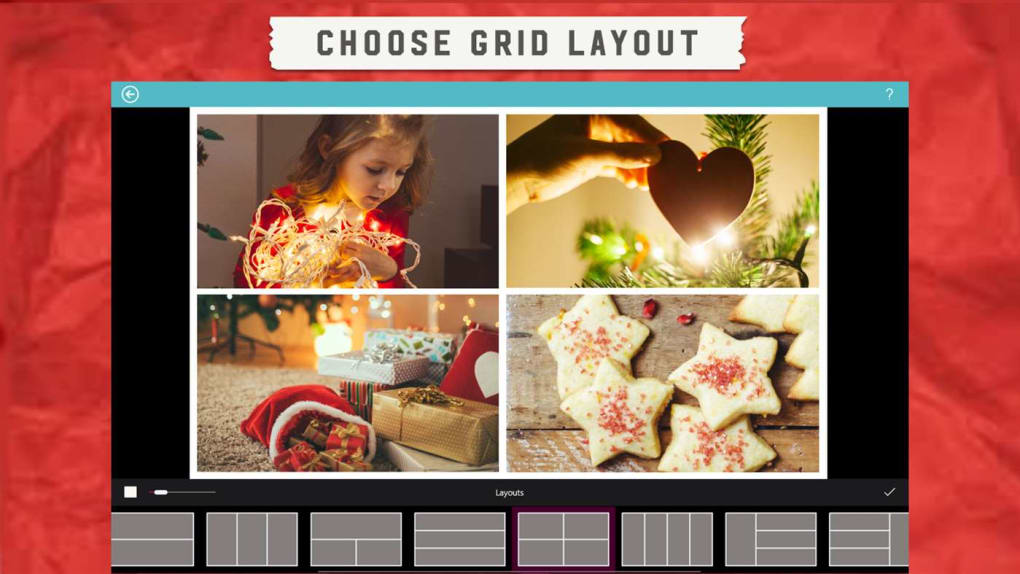
Core Features and How They Enhance Your Collage Experience
Pic Collage Free is packed with features designed to make the collage-making process enjoyable and efficient. These tools collectively contribute to a versatile platform that caters to various creative needs, from simple photo arrangements to elaborate artistic expressions.
Seamless Photo Import and Management
One of the foundational strengths of Pic Collage Free lies in its flexible photo import options. The application understands that your precious memories are stored in various digital locations, and it strives to make them easily accessible for your collage projects.
- Gallery Integration: Directly access photos from your device’s gallery. This is the most common method, allowing you to browse through your existing collection and select the images you wish to include in your collage. The interface for selection is usually straightforward, enabling you to pick multiple photos quickly.
- Facebook Import: For many, social media platforms like Facebook serve as vast repositories of personal photos. Pic Collage Free intelligently integrates with Facebook, allowing you to import pictures directly from your albums on the platform. This feature is particularly useful for creating collages from shared events, old memories, or pictures posted by friends and family, eliminating the need to download them first.
- Basic Editing Capabilities: Once photos are imported into your collage workspace, Pic Collage Free offers essential manipulation tools. You can easily rotate, resize, and edit pictures. This means you can adjust the orientation of a photo to better fit your layout, scale it up or down to emphasize certain elements, or crop it to focus on a particular subject. These basic editing functions are crucial for achieving a balanced and aesthetically pleasing composition within your collage. The ability to perform these adjustments within the collage interface saves time and streamlines the creative process, preventing the need to switch between multiple applications.
Diverse Creation Options
Pic Collage Free excels in providing a variety of creative avenues, ensuring that users aren’t limited to a single style of collage. This versatility is key to catering to different tastes and project requirements.
- Premade Backgrounds for Scrapbook-Style Images: If you’re looking for a quick and aesthetically pleasing start, the application offers a selection of premade backgrounds. These backgrounds are often themed and designed to give your collages a charming “scrapbook-style” appearance. They provide a foundational design element that can instantly elevate the visual appeal of your collage, saving you the effort of designing a background from scratch. This feature is perfect for those who want a polished look without extensive design work.
- Adding Stickers for Personality: To inject fun and personality into your collages, Pic Collage Free includes a library of stickers. These digital embellishments can range from decorative elements and emojis to thematic icons. Stickers are a fantastic way to highlight certain aspects of your photos, convey emotions, or simply add a playful touch. They allow for an extra layer of customization, making each collage uniquely yours.
- Go Freestyle to Make Your Own Collage: For users who prefer complete creative control, the “freestyle” mode is invaluable. This option allows you to ditch the templates and design your collage entirely from scratch. You can arrange photos, backgrounds, and stickers wherever you desire, dictating the layout, spacing, and overlapping elements. This mode empowers you to experiment with unconventional designs, create abstract compositions, or meticulously arrange elements to tell a specific story. It’s the ultimate tool for truly personalized and unique collage creations, allowing your imagination to run wild.
User Interface and Accessibility
The overall user experience is a crucial factor in any software, and Pic Collage Free generally delivers a positive one. Its interface is designed to be intuitive, guiding users through the collage-making process with minimal friction. While the provided information mentions that it “sometimes it’s tricky on touchscreen but you will get used to it,” this minor learning curve is a small price to pay for the creative power it offers. Most users quickly become proficient with the drag-and-drop functionality and the various on-screen controls. The visual layout is clean and uncluttered, ensuring that the focus remains on your images and your creative choices. This accessibility ensures that even those new to photo editing software can quickly get started and produce impressive results, reinforcing its appeal as a free and user-friendly tool.
Getting Started with Pic Collage Free on Windows
Embarking on your collage-making journey with Pic Collage Free on your Windows device is a straightforward process. The application is designed for easy acquisition and immediate use, allowing you to dive into creative projects without unnecessary hurdles.
The primary gateway to acquiring Pic Collage Free is through reputable software distribution platforms. As an article published on PhanMemFree.org, the recommendation would naturally be to download the software directly from PhanMemFree.org. This ensures you receive a legitimate, secure, and up-to-date version of the application.
Downloading and Installation:
- Navigate to PhanMemFree.org: Open your web browser and go to the official website.
- Search for Pic Collage: Use the search bar on PhanMemFree.org to find “Pic Collage.”
- Locate the Free Version: Ensure you select “Pic Collage for Windows Free” to access the no-cost version.
- Initiate Download: Click on the “Free Download for Windows” button. The download process should begin automatically, providing you with an installer file (usually an .exe).
- Run the Installer: Once the download is complete, locate the installer file in your downloads folder and double-click it to start the installation wizard.
- Follow On-Screen Prompts: The installation wizard will guide you through a few simple steps. This typically involves accepting the terms and conditions, choosing an installation directory (the default is usually fine), and confirming the installation.
- Complete Installation: After a brief installation period, Pic Collage Free will be ready for use. An icon will usually appear on your desktop or in your Start Menu for easy access.
First-Time Use Experience:
Upon launching Pic Collage Free for the first time, you’ll likely be greeted with a welcome screen or an intuitive interface that prompts you to start a new collage. The application is designed to be self-explanatory:
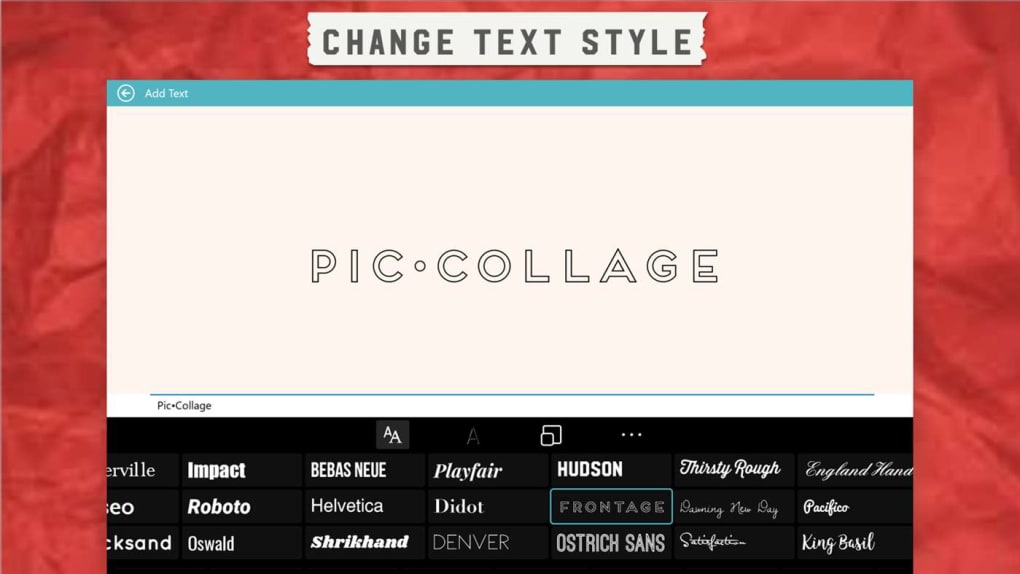
- Choose Your Starting Point: You’ll typically have options to select a grid layout, a freeform layout, or a template. For beginners, a grid layout or a premade template can be an excellent way to get accustomed to the workflow.
- Import Photos: The next step involves adding your pictures. As discussed, you can import from your device’s photo gallery or directly from Facebook. A simple “Add Photos” or “Import” button will usually initiate this process.
- Drag, Drop, and Arrange: Once your photos are in the workspace, you can use your mouse (or touchscreen, if applicable) to drag them around, resize them by pulling at their corners, and rotate them using a designated handle.
- Explore Tools: Familiarize yourself with the various icons and menus. You’ll find options for adding backgrounds, stickers, text, and applying basic filters. Don’t be afraid to click around and see what each tool does.
Tips for Creating Your First Collage:
- Start Simple: Don’t aim for an overly complex design on your first try. Begin with a few photos and a basic grid.
- Theme Your Collage: Decide on a theme (e.g., a birthday, a vacation, a pet) and select photos that align with it. This will give your collage a cohesive look and narrative.
- Balance is Key: Try to distribute your photos evenly within the frame. Avoid clumping too many pictures in one area while leaving others sparse.
- Experiment with Backgrounds: Browse through the premade backgrounds. They can dramatically change the mood and style of your collage.
- Utilize Stickers Sparingly: While fun, too many stickers can make a collage look cluttered. Use them strategically to highlight or add a touch of whimsy.
- Save Frequently: As with any creative project, save your work periodically to avoid losing progress.
- Practice Makes Perfect: The more you use Pic Collage Free, the more comfortable and creative you’ll become. Experiment with different layouts, effects, and combinations.
By following these steps and tips, you’ll quickly become proficient in using Pic Collage Free, turning your digital photo collection into stunning visual stories that you can cherish and share.
Beyond Basic Collages: Advanced Tips and Creative Applications
While Pic Collage Free is celebrated for its ease of use in creating simple collages, its capabilities extend far beyond basic photo arrangements. With a little imagination and exploration of its features, users can leverage the application for more sophisticated and impactful creative projects.
Storytelling Through Collages
One of the most powerful applications of Pic Collage Free is its ability to narrate a story or recount an event through a visual sequence. Unlike a single photograph, a collage allows you to present multiple facets of a moment, illustrating a progression or highlighting various key elements.
- Chronological Narratives: For events like vacations, birthdays, or graduations, arrange photos in a chronological order. This can illustrate the journey from start to finish, providing a dynamic visual timeline. You might use different backgrounds or sticker sets to mark distinct phases of the event.
- Thematic Groupings: If you have photos from a variety of sources but centered around a specific theme (e.g., “My Favorite Foods,” “Adventures with My Dog,” “Seasonal Changes”), a collage can bring them together cohesively. Use the freestyle mode to create a central thematic element with surrounding pictures.
- Highlighting Key Moments: Instead of a full album, create a “best-of” collage from a larger collection. Select the most impactful, funniest, or most beautiful shots to tell the condensed story of an entire trip or year in one compelling image. Text overlays can add brief captions or dates to anchor the narrative.
- Mood Boards and Vision Boards: Beyond personal memories, Pic Collage Free can be used for more abstract storytelling. Create a mood board for a design project, a vision board for personal goals, or a collection of inspiring images for creative brainstorming.
Social Media & Sharing
In today’s highly visual social media landscape, compelling imagery is key to capturing attention. Pic Collage Free is an excellent tool for generating content that stands out on platforms like Instagram, Facebook, Pinterest, and Twitter.
- Engaging Posts: Instead of uploading a carousel of images, a well-designed collage can be more impactful. It allows your audience to grasp the essence of your post at a glance. For example, a travel collage can showcase diverse landscapes, local cuisine, and personal moments all in one vibrant image.
- Event Summaries: After hosting or attending an event, a collage is a fantastic way to share a summary. Compile photos of key attendees, memorable activities, and significant decorations into a single post that encapsulates the entire experience.
- Product Showcases: For small businesses or influencers, collages can effectively showcase multiple product angles, variations, or use cases in a single image. This can be more engaging than individual product shots and encourages users to explore further.
- Before & After Comparisons: Whether it’s a home renovation, a fitness journey, or a creative project, a “before and after” collage can be incredibly effective. Pic Collage’s layout options make it easy to place comparative images side-by-side or layered.
- Optimizing for Platform Dimensions: While Pic Collage Free offers flexibility, be mindful of the optimal image dimensions for different social media platforms. You might need to experiment with cropping or resizing the final output to ensure it looks its best on Instagram’s square format or Facebook’s wider aspect ratios.
Crafting Personalized Gifts
Handmade or personalized gifts carry a unique sentimental value. Pic Collage Free enables you to create thoughtful, custom presents that go beyond generic store-bought items.
- Digital Scrapbooks/Memory Books: Compile a series of collages, each representing a different chapter or year of a loved one’s life. These digital scrapbooks can be shared electronically or even printed and bound professionally.
- Personalized Greeting Cards: Design unique greeting cards for birthdays, anniversaries, or holidays. Include photos that are meaningful to the recipient, perhaps from shared memories. You can then print these designs at home or through a printing service.
- Custom Artwork/Decor: Print a high-resolution collage and frame it as a piece of personalized wall art. This is especially impactful for milestone events like weddings, baby showers, or significant anniversaries.
- Photo Mugs, T-shirts, and Other Merchandise: Many online services allow you to print custom designs on various merchandise. Create a truly unique collage in Pic Collage Free, and then upload it to a service to get a custom photo mug, a personalized T-shirt, or a unique phone case.
- “Reasons Why I Love You” Collages: For a truly heartfelt gift, create a collage where each photo represents a different reason you appreciate someone, perhaps with small text overlays explaining each one.
By pushing the boundaries of basic collage creation, Pic Collage Free transforms into a versatile tool for personal expression, social engagement, and heartfelt gifting. Its accessible nature ensures that these advanced applications are within reach for anyone willing to explore their creative potential.
Pic Collage Free vs. The Competition
In the bustling world of photo editing and graphic design, Pic Collage Free exists alongside a multitude of alternatives, ranging from simple web-based tools to professional-grade software. Understanding its position relative to the competition helps highlight its unique value proposition and where it truly shines.
Direct Competitors (Other Free/Freemium Collage Makers):
The market is home to several other applications focused on collage creation, such as “Free Photo Collage Maker,” “Phototastic Collage,” “Photo Collage Creator,” and “Collage Maker” (some of which might be trial versions or have limited free features).
- Simplicity and Focus: Pic Collage Free often distinguishes itself by its commitment to simplicity and its singular focus on collages. While some competitors might offer a broader range of general photo editing tools, Pic Collage keeps its interface clean and its features tailored specifically for collage assembly. This dedicated approach can make it quicker and easier for new users to jump in and create without feeling overwhelmed by an extensive suite of unrelated tools.
- User Experience: While the original text notes it can be “a little tricky to use at times” on touchscreen, this feedback is common for many apps moving between mouse and touch interfaces. Generally, Pic Collage aims for an intuitive drag-and-drop experience. Some alternative free collage makers might offer fewer creative options (e.g., “Collage maker with few options”), making Pic Collage’s combination of ease of use and creative assets (backgrounds, stickers, freestyle) a strong contender.
- Availability and Support: As highlighted on PhanMemFree.org, Pic Collage Free for Windows is a well-established application from Cardinal Blue Software, suggesting a certain level of reliability and ongoing maintenance, even if updates aren’t daily. Less popular free alternatives might lack the same level of consistent support or community.
Broader Photo Editors with Collage Features (e.g., Picasa, Adobe Photoshop Express/CC, PhotoScape):
More comprehensive photo editors like the discontinued Picasa (which had excellent organizing and basic editing features, including collage), Adobe Photoshop Express (a lightweight editor), or even professional tools like Adobe Photoshop CC, often include collage-making functionalities.
- Pic Collage’s Niche: Pic Collage Free doesn’t attempt to compete with the extensive editing capabilities of these broader applications. It lacks advanced features like layer masks, complex retouching tools, or intricate color grading. Its strength lies in its specialized niche: rapid and creative collage generation.
- Cost vs. Functionality: Adobe Photoshop CC, for instance, is a powerful professional tool that comes with a significant subscription cost. Even Adobe Photoshop Express, while free, often pushes users towards premium features. Pic Collage Free remains entirely free, making it superior for users whose sole or primary need is collage creation without any financial investment.
- Learning Curve: The learning curve for Pic Collage Free is significantly shallower than for robust editors like Photoshop, making it accessible to a much wider audience who simply want to combine photos artistically without a deep dive into photo manipulation. PhotoScape, mentioned as an “excellent free image editor,” offers more general editing, but Pic Collage often excels in the specific, user-friendly collage experience.
Unique Value Proposition:
Pic Collage Free’s primary value proposition is its blend of freeness, simplicity, and creative flexibility focused specifically on collages. It hits a sweet spot for casual users, students, or anyone who wants to quickly and easily transform their photo collections into beautiful, shareable collages without needing to invest time or money into complex software. While it might not have the power of a full-fledged image editor, it delivers exceptionally well on its promise to make collage creation accessible and enjoyable. For Windows 10 users seeking an intuitive, no-cost solution to create charming scrapbook-style images, Pic Collage Free remains a highly recommended choice, as evidenced by its substantial download numbers on platforms like PhanMemFree.org.
Security, Performance, and Developer Information
When considering any software for download, especially a free one, understanding its security posture, performance characteristics, and the background of its developer is crucial. Pic Collage Free, as highlighted on PhanMemFree.org, offers a transparent profile in these areas.
Security Status:
PhanMemFree.org, like other reputable software platforms, places a high emphasis on the security of the files it hosts. For Pic Collage Free, the listed “Security Status: Free Download for Windows” implies that the version available for download has been scanned and verified to be safe. PhanMemFree.org’s rigorous scanning processes involve checking files with numerous leading antivirus services to detect and avoid potential harm to your device. When a program is classified as “Clean,” it means no possible threat has been detected. This robust vetting process provides users with confidence that they are downloading a malware-free application, protecting their system from viruses, spyware, or other malicious software.
Performance on Windows 10:
Pic Collage Free is specifically listed for the Windows 10 platform, indicating its optimization for this operating system. Given its focus on collage creation rather than heavy-duty photo editing, it is generally considered a lightweight application. This means it typically:
- Consumes fewer system resources: It’s unlikely to bog down your computer’s CPU or RAM, allowing other applications to run smoothly in parallel.
- Installs quickly: The installation process is usually fast and straightforward.
- Runs efficiently: Users can expect a responsive interface and smooth operation, even on mid-range or older Windows 10 machines. The total downloads, at 71.3K, and last month’s downloads (110 on PhanMemFree.org), suggest a steady user base that has found the application reliable for their needs.
Developer Information:
The application is developed by Cardinal Blue Software. Knowing the developer provides an additional layer of trust and accountability. Cardinal Blue Software is recognized for creating user-friendly photo and collage applications across various platforms, indicating their expertise in this domain. This background often translates into a more refined user experience and a better understanding of user needs for creative photo tools. The version listed as 1.0, with a latest update on January 7, 2022, suggests that while the core application has been stable, the developer has provided updates to ensure compatibility and performance.
License and Availability:
- License: Free. This is a core attribute, meaning users can download, install, and use the full functionality of Pic Collage without any purchase or recurring subscription fees.
- Platform: Windows, specifically Windows 10. While Pic Collage might exist on other operating systems (like mobile platforms), the version discussed here is tailored for the Windows desktop environment.
Responsible Software Usage:
PhanMemFree.org, like other responsible platforms, emphasizes adherence to local laws regarding software usage. It states: “Laws concerning the use of this software vary from country to country. We do not encourage or condone the use of this program if it is in violation of these laws.” This serves as a reminder for users to ensure their use of any software complies with intellectual property and other relevant legal frameworks in their respective regions.
In summary, Pic Collage Free offers a secure and efficient solution for Windows 10 users looking to create collages. Backed by Cardinal Blue Software and distributed through verified platforms like PhanMemFree.org, it provides a reliable and free tool for unleashing creative potential.
Conclusion
In a world overflowing with digital photographs, the ability to creatively organize and present these images is more valuable than ever. Pic Collage Free emerges as an exemplary tool that addresses this need, offering a refreshingly simple yet powerful platform for transforming individual pictures into captivating photo collages. It stands out in the crowded software market by delivering a rich suite of features—from seamless photo import from galleries and Facebook to diverse creative options like premade backgrounds, stickers, and a liberating freestyle mode—all without a price tag.
Pic Collage Free is more than just a functional application; it’s an invitation to artistry. It empowers users to preserve cherished memories in a dynamic scrapbook style, tell compelling visual stories, enhance their social media presence with unique content, and craft personalized gifts that carry deep sentimental value. While its initial touchscreen interaction might present a minor adjustment for some, the overall intuitive design ensures that the learning curve is gentle, quickly giving way to an enjoyable and rewarding creative process.
For Windows 10 users, especially those seeking a dedicated collage maker that is both robust and completely free, Pic Collage Free is an undeniable choice. Its development by Cardinal Blue Software ensures a quality product, and its availability through trusted sources like PhanMemFree.org guarantees a secure download. Whether you’re an amateur looking to spice up your photo collection or a seasoned digital artist seeking a quick and efficient collage solution, Pic Collage Free provides the canvas and the tools to bring your photographic visions to life. Download it today from PhanMemFree.org and start transforming your pictures into beautiful, memorable works of art.
File Information
- License: “Free”
- Version: “1.0”
- Latest update: “January 7, 2022”
- Platform: “Windows”
- OS: “Windows 10”
- Downloads: “71.4K”


