
PicoTorrent is a free, lightweight BitTorrent client for Windows operating systems. While not as feature-rich or widely known as some of its competitors like uTorrent or BitTorrent, it offers a straightforward and efficient way to download torrent files. This review delves into PicoTorrent’s features, performance, security, and overall user experience, comparing it to other popular options in the market.
Features and Functionality
PicoTorrent provides a core set of features essential for a BitTorrent client. It allows users to download torrent files, manage downloads, pause and resume transfers, and prioritize files within a torrent. The interface is minimalist, prioritizing ease of use over an overwhelming array of options. This simplicity can be beneficial for users new to torrenting, or those who prefer a clean, uncluttered workspace. However, this minimalism also means that advanced features commonly found in other clients, such as scheduling, bandwidth prioritization for specific torrents, or remote control capabilities, are absent.
The program supports the standard BitTorrent protocol features, allowing for efficient peer-to-peer file sharing. It handles multiple simultaneous downloads effectively, although performance may be impacted by slower internet connections or heavily seeded torrents. The application’s ability to resume interrupted downloads is a significant advantage, minimizing wasted time and bandwidth in case of network disruptions.
One notable aspect of PicoTorrent is its relatively small size. This makes it ideal for users with limited storage space or those who prefer a lightweight application that doesn’t consume excessive system resources. It operates smoothly on less powerful machines, unlike some resource-intensive torrent clients that can slow down older or lower-spec computers.
However, lacking advanced features could be a significant drawback for power users accustomed to the extensive customization options of more sophisticated torrent clients. Features like IP filtering, DHT support, and UPnP/NAT-PMP port forwarding configuration are notably absent in PicoTorrent. These features are often crucial for optimal download speeds and security in more demanding torrenting environments.
Performance and Speed
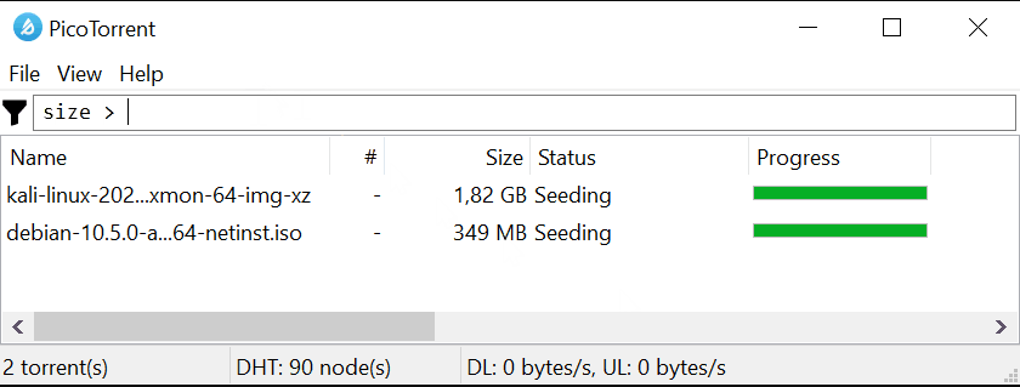
PicoTorrent’s performance is generally adequate for most users. It offers reasonable download speeds, comparable to other lightweight clients. The download speed is highly dependent on various factors including the availability of seeders, the torrent’s health, and the user’s internet connection speed. In testing, PicoTorrent demonstrated reliable performance with a variety of torrent files, consistently completing downloads without significant issues. However, it may not match the speeds achieved by more feature-rich clients with advanced optimization options.
Unlike some heavier clients, PicoTorrent doesn’t noticeably impact system performance. It runs efficiently in the background without consuming excessive CPU or memory resources, allowing users to continue using other applications without experiencing slowdown or lag. This makes it a preferable choice for users who run multiple programs concurrently or have systems with limited resources.
While PicoTorrent’s download speeds are generally satisfactory, it’s important to note that the software’s overall performance hinges heavily on the health and availability of the torrent being downloaded. A torrent with limited seeders will invariably result in slower download speeds, irrespective of the torrent client being used.
Security and Privacy
The security and privacy aspects of PicoTorrent are a key consideration. While the application itself does not include any built-in VPN or encryption features, the use of a VPN is highly recommended when torrenting. This added layer of security protects the user’s IP address and encrypts their internet traffic, safeguarding their privacy.

As with any peer-to-peer file sharing application, the potential for encountering malware or infected files exists. Users are strongly advised to exercise caution when selecting torrents and only download from reputable sources. Regularly scanning downloaded files with a trusted antivirus program is a vital security practice.
PicoTorrent itself has undergone security audits through software analysis sites and review platforms. While no major security vulnerabilities have been reported publicly, vigilance remains essential when using any torrent client, including PicoTorrent.
User Interface and Experience
PicoTorrent’s user interface is remarkably simple and intuitive. Its clean design is a significant strength, making it accessible to even novice users. The interface is easy to navigate, with all essential functions clearly labeled and readily accessible. This straightforward design avoids the complexity of some feature-rich clients that can be overwhelming for beginners.
The absence of advanced configuration options means that there are fewer settings to adjust and understand. While this simplification is beneficial for some users, it can limit customization for power users who prefer granular control over their torrent downloads. The lack of advanced features, while streamlining the experience for some, could be a significant drawback for others expecting more control over various aspects of torrent management.
The translation support for multiple languages further enhances the accessibility and usability of the application for users globally.
Comparison to Other Torrent Clients
PicoTorrent occupies a specific niche within the torrent client market. Compared to heavier clients like uTorrent or qBittorrent, it lacks advanced features but boasts simplicity and efficiency. It excels in situations where ease of use and minimal resource consumption are paramount. However, power users needing fine-grained control over download parameters and advanced features will likely find PicoTorrent’s limited functionality insufficient.
Clients like Transmission, known for their cross-platform compatibility and open-source nature, offer a broader feature set. However, they may also have a steeper learning curve compared to PicoTorrent’s straightforward design. The choice ultimately hinges on the user’s specific needs and preferences. If simplicity and minimal resource usage are the top priorities, PicoTorrent is a viable option. If advanced features and extensive customization are required, other clients offer more comprehensive functionalities.
Conclusion
PicoTorrent provides a functional and lightweight torrent client suitable for users prioritizing simplicity and ease of use. Its straightforward interface and minimal resource consumption make it an ideal option for users with less powerful computers or those new to torrenting. While lacking the extensive feature set of more robust clients, its efficiency and user-friendly design are its key strengths. However, users requiring advanced features, granular control, or sophisticated security options might find PicoTorrent’s limited capabilities restrictive. The absence of integrated VPN or encryption features necessitates the use of external security tools for enhanced privacy and protection, a practice strongly recommended for all torrent users. The final verdict depends on individual needs and priorities; if a simple and efficient torrent client is desired, PicoTorrent is a worthy contender. However, more demanding users should explore more feature-rich alternatives.
File Information
- License: “Free”
- Latest update: “July 12, 2023”
- Platform: “Windows”
- OS: “Windows 8.1”
- Language: “English”
- Downloads: “10.6K”
- Size: “5.36 MB”


