
PicSay Pro is a mobile photo editing application designed for quick, easy enhancements and fun additions to your images. This review will delve into its strengths, weaknesses, and overall usability, helping you decide if it’s the right photo editor for your needs.
Ease of Use and Core Functionality
PicSay Pro’s primary selling point is its user-friendly interface. The app prioritizes simplicity and speed, making it ideal for those who want to quickly edit photos without navigating complex menus or mastering intricate tools. The process of selecting a picture from your gallery is straightforward, offering various resolution choices to suit your needs. This intuitive design makes it accessible to users of all ages and technical skill levels. The small file size is another advantage, ensuring it doesn’t consume excessive storage space on your device. This focus on efficiency ensures a smooth and hassle-free photo enhancement experience, even on devices with limited storage capacity.
The app’s core editing functions are designed for rapid adjustments. While it doesn’t offer the extensive range of tools found in professional-grade editors, it provides a sufficient selection for casual users. These tools allow for quick enhancements, making it suitable for on-the-go edits and immediate sharing on social media. This is particularly beneficial for users who prefer a quick and easy editing process without the need for in-depth knowledge or extensive time investment.
Fun and Creative Features: Adding Whimsy to Your Photos

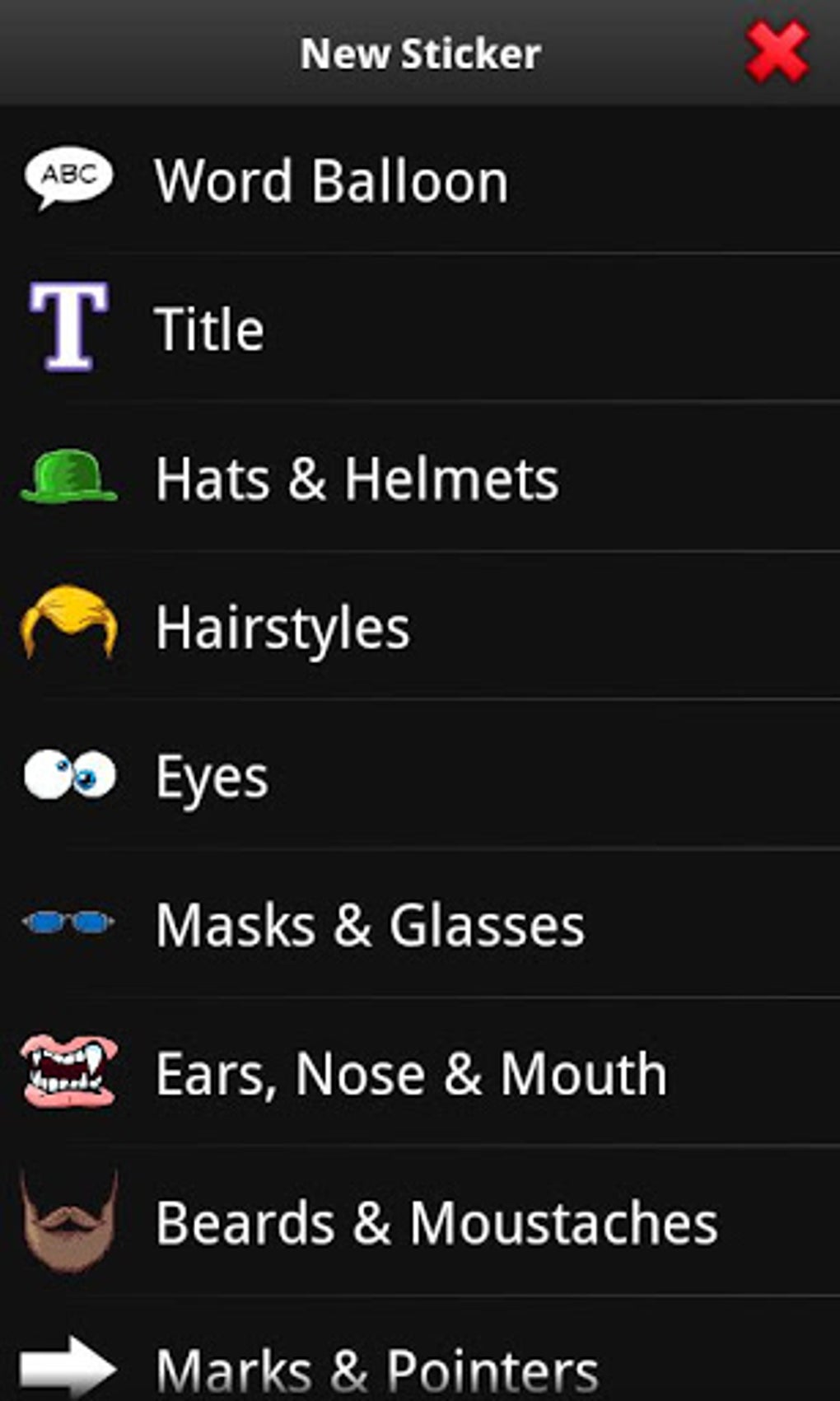
One of PicSay Pro’s most appealing aspects is its collection of “crazy elements.” These include a diverse range of fun features that transform ordinary photos into playful creations. Users can add speech balloons to inject personality and narrative into their images, apply text using a variety of fonts for creative captions, or insert props like hats and sunglasses to add a humorous or stylish touch. The level of customization offered is impressive; users can move, rotate, and resize these elements to perfectly match their vision.
This playful element sets PicSay Pro apart from many other photo editing apps. It caters to a user base that appreciates a quick and fun approach to photo editing. The ability to seamlessly integrate these quirky elements into photos allows for a high degree of personalization and creative expression, transforming everyday pictures into unique and shareable content. This makes it a particularly popular choice among younger users who appreciate its creative flexibility.
Limitations and Considerations: Where PicSay Pro Falls Short
Despite its strengths, PicSay Pro isn’t without its limitations. One significant drawback is the lack of batch processing capabilities. This means users must edit each photo individually, which can be time-consuming, especially when working with multiple images. This limitation significantly impacts productivity and can be a considerable drawback for users who regularly edit large batches of photographs.
Furthermore, the app’s interface might feel somewhat dated compared to newer, more modern photo editing applications. While its simplicity is a strength for some, others may find it lacking in visual appeal and intuitive navigation. The interface design doesn’t necessarily reflect the latest trends in user interface design, and this may affect the overall user experience for those accustomed to more visually appealing and modern interfaces.
Perhaps the most misleading aspect is the “Pro” in its name. While PicSay Pro offers a range of features, it’s not entirely free from ads. The presence of advertisements, even in the free version, might be a source of frustration for some users, and unlocking all the features requires a premium upgrade. This can be a drawback, particularly for users expecting a fully-featured, ad-free experience as suggested by the name.
Comparison with Alternative Apps
PicSay Pro occupies a niche in the mobile photo editing market. While it excels in its simplicity and fun features, it lacks the advanced capabilities of professional-grade editors like Photoshop Express or Snapseed. However, compared to simpler, more basic photo editors, it stands out due to its wider range of creative elements and editing options. The balance between simplicity and creative features makes it a unique contender in the market.
Consider other options if you need advanced features like complex layer manipulation, precise color correction, or powerful retouching tools. However, if you prioritize quick, easy, and fun editing with a focus on playful additions, PicSay Pro is a strong contender. Choosing the right app depends heavily on individual needs and priorities. If simplicity and a quick edit are key, PicSay Pro fits the bill. However, if more advanced functionalities are needed, other applications are better suited.
Overall Assessment: Is PicSay Pro Worth It?

PicSay Pro offers a unique blend of simplicity and creative fun. Its straightforward interface, quick editing tools, and playful elements make it a delightful choice for casual users who want to add a touch of personality and whimsy to their photos. The small file size and low system requirements are additional benefits.
However, the absence of batch processing, a potentially dated interface, and the presence of ads in the free version should be considered. The “Pro” moniker might be a bit of a misnomer given these limitations. The decision of whether or not it’s “worth it” hinges entirely on your expectations and priorities.
If you’re looking for a powerful, feature-rich photo editor for extensive projects or professional work, PicSay Pro isn’t the ideal choice. However, if you need a quick, easy, and fun way to enhance your photos with creative elements without the complexity of advanced tools, PicSay Pro could be the perfect fit. It effectively fills its niche as a lighthearted and user-friendly mobile photo editor, best suited for casual users who value speed and creative expression over intricate editing capabilities. Its strengths lie in its simplicity and fun features, making it a viable option for many casual users. The need for a premium upgrade to unlock all features, however, should be considered alongside the application’s strengths.
File Information
- License: “Free”
- Version: “1.8.0.5”
- Latest update: “July 15, 2025”
- Platform: “Android”
- OS: “Android 9.0”
- Language: “English”
- Downloads: “230.4K”
- Size: “1.43 MB”
- Download Options: “APK, Google Play”
- Filename: “com-shinycore-picsaypro-17301509-47692220-1ab57be83fd2789ac77e0a3ff5ae4746.apk”


