
Picture Doctor is a powerful and versatile software application designed to recover and repair damaged or corrupted JPEG and PSD image files. This specialized tool goes beyond simple image fixes, offering a robust solution for restoring images from various sources and conditions, ensuring that precious memories or important work aren’t lost due to file corruption. Whether you’re dealing with a corrupted hard drive, a damaged flash drive, or simply a file that has become unexpectedly unreadable, Picture Doctor provides a user-friendly method for regaining access to your visual data.
Understanding Image Corruption and the Need for Repair
Image files, like any digital data, are susceptible to corruption. This corruption can manifest in various ways, ranging from minor visual artifacts to complete data loss, rendering the image unusable. The causes of image corruption are diverse:
- Hard drive failures: Mechanical issues, bad sectors, or sudden power loss can damage image files stored on a hard drive.
- Flash drive malfunctions: Similar to hard drives, flash drives can suffer from physical wear, data corruption, or unexpected removal from the system, resulting in damaged images.
- Software errors: Bugs in image editing software or other applications can sometimes lead to file corruption.
- Incomplete downloads or transfers: Downloading or transferring an image before it is fully complete can lead to a partially corrupted file.
- Virus or malware attacks: Malware can intentionally damage or corrupt files, including image files, as part of its destructive payload.
- File system errors: Problems with the file system itself, like a corrupted file table, can render files inaccessible.
The consequences of image corruption can be significant, especially when dealing with irreplaceable photos or crucial design files. The loss of memories, business documents, or creative work can be frustrating and costly. Picture Doctor serves as a crucial tool to mitigate these risks, providing a means to recover and repair valuable image data.
Picture Doctor’s Capabilities: Repairing JPEG and PSD Files
Picture Doctor’s core functionality centers on its ability to repair damaged JPEG and PSD files. While both file formats serve different purposes (JPEG for compressed images, and PSD for layered Photoshop files), Picture Doctor addresses the common problems associated with corruption in both.
For JPEG files, Picture Doctor is able to recover images while preserving their original dimensions and color palette as much as possible. The software intelligently analyzes the corrupted data, identifying and repairing areas of damage to reconstruct a viewable image. While it does not restore the original JPEG format directly, it saves the repaired image in BMP format. This lossless format preserves all image data, ensuring that no information is lost during the repair process. The BMP file can then be easily converted to any desired format, such as JPEG, PNG, or TIFF, using standard image editing tools.
The handling of PSD files is equally impressive. Picture Doctor can recover damaged layered Photoshop files, preserving as much of the layered data as possible. This is crucial for designers, as the loss of layer information can significantly impact the ability to edit and rework the image. The recovery process maintains the integrity of the layers, allowing users to continue working with the recovered image as if it were intact. The preserved layers enhance the editing possibilities after the repair is complete, making Picture Doctor an indispensable tool for professionals.
Efficient Batch Processing for Multiple File Repair
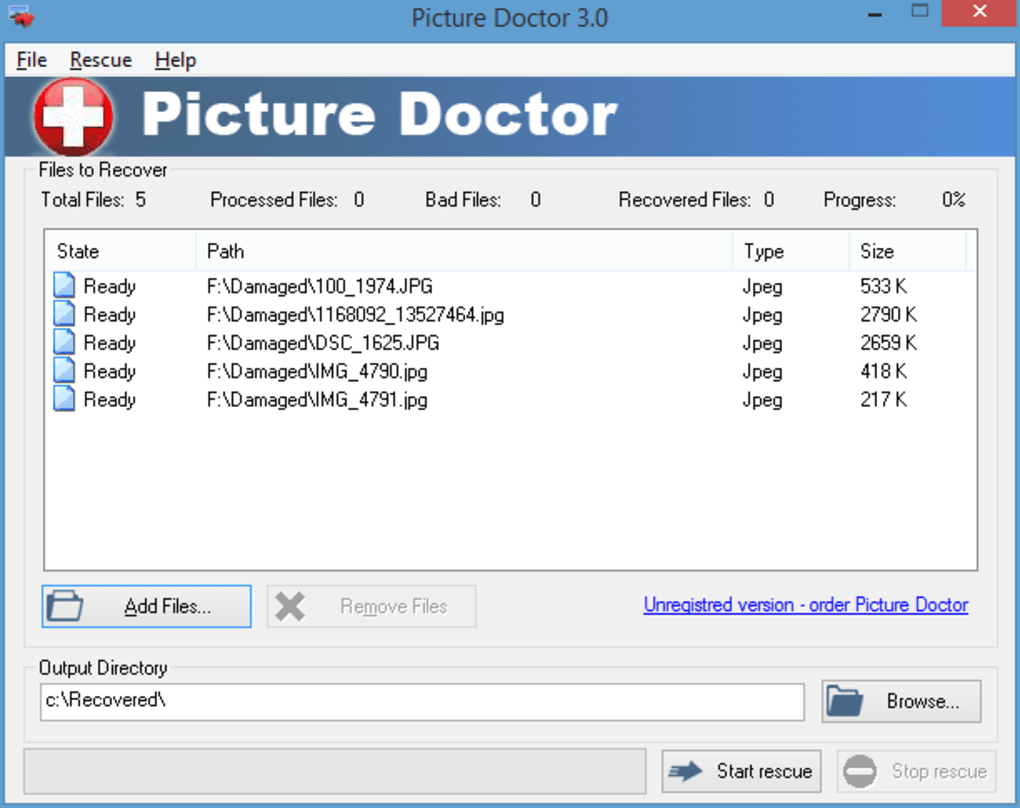
One of the significant advantages of Picture Doctor lies in its batch processing capabilities. This feature allows users to simultaneously repair multiple damaged image files with a single operation, dramatically reducing the time and effort required to recover a large number of corrupted images. This is particularly beneficial when dealing with extensive collections of photos or design work affected by a hard drive failure or similar event. Instead of manually repairing each file individually, Picture Doctor provides a streamlined process to handle multiple repairs concurrently, greatly improving efficiency.
User-Friendly Interface and Simple Workflow
Picture Doctor’s intuitive user interface ensures that the repair process is accessible to users of all technical skill levels. The software features a clear and straightforward design, making it easy to navigate and utilize its capabilities. Users simply need to select the damaged files they wish to repair, and the software will guide them through the process with minimal input. The simple workflow of “select, repair, save” makes it ideal for both casual users and experienced professionals needing a quick and efficient solution.
Beyond Repair: Protecting Your Images from Future Corruption
While Picture Doctor provides an effective solution for recovering damaged images, proactive measures are essential to prevent future corruption. Here are some tips to safeguard your valuable visual data:
- Regular backups: Implement a robust backup system to create regular copies of your image files. This allows you to easily restore your data in case of corruption or loss. Consider cloud storage, external hard drives, or network-attached storage (NAS) for backup options.
- Data protection software: Use antivirus and anti-malware software to protect your system from viruses and malware that could damage your files.
- Safe removal practices: Ensure that you safely remove any external storage devices, such as flash drives, before disconnecting them from your computer. Improper removal can lead to file corruption.
- Regular hard drive maintenance: Conduct routine maintenance checks on your hard drives to detect and fix potential issues before they cause significant damage.
- Use a reliable file system: Ensure you use a stable and reliable file system that effectively handles data integrity and error correction.
- Avoid sudden power outages: Protect your computer from power surges and sudden outages using a surge protector and UPS (Uninterruptible Power Supply) to prevent data loss.
Conclusion: A Vital Tool for Image Recovery and Preservation
Picture Doctor stands out as a comprehensive and highly effective tool for restoring damaged JPEG and PSD image files. Its ability to repair corrupted images, preserving original dimensions, color palettes, and layered information (for PSDs), makes it indispensable for users facing data loss. The batch processing feature significantly enhances efficiency, while the user-friendly interface simplifies the recovery process for users of all technical backgrounds. By combining Picture Doctor’s powerful capabilities with proactive data protection strategies, users can effectively protect their valuable image collections and prevent the frustration and potential loss associated with corrupted files. The program serves as a powerful safeguard against data loss, ensuring that precious memories and important work remain accessible.
File Information
- License: “Trial version”
- Latest update: “April 16, 2024”
- Platform: “Windows”
- OS: “Windows XP”
- Language: “English”
- Downloads: “37K”
- Size: “6.45 MB”


