
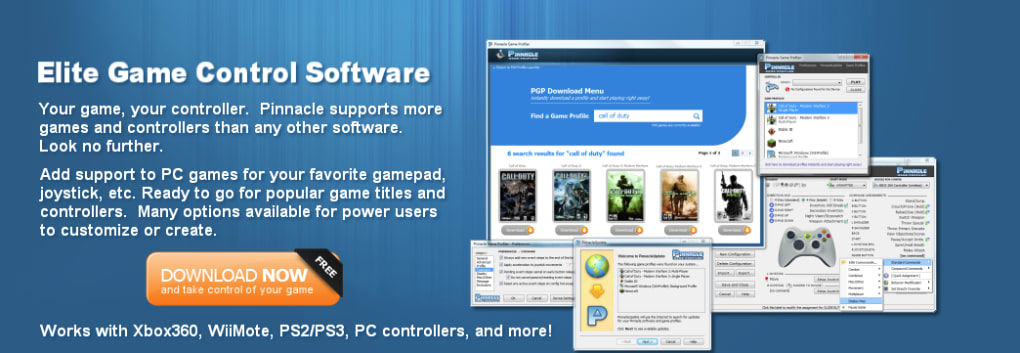
Pinnacle Game Profiler is a powerful utility designed to bridge the gap between game controllers and PC gaming. Its primary function is to enable users to seamlessly emulate keyboard and mouse inputs using their preferred gamepad, joystick, or other controllers. This functionality proves invaluable for gamers who wish to enjoy their favorite titles on PC without the limitations often imposed by native controller support. In essence, Pinnacle Game Profiler acts as a sophisticated translator, allowing controllers designed for consoles to function flawlessly within the PC gaming ecosystem.
Taking Control: Enhanced Gameplay and Customization
Many PC games lack robust native controller support, leaving gamers frustrated with awkward or unresponsive controls. Pinnacle Game Profiler elegantly solves this problem by providing a customizable interface for mapping controller inputs to keyboard and mouse commands. This level of customization empowers users to tailor their gaming experience, optimizing controls for individual preferences and play styles. No longer are players confined to limited default mappings; Pinnacle Game Profiler allows for precise adjustments, creating a truly personalized gaming environment.
Beyond basic button mapping, Pinnacle Game Profiler offers advanced features to further enhance gameplay. The ability to adjust controller sensitivity, dead zones, and response curves provides granular control over in-game actions, allowing players to fine-tune their input for optimal performance. This precision is crucial in fast-paced games where even subtle adjustments can significantly impact the outcome. For users seeking further optimization, Pinnacle Game Profiler allows for the adjustment of CPU priority, ensuring smoother gameplay even on systems with less powerful processors. This feature is especially beneficial for resource-intensive games.
The software’s versatility extends beyond basic controller mapping. It can handle a wide array of controllers, from standard gamepads to more specialized gaming peripherals. This broad compatibility makes Pinnacle Game Profiler an extremely adaptable tool, catering to diverse user setups and preferences. The software’s strength lies in its ability to transform a simple controller into a versatile input device capable of performing complex actions with precision and accuracy.
Getting Your Game On: Streamlined Setup and Background Operation
Pinnacle Game Profiler distinguishes itself through its user-friendly installation process and intuitive interface. The software is designed to be easily accessible, requiring minimal technical expertise to set up and configure. This ease of use is a significant advantage, ensuring that gamers of all skill levels can benefit from its features without needing extensive troubleshooting or technical assistance. The software’s straightforward design facilitates quick setup, allowing users to quickly start enjoying their games with optimized controller input.
A key benefit of Pinnacle Game Profiler lies in its seamless background operation. Once installed and configured, the software runs discreetly in the background without impacting system performance or interfering with other applications. This unobtrusive nature ensures that the program remains a helpful tool without becoming a burden on system resources. Furthermore, the software actively searches for updates, ensuring that users always have access to the latest features, performance enhancements, and bug fixes. This automatic update feature keeps the software running optimally and addresses any potential compatibility issues proactively.
Pros and Cons: A Balanced Perspective
Like any software, Pinnacle Game Profiler comes with its own set of advantages and disadvantages. Understanding these aspects allows users to make an informed decision about whether the software aligns with their specific needs and expectations.
Pros:
- Easy Installation: The installation process is straightforward and requires minimal technical expertise.
- Broad Compatibility: Supports a wide range of game controllers and gaming peripherals.
- Background Operation: Runs discreetly in the background without significant system resource consumption.
- Automatic Updates: Regularly checks for updates to ensure optimal performance and compatibility.
- Customizable Profiles: Allows users to create custom profiles for individual games, optimizing control settings for specific titles.
- Advanced Features: Provides granular control over controller sensitivity, dead zones, and response curves.
- CPU Priority Adjustment: Enables users to prioritize CPU allocation to the game for smoother performance.
Cons:
- Memory Consumption: The software can consume a noticeable amount of system memory, which might impact performance on systems with limited RAM.
- Learning Curve: While relatively user-friendly, some users may find the advanced features require a learning curve.
- Limited Scope: Primarily focuses on controller emulation; it does not provide additional gaming-related functionalities.
- Not Ideal for Novices: Although designed to be accessible, novice users may require some time to fully grasp the software’s capabilities.
Alternatives and Comparisons
While Pinnacle Game Profiler stands out as a robust and feature-rich option, several alternative programs offer similar functionalities. Consider these alternatives before making a purchasing decision:
-
Xpadder: A free, open-source alternative, Xpadder provides basic controller mapping capabilities, but it lacks the advanced features and customization options of Pinnacle Game Profiler. It serves as a good option for users with basic needs and those who prefer free software.
-
DS4Windows: Specifically designed for PlayStation DualShock 4 controllers, DS4Windows provides excellent support for these controllers on PC. However, its compatibility with other controllers is limited compared to Pinnacle Game Profiler.
- AntiMicro: A free and open-source program focusing on keyboard and mouse remapping and macro functionality. While not exclusively a controller emulator, it can be used in conjunction with a controller for custom mappings.
Ultimately, the choice between Pinnacle Game Profiler and its alternatives depends on individual needs and priorities. Pinnacle Game Profiler’s comprehensive features and advanced customization options justify its cost for users seeking a sophisticated and versatile solution. However, for users with basic needs or budget constraints, free alternatives may suffice.
Conclusion: A Powerful Tool for PC Gamers
Pinnacle Game Profiler stands as a valuable tool for PC gamers who desire a more seamless and personalized gaming experience with their controllers. Its comprehensive feature set, ease of use, and consistent background operation make it a compelling choice for users seeking to overcome the limitations of native controller support in PC games. While some users might find the memory consumption a concern or the advanced features slightly challenging to master, the benefits of enhanced customization, precise control, and improved gameplay generally outweigh these drawbacks. For those seeking to fully harness the potential of their game controllers on PC, Pinnacle Game Profiler remains a powerful and versatile option.
File Information
- License: “Full”
- Version: “8.2.8”
- Latest update: “January 4, 2024”
- Platform: “Windows”
- OS: “Windows 8”
- Language: “English”
- Downloads: “3.4K”
- Size: “11.92 MB”


