
In an age where visual content reigns supreme, the ability to craft compelling and polished videos has become an invaluable skill, whether for personal expression, social media engagement, or professional endeavors. Among the myriad of video editing software solutions available, Pinnacle Studio HD consistently stands out as a formidable contender, offering a rich blend of user-friendliness and professional-grade capabilities. Designed to cater to a diverse spectrum of users, from nascent hobbyists taking their first foray into video production to seasoned filmmakers seeking advanced tools, Pinnacle Studio HD provides an expansive toolkit that simplifies complex editing tasks while enabling sophisticated creative expression.
At its core, Pinnacle Studio HD is more than just a video editor; it’s a comprehensive creative suite engineered to transform raw footage into captivating narratives. Its intuitive interface, coupled with an impressive array of high-end effects and precision editing features, solidifies its position as a top choice for individuals and businesses alike who demand high-quality video production without an exorbitant price tag or a steep learning curve. The software’s extensive suite includes multi-track editing, motion tracking, and a wealth of customizable effects, all designed to foster a seamless and creatively liberating video editing experience. By opting for Pinnacle Studio HD, users unlock a world of possibilities, gaining access to a powerful platform that balances ease of use with robust functionality, ensuring that every project, regardless of its scale, can achieve a professional and impactful finish. This introduction sets the stage for a deeper exploration of what makes Pinnacle Studio HD an essential tool for modern video creators.
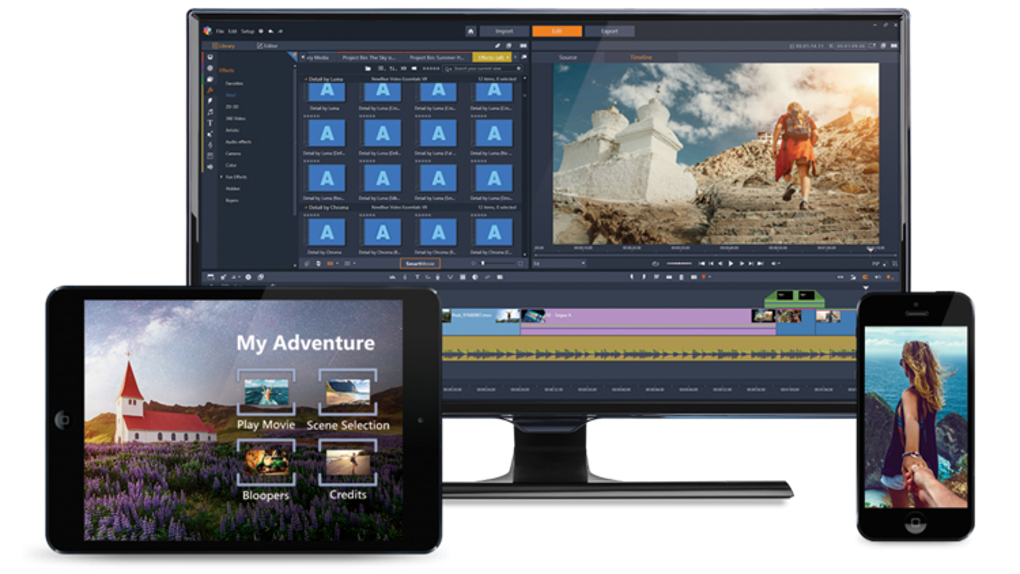
Professional-Grade Editing for Every Skill Level
One of the most compelling reasons to choose Pinnacle Studio HD is its remarkable ability to serve a wide range of skill levels, effectively bridging the gap between beginner-friendly accessibility and professional-level control. The software has been meticulously engineered to ensure that both novices and experienced editors can find value and efficiency within its ecosystem. For those new to video editing, Pinnacle Studio HD presents an inviting and easy-to-use drag-and-drop interface that simplifies the initial learning process. This intuitive design allows users to quickly grasp fundamental concepts like timeline organization, clip arrangement, and basic effect application, fostering confidence and encouraging experimentation without overwhelming complexity. The clear visual cues and logical workflow ensure that even without prior experience, users can start assembling videos and seeing tangible results almost immediately.
However, the software’s capabilities extend far beyond basic operations. For more seasoned editors or those who wish to delve deeper into the craft, Pinnacle Studio HD offers a sophisticated suite of advanced editing tools. These features provide granular control over every aspect of a project, allowing for intricate adjustments, nuanced enhancements, and highly customized visual and audio experiences. This dual approach ensures that as users grow in skill and ambition, Pinnacle Studio HD evolves with them, providing increasingly complex functionalities without necessitating a switch to different software. It’s a platform that supports continuous learning and creative growth, ensuring that your investment remains valuable as your expertise expands. The integration of powerful yet approachable tools makes Pinnacle Studio HD an exceptional choice for anyone aiming to produce high-quality video content, regardless of their starting point.
Core Editing Features for Precision and Creativity
Pinnacle Studio HD is packed with essential features that empower users to achieve precision and unleash their creative vision. These core tools form the backbone of a professional editing workflow, enabling everything from foundational adjustments to imaginative stylistic choices.
-
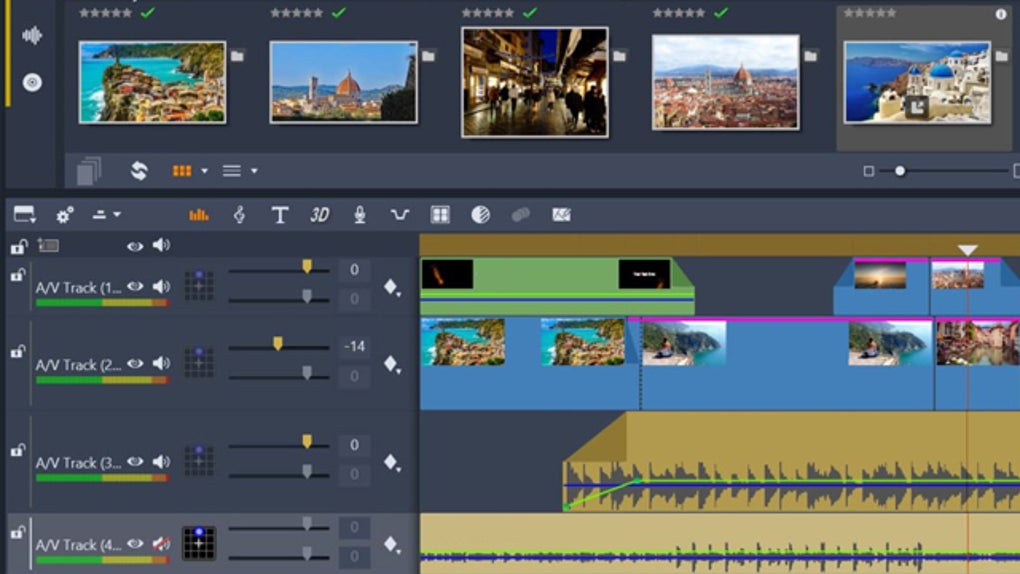
Multi-Track Editing: Layers of Possibility Multi-track editing is a cornerstone of professional video production, and Pinnacle Studio HD excels in this area. It allows users to work with multiple layers of video, audio, and effects simultaneously on separate tracks. This functionality is crucial for complex projects, enabling editors to overlay footage, add background music, incorporate voiceovers, and apply visual effects without destructive changes to the original clips. Imagine crafting an interview segment where you have the speaker’s footage on one track, b-roll footage showing relevant visuals on another, a subtle music bed on a third, and interview questions appearing as text on a fourth. Multi-track editing provides the organizational structure and creative flexibility needed to build rich, layered narratives that captivate audiences. It’s about more than just stacking clips; it’s about orchestrating a symphony of visual and auditory elements.
-
Motion Tracking: Dynamic Visual Storytelling Motion tracking is an advanced feature that brings a new dimension to video editing by allowing users to attach effects, text, or graphics that automatically follow moving objects within a video. This capability is incredibly versatile, whether you’re blurring a face for privacy, highlighting a specific product in a commercial, or adding a dynamic caption that moves with a subject. Pinnacle Studio HD’s motion tracking is robust and intuitive, enabling editors to select an object, track its movement throughout a sequence, and then apply elements that stick seamlessly to that object. This feature dramatically enhances visual storytelling, adding professional polish and engagement by making graphics and text appear organically integrated into the scene rather than static overlays. It saves countless hours that would otherwise be spent manually adjusting positions frame by frame, making complex animations accessible to a wider audience.
-
Keyframe Controls: Mastering Animation and Effects Keyframe controls are fundamental for fine-tuning transitions, animations, and effects, offering granular control over changes that occur over time. In Pinnacle Studio HD, keyframes allow users to define specific points in time where an effect or property should start, stop, or change intensity. For instance, you can use keyframes to smoothly fade in and out audio, gradually increase the size of a title, or animate the position of a graphic across the screen. This level of control is essential for creating polished, dynamic videos where every visual and auditory element transitions seamlessly. Without keyframes, animations would be abrupt and unnatural; with them, editors can craft subtle, professional-looking movements that enhance the overall cinematic quality of their projects. It’s the secret sauce behind many sophisticated visual effects and smooth, engaging video production.
-
Title Editing and Animations: Polishing Your Narrative Engaging intros, lower thirds, and concluding credits are vital for giving videos a professional and cohesive feel. Pinnacle Studio HD provides extensive title editing and animation capabilities, allowing users to create captivating text elements that complement their content. Beyond basic text, the software offers a wide array of customizable fonts, colors, sizes, and styles, along with pre-set animations and the ability to create unique motion graphics using keyframes. Whether it’s a dramatic opening title sequence, informative on-screen text for an explainer video, or stylish end credits, Pinnacle Studio HD ensures that your textual elements are visually appealing and effectively convey your message. Polished titles elevate the perceived quality of a video, leaving a lasting positive impression on viewers and reinforcing your brand or narrative.
-
Green Screen Editing (Chroma Key): Unlimited Creative Backgrounds Chroma key, commonly known as green screen editing, is a powerful technique that allows editors to remove a solid-colored background (typically green or blue) from footage and replace it with any other image or video. Pinnacle Studio HD’s green screen editing feature opens up a realm of creative possibilities, enabling users to transport subjects to exotic locations, create fantastical environments, or integrate them seamlessly into graphic overlays. This cinematic effect is a staple in professional productions, from weather forecasts to blockbuster movies, and Pinnacle Studio HD makes it accessible to everyone. With intuitive controls for adjusting keying parameters, users can achieve clean, professional-looking composites, removing backgrounds with precision and adding creative overlays for truly cinematic effects. This capability is invaluable for vloggers, educators, and indie filmmakers looking to produce high-impact visuals on a budget.
-
High-Quality Exports: Delivering Your Vision The final step in any video editing project is exporting the finished product, and Pinnacle Studio HD ensures that your hard work translates into stunning visual and audio fidelity. The software supports high-quality exports in a variety of formats and resolutions, including 4K and HD, guaranteeing that your videos look crisp and professional on any screen. With optimized presets for popular platforms like YouTube, Vimeo, and social media, sharing your creations is effortless. You can customize bitrates, codecs, and aspect ratios to meet specific requirements, ensuring compatibility and optimal playback across different devices and platforms. This comprehensive export functionality means that your meticulously edited videos will always be delivered with the clarity and impact they deserve, allowing your audience to experience your vision exactly as intended.
Unleashing Creativity: Advanced Effects and Editing Capabilities
Pinnacle Studio HD truly distinguishes itself through its impressive array of high-end effects and advanced editing capabilities. While its core features provide a solid foundation, these specialized tools empower users to transcend basic editing and infuse their projects with a professional, cinematic quality. Whether you’re crafting a dynamic vlog, a compelling short film, a sophisticated commercial, or a personal masterpiece, the software provides the means to realize and enhance your creative vision, pushing the boundaries of what you thought was possible with consumer-level software. These advanced functionalities are designed not just to add flair, but to provide precise control over the visual and auditory nuances that define professional productions. By integrating these powerful features, Pinnacle Studio HD ensures that creators can achieve results that rival industry standards, making it a competitive choice for anyone serious about elevating their video content.
Specialized Tools for Cinematic Excellence
These specialized features found in Pinnacle Studio HD are designed to give users the sophisticated controls needed to achieve truly cinematic results, from immersive experiences to perfectly balanced soundscapes.
-
360-Degree Video Editing: Immersive Experiences The realm of 360-degree video has opened up new avenues for immersive storytelling, and Pinnacle Studio HD is at the forefront of this innovation. The software provides comprehensive tools for editing spherical videos, giving creators complete control over angles, viewpoints, and post-production effects. Users can easily stabilize 360-degree footage, add titles and graphics that appear correctly in a VR environment, and even convert 360-degree footage into standard video formats for traditional viewing. This feature is invaluable for virtual tours, immersive documentaries, or any project aiming to transport viewers directly into the heart of the action. It allows editors to not only stitch and refine 360-degree footage but also to guide the viewer’s attention within the immersive space, creating truly engaging and interactive experiences that stand out in a crowded digital landscape.
-
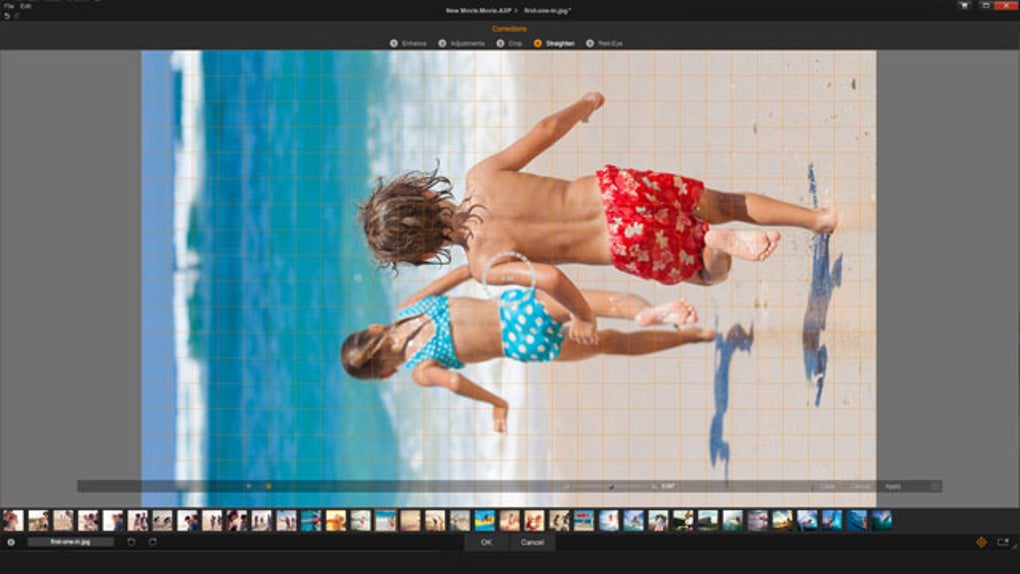
Color Grading and Correction: The Art of Visual Mood Color is one of the most powerful tools in visual storytelling, capable of setting mood, enhancing realism, or creating fantastical aesthetics. Pinnacle Studio HD offers robust color grading and correction tools that allow users to precisely adjust color tones, saturation, exposure, and lighting to achieve cinematic results. Whether you need to fix inconsistent lighting between shots, correct white balance issues, or apply a distinct stylistic look (e.g., a desaturated, gritty feel for a drama or vibrant, warm tones for a travelogue), the software provides a comprehensive suite of controls. These tools enable editors to unify the visual appearance of their footage, ensuring a consistent and professional aesthetic that elevates the emotional impact and narrative coherence of their videos. Mastering color grading is key to making your videos look polished and professional, and Pinnacle Studio HD puts this power at your fingertips.
-
LUT Presets: Professional Color Consistency Look-Up Tables (LUTs) are a game-changer for professional color grading, offering a quick and efficient way to apply industry-standard color profiles or unique stylistic looks to your footage. Pinnacle Studio HD supports LUT presets, allowing users to instantly transform the visual tone of their videos with a single click. Instead of manually adjusting multiple color parameters, a LUT can apply a complex set of color transformations, mimicking the looks of popular films, specific camera profiles, or custom creative styles. This feature is particularly useful for maintaining consistent visuals across different clips filmed under varying conditions or for rapidly achieving a desired aesthetic. It democratizes sophisticated color treatment, making it accessible even to those without extensive color theory knowledge, while still providing the precision and quality expected by professionals.
-
Audio Ducking: Harmonizing Soundscapes Professional video demands professional audio, and one of the hallmarks of well-produced sound is balanced levels, especially between dialogue and background music. Pinnacle Studio HD’s audio ducking feature automates this crucial process. Audio ducking automatically lowers the volume of background music when dialogue or narration is present, ensuring that voices remain clear and prominent without being drowned out by accompanying tracks. As soon as the dialogue ends, the music gently fades back up to its original level. This intelligent feature saves editors significant time from manually adjusting volume keyframes and guarantees a polished, professional sound design. It ensures that your message is always heard clearly, contributing significantly to the overall professional perception and listenability of your video.
- Speed Ramping: Dramatic Pacing and Emphasis Speed ramping is a dynamic editing technique that allows creators to control playback speed within a clip, transitioning smoothly between slow-motion and fast-forward effects. Pinnacle Studio HD provides intuitive controls for speed ramping, enabling dramatic pacing and emphasis in your videos. You can use it to create breathtaking slow-motion shots that highlight key moments, or fast-forward through uneventful sections to maintain audience engagement. For example, a sports highlight reel might use speed ramping to slow down a crucial goal, then speed up the celebratory aftermath. This feature adds a layer of sophistication and dynamism to storytelling, making videos more visually exciting and impactful. It’s an effective way to manipulate the viewer’s perception of time, enhancing emotional resonance and adding a truly cinematic flair to any project.
Availability, Compatibility, and System Requirements
Understanding the practical aspects of acquiring and running Pinnacle Studio HD is essential for any prospective user. The software is primarily available as a downloadable package, typically purchased directly through Corel’s official website or via authorized third-party distributors. Corel, the developer behind Pinnacle Studio, offers different versions of the software—Standard, Plus, and Ultimate editions—each designed to cater to varying levels of user needs and budget constraints. These editions progressively unlock more advanced features, effects, and content packs, allowing users to choose the option that best suits their creative ambitions and financial considerations. Corel is committed to keeping Pinnacle Studio HD current, providing frequent updates that ensure compatibility with the latest Windows operating systems and leveraging advancements in hardware technology to optimize performance and introduce new functionalities. This commitment to ongoing development means that users can expect their software to remain relevant and efficient in an ever-evolving technological landscape.
Crucially, Pinnacle Studio HD is designed exclusively for the Windows operating system, offering robust support across different system configurations. This dedicated focus on the Windows ecosystem allows for highly optimized performance and seamless integration with Windows-specific hardware and software components. It is compatible with modern 64-bit versions of Windows, specifically Windows 11 and Windows 10. While it is engineered to run on most modern PC hardware configurations featuring Intel or AMD processors, the inclusion of a dedicated graphics card is highly recommended for achieving smooth rendering, efficient previewing of complex projects, and optimal performance with demanding effects. Furthermore, the software boasts extensive support for a multitude of video file formats, including widely used standards such as MP4, AVI, MOV, and many others, ensuring broad compatibility with footage from various cameras and devices. This versatility in import and export capabilities streamlines the workflow, allowing editors to work with a diverse range of source material without conversion hassles.
Technical Specifications for Optimal Performance
To ensure a creative and hassle-free editing experience, it is vital that your system meets or ideally exceeds the recommended specifications for Pinnacle Studio HD. While the software can run on minimum requirements, optimal performance, especially for complex projects or high-resolution editing, significantly benefits from more powerful hardware.
- Operating System: Windows 10 or 11 (64-bit required).
- Processor:
- Minimum: Intel Core i3 or AMD Ryzen 3. These processors are sufficient for basic HD editing and simpler projects.
- Recommended: Intel Core i7 or AMD Ryzen 7 (or higher) for seamless 4K editing, multi-track projects, and faster rendering times. More cores and higher clock speeds will directly translate to a smoother editing experience.
- RAM:
- Minimum: 8GB. This amount is adequate for standard HD projects with a moderate number of tracks and effects.
- Recommended: 16GB (or more) for complex projects, extensive multi-track editing, and especially for 4K video editing. More RAM allows the software to handle larger files and multiple applications concurrently without slowdowns.
- Storage:
- Minimum: At least 10GB of free space for installation.
- Recommended: An SSD (Solid State Drive) for both the operating system and project files is highly recommended for significantly faster performance, including quicker software launch times, project loading, and real-time playback. Traditional HDDs can be used for archival storage but will be slower for active projects.
- Graphics Card:
- Minimum: DirectX 11 or higher-compatible GPU. Integrated graphics can work for very basic tasks but will struggle with effects and high resolutions.
- Recommended: NVIDIA GeForce GTX 1050 or AMD Radeon RX 560 (or equivalent/higher) with at least 4GB of VRAM. A dedicated graphics card with ample VRAM dramatically accelerates rendering, effects processing, and smooth playback, particularly crucial for 4K and complex visual effects.
- Internet Connection: Required for software activation, downloading updates, accessing online tutorials, and utilizing certain online features or cloud services integration.
By ensuring your system aligns with or surpasses these specifications, you are setting yourself up for an enjoyable and highly productive video editing journey with Pinnacle Studio HD, minimizing frustrating delays and maximizing your creative flow.
Why Pinnacle Studio HD Stands Out: Advantages and Value Proposition
Pinnacle Studio HD distinguishes itself in the competitive video editing landscape through a combination of thoughtful design, powerful features, and a compelling value proposition. It’s not just another editing tool; it’s a comprehensive ecosystem built to empower creators across various disciplines and skill levels. For those navigating the choices between different video editing software, Pinnacle Studio HD presents a particularly strong case as a robust and reliable solution for diverse projects, from personal passion ventures to professional-grade productions for cinema, marketing, or advertising. Its ability to balance ease of use with an extensive array of implements ensures that users can achieve high-quality videos effectively and efficiently. The software’s approach to licensing, ongoing support, and learning resources further solidifies its position as an attractive and enduring choice for anyone serious about elevating their video production capabilities.
Key Benefits for Long-Term Creative Success
The advantages of choosing Pinnacle Studio HD extend beyond its immediate features, encompassing aspects of cost-effectiveness, learning, and long-term utility.
-
Scalability and Version Options: Pinnacle Studio HD offers a tiered product line, including Standard, Plus, and Ultimate versions. This scalability is a significant advantage, allowing users to select the software package that precisely matches their current skill level and specific project requirements. A beginner might start with the Standard edition, which provides a solid foundation of essential tools without overwhelming advanced features. As their skills grow and their projects become more ambitious, they can easily upgrade to the Plus or Ultimate editions, unlocking more sophisticated capabilities like advanced color grading, motion tracking, multi-cam editing, and a broader library of effects and plugins. This tiered approach means users only pay for the features they need, making it a flexible and cost-efficient solution that grows with the creator, avoiding the need to switch software as expertise develops.
-
One-Time Purchase Option: A Cost-Effective Solution: In an era dominated by subscription-based software models, Pinnacle Studio HD offers the refreshing alternative of a one-time purchase option. Unlike many of its direct competitors, which demand recurring monthly or annual fees, users can buy Pinnacle Studio outright. This model provides significant long-term savings, as once purchased, the software is yours to own and use indefinitely, without the ongoing financial commitment. For hobbyists, small businesses, or independent creators operating on a tight budget, this represents a substantial financial advantage, allowing them to invest in a powerful tool without the perpetual drain on resources. It makes professional-grade video editing accessible and sustainable, removing the barrier of continuous subscription payments and offering true ownership of a vital creative asset.
-
Commitment to Innovation: Regular Updates: Pinnacle Studio HD is backed by Corel’s commitment to continuous improvement, evidenced by its regular updates. These updates are crucial for keeping the software current, introducing new features, enhancing existing tools, improving performance, and ensuring compatibility with the latest operating systems, hardware advancements, and video formats. This proactive approach ensures that users always have access to optimized tools and stay abreast of technological changes in video production. Regular updates also address bugs, improve stability, and incorporate user feedback, demonstrating a dedication to refining the user experience. This ongoing development means that your investment in Pinnacle Studio HD continues to yield value over time, providing a future-proof editing solution that evolves with the industry and user needs.
-
Empowering Users: Extensive Learning Resources and Community: For new users, or those looking to expand their skills, Pinnacle Studio HD offers extensive learning resources, including comprehensive tutorials, user guides, and a vibrant online community. This wealth of support materials is invaluable for mastering the software and exploring its full potential. Step-by-step video tutorials guide users through various editing techniques, from basic cuts to advanced effects, while community forums provide a platform for asking questions, sharing tips, and connecting with fellow editors. This robust support system ensures that users are never left to figure things out on their own, fostering a supportive environment for learning and creative development. The availability of these resources significantly lowers the learning curve, making sophisticated video editing more accessible and enjoyable for everyone.
-
Seamless Sharing: Optimized Export Presets: The ultimate goal of video editing is to share your creations with an audience, and Pinnacle Studio HD excels in providing seamless export options. The software includes optimized presets for sharing projects across various popular platforms, including YouTube, Vimeo, Facebook, and other online services, as well as for burning to DVD or Blu-ray. These presets automatically configure the ideal resolution, bitrate, and format for each platform, ensuring that your videos look their best and upload efficiently without requiring complex manual adjustments. This streamlined export process saves time and eliminates guesswork, guaranteeing that your meticulously crafted videos are perfectly formatted for their intended destination. Whether you’re publishing to social media or preparing a high-quality master file, Pinnacle Studio HD simplifies the final step of delivering your vision to the world.
To conclude, Pinnacle Studio HD offers a powerful and comprehensive solution for anyone looking to create professional-quality videos. Its intuitive yet extensive editing capabilities, coupled with robust features like multi-track editing, motion tracking, 360-degree video support, and advanced color tools, make it a versatile choice for a wide array of projects. With its user-friendly interface and commitment to both novice and experienced editors, Pinnacle Studio HD ensures that every project stands out, balancing ease of use with potent implements. The flexible purchase model, ongoing updates, and extensive learning resources further enhance its appeal, making it a sound investment for long-term creative success. While alternatives like Adobe Premiere Pro and DaVinci Resolve, also found on PhanMemFree, offer advanced features, Pinnacle Studio HD remains a fantastic option for those seeking a cost-effective, full-featured video editing solution. Start creating stunning videos today and download Pinnacle Studio HD for Windows from Phanmemfree.org. It’s the perfect tool to elevate your video production skills to the next level.
File Information
- License: “Full”
- Latest update: “April 10, 2025”
- Platform: “Windows”
- OS: “Windows 10”
- Language: “English”
- Downloads: “914.5K”
- Size: “5.89 MB”


