
Pitu is a free-to-use selfie camera and photo editing application developed by Tencent. This mobile application allows users to capture and enhance selfies, transforming ordinary photos into visually stunning images ready for sharing across various social media platforms. The app simplifies the photo editing process, making it accessible to users of all skill levels, from casual smartphone photographers to those seeking more advanced features. Its user-friendly interface and diverse range of tools have contributed to its significant popularity. However, like many apps, Pitu also presents some challenges and areas for improvement. This review delves into the app’s strengths, weaknesses, and overall user experience.
Intelligent Editing and AI-Powered Features: Streamlining the Photo Enhancement Process

One of Pitu’s key selling points is its Intelligent Editor. This feature leverages artificial intelligence (AI) to analyze photos and automatically suggest appropriate filters and lighting adjustments. This automated approach significantly reduces the time and effort required for editing, particularly beneficial for users unfamiliar with photo editing software or those seeking quick and efficient enhancements. The AI analyzes factors such as saturation, brightness, and contrast, tailoring the suggested adjustments to the specific characteristics of each photo. This intelligent assistance simplifies the process of finding the optimal settings, allowing users to achieve professional-looking results without extensive manual adjustments.
Beyond intelligent editing suggestions, Pitu boasts an AI Magical Cutout feature, a standout element that sets it apart from many competitor apps. This feature employs AI to precisely isolate a subject within an image, effectively creating a cutout that can then be seamlessly integrated into various animated digital backgrounds. The app automatically extracts the subject from the original image, eliminating the need for manual masking or selection. Users can then select from a range of dynamic backgrounds, ranging from fantastical scenes like meteor showers and cloud landscapes to more whimsical settings. This capability transforms ordinary selfies into imaginative compositions, opening up a wide array of creative possibilities for users. The ability to instantly transport oneself to a visually arresting digital environment adds a fun and engaging element to the app’s functionality.
User Interface and Accessibility: A Mixed Bag of Strengths and Weaknesses
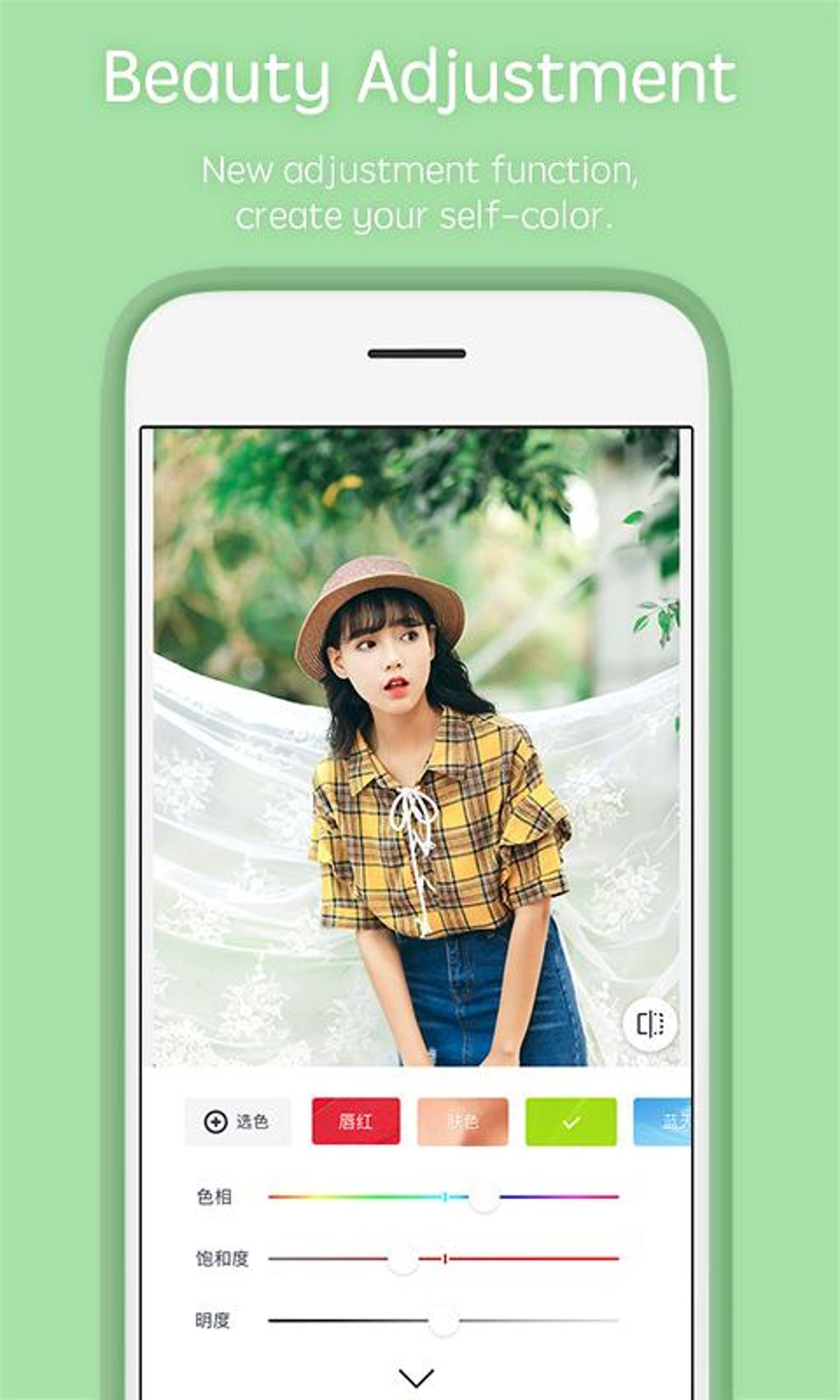
Pitu’s interface is primarily visual, contributing to its intuitive design and making it relatively easy to navigate, even for users unfamiliar with similar applications. The visual cues and intuitive layout minimize the need for extensive text-based instructions, enhancing accessibility for a global user base. The app’s design focuses on a streamlined workflow, guiding users through the editing process with clear visual prompts. This visual-first approach aims to overcome language barriers, ensuring a more inclusive user experience.
However, a significant limitation arises from the prevalence of Mandarin Chinese in the app’s text prompts and guides. While the visual aspects are largely self-explanatory, the textual elements remain primarily in Mandarin. This significantly hinders the app’s accessibility for non-Mandarin speakers, creating a barrier for users who might rely on textual instructions for navigation or understanding specific features. This language limitation undermines Pitu’s potential to reach a truly global audience and presents a notable area for improvement. The app would benefit greatly from multilingual support, providing text-based instructions and guidance in multiple languages to accommodate its diverse user base.
Ethical Considerations: Addressing Concerns about Insensitive Filters
While Pitu offers a wealth of creative and engaging features, it has also faced criticism concerning the inclusion of filters deemed insensitive and offensive by many users. One particular filter, based on blackface, has drawn significant negative attention. The presence of such a filter raises serious ethical concerns, highlighting the importance of careful consideration and responsible content curation in the development of photo editing applications. The inclusion of this filter not only demonstrates a lack of cultural sensitivity but also demonstrates a failure to adequately address potential negative impacts on user experience and perceptions.
The existence of such filters undermines the overall positive aspects of the app, potentially deterring users who find them offensive or hurtful. It underscores the need for a more rigorous review process to ensure that all filters and features align with ethical standards and promote respectful inclusivity. Tencent, as the developer, has a responsibility to address these concerns promptly, removing offensive content and implementing stronger safeguards to prevent similar incidents in the future. The failure to do so risks damaging the app’s reputation and alienating a significant portion of its potential user base.
Comparison with Similar Applications: Pitu’s Place in the Competitive Market
Pitu competes in a crowded marketplace of selfie camera and photo editing apps. Apps like Beauty Camera and InstaBeauty - Makeup Selfie Cam offer similar functionalities, focusing on enhancing selfies and creating visually appealing images. However, Pitu differentiates itself through its unique AI-powered features, notably the AI Magical Cutout and the Intelligent Editor. These advanced AI-driven features provide a more streamlined and efficient editing experience compared to competitors that may rely more on manual adjustments and a less intuitive interface. The app’s focus on integrating AI to simplify and enhance the user experience sets it apart from applications offering more basic photo editing tools.
While other apps might provide similar basic editing functionalities, Pitu’s sophisticated AI features present a significant competitive advantage. The ability to automatically suggest optimal settings and seamlessly integrate users into imaginative digital backgrounds represents a unique selling proposition in the crowded market. However, the language barrier and the presence of ethically questionable filters significantly detract from this competitive edge, highlighting the need for improvement in these areas to fully realize its potential.
Conclusion: Potential and Areas for Improvement

Pitu offers a compelling blend of AI-powered features and a user-friendly interface, making photo editing more accessible and enjoyable for a broad audience. The Intelligent Editor and AI Magical Cutout represent significant advancements in mobile photo editing technology, offering users a streamlined and creative experience. However, the app’s limitations regarding language accessibility and the inclusion of insensitive filters represent considerable drawbacks.
To fully realize its potential, Pitu needs to address these issues decisively. Expanding multilingual support is crucial to making the app truly global and inclusive. The removal of ethically problematic filters and the implementation of stricter content review processes are essential to ensuring a positive and respectful user experience. By addressing these weaknesses, Pitu can solidify its position in the competitive photo editing market and reach its full potential as a leading mobile application. The app’s core strengths, particularly its AI-driven functionalities, suggest a bright future if these crucial improvements are implemented. The developers need to prioritize ethical considerations and user accessibility to ensure the app remains relevant and appealing to a diverse and expanding user base.
File Information
- License: “Free”
- Version: “6.2.2.2610”
- Latest update: “March 8, 2024”
- Platform: “Android”
- OS: “Android 4.1”
- Language: “English”
- Downloads: “182.2K”
- Size: “102.13 MB”
- Download Options: “APK, Google Play”
- Filename: “Pitu_v6.2.2.2610.apk”


