
PixelLab - Text on Pictures is a free photography application developed by App Holdings, available for Android devices. This image editor simplifies the process of adding text to photos, offering a wide array of styles and presentation options. Users can leverage pre-made templates or design custom text from scratch, providing a degree of flexibility not always found in similar applications. While apps like Photo Grid or PicsArt offer broader editing capabilities, PixelLab excels in its focused approach to text and artwork integration, delivering a robust set of editing tools for precise control over the final product.
A Modern Approach to Image Enhancement
In the past, sophisticated image editing was largely confined to desktop computers. However, the increasing power and capabilities of smartphones have made mobile image editing apps commonplace. PixelLab - Text on Pictures is a prime example of this evolution, offering a streamlined user experience centered around effortlessly adding text and artwork to photos. This application stands out for its user-friendly interface and comprehensive features, allowing both novice and experienced users to quickly achieve professional-looking results. No longer is advanced image manipulation restricted to desktop software; PixelLab brings powerful editing tools directly to your mobile device.
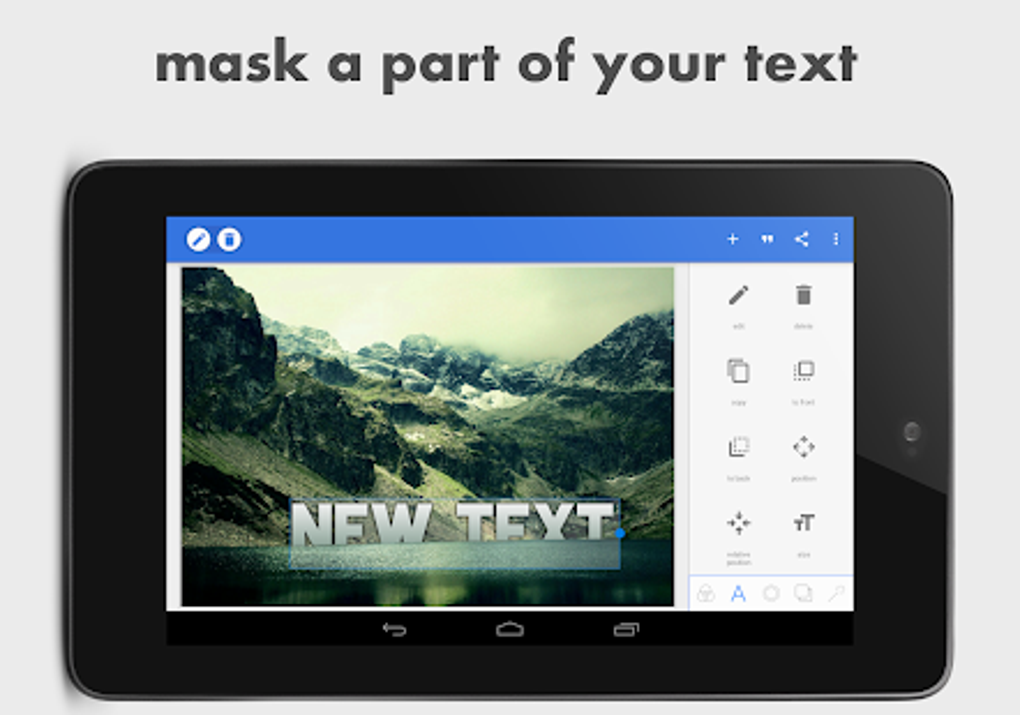
The application’s core functionality revolves around adding stylish and elaborate 3D text to images. Users can select from a vast library of preset styles or create entirely unique text elements using over 100 font styles. A variety of text effects and customizable colors empower users to achieve precisely the aesthetic they desire. Furthermore, numerous stickers are available to add extra visual flair, enhancing the overall impact of the image. The inclusion of drawing tools with adjustable pen sizes and colors allows users to create custom artwork directly within the app, further expanding the creative possibilities. A particularly useful feature is the background removal tool, enabling users to make image backgrounds transparent and seamlessly integrate them into other designs or projects. This integrated background removal significantly enhances the versatility of the app, allowing for more complex design projects.
Feature Breakdown: Strengths and Limitations
PixelLab - Text on Pictures deliberately avoids attempting to be a fully featured image editor, instead focusing on its core functionality: adding text and artwork to images. This focused approach allows the app to excel in its primary function. The intuitive interface ensures a smooth user experience, and the abundance of customization options caters to a wide range of creative needs. The inclusion of the background removal feature is a significant advantage, adding valuable functionality beyond simple text and sticker placement.
Pros:
- Intuitive User Interface: The app is designed for ease of use, making it accessible to users of all skill levels. The logical layout and clear instructions minimize the learning curve, allowing users to quickly grasp the core functionalities and begin creating impressive images.
- Extensive Template Library: A wide variety of pre-made templates offers immediate inspiration and a quick path to creating visually appealing results. These templates provide a solid foundation upon which users can build their unique designs, saving considerable time and effort.
- Comprehensive Customization Options: PixelLab provides granular control over every aspect of text and artwork integration. From font selection and color palettes to text effects and sticker placement, users have complete creative freedom. This degree of customization allows for highly unique and personalized results.
- Background Removal Functionality: The integrated background removal tool is a significant asset, enabling users to seamlessly incorporate images with transparent backgrounds into their projects. This significantly broadens the app’s potential applications beyond simple image editing.
- Free Availability: The accessibility of PixelLab as a free application lowers the barrier to entry for users, making sophisticated image editing tools available to a wider audience.
Cons:
- Lengthy and Unskippable Ads: While the app is free, it is supported by advertisements. The length and unskippable nature of these ads can be a significant drawback for some users, interrupting the creative workflow and potentially detracting from the overall user experience. This is a point of potential improvement for future iterations of the app.
Comparing PixelLab to Other Apps
Compared to more comprehensive image editors like PicsArt, PixelLab offers a more focused feature set. While PicsArt provides a wide range of editing tools, including filters, effects, and collage creation, PixelLab concentrates on precise text and artwork integration. This focused approach allows PixelLab to deliver a superior user experience specifically for text-based image enhancements. The trade-off is the reduced breadth of functionality; users needing extensive photo editing features beyond text and artwork will find PicsArt or similar applications more suitable. However, for users whose primary need is adding text and artwork to images, PixelLab offers a far more streamlined and efficient workflow.
Photo Grid, another popular photo editing app, emphasizes collage creation and photo arrangement. While it includes some basic text editing features, it lacks the depth and control provided by PixelLab’s dedicated text and artwork tools. Users requiring advanced text customization and precise control over image elements will find PixelLab a more effective choice.
User Experience and Interface
The user interface of PixelLab is designed with simplicity and ease of use in mind. The app’s intuitive layout ensures a smooth and straightforward user experience, allowing both novices and experienced users to quickly learn the core functionalities and begin creating visually stunning results. The tools are logically organized and easily accessible, and the overall design contributes to a highly efficient workflow. The app’s responsiveness further contributes to a positive user experience, ensuring that actions are processed quickly and efficiently, minimizing frustration and maintaining creative momentum.
PixelLab: A Verdict
PixelLab - Text on Pictures is a highly effective and user-friendly application for adding text and artwork to images. Its focused functionality, intuitive interface, and extensive customization options make it an excellent choice for users seeking a dedicated tool for enhancing their photos with text and creative elements. While the lengthy ads are a drawback, the overall benefits of the app, including its ease of use, powerful features, and free availability, make it a top contender in its category. For users whose primary need is adding precisely styled text and artwork to images, PixelLab provides an exceptional and efficient solution. The balance between power and simplicity makes it a valuable asset for both casual and professional users.
File Information
- License: “Free”
- Latest update: “April 28, 2025”
- Platform: “Android”
- OS: “Android 13.0”
- Language: “English”
- Downloads: “293.5K”
- Size: “28.40 MB”
- Download Options: “APK, Google Play”
- Filename: “com.imaginstudio.imagetools.pixellab_2.1.4.apk”


