
Pixie is a compact and efficient color picker utility designed primarily for webmasters and graphic designers. Its primary function is to identify and display the color values of any pixel on the screen, providing a quick and easy way to match colors in various design projects. This review will delve into Pixie’s functionalities, strengths, weaknesses, and its place within the broader landscape of color picker software.
Ease of Use and Core Functionality
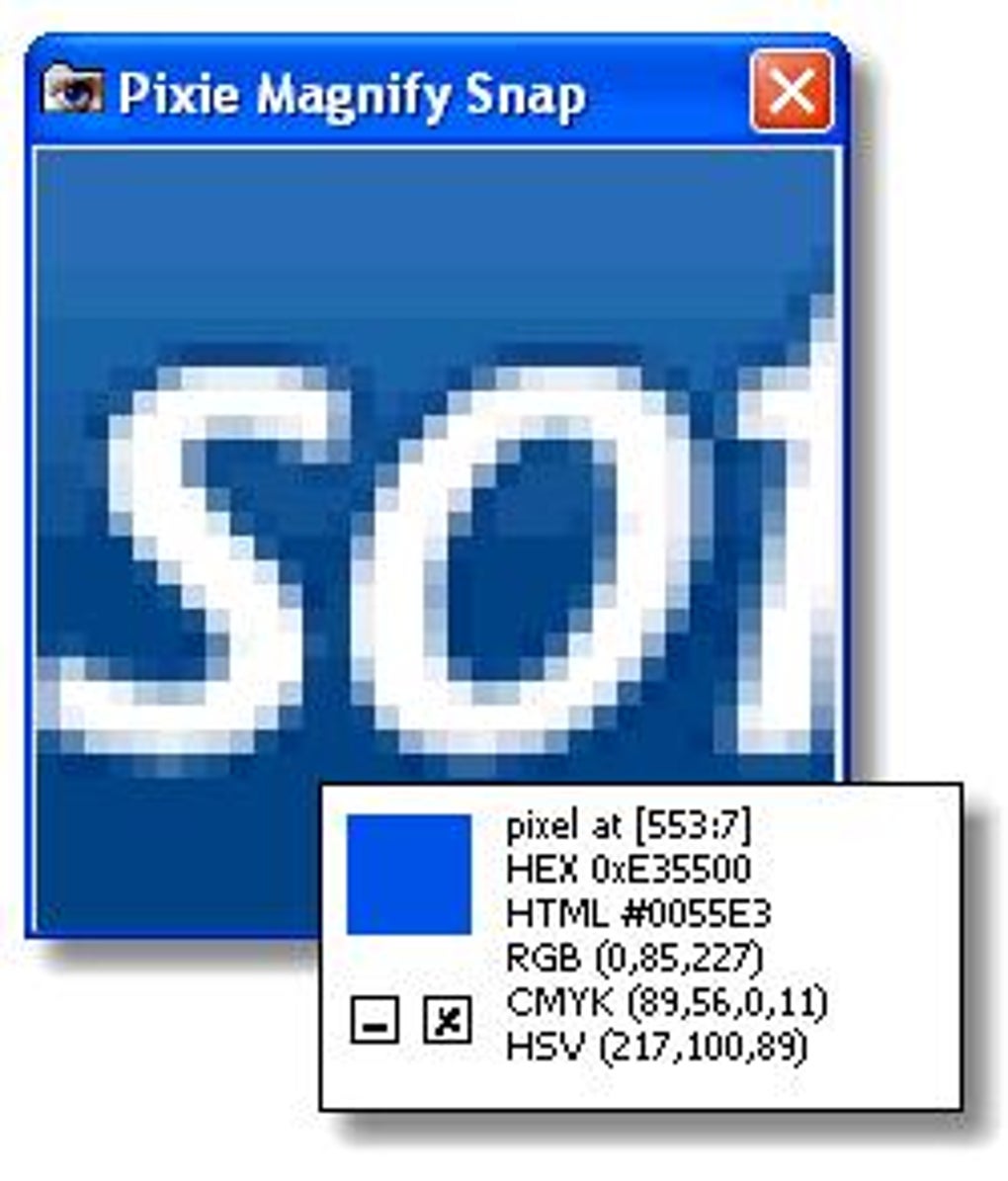
Pixie’s strength lies in its remarkable simplicity. The program boasts a minimal user interface, making it incredibly intuitive and user-friendly. Upon launching, Pixie presents a small, uncluttered window. To determine a color, users simply hover their mouse cursor over the desired pixel on their screen. Instantly, Pixie displays the color’s values in multiple formats:
-
Hexadecimal (Hex): A concise six-digit alphanumeric code representing the color (#RRGGBB). This format is widely used in web development and graphic design software.
-
RGB (Red, Green, Blue): Represents the color by specifying the intensity of its red, green, and blue components, each ranging from 0 to 255. This is another common format across many digital design applications.
-
HTML: A textual representation compatible with HTML and CSS code, allowing for easy integration into web pages.
-
CMYK (Cyan, Magenta, Yellow, Key [Black]): Specifically relevant for print design, CMYK values indicate the proportions of cyan, magenta, yellow, and black inks needed to reproduce the color.
-
HSV (Hue, Saturation, Value): This color model describes a color based on its hue (color shade), saturation (intensity), and value (brightness). This can be particularly useful for color adjustments and modifications.
This multifaceted output makes Pixie incredibly versatile, catering to various needs and workflows. The immediate display of color values eliminates the need for manual color selection and guesswork, saving designers significant time and effort. Furthermore, the ability to magnify a specific area of the screen allows for pinpoint accuracy, even when dealing with intricate details within complex images.
Advantages and Disadvantages
Pixie’s core functionality is undeniably its strongest asset. Its speed, accuracy, and ease of use set it apart from more complex color picking software. The small download size, just over 10KB, contributes to its speedy performance and minimal system resource consumption. This makes it an ideal tool for users with limited computing power or those prioritizing a lightweight application. The option to map keyboard shortcuts to frequently used functions further enhances productivity.
However, Pixie’s simplicity also presents some limitations. The dated visual presentation might feel less appealing compared to contemporary, visually rich applications. Additionally, its core functionality, while impeccably executed, is relatively narrow. Pixie lacks advanced features often found in more comprehensive color picking tools such as color palettes, color history, or integrated color manipulation tools. Users seeking these functionalities may need to consider alternative software.
The limited scope of Pixie’s features makes it most suitable for specific tasks. It excels at quickly identifying the precise color value of a pixel, but it does not replace a full-fledged graphic design or color manipulation application. Its best use case is in situations where fast, accurate color picking is the primary need, such as quickly matching a color from a website for a design project or verifying the color of a specific element in an image.
Comparison with Alternative Applications
The market offers a variety of color picker applications, each with its own strengths and weaknesses. Some prominent alternatives include:
-
ColorPix: This free tool is praised for its streamlined interface and efficient color formatting.
-
Just Color Picker: This application focuses on precise pixel color value calculation.
-
Free Color Picker: This advanced tool combines color picking with screen magnification and palette management.
-
ColorMania: This tool offers advanced color selection features targeted at graphic artists and web designers.
While Pixie excels in speed and simplicity, alternatives often provide more comprehensive features such as color palette management, color history tracking, and integrated color manipulation tools. The choice between Pixie and these alternatives depends largely on individual needs and priorities. If the primary need is quick and accurate color identification, Pixie is a superb choice. However, if more advanced features are required, users should consider a more feature-rich application.
Pixie’s Place in the Design Workflow
Despite its limited feature set, Pixie holds a valuable niche within the graphic design and web development workflows. Its efficiency in quick color matching allows designers to maintain a smooth and uninterrupted design process. For tasks requiring rapid color identification and integration into projects, Pixie can significantly improve productivity.
The ease of use and small footprint make Pixie an excellent companion application alongside more comprehensive design software. Rather than being a replacement for a full-fledged image editor or color manipulation suite, Pixie serves as a highly specialized, efficient tool dedicated to a specific task: precise and rapid color identification.
Target Audience and User Experience
Pixie’s target audience clearly includes web developers and graphic designers needing a quick and easy method to identify the precise color of any pixel. Its intuitive interface and immediate feedback system contribute to a positive user experience. Experienced users will appreciate the speed and efficiency, while beginners will find it incredibly easy to grasp and utilize.
However, users seeking advanced color manipulation, palette management, or extensive color analysis tools may find Pixie’s limited functionality insufficient. The lack of extensive customization options might also be a drawback for some users.
Conclusion
Pixie is a lightweight, user-friendly color picker with a singular focus: providing rapid and accurate color values. Its simplicity and efficiency make it an invaluable tool for specific tasks within web design and graphic design workflows. While it may lack the extensive features found in more comprehensive applications, Pixie’s speed, accuracy, and ease of use make it a worthy addition to any designer’s toolkit, particularly for situations requiring quick color identification and integration. Users prioritizing simplicity and efficiency over extensive features will find Pixie a highly effective and satisfying tool. However, users seeking a more fully featured color management application should explore other options available in the market.
File Information
- License: “Free”
- Latest update: “July 12, 2023”
- Platform: “Windows”
- OS: “Windows 2000”
- Language: “English”
- Downloads: “178.4K”
- Size: “11.78 KB”


