
PKZIP, a name synonymous with file compression for many veteran computer users, has stood the test of time. Initially developed by Phil Katz and his company, PKWARE, Inc., back in 1989, PKZIP introduced the now ubiquitous ZIP file format, revolutionizing how users managed and shared digital data. This review delves deep into the capabilities, strengths, weaknesses, and overall value proposition of this long-standing software.
PKZIP’s Core Functionality: Compression, Encryption, and Beyond
PKZIP’s primary function is file compression, a task it accomplishes with remarkable efficiency, boasting a potential reduction in file size of up to 95%. This makes it ideal for freeing up disk space, reducing email attachment sizes, and streamlining data transfers. The software’s ability to handle massive file batches, exceeding 2 billion files in a single archive and managing files larger than 9 exabytes (EB), showcases its robust architecture and capacity for handling even the most demanding tasks. This scalability makes it a suitable choice for both individual users and organizations with large datasets.
Beyond mere compression, PKZIP offers robust security features. Users can protect their compressed archives with passwords, employing strong encryption to ensure data integrity and confidentiality during transfer or storage. This added layer of security is crucial for protecting sensitive information. The software supports a wide array of file formats, including not only the ZIP format it pioneered but also TAR, BZ2, GZ, UUE, XXE, and JAR, further enhancing its versatility. It’s equally adept at extracting files from these various formats. The cross-platform compatibility, allowing seamless operation across major operating systems, further adds to its practical appeal.
The inclusion of a command-line interface (CLI) provides power users with the flexibility to integrate PKZIP into automated scripts and workflows. This allows for unattended batch processing, streamlining tasks such as automated archiving or data backups. The CLI’s inclusion caters to advanced users seeking a higher degree of control and automation.
User Interface and Usability: A Blend of Simplicity and Functionality
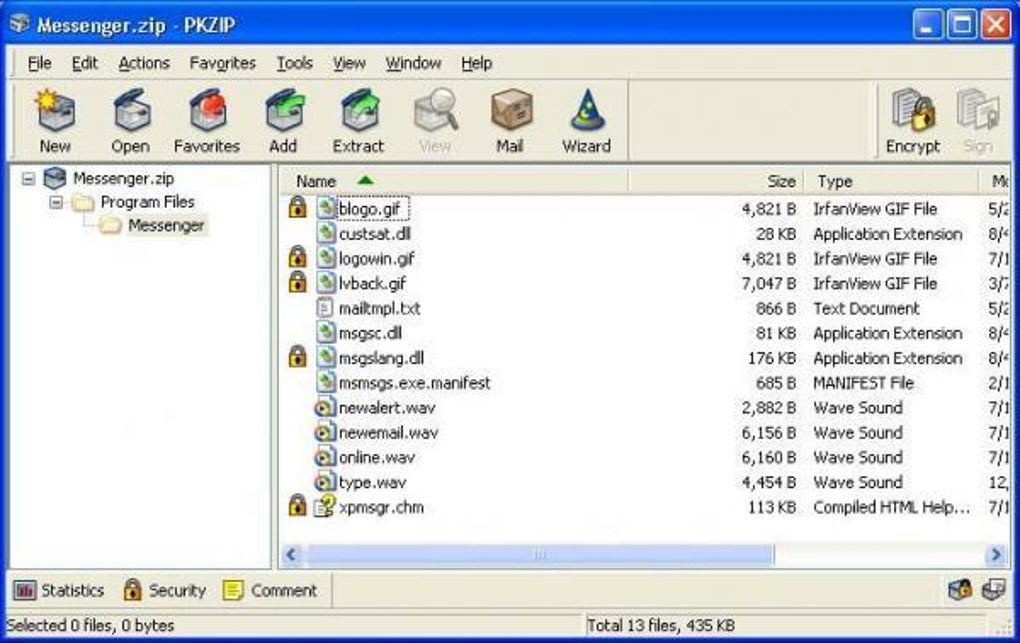
PKZIP’s user interface adopts a straightforward approach, prioritizing ease of use. The main window is cleanly divided into a navigation pane on the left and file lists on the right, a layout familiar to users of similar applications. The top bar provides readily accessible features through tabs and a menu bar. The Home tab conveniently presents key functions such as “Add Files,” “Extract Files,” “Encrypt,” “Sign,” “View,” and “Email Archive,” minimizing the learning curve for new users.
The overall workflow is generally quick and efficient for smaller tasks. However, as with many compression utilities, processing larger file batches can noticeably impact performance. While this slowdown isn’t uncommon in the realm of file compression software, it’s a crucial factor to consider when dealing with extensive data volumes. Despite occasional slowdowns with large files, PKZIP’s stability is noteworthy; crashes are infrequent, ensuring a relatively reliable user experience.
Comparing PKZIP to Competitors: Strengths and Weaknesses
While PKZIP offers strong functionality, a comparison with competitors reveals both advantages and disadvantages. One significant drawback is the availability of only a 30-day trial version, unlike many competing utilities that offer free, albeit often limited, versions. The registration process for the trial version also requires users to complete a form with mandatory personal information and justification for the download, which may be perceived as an unnecessary hurdle. This contrasts with the more immediate accessibility of many competitors.
The premium version of PKZIP operates on a subscription basis and actively promotes SecureZIP, PKWARE’s enterprise-grade solution. This approach reflects a clear market segmentation strategy, focusing on a paid, feature-rich offering alongside a trial version for individual users to evaluate the software’s capabilities.
The software’s encryption and password protection, however, stand as notable strengths. Its reliability in securing compressed archives provides users with confidence in the integrity and privacy of their data.
In summary, while PKZIP provides a reliable and secure solution for file compression and management, its reliance on a paid subscription model and restrictive trial version make it less appealing than some competitors that offer more generous free versions. The need for a form-filling download process for the trial presents an additional friction point.
Alternative File Compression Utilities: A Market Overview
The market for file compression utilities is highly competitive, with several strong alternatives available. These competitors often offer features not found in PKZIP, sometimes including integrations with cloud storage services, advanced file management capabilities, or more streamlined user interfaces.
For instance, 7-Zip is a popular open-source choice known for its speed and broad format support. WinRAR, another widely-used program, is recognized for its robust feature set and user-friendly interface. PeaZip, an open-source alternative, offers cross-platform compatibility and strong encryption features. The specific strengths of each alternative vary, with some prioritizing speed, others focusing on ease of use, and still others emphasizing security or advanced features.
These alternatives often stand out due to their free or freemium models, offering a more accessible entry point for users and giving them the opportunity to thoroughly assess the software before committing to a purchase.
Conclusion: Weighing the Pros and Cons of PKZIP in 2024
PKZIP’s longevity in the file compression arena is a testament to its enduring functionality and security features. It excels in handling large files and archives, delivering robust compression ratios and dependable encryption. Its command-line interface provides advanced users with significant control. However, the paywalled nature of the full version and the less-than-ideal trial version acquisition process might discourage many users, particularly those looking for free or affordable alternatives. The lack of certain features present in competing products further reinforces the necessity of considering alternative options.
Ultimately, the decision to use PKZIP depends on individual needs and priorities. Users requiring robust compression, strong encryption, and the ability to handle extremely large files may find its capabilities worthwhile, particularly if the cost of the subscription model aligns with their budget. However, users seeking a free or freemium option with a simpler acquisition process and possibly a more modern and feature-rich interface would be well-advised to explore the readily available alternatives. The modern file compression landscape presents a rich variety of options, ensuring users can find a tool that perfectly suits their requirements.
File Information
- License: “Trial version”
- Latest update: “May 24, 2023”
- Platform: “Windows”
- OS: “Windows 7”
- Language: “English”
- Downloads: “82.3K”


