
Plastic Animation Paper is a free 2D animation software application available for Windows operating systems. Developed by Krogh Mortensen Animation, this program offers a straightforward approach to creating animations, making it accessible to both beginners and experienced animators. While lacking the extensive feature sets of professional-grade software, its simplicity and ease of use are its primary strengths. This review explores the software’s features, usability, and overall effectiveness for creating 2D animations.
Software Overview and Functionality
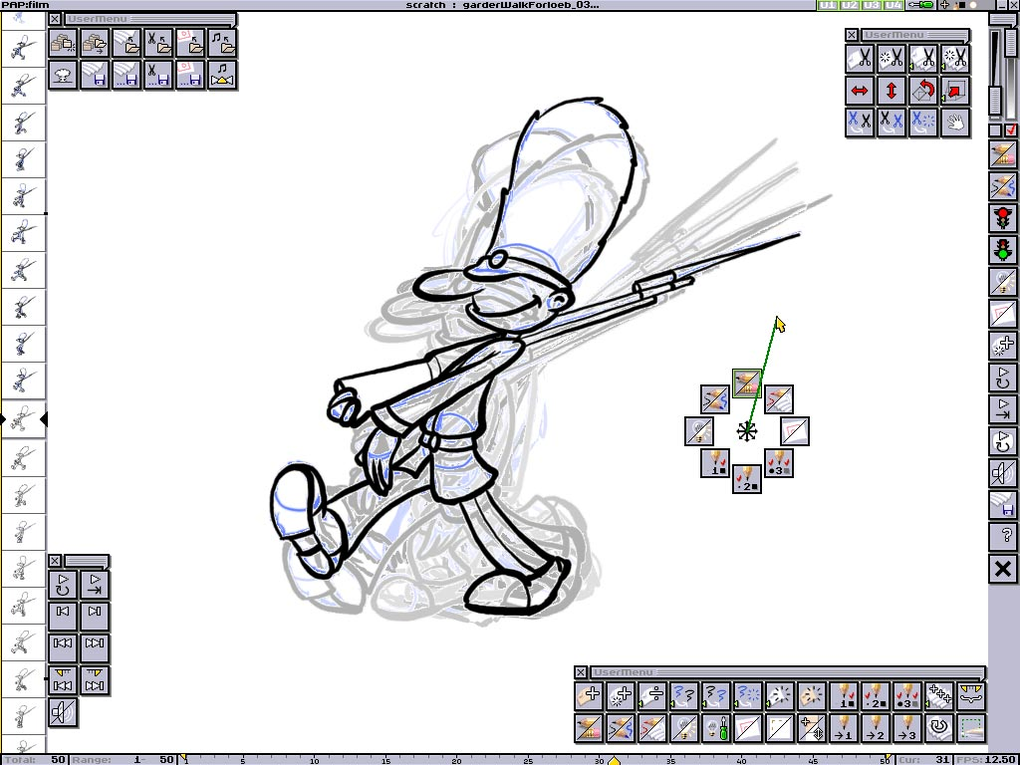
Plastic Animation Paper is a lightweight program designed for creating 2D animations using a paper-like interface. This design philosophy fosters an intuitive workflow, allowing users to focus on the creative process without being overwhelmed by complex settings or tools. The software’s core functionality revolves around creating and manipulating frames, effectively simulating traditional animation techniques. Users can draw directly onto the digital canvas, using the provided tools to add details, lines, and shapes.
The program’s interface presents a clean and uncluttered workspace, prioritizing ease of navigation. Key features include basic drawing tools such as pencils, brushes, and shapes. These tools offer customizable options, enabling users to adjust brush size, opacity, and color. While not as versatile as specialized professional illustration software, the basic tools suffice for creating simple and even moderately complex animations.
The animation process centers around creating individual frames, sequentially organizing them to generate movement. Plastic Animation Paper supports onion skinning, a common animation technique that displays previous and subsequent frames as semi-transparent overlays. This assists in maintaining consistency and smoothness across the animation sequence. The software offers rudimentary animation controls, allowing users to adjust the timing and playback speed of their animations.
User Interface and Experience
The software boasts a clean and intuitive interface, prioritizing user-friendliness. The straightforward design minimizes distractions, allowing users to concentrate on creating their animations. The user experience is designed to be simple and accessible, making it a suitable option for users with limited experience in animation software. Navigating the various tools and options is straightforward, requiring minimal time to learn the basic functions.
The program’s design echoes the experience of working with physical paper, enhancing the overall intuitive nature of the software. This approach creates a familiar and comfortable working environment, particularly beneficial for users accustomed to traditional animation methods. The simplicity of the interface, however, might be limiting for users seeking advanced features and precise control over various parameters. Those requiring a wider range of artistic tools or complex animation capabilities might find the software’s limitations restrictive.
System Requirements and Compatibility
Plastic Animation Paper’s system requirements are relatively modest, ensuring compatibility with a wide range of Windows systems. The software is compatible with Windows 10 and above, making it accessible to a significant portion of Windows users. Its lightweight nature ensures smooth operation even on less powerful systems, although performance may vary based on project complexity and system resources. The small file size (5.27 MB) makes installation quick and painless. This low system demand ensures wider accessibility, eliminating the need for high-end hardware for basic animation projects.
Comparison with Other 2D Animation Software
While Plastic Animation Paper presents a user-friendly and accessible entry point into 2D animation, it’s important to compare its capabilities with other available options. Compared to professional-grade software such as Adobe Animate or Toon Boom Harmony, Plastic Animation Paper lacks advanced features such as sophisticated brush engines, vector-based drawing tools, and comprehensive animation controls. However, this lack of complexity also contributes to its simplicity and ease of use.
Compared to other free and open-source animation software, Plastic Animation Paper offers a competitive alternative, particularly for users prioritizing ease of use and a simple interface. Its direct approach to frame-by-frame animation can be preferable to users who favor a less feature-rich but more intuitive experience. The software’s focus on simplicity makes it particularly suitable for educational purposes or users who prefer a straightforward, less complex workflow.
Strengths and Weaknesses
Strengths:
- Ease of Use: The software’s primary strength is its intuitive and user-friendly interface. Beginners can quickly grasp the fundamentals and start creating animations with minimal learning curve.
- Simplicity: The streamlined interface and limited features contribute to a clean and uncluttered workspace, fostering a focus on the creative process.
- Free and Accessible: Being free to download and use, Plastic Animation Paper lowers the barrier to entry for users interested in exploring 2D animation.
- Lightweight: The software’s low system requirements ensure wide compatibility and smooth operation even on less powerful computers.
- Paper-like Interface: The software emulates the feeling of working with traditional animation techniques on paper, providing a familiar and comfortable experience for some users.
Weaknesses:
- Limited Features: Compared to professional software, Plastic Animation Paper lacks advanced features such as vector-based drawing, sophisticated brushes, and detailed animation controls.
- Basic Drawing Tools: While functional, the drawing tools offer a limited range of customization options, potentially restricting artistic expression for some users.
- Lack of Advanced Animation Capabilities: The program lacks the advanced animation features commonly found in professional-grade software, limiting its suitability for complex or large-scale projects.
- No Export Options (Presumed): The review provides limited detail on export capabilities, raising concerns about the range of file formats supported for sharing and further editing. This aspect needs further clarification.
- Community Support and Documentation: The availability of community support and detailed documentation is unclear, potentially posing challenges for users encountering difficulties.
Conclusion
Plastic Animation Paper provides a viable option for users seeking a simple and accessible way to create 2D animations. Its straightforward interface and intuitive design make it particularly suitable for beginners or users who prefer a less complex workflow. The software’s strength lies in its ease of use and accessibility. However, users requiring advanced features or expecting professional-level capabilities should consider more robust, albeit more complex, alternatives. The lack of information about export options and community support requires further clarification to assess its overall usability and effectiveness fully. Further investigation into these aspects is necessary for a comprehensive evaluation.
File Information
- License: “Free”
- Version: “4.0”
- Latest update: “May 16, 2024”
- Platform: “Windows”
- OS: “Windows Vista”
- Downloads: “351”
- Size: “5.27 MB”


