
Playnite is a free, open-source utility that revolutionizes how you manage and interact with your PC game collection. More than just a launcher, Playnite acts as a comprehensive game library organizer, unifying your games from various sources into a single, easily navigable interface. This powerful tool significantly enhances the gaming experience by streamlining access, tracking playtime, and offering extensive customization options.
A Unified Gaming Experience
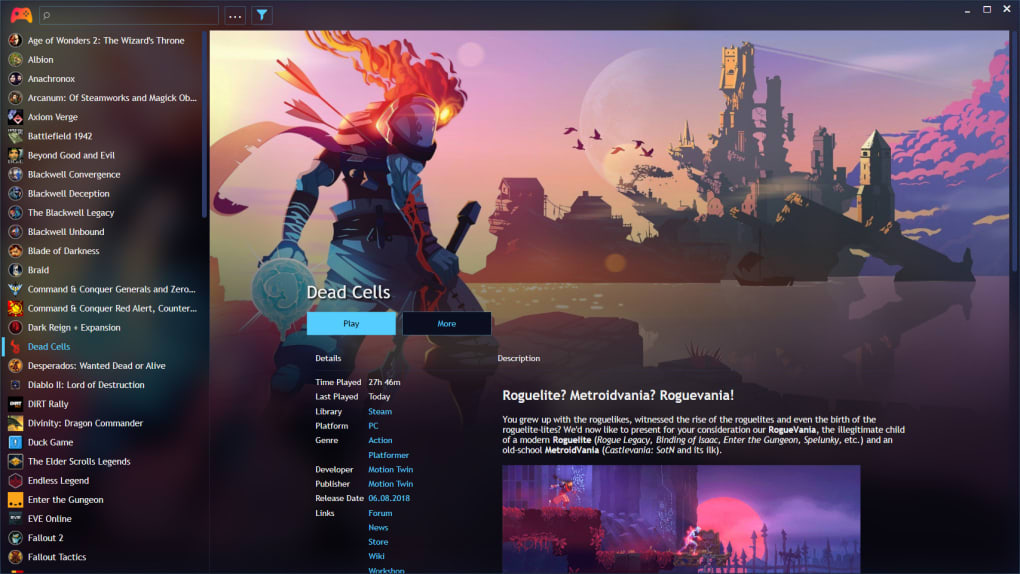
Playnite’s core function is to consolidate all your PC games into a centralized location. This includes games installed directly onto your system, as well as titles acquired through various digital distribution platforms. Imagine having Steam, GOG, Epic Games Store, Battle.net, Origin, and Uplay games all readily accessible from a single, clean interface – that’s the power of Playnite. Instead of juggling multiple launchers and separate libraries, you’ll find everything neatly organized in an alphabetized list within Playnite, providing a streamlined and efficient way to manage your entire gaming catalog.
Each game entry within Playnite’s library provides detailed information, extending far beyond a simple title and icon. You’ll find comprehensive data including:
- Official Game Descriptions: Access readily available game summaries for quick reference.
- Time Played: Accurately track your playtime for each game, satisfying your curiosity about time spent on favorite titles.
- Last Played: Conveniently review the last time you played a particular game, helping you quickly resume where you left off.
- Genre, Developer, Publisher: Essential information for categorization, searching and exploration of your library.
- Release Date: Know when your favorite games were originally released, perfect for nostalgia trips or comparing release timelines.
- Tags: Create custom tags to categorize your games based on various personal preferences (e.g., “RPG,” “Open World,” “Multiplayer”). This allows for flexible and highly personalized organization.
- Platform: Clearly identifies the platform each game runs on, crucial when managing a library that spans multiple systems.
- Links: Provides direct links to related resources, such as the game’s official website, store page, or community forums.
Beyond its organizational capabilities, Playnite’s intuitive interface is designed for ease of use. The layout and theme are completely customizable, allowing users to personalize the experience to fit their individual tastes and preferences. This level of customization ensures Playnite adapts to your workflow, rather than the other way around.
Extensive Integration and Extensibility
One of Playnite’s most compelling features is its extensive integration capabilities. It seamlessly integrates with major digital distribution platforms, automatically importing your game libraries from services like Steam, GOG, Epic Games Store, Battle.net, Origin, and Uplay. This automated importing saves considerable time and effort, eliminating the need for manual data entry. However, it’s important to note that while Playnite strives for complete accuracy, some games may still require manual organization or adjustment. Similarly, in rare instances, Playnite may not perfectly recognize libraries from all digital distribution services.
Playnite extends its functionality further through support for various plugins, scripts, and APIs. This extensibility allows users to tailor the application to their specific needs and preferences, expanding its capabilities well beyond its core functionality.
- .NET Plugins: Integrate custom functionality using the .NET framework, offering extensive programming possibilities for advanced users.
- IronPython or PowerShell Scripts: Automate tasks, customize the interface, and add entirely new features using powerful scripting languages.
- IGDB API: Integrate with the Internet Game Database (IGDB) API to automatically fetch detailed game information, including images and additional descriptions, enriching your game library entries with automatically updated data.
These options provide a robust foundation for power users to create truly personalized gaming experiences, automating tasks, customizing interfaces, and adding features tailored to individual needs.
Beyond Organization: Enhanced Gameplay
Playnite’s impact extends beyond simple game organization. The application provides several features that enhance the actual gameplay experience:
- Fullscreen Gameplay with Controller Support: Launch and play your games directly from Playnite in fullscreen mode, with full controller support. Enjoy a seamless transition from library management to gameplay.
- Game Emulator Support: Playnite supports various game emulators, opening up access to a vast library of classic console games. This feature transforms Playnite into a versatile hub for both modern and retro gaming.
This integration of library management and gameplay enhancements creates a streamlined and enjoyable experience, maximizing convenience and minimizing interruptions.
Portability and Cloud Synchronization
Playnite embraces portability, allowing users to easily carry their game library and settings with them. The application is designed to be easily run from portable storage, such as a USB drive. This feature is especially convenient for those who frequently use multiple computers or prefer to keep their game data separate from their main system.
Furthermore, Playnite facilitates cloud synchronization with services like Dropbox and Google Drive. This allows you to keep your game library synchronized across multiple devices, ensuring you always have access to your organized game collection regardless of the machine you are using.
While Playnite prioritizes user data security, users should be aware that the application still requires online access for some features and may use cookies to improve user experience.
Playnite: A Comprehensive Overview of Pros and Cons
Pros:
- Centralized Game Library: Consolidates all your PC games into a single, easily navigable interface.
- Extensive Game Information: Provides detailed information about each game, including playtime, last played date, genre, developer, publisher, and more.
- Customizable Interface: Allows for personalized themes and layouts to suit individual preferences.
- Support for Multiple Digital Distribution Platforms: Seamlessly integrates with Steam, GOG, Epic Games Store, Battle.net, Origin, Uplay, and more.
- Extensive Plugin, Script, and API Support: Allows for significant customization and extension of functionality.
- Portable and Cloud-Syncable: Enables easy portability and synchronization across multiple devices.
- Full-screen Gameplay with Controller Support: Provides a seamless transition from library management to gameplay.
- Game Emulator Support: Allows for playing classic console games through integrated emulators.
Cons:
- Manual Organization May Be Required: While Playnite automates much of the library import process, some manual organization might still be necessary for certain games.
- Limited Platform Compatibility: Primarily focused on PC games; other platforms are not directly supported.
- Potential for Library Recognition Issues: In some cases, Playnite may not fully recognize game libraries from all digital distribution services.
- Reliance on External Launchers: Playnite may require opening external launchers for certain games before launching the games themselves.
- Online Access Requirements: Certain features require online access, and cookies may be used for improved user experience.
In conclusion, Playnite emerges as a potent and versatile game library manager, addressing the shortcomings of managing scattered game collections across different platforms. Its powerful features, coupled with its open-source nature and extensive customization options, make it an invaluable tool for any serious PC gamer. While minor limitations exist, the benefits significantly outweigh the drawbacks, solidifying Playnite’s place as a top-tier game library management solution.
File Information
- License: “Free”
- Latest update: “July 11, 2023”
- Platform: “Windows”
- OS: “Windows 8.1”
- Language: “English”
- Downloads: “4.6K”
- Size: “240.97 KB”


