
Plex is a powerful and versatile media center application that allows users to organize, manage, and stream their personal media collections across a wide array of devices. It functions as a client-server system, enabling users to store their media files (videos, music, photos) on a central server and access them seamlessly from various clients, such as smartphones, tablets, smart TVs, gaming consoles, and computers. While Plex doesn’t have a direct equivalent, it offers similar functionality to other media center solutions like Kodi or Media Portal, but distinguishes itself through its robust features, user-friendly interface, and strong emphasis on security.
Plex’s Client-Server Architecture and Device Compatibility
At the heart of Plex’s functionality lies its client-server architecture. Users designate a device (computer, NAS drive, etc.) as the server, where their media library is stored and organized. This server then acts as the central hub, streaming content to various client devices that are connected to the same network. This setup offers significant advantages, especially for users with extensive media collections. Storing everything on a central server avoids the need to duplicate files across numerous devices, saving valuable storage space and simplifying media management.
The beauty of Plex lies in its extensive device compatibility. The application supports an impressive range of devices for both server and client functions. Potential server devices include personal computers (PCs), laptops, network-attached storage (NAS) devices, and even Raspberry Pi devices for those seeking a more budget-friendly solution. The choice of server depends largely on the size of the media library and the desired level of performance. For smaller libraries, a standard PC may suffice. However, for users with extensive collections, a dedicated NAS device is often preferred due to its enhanced storage capacity, reliability, and often superior processing power to handle the simultaneous streaming requests from multiple clients.

The list of supported client devices is equally extensive, encompassing virtually all major platforms. Plex clients are available for popular operating systems like Windows, macOS, Linux, Android, and iOS. It also integrates seamlessly with many smart TVs, streaming devices (such as Roku, Apple TV, and Chromecast), and gaming consoles (including PlayStation and Xbox). This widespread compatibility makes Plex highly accessible, irrespective of the devices used within a household or personal network.
User Interface, Security, and Community Support
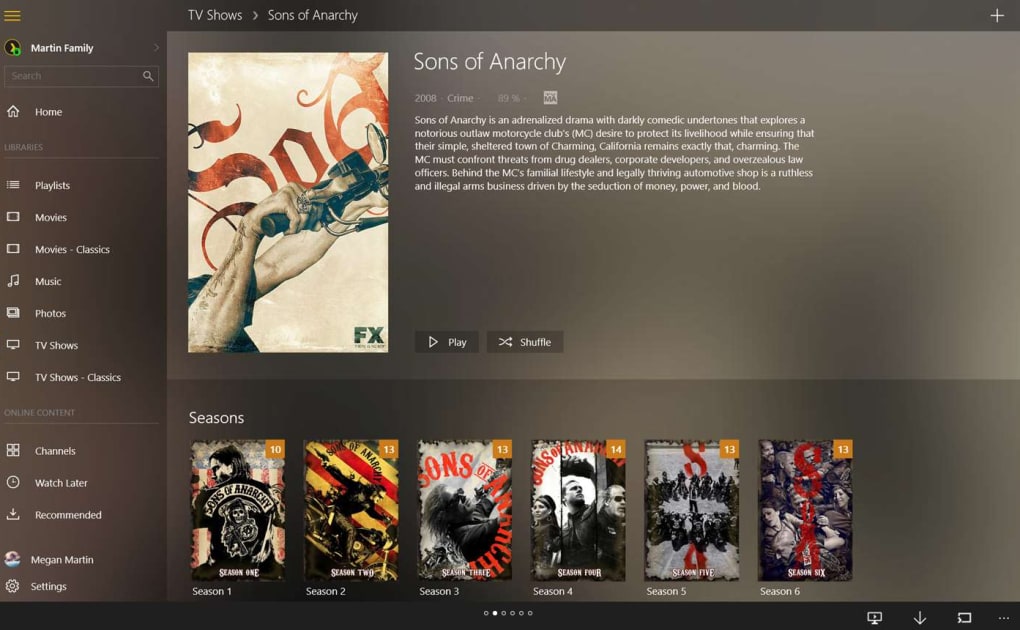
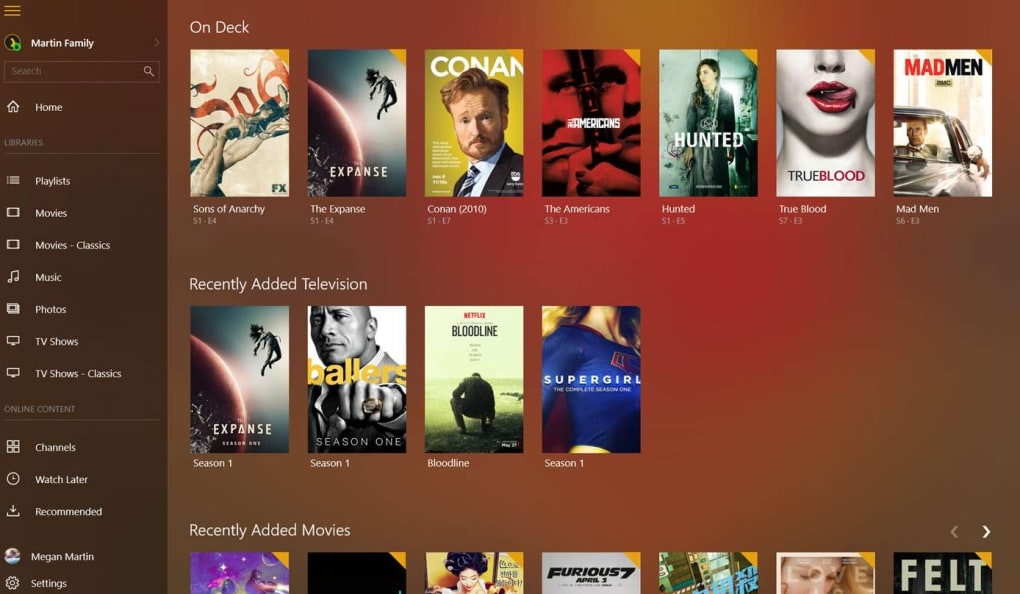
Plex prides itself on offering a user-friendly interface, making it accessible even to those with limited technical expertise. The intuitive design ensures that navigating the library, organizing media, and initiating streams is straightforward and hassle-free. The clean and visually appealing interface contributes to a more enjoyable user experience. After the initial setup, which involves linking your chosen server to the application and adding your media directories, users can quickly start browsing and enjoying their media.
Security is a paramount concern for any media center application, and Plex addresses this with its robust encryption protocols. While the exact details of the encryption methods employed are not publicly disclosed for security reasons, Plex assures users that their data is transmitted securely, protecting it from unauthorized access during streaming. This is particularly important for those who store copyrighted or sensitive content within their media libraries.
Plex also benefits from a large and active community of users and developers. This vibrant community provides ongoing support, contributing significantly to the app’s development and maintenance. The community forums are a valuable resource for users encountering problems or seeking guidance. The open-source nature of Plex encourages transparency and fosters collaboration, ensuring the platform continues to evolve and adapt to the changing needs of its user base. This active community quickly addresses reported bugs and offers solutions to common user problems, adding to the application’s overall reliability and longevity.
Extended Features and Content Access
Plex’s functionality extends beyond simply managing and streaming personal media libraries. Registered users can leverage the platform’s features for sharing their content with friends and family. By granting access, users can extend their media libraries to others, facilitating shared viewing experiences. This functionality is a significant value-add, particularly for families or groups of friends who want to easily share their collections.
Beyond personal libraries, Plex also offers access to a curated selection of on-demand content through its premium subscription service, Plex Pass. While the free version of the application allows access to a limited number of free channels (with availability depending on geographic location), Plex Pass unlocks a wider range of premium channels, movies, and TV shows. These partnerships with content providers such as Lionsgate, Legendary, and Endemol broaden the content available to users significantly. In addition to video content, Plex also partners with music services like Tidal, enabling users to integrate high-fidelity music streaming directly into their Plex experience. The availability of these services is subject to geographic restrictions and may require a Plex Pass subscription.
The platform also supports unofficial client apps created by third-party developers. These unofficial clients can offer expanded functionality or support for devices not officially supported by Plex. However, users should exercise caution when using such unofficial clients, as they may pose security risks if not developed with appropriate safeguards.
Plex: A Modern Home Theater Solution
For users seeking a comprehensive and versatile solution for managing and streaming their personal media collections, Plex offers a compelling alternative to dedicated home theater systems or relying solely on streaming services. By utilizing a separate, high-capacity server, users can offload storage demands from their primary viewing devices, allowing for optimal performance and responsiveness without sacrificing storage space. This approach is especially beneficial for users with large media libraries and multiple client devices, as it ensures that streaming remains smooth and uninterrupted, even with multiple simultaneous streams.
Its compatibility with Windows 11 underscores Plex’s commitment to keeping up-to-date with the latest operating systems, ensuring a seamless experience for users of modern technology. Furthermore, the wealth of content provided through the combination of personal libraries, partnerships with content providers, and access to free streaming channels makes Plex a compelling option for users seeking both curated and personally organized entertainment experiences.
Advantages and Disadvantages of Plex
Pros:
- Extensive Device Compatibility: Supports a vast array of server and client devices.
- User-Friendly Interface: Intuitive design simplifies media organization and streaming.
- Robust Security: Employs strong encryption protocols for secure data transmission.
- Active Community Support: Benefits from a large and responsive community.
- Content Variety: Offers both personal library management and access to on-demand content (with a Plex Pass subscription).
- Sharing Capabilities: Allows users to share their libraries with others.
- Windows 11 Compatibility: Ensures seamless integration with the latest operating system.
Cons:
- Limited Free Online TV: The selection of free online TV channels is geographically restricted and may be limited.
- Plex Pass Subscription: Access to premium content requires a subscription to Plex Pass.
- Potential Risks with Unofficial Clients: Using unofficial clients may introduce security vulnerabilities.
In conclusion, Plex offers a powerful and versatile solution for organizing, managing, and streaming media across a wide range of devices. Its user-friendly interface, extensive compatibility, and robust security features make it an appealing choice for both casual and serious media enthusiasts. While there are some limitations, particularly concerning the availability of free online TV channels, the overall benefits and functionality of Plex make it a compelling media center application for a broad spectrum of users.
File Information
- License: “Free”
- Latest update: “July 15, 2025”
- Platform: “Windows”
- OS: “Windows 11”
- Language: “English”
- Downloads: “36.5K”


