
Pluto Video Downloader is a software application designed to simplify the process of downloading and managing videos from a wide range of online streaming platforms. While not without its limitations, its unique features and extensive compatibility make it a compelling option for users seeking a robust video downloading solution. This review will delve into the capabilities, pros and cons, and overall user experience of Pluto Video Downloader.
Key Features and Functionality
Pluto Video Downloader boasts a comprehensive feature set designed to streamline the video downloading and playback experience. Its core functionality revolves around downloading videos from hundreds of streaming sites, offering users a centralized platform for managing their online video content. This versatility extends to its support for a broad spectrum of video formats, allowing users to download videos in their preferred quality and resolution.
One of its standout features is the integrated standalone player. This eliminates the need to rely on web browsers for video playback, offering a seamless and ad-free viewing experience. The standalone player also supports sequential playback of videos from different sources, effectively allowing users to create custom playlists for uninterrupted viewing. This is particularly useful for users who regularly watch videos from diverse platforms.
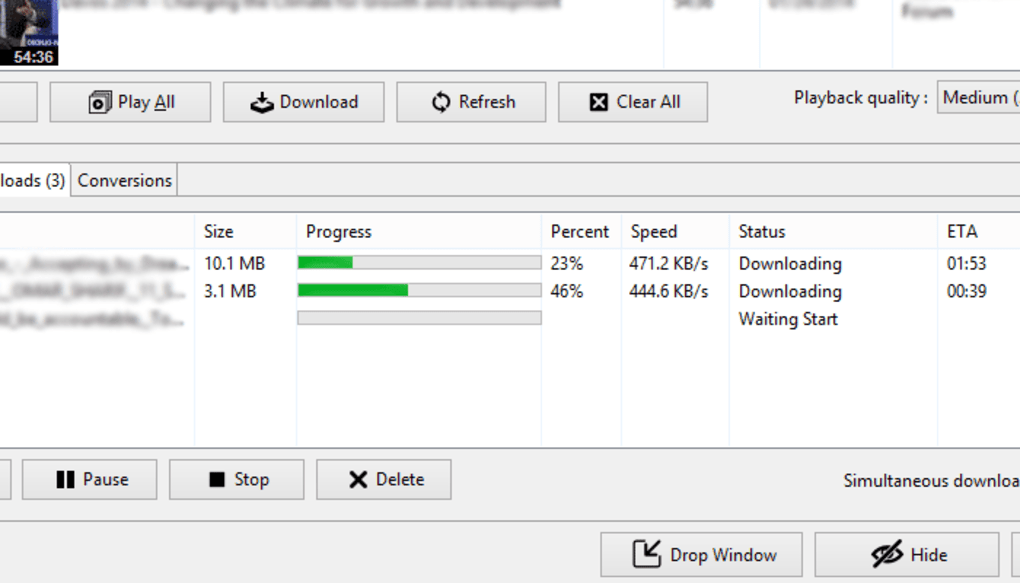
The application goes beyond simply downloading videos; it also actively retrieves metadata, including essential details like the video title, description, upload date, viewer count, and even the uploader’s name. This detailed metadata enriches the user’s experience, providing context and organization to their downloaded video library. The inclusion of thumbnails further enhances the library’s organization and usability. For audiophiles, the Fast Audio Extract function allows the user to download only the audio track, thereby saving storage space and download time.
Ease of use is another prominent feature. The drag-and-drop interface simplifies the process of adding video links. Users can drag a video link directly from their web browser (Chrome or Firefox are explicitly supported) into a designated drop box, instantly initiating either downloading or playback within the standalone player, depending on the user’s choice. This intuitive interface reduces the technical barrier to entry, making it accessible even for novice users.
The application also provides versatile conversion capabilities. The ‘Quick Download’ option allows users to download a video and immediately convert it to their desired format, eliminating the need for separate conversion software. This integrated conversion feature simplifies the workflow and ensures compatibility with various devices.
Finally, the application offers support for MCE remote controls. This is a niche feature, but it significantly enhances the user experience for those using media center PCs, allowing for convenient control of video playback through a remote without needing to interact directly with the computer. This feature allows users to pause, resume, fast-forward, rewind, and navigate between clips within the standalone player using the remote.
Pros and Cons of Pluto Video Downloader
Like any software application, Pluto Video Downloader presents a blend of advantages and disadvantages. Understanding these aspects is crucial to determine its suitability for individual needs.
Pros:
- Extensive Site Compatibility: Pluto Video Downloader supports a vast array of video streaming websites, surpassing many competitors in its breadth of compatibility. This broad reach minimizes the limitations faced by users who access videos from diverse platforms.
- Standalone Player: The integrated standalone player provides a smooth, ad-free viewing experience, independent of the user’s web browser. This significantly improves the user experience, particularly for users who are frequently interrupted by advertisements or browser-related issues.
- Metadata Retrieval: The application’s capacity to retrieve comprehensive metadata greatly enhances the organizational capabilities of the downloaded video library. This organized library makes it simpler for users to locate and manage their downloaded content.
- Drag-and-Drop Interface: The user-friendly drag-and-drop interface minimizes the technical expertise required to use the application. The ease of use makes it accessible to a broader range of users, including those without extensive technical skills.
- Versatile Conversion: Integrated conversion tools eliminate the need for external conversion software, streamlining the workflow and reducing the complexity involved in converting downloaded videos to different formats.
- Fast Audio Extract: The ability to extract only the audio track is a valuable feature for users primarily interested in the audio content, allowing for smaller downloads and storage savings.
- MCE Remote Control Support: The support for MCE remote controls provides a convenient way for users with home theater PCs to control playback without directly interacting with the computer.
Cons:
- Platform Limitations: The primary drawback is the software’s current unavailability for smartphones and tablets. This severely restricts its usability for users who predominantly access videos on mobile devices.
- Cost of Full Version: The full version of the software is reportedly expensive compared to other video downloader applications. The cost-benefit ratio may not be favorable for all users, especially those with limited budgets or infrequent video downloading needs.
- Outdated Version: The last update listed is from August 12, 2019, suggesting the software may not be actively maintained. This raises concerns about compatibility with newer websites and security updates.
- Limited User Reviews: A notable lack of user reviews makes it difficult to gauge the actual user experience and identify any potential unresolved issues. This lack of feedback limits the potential buyer’s ability to make an informed decision.
Alternatives to Pluto Video Downloader
Several alternative applications provide similar functionalities to Pluto Video Downloader. These options offer varying features and compatibility levels, allowing users to choose the application best suited to their specific requirements. Some popular alternatives include:
- 4K Video Downloader: A robust and widely recognized video downloader with broad compatibility and a user-friendly interface.
- JDownloader: A powerful, open-source download manager with extensive features and support for a wide range of websites.
- VLC Media Player: While primarily a media player, VLC also offers built-in download capabilities for certain websites. It’s a versatile tool, but its download features aren’t as extensive as dedicated downloaders.
- YTMP3: This is a specifically YouTube-focused converter, converting videos to mp3 files.
The selection of an appropriate alternative should be based on factors like the desired level of features, supported websites, compatibility with the user’s operating system, and cost considerations.
Conclusion
Pluto Video Downloader offers a unique combination of features, including a standalone player, metadata retrieval, and extensive site compatibility. The drag-and-drop interface simplifies usage, making it accessible to a wide audience. However, its limitations, particularly the lack of mobile support, the high cost of the full version, and the absence of recent updates, are significant drawbacks. Prospective users should carefully weigh these pros and cons alongside the availability and features of alternative applications to make an informed decision. The absence of current user reviews further highlights the need for thorough research before investing in this software. If the platform limitations and lack of recent updates aren’t deal-breakers, then the feature set offered by Pluto Video Downloader can provide a viable solution for managing and downloading videos from numerous online sources.
File Information
- License: “Free”
- Version: “1.0.0.325”
- Latest update: “August 12, 2019”
- Platform: “Windows”
- OS: “Windows Vista”
- Language: “English”
- Downloads: “11.9K”
- Size: “62.91 MB”


