
In an era dominated by streaming services and increasingly complex digital ecosystems, the humble iPod still holds a special place in the hearts of many music lovers. For years, Apple’s ubiquitous iTunes software was the gatekeeper to managing these iconic devices, often proving to be a source of frustration for Windows users due to its perceived bloat, sluggish performance, and restrictive synchronization policies. Enter PodTrans, a remarkably straightforward and powerful free tool designed to liberate iPod owners from the shackles of iTunes, offering a seamless experience for transferring music, videos, and other media to and from their computers.
PodTrans stands out as a well-designed solution specifically crafted for transferring a wide array of content, including iPod Music, movies, TV shows, videos, audiobooks, and podcasts. Its core promise is to simplify the management of your beloved iPod content without requiring the installation of the often “clunky and slow iTunes,” a sentiment echoed by many PC users over the years. This dedication to user convenience and freedom from iTunes’ complexities forms the cornerstone of PodTrans’s appeal, making it a valuable utility for those looking to maintain their iPod libraries with ease and precision.
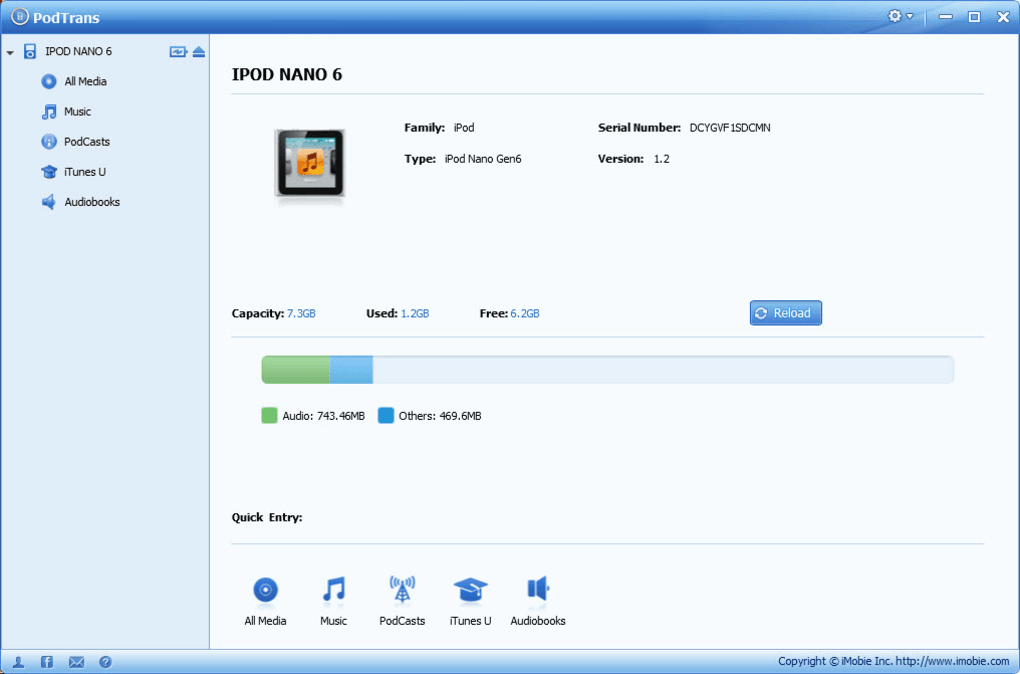
Liberating Your iPod: Manage Content Without iTunes, Even Better Than iTunes
The primary selling point of PodTrans, and arguably its most significant advantage, is its ability to manage iPod content independently of iTunes. For a long time, the idea of owning an iPod meant committing to the iTunes ecosystem, which, while integrated and powerful for Apple device users, often felt like an imposition on Windows PCs. Users frequently encountered issues like slow performance, forced synchronization that could erase existing content, and a general lack of flexibility in how media could be moved. PodTrans directly addresses these pain points, positioning itself not just as an alternative but, in many ways, as a superior solution for specific tasks.
With PodTrans, the tedious and often risky process of “annoying iTunes auto sync” becomes a thing of the past. The software enables users to effortlessly import or export songs and other media onto their iPods using a simple, intuitive drag-and-drop method. This feature alone represents a monumental shift in user control. Imagine being able to selectively add a few new tracks to your iPod without the fear of your entire library being overwritten or having to perform a full sync that takes ages. This level of granular control is precisely what PodTrans delivers. Whether you’re moving a freshly ripped album from your computer to your iPod or backing up cherished playlists from your device to your hard drive, the drag-and-drop functionality streamlines the entire process, making it feel natural and efficient.
The promise of “not having to install the clunky and slow iTunes” might seem like a bold claim, especially considering a user review on PhanMemFree.org that noted, “It asks for iTunes once installed.” This discrepancy highlights a common point of confusion: while PodTrans aims to replace iTunes for management and transfer, some core functionality, particularly device recognition and driver installation, might still implicitly rely on components typically installed alongside iTunes. It’s more accurate to say that PodTrans eliminates the need to actively use iTunes for day-to-day media transfers and management, bypassing its notorious auto-sync and offering a more direct interface. The intent is clear: to provide a lightweight, focused tool that performs essential transfer operations without the overhead and restrictive nature of the full iTunes application. This distinction is crucial for understanding PodTrans’s value proposition – it seeks to be the dedicated iPod media manager, freeing users from the frustrations of a one-size-fits-all media suite.
Beyond mere transfer, PodTrans offers comprehensive support for all generations of iPod nano, iPod shuffle, and iPod classic. This broad compatibility ensures that whether you’re dusting off an old 1st-gen Shuffle or regularly using a Classic with thousands of songs, PodTrans can handle your device. The fact that it offers this extensive functionality entirely for free further solidifies its position as an indispensable tool for iPod enthusiasts. It means that without bulky iTunes and its often tedious sync processes, users can add new music, movies, and podcasts to their iPods without the constant worry of existing content being erased, a common and deeply frustrating experience for many who relied solely on iTunes for managing their devices. This focus on preserving existing content while enabling new additions underscores PodTrans’s user-centric design philosophy.
Effortless Discovery: Go Find Music with Intelligent Smart Search
For anyone with a substantial music library on their iPod, navigating through hundreds or thousands of tracks can be a daunting task. iTunes offered some search capabilities, but PodTrans elevates this experience with its “Intelligent Smart Search” feature, making content discovery both simple and incredibly efficient. This is where the software truly shines for users with extensive collections, transforming a potentially laborious chore into a quick and satisfying action.
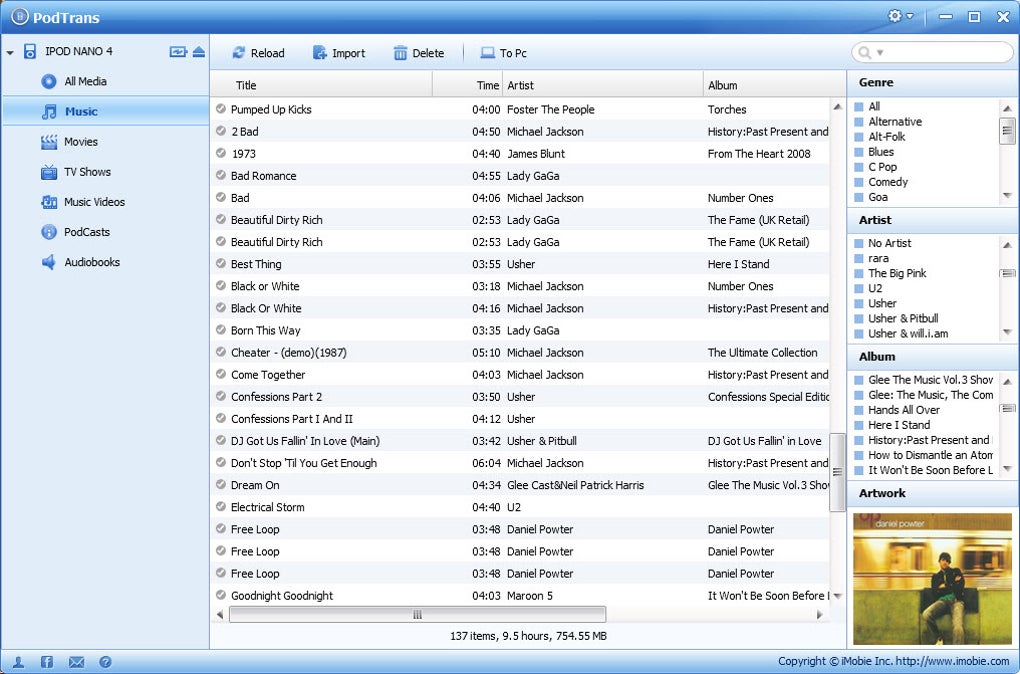
PodTrans’s Smart Search is designed to pinpoint exactly what you’re looking for with remarkable precision. Instead of scrolling endlessly or relying on vague filtering options, users can type with “multiple criteria” to straightforwardly locate any songs, videos, or other media. This multi-faceted search capability allows for highly specific queries, meaning you’re not just limited to searching by song title. You can, for instance, search by:
- Artist: Quickly pull up all tracks by your favorite musician.
- Album: Find every song from a specific album in an instant.
- Genre: Curate a listening experience based on musical categories like rock, pop, jazz, or classical.
- Playlists: Locate specific playlists you’ve created or imported, making it easy to manage and transfer them.
This intelligent search functionality significantly enhances the user experience. Imagine preparing for a trip and needing to quickly add all songs by a particular artist, or wanting to back up all tracks from a specific album. With Smart Search, these tasks become trivial. It’s not just about finding music; it’s about efficient library management and ensuring that your iPod content remains organized and accessible. The ability to filter and sort through content using various metadata points turns a potentially overwhelming collection into a well-ordered personal archive, easily navigable even without the visual cues of album art on a small iPod screen. This level of organization and easy access is a testament to PodTrans’s thoughtful design, aiming to empower users with full control over their media rather than imposing restrictive structures.
A Deeper Dive into PodTrans: Features, Usability, and Technical Aspects
Beyond its core functionalities of iTunes-free management and intelligent search, PodTrans embodies a suite of features that collectively contribute to its robust utility and user-friendly appeal. Its design philosophy clearly prioritizes simplicity and effectiveness, ensuring that even novice users can navigate its interface and perform complex tasks with minimal effort.
Seamless Bi-Directional Transfer: One of the most critical aspects of any iPod transfer tool is the ability to move files in both directions: from the computer to the iPod, and crucially, from the iPod back to the computer. PodTrans excels here, allowing users to “freely import or export iPod music, movies to/from computer without compromising the existing content.” This bi-directional capability is vital for several reasons. It allows users to:
- Backup their iPod library: In case of computer failure or data loss, having a copy of your iPod’s content safely stored on your PC is invaluable.
- Transfer content between computers: If you get a new computer, PodTrans makes it simple to move your entire iPod library over, without needing to re-sync everything through iTunes.
- Share music (within legal limits): Easily copy songs from a friend’s iPod (with their permission) to your computer.
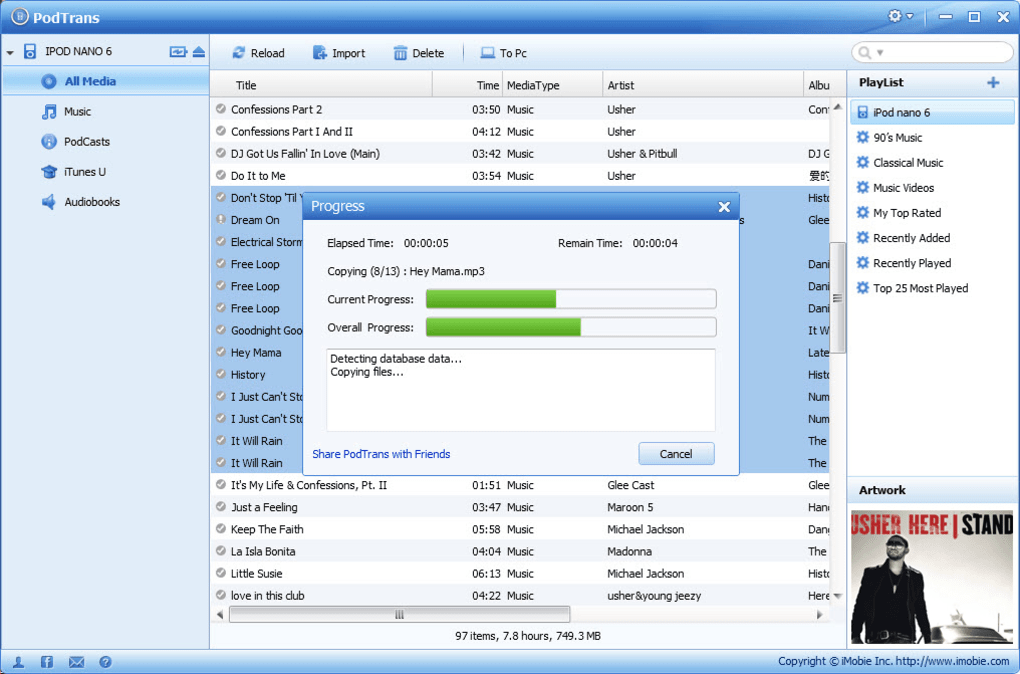
The assurance that this process won’t “compromise the existing content” on your iPod is a huge relief for users who’ve previously experienced data loss or accidental deletion through iTunes’ often aggressive sync behaviors.
Lightweight and Efficient Design: PodTrans is built to be a lean and fast application. With a size of just 5.32 MB, it’s remarkably small, ensuring quick downloads and minimal impact on system resources. This lightweight nature contributes to its “fast and intuitive” performance, distinguishing it from the often-resource-intensive iTunes. The installation process is straightforward, requiring no complex configurations, making it accessible to a wide audience.
Developer and Version Information: Developed by iMobie Inc., a company known for its iOS-related utility software, PodTrans has maintained a specific version for some time. The latest update, version 1.1.0, was released on February 13, 2019. While this date might seem a few years back, for a utility focused on classic iPods, which themselves are no longer receiving major software updates, the stability of an older, well-tested version can be an advantage. It suggests a mature product that reliably performs its intended functions without constant, potentially disruptive updates.
Security and Reliability: PhanMemFree.org’s security status for PodTrans indicates it is “Clean.” This means the file and associated URLs have been scanned by over 50 leading antivirus services, with no threats detected. This gives users peace of mind, knowing they are downloading and installing a safe and legitimate application, free from malware or unwanted bundled software, which is a significant concern in the free software landscape.
User Experience and Interface: The interface of PodTrans is designed with clarity in mind. Upon connecting an iPod, the software typically displays the device’s contents in an organized manner, often resembling a file explorer or media library view. Categories for music, videos, podcasts, etc., are usually clearly demarcated, allowing for easy navigation. The drag-and-drop mechanism is central to its ease of use; users can simply select files or folders from their computer’s directories and drag them into the PodTrans window to initiate transfer to the iPod, or vice versa. This direct, visual interaction eliminates much of the guesswork associated with more complex media management tools.
The absence of a complex sync engine simplifies troubleshooting. If a transfer fails, it’s usually due to a simple disconnection or a file format issue, rather than a convoluted sync error that requires extensive debugging within iTunes. This focus on direct action and clear feedback makes PodTrans a highly reliable tool for its intended purpose.
Understanding the Landscape: PodTrans in Context
While PodTrans addresses a specific need for iPod users, it’s important to place it within the broader context of media management and device connectivity. The software’s release and continued availability reflect a persistent demand for alternatives to official vendor software, particularly when that software is perceived as cumbersome or restrictive.
Why PodTrans Still Matters (Even for “Old” Devices): Despite the shift towards streaming and smartphones, many individuals still own and use their classic iPods. Reasons vary:
- Nostalgia: The tactile experience of the click wheel or the simplicity of a dedicated music player.
- Offline Music: Ideal for travel, areas with poor internet, or simply reducing data usage.
- High-Quality Audio: Many audiophiles prefer the direct playback of uncompressed files on an iPod over streaming.
- Battery Life: Dedicated devices often have superior battery life compared to smartphones used for music playback.
- Storage: Older iPods, especially the Classics, offer vast local storage that can hold massive music libraries.
For these users, PodTrans provides a vital link to keep their devices updated and their libraries organized without having to contend with modern iTunes versions that are heavily geared towards iPhones, Apple Music, and other current services.
Addressing the User Review: “Still need iTunes.” The user review on PhanMemFree.org stating, “Still need iTunes,” is a crucial piece of feedback to consider. While PodTrans strives to replace iTunes for media transfer, it’s highly probable that some underlying Apple device drivers are still necessary for Windows to recognize and communicate with an iPod. These drivers are typically installed automatically when iTunes is first set up. Therefore, a user might not need to run iTunes or sync with it, but the foundational drivers might still need to be present on the system. PodTrans effectively leverages these underlying system components while providing its own superior interface and transfer logic, bypassing the more problematic aspects of iTunes’ application layer. This nuance is important for users to understand: it’s about decoupling media management from iTunes, not necessarily from all Apple-related system files.
Comparison with Alternatives: The market for iPod transfer tools has seen various players over the years, each with its own strengths. PhanMemFree.org lists several alternatives, providing context:
- Floola: Another free alternative to iTunes, focusing on iPod management.
- WALTR 2: A more modern tool, often paid, designed to manage iPhones/iPods like magic, offering advanced transcoding.
- KiwiG PhonTunes: A free tool for transfer, backup, and management across various devices (iPhone, iPod, iTunes, Android, PC).
- YamiPod: A complete manager for iPods, often noted for finding duplicate tracks and lyrics.
- CopyTrans Manager: A popular lighter alternative to iTunes for managing iPods.
- iRip / iPod Access / Xilisoft iPod Rip / iPod Music Liberator: Often trialware or paid solutions focused on copying content from iPod to PC.
PodTrans carves its niche among these by being completely free, focused primarily on direct transfer, and boasting a clean, intuitive interface. While some alternatives might offer more advanced features (like extensive library management, deduplication, or multi-device support), PodTrans remains a strong contender for its simplicity and the critical ability to transfer content without iTunes’ interference. Its continued availability and “Clean” security status on PhanMemFree.org speak to its enduring relevance and reliability for its target audience.
Conclusion: The Enduring Value of PodTrans
In a world constantly pushing for the newest technology, PodTrans offers a refreshing return to simplicity and user control for those who cherish their iPods. It successfully delivers on its promise of being a “Free, Simple, Fast and Intuitive iPod Transfer” utility, effectively bridging the gap between iPods and Windows PCs without the cumbersome intervention of iTunes.
Its ability to manage iPod content through simple drag-and-drop, coupled with an intelligent Smart Search feature that allows for precise content discovery, makes it an incredibly powerful tool for anyone with a substantial media library. The support for all iPod generations and the critical function of bi-directional transfer without risking existing content solidify its position as an essential utility.
While the modern digital landscape has largely moved on from dedicated MP3 players and local media management, PodTrans serves as a testament to the enduring appeal of the iPod and the persistent demand for user-friendly, non-restrictive software. For those who still rely on their classic iPods for music, podcasts, or videos, PodTrans remains a highly recommended, free solution available on PhanMemFree.org, empowering them to effortlessly curate and maintain their digital collections with unmatched ease and efficiency. It’s more than just a transfer tool; it’s a commitment to keeping beloved devices alive and functional on your terms, free from the traditional Apple ecosystem constraints.
File Information
- License: “Free”
- Version: “1.1.0”
- Latest update: “February 13, 2019”
- Platform: “Windows”
- OS: “Windows 7”
- Language: “English”
- Downloads: “16.5K”
- Size: “5.32 MB”


