
Pokki, a once-popular desktop application for Windows, offered users a unique way to interact with their operating system by extending the functionality of the taskbar. This review delves into its features, pros, cons, user experiences, and its overall impact on the Windows desktop environment. While no longer actively developed, understanding Pokki provides valuable insight into the evolution of desktop customization and app integration.
Pokki’s Core Functionality: Taskbar Enhancement and App Integration
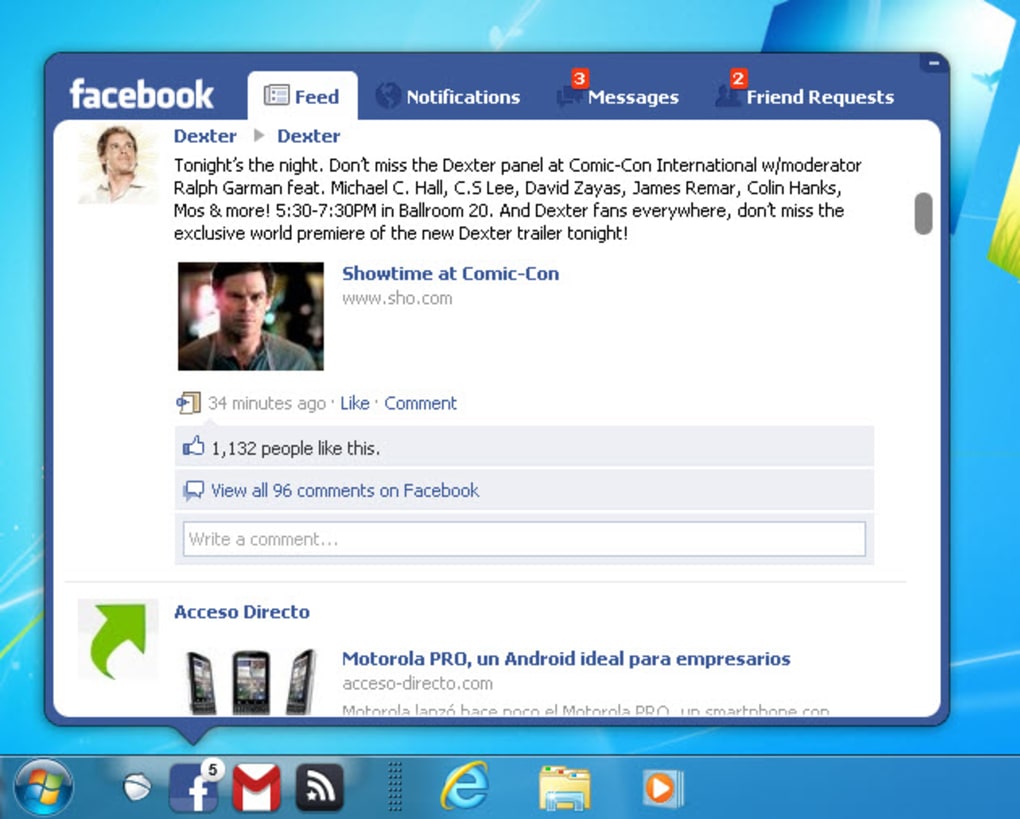
At its core, Pokki served as a platform to enhance the Windows taskbar, particularly beneficial for Windows 7 users who desired a more streamlined and customizable experience. The application allowed users to pin frequently used web applications, such as Facebook and Gmail, directly to the taskbar, providing quick and easy access. This eliminated the need to open a web browser and navigate to specific websites, thereby improving overall workflow efficiency. This direct pinning functionality was a significant selling point, especially before the widespread adoption of pinning websites to the taskbar became a standard feature within Windows itself.
Beyond web app integration, Pokki featured an integrated app store. This store offered a range of applications, including games, productivity tools, and other utilities. Users could browse, download, and install these applications directly through the Pokki platform, adding further functionality and customization options to their Windows desktop. The app store provided a convenient centralized location for discovering and managing various applications, eliminating the need to search across multiple websites or application stores. This streamlined installation process contributed significantly to Pokki’s user-friendliness. The typical installation and launch process was quick, usually taking only a few seconds.

The application itself boasted a user-friendly interface, designed for ease of use and intuitive navigation. The app store was easily accessible within the Pokki application, allowing users to seamlessly browse and install new applications. This integration fostered a smooth user experience, encouraging exploration and discovery of new tools and games.
Furthermore, Pokki provided notification support for integrated apps. Users received desktop notifications regarding updates, new messages, and other relevant information from applications pinned to the taskbar. This feature enhanced the user experience by providing timely updates without requiring constant manual checking of applications. This proactive notification system contributed to Pokki’s effectiveness as a productivity tool.
Pokki’s App Ecosystem: Games, Utilities, and Web Apps
The Pokki app store boasted a diverse collection of applications catering to a range of interests and needs. The selection included casual games, offering quick and enjoyable diversions during work breaks or downtime. These games varied in genre, ensuring a diverse selection to suit different tastes. Examples included titles like Four Horsemen, Tweeki, and Mixtape, showcasing the range available.
However, a key aspect of Pokki’s app offerings was the integration of web applications. This was a significant feature that differentiated Pokki from other desktop enhancement tools. The ability to access frequently used websites directly from the taskbar significantly improved productivity for many users. While the web app versions weren’t always feature-complete compared to the full browser versions, the convenience of having quick access and receiving notifications for unread messages or updates proved extremely valuable. This minimized context switching and kept users focused on their primary tasks.

The inclusion of productivity tools added further appeal to a broader range of users. While specific details regarding the range of productivity applications are limited, the overall functionality aimed to streamline workflows and improve daily efficiency. The aim was to consolidate essential tools and functions into a single easily accessible location on the taskbar, fostering a more organized and efficient work environment.
The User Experience: Strengths and Weaknesses
The widespread positive feedback received by Pokki users highlighted several key strengths. Many praised the application’s ease of installation and intuitive interface, making it accessible to a wide range of technical skill levels. The ability to customize the taskbar with frequently used web apps and other applications significantly enhanced the user experience, leading to increased productivity and efficiency for many users. The quick download and installation speeds, along with the integration of notifications, also contributed significantly to the positive feedback.
However, limitations were also noted. A common criticism revolved around the fact that integrated web applications didn’t always offer the full range of functionality available in the full web browser versions. While the convenience of taskbar integration was a significant advantage, the reduction in features could be frustrating for some power users who relied on the complete functionality of their preferred web applications.
Furthermore, the app selection, while diverse, may not have matched the breadth and depth of other established app stores. While Pokki strived to offer a varied catalog, including games, utilities, and web applications, the limited scale compared to established platforms might have impacted the overall appeal.
Another point of contention for some users was the potential for increased startup applications and the appearance of additional items in the recent applications list. While the integration of Pokki brought considerable improvements, the unintended consequences on startup and recent applications lists might have been seen as drawbacks by some.
Pokki’s Legacy: Impact and Comparison with Modern Approaches
Pokki’s impact on the Windows desktop environment was significant, especially during a time when comprehensive taskbar customization was less prevalent. Its innovative approach to integrating web applications and offering a user-friendly app store provided a compelling alternative for users seeking enhanced productivity and personalization. The focus on ease of use, quick installation, and integrated notifications set it apart from more technically demanding customization solutions.
However, the evolution of Windows itself has largely rendered Pokki’s core functionality redundant. Modern versions of Windows now offer robust features for pinning websites and applications to the taskbar, significantly reducing the need for third-party applications like Pokki. The integration of Microsoft Store and its vast app catalog also provides a readily available and more comprehensive alternative to Pokki’s app store. Therefore, while Pokki played a significant role in shaping the evolution of desktop customization, its core functionalities are now largely superseded by native Windows features.
In conclusion, Pokki represented a notable innovation in desktop enhancement for its time. Its user-friendly approach to taskbar customization and app integration appealed to many users. However, the advancements in Windows operating systems have rendered many of its core features less crucial. Its legacy lies in its pioneering role in improving the Windows taskbar experience and offering a more accessible approach to desktop customization for a broader range of users. While no longer actively developed, Pokki’s impact on shaping user expectations for desktop personalization remains significant.
File Information
- License: “Free”
- Version: “1.0”
- Latest update: “November 17, 2022”
- Platform: “Windows”
- OS: “Windows XP”
- Language: “English”
- Downloads: “83.3K”
- Size: “802.64 KB”


