
The Pokki Start Menu was a popular application designed to restore the familiar Start menu experience to Windows 8, a departure from the traditional Windows interface. This review will delve into the features, functionality, and impact of this once-popular application. The software aimed to provide a user-friendly alternative, offering a blend of classic usability with modern additions.
Recovering the Familiar: The Start Menu Experience
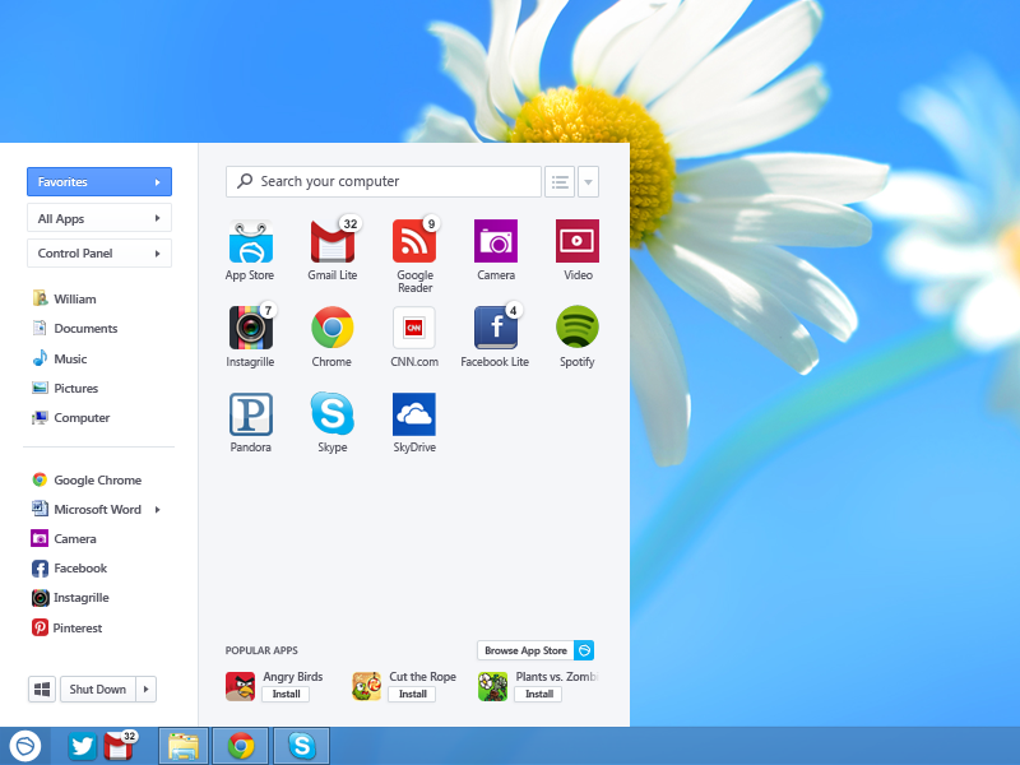
Windows 8’s departure from the traditional Start menu sparked considerable user frustration. The removal of this central access point proved disorienting for many, prompting a surge in demand for alternative solutions. Pokki emerged as a prominent contender, attempting to bridge the gap between the new Windows 8 interface and the long-standing preferences of its users. It offered a familiar, customizable Start menu that acted as a central hub for accessing applications, files, system settings, and more. This allowed users to quickly launch programs, search files and folders, access the control panel, and manage power options, all from a single, easily accessible location. Its intuitive design and straightforward operation quickly won over numerous users struggling to adapt to the new Windows 8 environment. In essence, Pokki aimed to replicate the convenient functionality of the Windows 7 Start menu, providing a seamless transition for users accustomed to that system.
The simplicity and speed of Pokki were significant advantages. Users appreciated the immediate access to frequently used applications, files, and system functions. The integrated search functionality further enhanced efficiency, allowing for rapid retrieval of desired items regardless of their location on the system. This ability to navigate the computer swiftly and smoothly was a key driver of Pokki’s popularity.
Beyond the Basics: Customizability and Additional Features
Beyond replicating the traditional Start menu, Pokki went further by offering a customizable interface and extra features. Users could pin their favorite apps, websites, files, and folders for one-click access, significantly streamlining their workflow. The ability to quickly shut down or restart the PC directly from the desktop was also a highly appreciated addition. The incorporation of a “smartphone-like” home screen provided an alternative approach to organizing frequently used items, allowing for greater personalization.
The inclusion of a real-time notification center further enhanced the overall user experience. This feature consolidated system alerts and app notifications into a single, easily accessible location, preventing users from missing important updates or messages. Unlike many simple Start menu replacements, Pokki incorporated a built-in app store, which offered a curated selection of free applications and games. This integration offered users a convenient way to discover and install additional software, enhancing the functionality of their system. The inclusion of a diverse range of applications catered to varied interests and needs, from productivity tools to casual games.
The app store provided access to various categories, including:
-
Games: A range of casual games, likely similar to those found on mobile platforms. The inclusion of games within the Pokki environment served to increase user engagement and provide entertainment alongside productivity tools.
-
Productivity Applications: Pokki potentially offered a range of tools to streamline tasks, such as calendar applications, note-taking software, and potentially even basic office suite alternatives.
-
Utilities: Utilities potentially included system monitoring tools, file managers, and other helpful programs intended to improve overall system functionality and ease of use.
Pokki’s customization options extended to the overall Windows 8 experience itself. Users could choose to boot directly to the classic desktop, bypassing the Windows 8 Start screen, a feature that significantly appealed to users who disliked the new interface. Disabling the Windows 8 hot corners – areas of the screen that triggered specific functions – was another option that allowed for greater control and personalization of the user experience.
Critical Reception and Impact
Pokki Start Menu received generally positive reviews from tech publications and users alike. Many praised its intuitive design, easy-to-use interface, and the convenience it offered to Windows 8 users struggling to adapt to the new operating system. Positive reviews often highlighted:
- Ease of Use: Its intuitive interface and straightforward design made it easy for even novice users to navigate and utilize its functions.
-
Customizability: The wide range of customization options provided users with a tailored experience to match their preferences and needs.
-
Additional Features: The built-in app store, notification center, and options to alter core Windows 8 functions added significant value beyond basic Start menu functionality.
However, some criticism did arise, potentially centered on:
-
App Store Selection: While offering a range of applications, the depth and breadth of the Pokki app store might not have matched the scale of other, more established app platforms.
-
Resource Usage: As with any software, Pokki’s impact on system resources could have been a point of concern for users with less powerful hardware.
-
Long-Term Support: The discontinuation of Pokki meant that the software no longer receives updates and security patches, posing a potential security risk to users who continued to employ it.
Regardless of the criticism, Pokki served as a noteworthy example of an application responding directly to a widespread user need. Its success in providing a smooth transition for users moving from Windows 7 to Windows 8 speaks to its effectiveness and the impact of a user-friendly solution to a significant interface alteration. The software’s contribution lay in its ability to tailor the Windows 8 experience to user preferences and restore a sense of familiarity and control.
Comparison with Alternative Solutions
Several other applications aimed to address the same problem of the missing Start menu in Windows 8. Pokki distinguished itself through its comprehensive feature set, which went beyond simply replicating the Start menu. While other solutions might have focused solely on providing a functional replacement for the Start button, Pokki integrated additional features and customization options that enhanced the overall user experience. This difference set it apart from many competitors, solidifying its position as a prominent and widely adopted alternative. The inclusion of the app store further broadened its appeal, offering users a convenient platform for downloading and installing additional software.
The discontinuation of Pokki highlights the dynamic nature of the software landscape. While it played a significant role in alleviating user frustrations with Windows 8, the evolution of Windows and the changing needs of users have inevitably rendered it obsolete. Its legacy, however, remains as a noteworthy example of an application directly responding to and effectively addressing a widespread technological challenge.
Pokki’s Legacy and Conclusion
Pokki Start Menu represented a significant response to the considerable user dissatisfaction with the absence of a traditional Start menu in Windows 8. Its intuitive design, user-friendly interface, and added features like the customizable home screen and integrated app store made it a highly popular alternative. While it is no longer actively supported, Pokki’s impact on the user experience during the transition to Windows 8 is noteworthy. Its legacy underscores the importance of listening to user feedback and providing solutions that address widespread technological challenges. Its availability of additional games and apps, while limited in scope compared to larger app stores, further highlights the holistic approach it took to improving the overall Windows 8 user experience. The combination of familiarity and enhanced features allowed Pokki to achieve significant success in bridging the gap between the expectations of users accustomed to earlier Windows versions and the new interface introduced in Windows 8.
File Information
- License: “Free”
- Version: “260.11.291”
- Latest update: “July 10, 2013”
- Platform: “Windows”
- OS: “Windows Vista”
- Language: “English”
- Downloads: “40.1K”
- Size: “822.61 KB”


