
In an age dominated by instantaneous digital capture and endlessly retouched perfection, there’s a unique charm in the imperfect, tangible aesthetic of analog photography. The iconic Polaroid instant camera, with its distinctive white-bordered prints that materialized before your eyes, holds a special place in the hearts of many. It’s this very nostalgia, this yearning for a simpler, more authentic photographic experience, that Poladroid masterfully taps into. Initially a beloved sensation on the Mac platform, this fun and free photo effect tool eventually made its way to Windows, offering users a remarkably realistic digital rendition of the classic Polaroid picture.
Poladroid isn’t just another filter application; it’s an experience designed to meticulously recreate the magic and mystique of instant photography. From the moment you interact with its uniquely designed interface, shaped like an actual Polaroid camera, you’re transported back to a time when photographs were cherished objects, not just fleeting pixels. Its genius lies in capturing not only the visual characteristics but also the very process of an instant print developing. For anyone who misses the tactile sensation and unique visual qualities of those good old Polaroid photos, Poladroid offers a compelling and accessible way to resurrect that feeling with any image from their digital library.
The Allure of Instant Nostalgia: What is Poladroid?
At its core, Poladroid is a dedicated software application engineered to transform digital photographs into convincing replicas of classic Polaroid instant prints. Its primary function is to apply a “Polaroid effect” to any given image, but it goes far beyond simply slapping a white frame around a picture. The developers have meticulously studied the nuances of original Polaroid photography, replicating its distinctive characteristics with impressive accuracy.
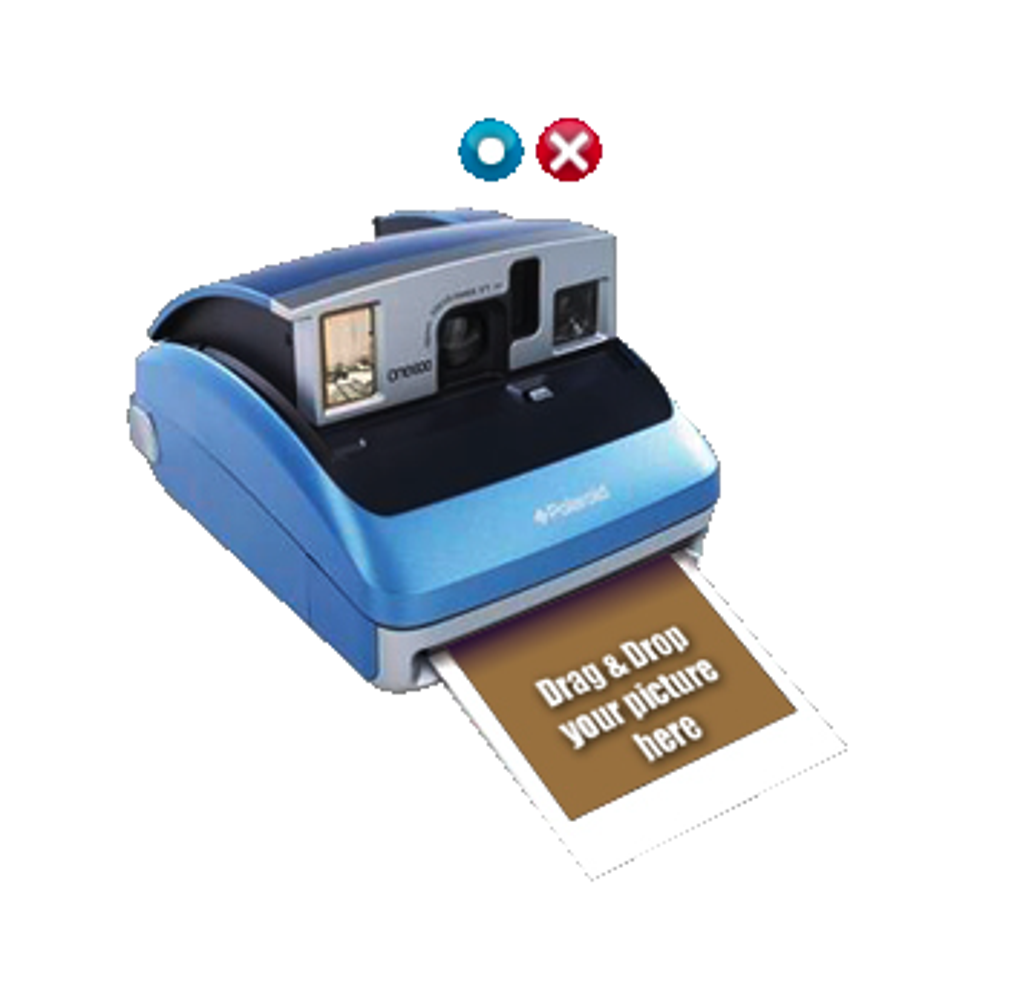
The initial success of Poladroid on the Mac platform underscored a significant demand for tools that could evoke the warm, retro feelings associated with instant prints. Its eventual release for Windows users broadened its appeal, allowing a wider audience to indulge in this digital nostalgia. The tool’s name itself, a clever portmanteau of “Polaroid” and “Android” (though initially Mac-focused, the suffix suggests a modern digital take), immediately communicates its core purpose and identity. It serves as a bridge between the convenience of digital photography and the beloved aesthetic of a bygone analog era.
Recreating the Iconic Polaroid Aesthetic
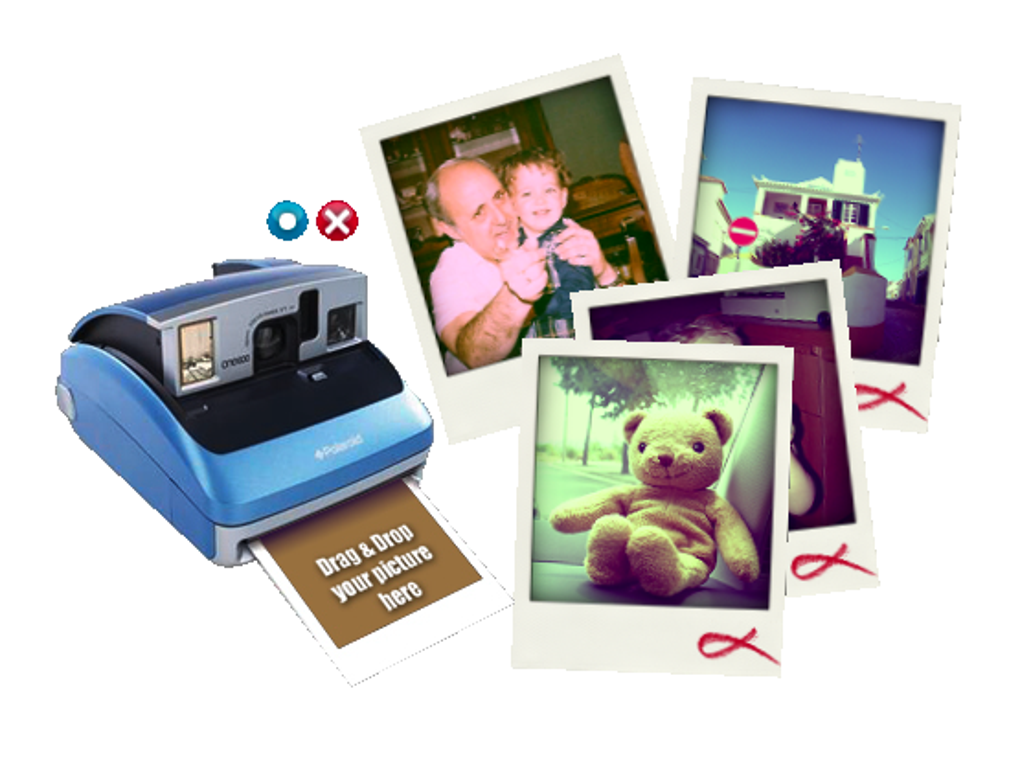
The realism Poladroid achieves is multifaceted, extending far beyond a superficial resemblance. When you drop an image onto its virtual camera, the program immediately begins processing, adding several layers of authentic detail. The most immediately recognizable element is the typical white frame, which isn’t just a plain border. Poladroid renders this frame with a texture that looks remarkably like the actual material of an original Polaroid print. This subtle texturing adds a tangible quality, mimicking the slightly uneven, tactile edge that instant prints often possessed.
However, the true artistry of Poladroid lies in its application of a sophisticated color filter. This filter is carefully designed to resemble the color quality of an original Polaroid picture, characterized by its unique color shifts, slight desaturation, and often a warm, sometimes overexposed, tonal palette. Unlike the crisp, hyper-realistic output of modern digital cameras, original Polaroids had a distinct “look”—a certain softness, a dreamlike quality, and often, unique quirks in color rendition that made each print special. Poladroid recreates these subtle imperfections, ensuring that the final digital output feels genuinely authentic, rather than just a digitally manipulated image with a border. This attention to detail in color and texture is what truly elevates Poladroid from a simple filter to a genuine emulator of the Polaroid experience.
From Mac Darling to Windows Enthusiast
Poladroid first carved out its niche as a popular and critically acclaimed tool within the Mac community. Mac users, known for their appreciation of elegant design and intuitive software, quickly embraced Poladroid for its seamless functionality and aesthetically pleasing results. Its unique interface and faithful recreation of the Polaroid effect resonated deeply with a user base that often champions creative and artistic applications.
The successful reception on Mac platforms generated significant anticipation for a Windows version. When Poladroid finally arrived on Windows, it brought the same core functionality and distinctive user experience to a much larger audience. This expansion was crucial in solidifying Poladroid’s position as a prominent tool for vintage photo effects, demonstrating its universal appeal across different operating systems. While the initial Windows release, like many first iterations, had its quirks and areas for improvement, it successfully delivered on its promise to bring the beloved instant camera experience to PC users, allowing them to transform their digital photos into charming retro prints with unparalleled ease. The migration from Mac to Windows was a testament to the software’s inherent quality and the widespread desire for its unique nostalgic offering.

A Seamless User Experience: Drag, Drop, and Develop
One of Poladroid’s most compelling features is its incredibly user-friendly design. In an era where many photo editing tools can be overwhelming with countless sliders, layers, and complex menus, Poladroid champions simplicity and intuition. Its interface isn’t just functional; it’s a playful homage to the very device it emulates, making the process of creating a “digital Polaroid” an engaging and delightful experience.
The developers understood that replicating the Polaroid experience meant more than just the final image; it involved the sensation of creation itself. This philosophy is evident in every aspect of Poladroid’s operation, from its visually striking interface to the subtle audio cues that accompany the image transformation. It’s designed to be instantly accessible, even for those with no prior photo editing experience, transforming a potentially complex task into a straightforward and enjoyable activity.
The Intuitive Camera Interface
The most striking aspect of Poladroid’s user interface is its design: it takes the shape of an actual Polaroid camera. This isn’t merely a stylistic choice; it’s a fundamental part of the interaction model. To create a Polaroid picture, users are not asked to navigate through file menus or upload dialogue boxes. Instead, they simply “feed” their digital images into the virtual camera. This is achieved through a remarkably intuitive drag-and-drop mechanism. A user can literally drag any image file from their desktop or a folder and drop it directly onto Poladroid’s camera interface.
This direct interaction eliminates any learning curve, making the process feel natural and immediate. The visual metaphor of a camera receiving a film, or in this case, a digital image, instantly communicates the tool’s purpose and how to use it. This design choice contributes significantly to Poladroid’s accessibility and its reputation as a “fun, free photo effect tool.” It transforms the act of editing into a playful interaction, rather than a technical chore, encouraging users to experiment and enjoy the creative process.
Immersive Details: Sounds and Slow Development
Beyond the visual interface, Poladroid incorporates subtle yet powerful sensory details to enhance the realism of the instant photo development process. Once an image is dragged and dropped onto the camera, the program includes a distinct sound effect that mimics the whirring and clicking of an actual Polaroid camera as it ejects a fresh print. This audio cue is a small but significant detail that adds another layer of authenticity, engaging more of the user’s senses and reinforcing the illusion of a physical print being created.
Following the “ejection” sound, the generated virtual Polaroids don’t instantly appear as fully developed images. Just like their original analog counterparts, they take a moment to display. Initially, the picture might appear dark or faint, gradually developing its colors, contrasts, and details over a few seconds. This simulated development process is a critical component of the Poladroid experience. It mirrors the anticipation and wonder that came with watching a physical Polaroid print slowly materialize, transforming a blank white surface into a cherished photograph. This deliberate delay, combined with the sound effects, creates an immersive and highly realistic simulation, making the digital process feel remarkably similar to the magic of holding a freshly printed instant photo in your hands. Users often report that this unique “developing” time is one of the features they love most, as it truly encapsulates the spirit of instant photography.
Unpacking the Poladroid Effect: Realism and Artistry
The enduring appeal of Poladroid lies squarely in its ability to produce highly realistic and aesthetically pleasing Polaroid-style images. This isn’t a superficial filter; it’s a deep dive into the photographic characteristics that defined instant prints. The developers went beyond simple framing, focusing on the intricate details that give an image its “Polaroid soul.” This commitment to authenticity ensures that the output feels less like a digital alteration and more like a faithful digital reincarnation of an analog classic.
The artistic choices embedded within Poladroid’s algorithms allow for a level of variation and charm that mimic the inherent unpredictability of real instant film. Every digital “print” created has the potential for subtle differences, echoing the unique nature of physical Polaroids where no two prints were ever exactly alike. This deliberate introduction of “imperfection” is a cornerstone of Poladroid’s artistry, providing a richer, more engaging visual experience.
Beyond the Frame: Color Filters and Texture
While the iconic white frame is undeniably a hallmark of Polaroid photography, Poladroid understands that its true magic extends deeper. The program applies a sophisticated color filter to the image that meticulously resembles the color quality of an original Polaroid picture. This isn’t a one-size-fits-all saturation or hue adjustment; it’s a nuanced transformation that often includes slight shifts in white balance, gentle desaturation of certain colors, and a characteristic warmth that many associate with vintage prints. The resulting image often features the signature “overexposed” look that was common with early instant cameras, adding to its vintage charm and authenticity. This delicate manipulation of color palette is critical in making the digital image feel genuinely retro and analog.
Furthermore, the white frame itself isn’t a flat, sterile digital border. Poladroid renders it with a subtle texture, mimicking the slightly coarse, fibrous material of actual Polaroid film. This texture adds a tactile dimension, making the digital frame feel more like a physical object. User reviews often highlight how these seemingly minor details contribute significantly to the overall realism. Some even point out that the borders include subtle “fingerprints,” an authentic touch that was a common occurrence with handling developing instant prints. While these fingerprints can be removed in the settings, many users appreciate them as an added layer of authenticity, underscoring Poladroid’s commitment to capturing the full essence of the Polaroid experience.
The Charm of Imperfection: Unique Digital Prints
One of the most captivating aspects of genuine Polaroid prints was their inherent uniqueness. Due to variations in exposure, development chemicals, and handling, no two prints were ever exactly the same. Poladroid ingeniously replicates this charm of imperfection in its digital output. Users often note that Poladroid produces “square pictures, over exposed pictures, and no two are the same just like the old Polaroid prints.” This variability is crucial for maintaining the illusion of authenticity.
Each time you drag and drop an image onto Poladroid, even the same image, the precise subtle nuances of the color filter, vignetting, and perhaps even the texture or placement of simulated fingerprints might vary slightly. This feature prevents the output from feeling static or generic, imbuing each digital Polaroid with its own distinct character. This element of controlled randomness adds to the artistic value, encouraging users to create multiple versions of the same photo, each with its own unique “developing” personality. This fidelity to the unpredictable nature of analog instant photography is a key reason why Poladroid resonates so strongly with enthusiasts seeking a truly authentic vintage photographic experience.
Navigating the Nuances: Performance and Potential Enhancements
While Poladroid shines brightly in its ability to deliver an authentic Polaroid effect with an intuitive interface, it is not without its limitations. As with any software, particularly those that push the boundaries of visual emulation, there are trade-offs and areas where improvements could enhance the user experience further. These nuances, though minor in the grand scheme of its overall appeal, are important for a comprehensive understanding of the tool and its potential for future development.
Understanding these aspects is not to detract from Poladroid’s significant achievements but rather to provide a balanced perspective, acknowledging that even beloved software can evolve. The feedback and observations from users often highlight practical considerations that, if addressed, could make an already excellent tool even more versatile and user-friendly for a wider range of applications.
Resource Consumption: A Memory Footprint
One of the most significant drawbacks highlighted in the initial Windows version of Poladroid is its tendency to consume a considerable amount of system resources, particularly RAM. During testing, the program was observed using “up to around 340 MB while generating the Polaroids.” For modern systems with abundant RAM, this might not be a critical issue. However, for users with older machines, or those running multiple demanding applications simultaneously, such a memory footprint can lead to noticeable slowdowns or system sluggishness.
This “resource hogger” characteristic suggests that the processing involved in meticulously recreating the Polaroid effect, particularly the complex color filtering and texture generation, is quite intensive. While the high-quality results justify some resource usage, optimizing this aspect could significantly improve the user experience, making Poladroid more accessible and responsive on a broader spectrum of hardware configurations. A lighter memory footprint would ensure that the joy of creating digital Polaroids isn’t dampened by performance bottlenecks.
Room for Growth: Cropping and Thumbnail Preservation
Beyond resource management, there are a couple of functional enhancements that users and reviewers have frequently pointed out. One important suggestion is the ability to “select the specific area you want to appear on the Polaroid.” Currently, Poladroid likely applies its effect based on the full dimensions of the input image, or perhaps a default central crop. The ability to manually define the cropping area before the effect is applied would offer users greater creative control, allowing them to frame their subjects precisely within the square Polaroid format. This would be particularly useful for images that might not perfectly fit the square aspect ratio or where the subject is not centered.
Another missed opportunity, as identified by users, is the inability to “save the cute thumbnails generated by the program.” As Poladroid processes images, it often displays smaller, developing versions. These ephemeral previews, sometimes seen as little digital Polaroid moments themselves, hold a certain charm. Providing an option to save these intermediate or smaller versions could be a delightful feature for users who appreciate the “process” as much as the final product, or who might want to use these miniature versions for other creative purposes. These suggested enhancements point towards a desire for greater flexibility and control within Poladroid’s otherwise straightforward and delightful workflow.
Poladroid in the Modern Digital Photography Landscape
In the vast and ever-evolving landscape of digital photography, Poladroid occupies a unique and cherished niche. While contemporary photo editing software offers an endless array of tools for precise manipulation, intricate layering, and hyper-realistic enhancements, Poladroid deliberately steers in the opposite direction. It’s a testament to the enduring appeal of simplicity, nostalgia, and the charm of imperfection. Its continued relevance, even years after its initial release, speaks volumes about the emotional connection people have with instant photography and the distinct aesthetic it offers.
Poladroid doesn’t aim to replace advanced editors like Adobe Photoshop CC or even more general-purpose tools like PhotoScape. Instead, it offers a focused, specialized experience for a very specific artistic outcome. It’s a tool for those who seek to imbue their digital memories with a touch of analog warmth, a hint of vintage character, and the unique storytelling quality that a Polaroid frame inherently conveys.
A Free Tool for Creative Expression
One of Poladroid’s most compelling attributes is its availability as a free application. In an ecosystem where many high-quality photo editing tools come with subscription fees or significant upfront costs, Poladroid stands out as an accessible option for creative expression. This free-to-use model significantly lowers the barrier to entry, allowing anyone with a digital image and a desire for vintage aesthetics to transform their photos without financial commitment.
This accessibility has fostered a loyal user base who appreciate the quality and unique offering of Poladroid without having to invest in premium software. For amateur photographers, casual users, or those simply looking to add a touch of retro flair to their social media posts, Poladroid provides an invaluable tool. Its straightforward nature and excellent results make it an ideal choice for quick, impactful edits that evoke a specific emotional response, proving that powerful creative tools don’t always need to come with a price tag. The fact that it retains its charm and functionality as a free program makes it a perennial favorite for anyone exploring vintage photographic effects.
Comparing Poladroid to Contemporary Alternatives
The market for photo effect tools, particularly those offering vintage or retro filters, is vast and competitive. Alternatives like XnRetro, Vintager, and Tintii offer a broader spectrum of vintage effects, ranging from sepia tones and light leaks to various artistic filters. XnRetro, for instance, allows users to “create stunning images with vintage or instant effect,” suggesting a more generalized approach to retro aesthetics. FotoSlate focuses on “creative photo compositions,” offering templates and layouts for various print projects.
However, Poladroid carves out its distinct identity by hyper-specializing in one specific effect: the authentic Polaroid instant print. While other tools might offer a “Polaroid-like” filter among many others, Poladroid dedicates its entire design and functionality to perfecting this single aesthetic. Its unique camera-shaped interface, the sound effects, and the gradual development process are all tailor-made to simulate the full Polaroid experience, not just the visual outcome. This singular focus gives Poladroid an edge in authenticity and immersion when it comes to replicating the instant camera feel.
Users looking for a diverse range of vintage filters might turn to broader tools, but those specifically chasing the genuine magic of a Polaroid print – with its distinct frame, color shifts, and developing suspense – will find Poladroid to be unparalleled in its niche. It provides a deeper, more faithful emulation than most general-purpose filter applications, making it a standout choice for those who value authentic nostalgia over a broad but less specialized range of effects. PhanMemFree, like other software directories, lists these alternatives, showcasing the variety available, but Poladroid’s dedicated approach maintains its unique value proposition.
Conclusion: Embracing the Digital Polaroid Moment
Poladroid stands as a captivating example of how digital tools can rekindle our affection for analog aesthetics. It’s more than just a filter; it’s a meticulously crafted experience that pays homage to the beloved Polaroid instant camera, bringing its unique charm and mystique into the digital realm. From its innovative camera-shaped interface and intuitive drag-and-drop functionality to the nuanced recreation of color shifts, textures, and even the iconic developing process, Poladroid excels at delivering an authentic and emotionally resonant vintage photographic effect.
While it does come with its share of limitations, such as a noticeable memory footprint and a lack of advanced cropping options or thumbnail saving, these drawbacks are often overshadowed by its significant strengths. Poladroid’s ease of use, the remarkably realistic quality of its output, and its accessibility as a free tool make it an enduring favorite for countless users. It perfectly captures the essence of instant photography, offering a delightful blend of nostalgia and creative expression.
In a world increasingly driven by digital perfection, Poladroid reminds us of the beauty in imperfection, the warmth of vintage tones, and the simple joy of watching an image slowly come to life. Whether you’re a seasoned photographer looking to add an artistic touch to your portfolio or a casual user seeking to inject a dose of retro charm into your everyday photos, Poladroid provides a unique and engaging gateway to the timeless allure of the Polaroid moment. Its legacy on PhanMemFree.org and its continued popularity are testament to its timeless appeal and its unwavering ability to bring a piece of photographic history back to life.
File Information
- License: “Free”
- Version: “0.9.6r0”
- Latest update: “July 1, 2024”
- Platform: “Windows”
- OS: “Windows Vista”
- Language: “English”
- Downloads: “75.9K”
- Size: “6.20 MB”


