
Portrait Professional, a software application designed for enhancing portraits, offers a unique approach to photo editing distinct from traditional methods like those found in Photoshop. Instead of relying on manual tools and techniques, Portrait Professional leverages a sophisticated algorithm trained on numerous examples of human beauty to intelligently retouch and refine images. This automated approach makes high-quality portrait enhancement accessible even to users with limited photo editing experience. This review delves into the capabilities, limitations, and overall user experience of this intriguing program.
The Uniqueness of Portrait Professional’s Approach
Unlike traditional photo editing software that requires extensive user skill and knowledge of image manipulation techniques, Portrait Professional adopts a fundamentally different strategy. It employs a sophisticated algorithm trained on a vast dataset of human faces, learning to identify and address common imperfections. This pre-programmed understanding of facial features and aesthetic ideals enables it to perform complex retouching tasks with minimal user input.
The software achieves this by guiding the user through a streamlined workflow. After a brief initial setup—typically involving the identification of key facial landmarks—the user can then adjust various parameters using intuitive sliders. These sliders control aspects like skin smoothing, blemish removal, wrinkle reduction, and even features like eye brightening and lip enhancement. The results are achieved through automated processes guided by the software’s inherent understanding of human facial aesthetics, delivering polished and natural-looking results.
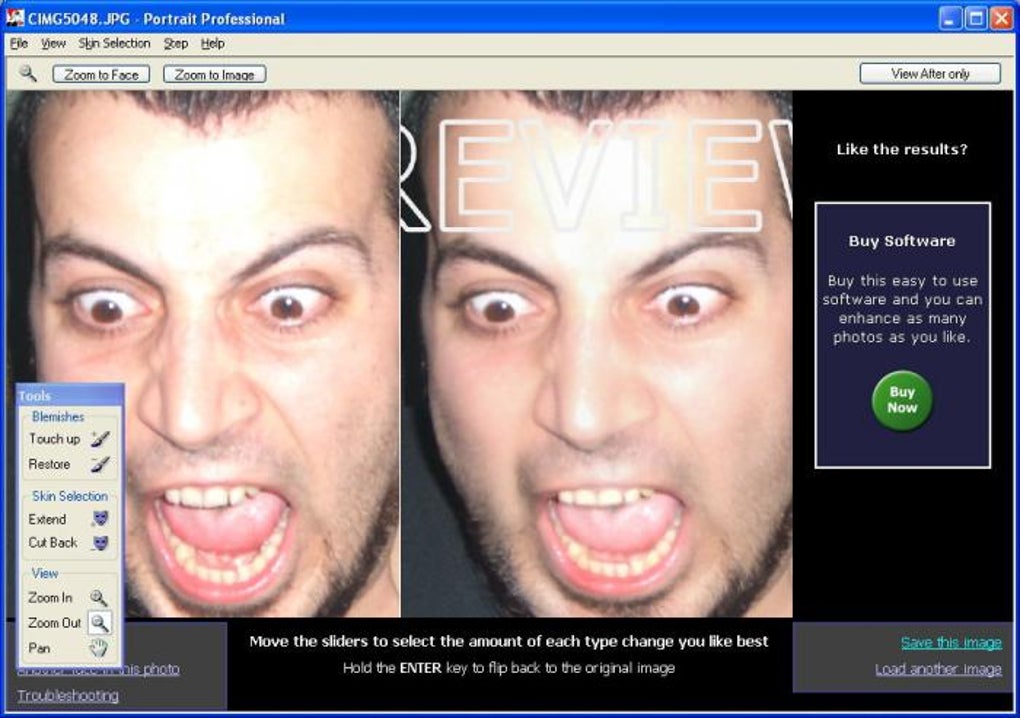
This approach significantly lowers the barrier to entry for users seeking professional-level portrait enhancements. Even users unfamiliar with complex photo editing tools can achieve remarkable improvements with minimal effort and training. The software’s intuitive interface and straightforward controls make the process accessible and user-friendly, allowing individuals to focus on the creative aspects of portrait enhancement rather than struggling with technical complexities.
Features and Functionality: A Closer Look
Portrait Professional’s core functionality revolves around intelligently enhancing portrait photographs. Key features include:
- Automated Skin Smoothing: This feature intelligently smooths skin tone, reducing the appearance of blemishes, imperfections, and uneven textures without creating an unnatural, airbrushed look. The algorithm is designed to preserve the natural texture of the skin while minimizing imperfections.
-
Wrinkle Reduction: The software effectively reduces the appearance of wrinkles and fine lines, lending a youthful glow to the subject. The level of reduction is adjustable, allowing for fine-tuning to suit individual preferences and the specific requirements of the image.
-
Blemish Removal: Portrait Professional efficiently removes blemishes, scars, and other skin imperfections. The process is automated but offers sufficient control to ensure natural-looking results, avoiding the overly processed look sometimes associated with manual blemish removal.
-
Eye Enhancement: The software can brighten and enhance the eyes, making them appear more vibrant and expressive. This can significantly improve the overall impact of the portrait.
-
Lip Enhancement: Similar to eye enhancement, this feature enhances the lips, adding a touch of definition and vibrancy.
-
Shape and Reshaping: Advanced options allow users to subtly adjust facial features like jawline and nose shape. This offers a level of control that transcends simple retouching, enabling more extensive aesthetic adjustments.
-
Lighting Adjustments: Some versions of the software incorporate tools for adjusting lighting and shadow, further enhancing the overall quality of the portrait.
User Experience and Interface
The user interface of Portrait Professional is designed for simplicity and ease of use. The software’s intuitive interface makes it accessible even to those with limited experience in image editing. The primary tools are presented clearly, and the adjustment sliders are straightforward, facilitating smooth navigation and quick results.
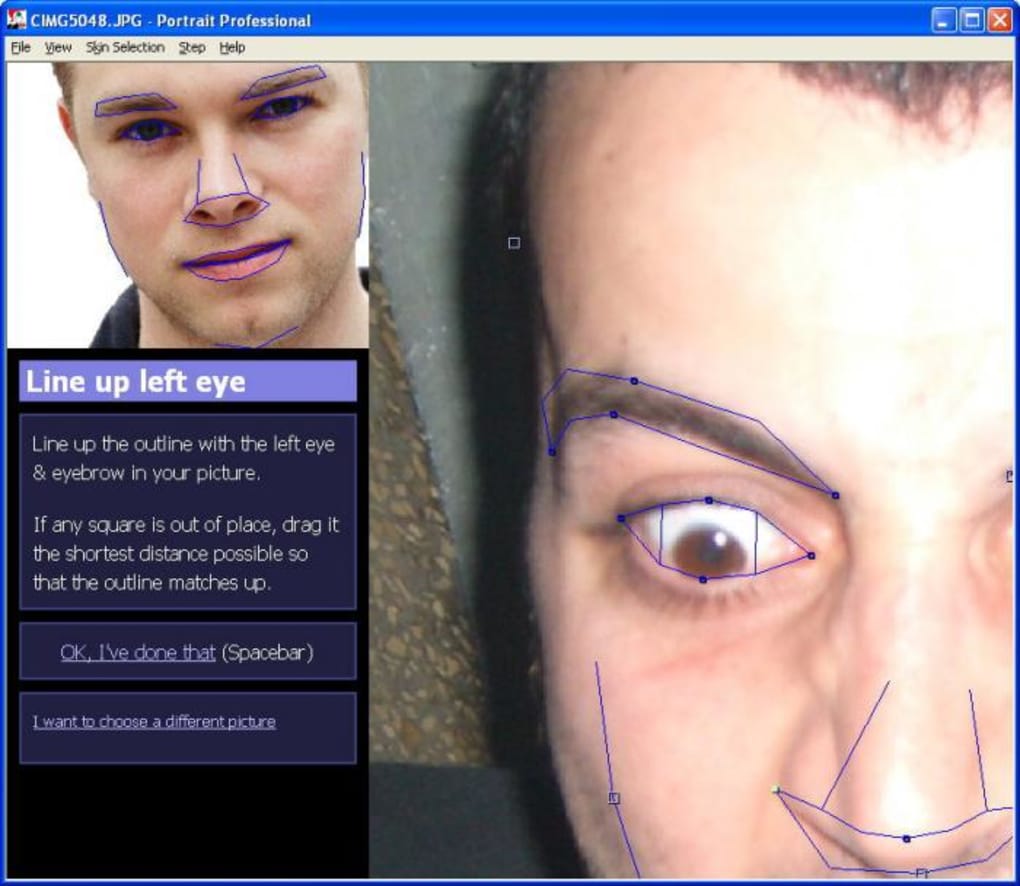
The workflow typically begins with uploading the image and selecting the desired level of enhancement. The software then automatically identifies key facial features, which can be fine-tuned manually if needed. Subsequent adjustments are made via intuitive sliders, offering granular control over various aspects of the portrait. The immediate preview feature allows users to see the effects of their adjustments in real-time, making the editing process faster and more efficient. This allows users to experiment and fine-tune their edits without the need for constant saving and reloading of the image.
Limitations and Potential Drawbacks
Despite its strengths, Portrait Professional has certain limitations. While the software excels at automated enhancements, it may not be suitable for all types of portrait editing tasks. For instance, more extensive edits, such as significant changes to facial structure or complex photo manipulations, may require more advanced software like Photoshop.
The software’s reliance on automated processes might result in occasional inconsistencies or unnatural-looking results, particularly when dealing with challenging images or unusual lighting conditions. While the software’s algorithm is sophisticated, it is not perfect, and users may need to fine-tune certain aspects manually to achieve optimal results.
Furthermore, the program’s reliance on its pre-trained understanding of beauty standards could be viewed as a limitation. While its algorithms aim for natural-looking enhancements, the underlying aesthetic model might not always align with individual preferences or cultural norms. Users should be mindful of this aspect and ensure the edits align with their desired aesthetic outcome.
Finally, although the initial interface is intuitive, mastering the more advanced features and fine-tuning options might require a learning curve. While the basic enhancements are easy to apply, achieving truly professional-level results often necessitates a deeper understanding of the software’s capabilities and the nuanced ways in which its controls interact.
User Reviews and Feedback:
Existing user reviews paint a mixed picture. While many praise its ease of use and ability to achieve remarkable results quickly, others report issues with customer service responsiveness and concerns about misleading marketing claims regarding refund policies. Some users have reported difficulties achieving completely natural-looking results, especially with images of individuals possessing unusual facial features or those taken in less-than-ideal lighting conditions. It is crucial for prospective users to carefully weigh these conflicting accounts before purchasing the software.
Alternatives:
Several alternative applications provide similar functionality, each with its own strengths and weaknesses. Some offer a wider range of editing tools, while others focus on specific aspects of portrait enhancement. Prospective users should explore these alternatives to find the software that best suits their individual needs and preferences.
Conclusion:
Portrait Professional represents a unique approach to portrait enhancement, offering a powerful blend of automation and user control. Its intuitive interface and streamlined workflow make it readily accessible to users of all skill levels. However, its reliance on automated processes might result in occasional inconsistencies, and its effectiveness can be affected by image quality and lighting conditions.
The software’s strengths lie in its ability to quickly and easily improve the overall quality of portraits through automated skin smoothing, wrinkle reduction, and blemish removal. The ability to refine these adjustments using intuitive sliders allows for a reasonable degree of customization. Users seeking significant alterations to facial features or complex photo manipulations might find it better to use more versatile and comprehensive applications. The conflicting reports regarding customer service necessitate caution and further investigation. Potential buyers should carefully evaluate their specific requirements and weigh the software’s capabilities against its limitations and user feedback before making a purchasing decision.
File Information
- License: “Trial version”
- Version: “4.2.5”
- Latest update: “April 24, 2007”
- Platform: “Windows”
- OS: “Windows 2000”
- Language: “English”
- Downloads: “53.6K”
- Size: “4.70 MB”


