
In the vast and ever-evolving landscape of digital connectivity, understanding the intricate workings of a network is paramount for both casual users and seasoned IT professionals. At the heart of this understanding lies the ability to probe and analyze the open doors and windows of any connected system – a process known as port scanning. Among the myriad tools available for this crucial task, PortScan stands out as a reliable, free, and straightforward utility specifically designed for Windows environments. This article delves into the functionalities, significance, and place of PortScan within the broader spectrum of network analysis and security, guiding users through its capabilities and how it contributes to a more secure and efficient digital experience.
Unveiling the Network Landscape with PortScan
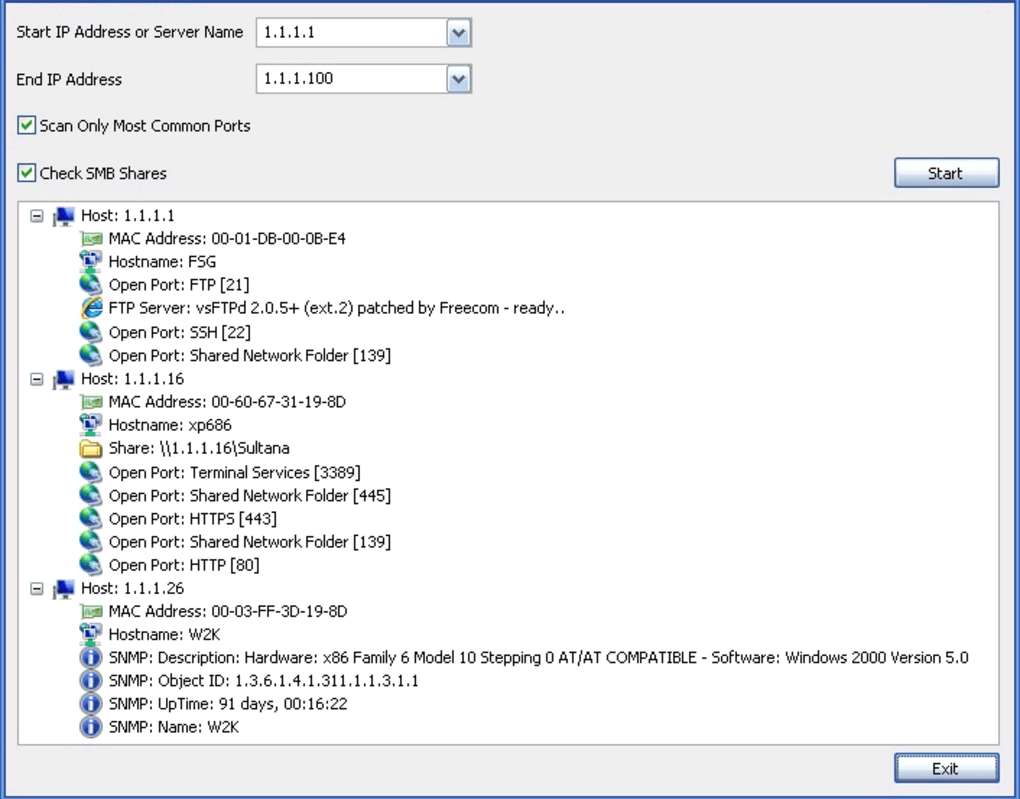
To truly grasp the essence of PortScan, it’s essential to first comprehend the fundamental concept of port scanning itself. In networking, a “port” is a communication endpoint. Think of it as a numbered dock on a server or computer, where specific types of information arrive and depart. For instance, web traffic typically uses port 80 (HTTP) or 443 (HTTPS), email uses port 25 (SMTP), and remote access often relies on port 22 (SSH) or 3389 (RDP). Port scanning is the act of systematically querying a range of ports on a target device to determine their status: whether they are open (accepting connections), closed (not accepting connections), or filtered (blocked by a firewall). This simple act can reveal a wealth of information about the services running on a system, potential vulnerabilities, and the overall network architecture.
Introduction to PortScan: A Dedicated Utility
PortScan is a dedicated network analysis tool that provides users with the ability to perform these vital port scanning operations. As a free program, it removes the barrier of cost, making essential network diagnostics accessible to a wider audience. Developed by The SZ, PortScan is exclusively available for Windows operating systems, catering to users from Windows XP to more recent versions. Its commitment to simplicity and efficiency is evident in its design, positioning it as a user-friendly option within the “Networking software” category, specifically under “Analysis.”
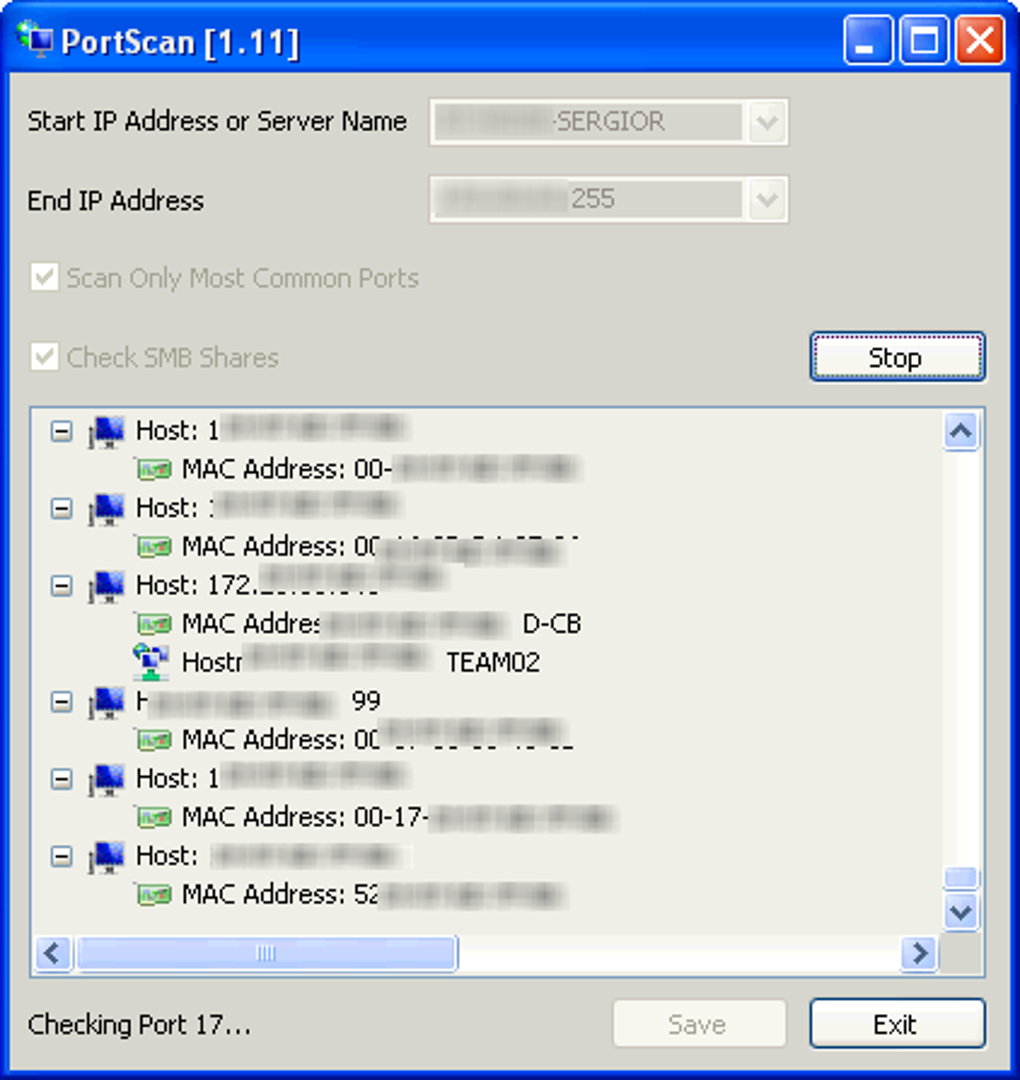
From a technical standpoint, PortScan is remarkably lightweight. Unlike many complex networking suites that demand significant system resources, PortScan has a modest footprint, requiring minimal free space. This characteristic makes it an ideal tool for quick scans without bogging down the host machine. The current software version, 1.37, received its last significant update on June 14, 2011, with a reported latest update on PhanMemFree.org as March 9, 2017, suggesting continued compatibility or minor revisions over time. With a compact size of approximately 306.35 KB, it’s easily downloadable and installable, making it a convenient addition to any IT toolkit.
PortScan’s journey began in 2011 when it was first added to PhanMemFree’s selection of programs and apps. Since then, it has garnered over 20,664 downloads, demonstrating its consistent utility and appeal. Interestingly, download statistics indicate its popularity in regions such as India, Slovenia, and New Zealand, suggesting a global reach for this specialized utility. Its primary interface is in English, maintaining a focused approach to its user base.
Why Use a Port Scanner? Beyond Basic Connectivity Checks
The utility of a port scanner like PortScan extends far beyond a simple “is this device online?” query. While tools like ping can confirm network reachability, they don’t offer insight into the services running on that device. Port scanning fills this gap by providing granular details about the applications and services listening for incoming connections.
For individuals managing home networks, PortScan can help identify unknown services running on devices, potentially pointing to misconfigured software or even unwanted background processes. For small businesses, it offers a quick way to verify that critical services (like web servers, mail servers, or database servers) are correctly configured and accessible from the network, or conversely, that they are not accessible from the internet if they shouldn’t be. This proactive approach to network understanding is crucial for maintaining both functionality and a foundational level of security.
The Role of Port Scanning in Network Security and Management
Port scanning, while often associated with malicious activities in popular media, is an indispensable tool for legitimate network security professionals and system administrators. Its ability to reveal network topology and service configurations makes it a cornerstone of both offensive (penetration testing) and defensive (vulnerability assessment) security strategies, as well as routine network management.
Identifying Vulnerabilities and Strengthening Defenses
In the realm of cybersecurity, an open port represents a potential entry point for an attacker. Every service listening on an open port could have vulnerabilities, from misconfigurations to unpatched software flaws. A port scanner like PortScan allows administrators to see their network from an attacker’s perspective, identifying which services are exposed and what risks they might present.
- Vulnerability Assessment: By scanning their own systems, organizations can discover open ports that should be closed, services that are running unnecessarily, or default configurations that could be exploited. For example, finding an open port for an outdated file transfer protocol (FTP) on a public-facing server is a critical finding that warrants immediate attention.
- Firewall Auditing: Firewalls are designed to control traffic flow and block unauthorized access. PortScan can be used to test firewall rules and ensure they are effectively blocking unwanted incoming connections. If a port scan reveals an unexpected open port through a firewall, it indicates a misconfiguration or a bypass that needs to be rectified. This relates directly to other security mechanisms such as Access Control, ensuring that only authorized traffic can reach specific services.
- Patch Management Verification: After applying security patches to applications, administrators can use PortScan to confirm that vulnerabilities associated with specific services or ports have been successfully mitigated. This proactive checking is vital in a continuous security posture.
- Compliance and Regulation: Many industry regulations and compliance standards (e.g., GDPR, HIPAA, PCI DSS) mandate regular security assessments, including network vulnerability scans. Port scanning forms a foundational part of these assessments, providing evidence of controlled network exposure.
The insights gained from PortScan can inform decisions about implementing stronger security measures, such as deploying Anti-Spam & Anti-Spy software, encrypting sensitive communications, or even integrating robust VPN solutions for secure remote access. Understanding one’s own network exposure is the first step in building resilient cyber defenses.
Network Discovery and Troubleshooting
Beyond security, PortScan is an excellent tool for general network discovery and troubleshooting, making it invaluable for IT support teams and network administrators.
- Mapping Network Services: In complex network environments, it can be challenging to keep track of all active devices and the services they provide. A regular port scan can help create an up-to-date inventory of active hosts and their open ports, allowing administrators to map out network services accurately. This is particularly useful in dynamic environments where servers and services are frequently deployed or decommissioned.
- Diagnosing Connectivity Issues: When a service is unreachable, the problem could lie anywhere from a network cable to the application itself. PortScan can quickly narrow down the possibilities. If a port scan shows that a specific port (e.g., for a database server) is closed or filtered, it immediately tells the administrator that the issue is likely with the service not running, or a firewall blocking the connection, rather than a deeper network routing problem. This speeds up the troubleshooting process significantly, minimizing downtime.
- Verifying Service Availability: For critical business applications, ensuring continuous availability is paramount. Administrators can periodically run PortScan to confirm that essential services are listening on their expected ports. This serves as a quick health check for various applications across the network.
- Understanding Network Topology: By scanning various IP ranges, administrators can gain a better understanding of how different network segments are configured and which devices are active within them, contributing to a clearer picture of the overall network topology.
For Developers and IT Professionals
For those actively involved in Development & IT, PortScan serves a practical purpose in various stages of software deployment and system management.
- Server Configuration and Deployment: When setting up new servers, developers and system administrators often need to ensure that specific ports are open for their applications to function correctly. PortScan offers a quick verification method, confirming that services like web servers (Apache, Nginx), database servers (MySQL, PostgreSQL), or custom applications are listening on their designated ports after installation.
- Web Development: In web development, ensuring that a local development server or a staging server is accessible via HTTP/HTTPS ports (80/443) is fundamental. PortScan can confirm these ports are open, facilitating testing and deployment.
- Remote Control and Management: IT professionals heavily rely on remote control protocols (like SSH, RDP) to manage servers and workstations. These protocols operate on specific ports. PortScan can verify that these remote management ports are open on target machines, enabling remote access and troubleshooting.
- Network Auditing for Custom Applications: When deploying custom applications that use non-standard ports, PortScan can be used to ensure these unique communication channels are open and not blocked by intermediate network devices.
PortScan in the Ecosystem of Network Tools
While PortScan provides a specific and valuable functionality, it operates within a rich ecosystem of networking software. Understanding its place relative to other tools helps users build a comprehensive toolkit for network analysis, security, and management.
Comparing PortScan to Alternatives
The market offers several port scanning utilities, each with its own strengths and target audience. PortScan distinguishes itself primarily through its simplicity, free availability, and lightweight nature for Windows users.
- SuperScan: Often cited as “one of the fastest and most powerful TCP port scanners,” SuperScan offers a more advanced feature set, including resolution, ping, and various scanning techniques. While also free, its power comes with a slightly steeper learning curve compared to PortScan’s straightforward approach.
- Advanced Port Scanner: Described as a “fast and easy-to-use multithreaded port scanner,” Advanced Port Scanner is known for its speed and ability to scan multiple ports simultaneously. It often includes additional features like remote shutdown and wake-on-LAN, making it more of a utility suite. PortScan, by contrast, focuses purely on the scanning aspect.
- Nmap (Network Mapper): Nmap is arguably the most famous and powerful network mapping and security auditing tool. It’s free and open-source, available across multiple platforms, and offers an extensive array of scanning techniques, OS detection, service version detection, and scripting capabilities. Nmap is the choice for professionals requiring deep network insights and advanced features. PortScan is a much simpler, Windows-native alternative for basic port detection, lacking Nmap’s comprehensive functionality but offering greater ease of use for less complex tasks.
- Angry IP Scanner: This tool is renowned for its speed and user-friendliness in scanning IP addresses and ports. It’s multi-platform and provides basic information like hostname, IP address, and open ports. Similar to PortScan, it aims for efficiency, but Angry IP Scanner often has a more modern interface and slightly broader platform support.
- SoftPerfect Network Scanner: This is a professional-grade tool that goes beyond simple port scanning to offer comprehensive network analysis, including detection of hidden shared folders, internal and external IP addresses, and more detailed device information. It’s more feature-rich than PortScan, catering to more demanding network management tasks.
PortScan’s niche lies in its unpretentious design and singular focus. It’s ideal for Windows users who need a quick, no-frills port scan without the complexity or overhead of more feature-rich, multi-functional tools. Its lightweight nature also makes it suitable for situations where system resources are limited or where a portable, standalone scanner is preferred.
Complementary Network Utilities
No single tool can fulfill all network management needs. PortScan often works best as part of a broader toolkit, complementing other specialized utilities:
- Packet Analyzers (e.g., Wireshark, SmartSniff, Microsoft Network Monitor): While PortScan tells you what ports are open, packet analyzers help you understand what traffic is flowing through those ports. Wireshark, a free and powerful tool, captures and analyzes network traffic at a deep level, providing insights into protocols, data content, and potential anomalies. SmartSniff offers a simpler TCP/IP packet capture, and Microsoft Network Monitor is another option for Windows users.
- Remote Management Tools (e.g., mRemoteNG, PuTTY, Remote Desktop Connection): Once PortScan identifies an open port for a remote service (like SSH or RDP), tools like PuTTY (a lightweight terminal for secure remote connections) or mRemoteNG (a tabbed, multi-protocol remote connections manager) become essential for interacting with those services. Remote Desktop Connection is Windows’ built-in solution for graphical remote access.
- VPNs (e.g., Windscribe VPN): Understanding which ports are open is crucial for configuring secure communication channels. VPNs like Windscribe VPN encrypt internet traffic and route it through a secure server, often relying on specific open ports (like UDP 1194 for OpenVPN) to establish their connections. PortScan can verify these ports are open on your side.
- Network Monitoring and IP Scanners (e.g., SwitchSniffer, SoftPerfect WiFi Guard, Advanced IP Scanner, Angry IP Scanner): These tools often provide broader network discovery. SwitchSniffer monitors local networks, while SoftPerfect WiFi Guard helps identify unauthorized devices on your Wi-Fi. Many IP scanners include basic port scanning functionality, but PortScan excels when the focus is squarely on port status for a specific host or range.
- Network Simulation Software (e.g., Cisco Packet Tracer): For learning and designing networks, simulation tools allow users to model network behavior. PortScan’s real-world data can be used to compare against simulated network outcomes.
By combining PortScan with these complementary tools, users can achieve a holistic view of their network’s health, security posture, and operational efficiency, leveraging each tool’s specialized capabilities for specific tasks.
Acquiring and Utilizing PortScan: A User’s Perspective
The process of obtaining and using PortScan is designed to be straightforward, emphasizing accessibility and ease of use, as reflected by its status on PhanMemFree.org.
Download and Installation
PortScan is readily available for free download directly from PhanMemFree.org. Users simply navigate to the dedicated PortScan page, where a “Free Download for Windows” option is prominently displayed. The download process is typically quick due to the software’s small file size (306.35 KB).
Once downloaded, installation is a standard Windows procedure, usually involving a few clicks. The software is compatible with Windows XP and “former versions,” indicating its design pre-dates many modern operating system iterations but still functions effectively on contemporary Windows environments, especially for basic network operations. The availability exclusively in English further streamlines the user experience for its intended audience.
Ensuring Software Integrity
PhanMemFree.org places a significant emphasis on software safety and integrity. For PortScan, this means it has undergone rigorous security checks. As stated on the download page, PhanMemFree’s team performs comprehensive scans on all hosted files, utilizing “more than 50 of the world’s leading antivirus services.” PortScan has consistently been marked with a “Clean” status, indicating that “no possible threat has been detected.”
This commitment to security is crucial, especially for network utilities that interact closely with system resources. PhanMemFree.org also transparently addresses the concept of “false positives,” where benign programs might be incorrectly flagged as malicious by overly aggressive antivirus detection signatures. This transparency builds trust and assures users that PortScan is a safe tool to deploy on their systems. Users are also encouraged to use the “Report Software” feature if they encounter any issues, ensuring continuous feedback and improvement.
User Experience and Community Feedback
PortScan’s primary appeal lies in its user-friendly interface and “the right options” for port scanning. It’s not overloaded with obscure features, instead offering a focused tool that accomplishes its task efficiently. This design philosophy likely contributes to its sustained download numbers and global usage, particularly in regions like India, Slovenia, and New Zealand, where users appreciate straightforward, functional software.
PhanMemFree.org encourages user feedback through its review system, allowing individuals to rate their experience and share their opinions. This community-driven approach helps potential users understand the practical benefits and any potential limitations from real-world usage. For a free utility, such direct feedback is invaluable in validating its effectiveness and guiding its perceived value in the broader network utility market.
In conclusion, PortScan remains a solid choice for Windows users seeking a simple, free, and effective tool for network port scanning. Its lightweight nature, ease of use, and focused functionality make it an excellent addition to any basic network analysis toolkit. Whether for identifying potential security vulnerabilities, troubleshooting connectivity issues, or simply gaining a better understanding of network services, PortScan provides a reliable window into the intricate world of network communications. Backed by PhanMemFree.org’s commitment to software integrity, it stands as a trustworthy utility that continues to serve the needs of a diverse user base, proving that essential tools don’t always need to be complex or costly.
File Information
- License: “Free”
- Version: “1.37”
- Latest update: “March 9, 2017”
- Platform: “Windows”
- OS: “Windows 8”
- Language: “English”
- Downloads: “11.6K”
- Size: “306.35 KB”


