
Potatoshare Android Data Recovery is a software application designed to retrieve lost, corrupted, or deleted files from Android devices. This review will delve into its functionality, advantages, disadvantages, and compare it to alternative solutions available in the market. The software aims to be a versatile tool for recovering various data types, catering to users experiencing data loss due to accidental deletion, system crashes, or other unforeseen circumstances. This in-depth analysis will provide a clear understanding of its capabilities and limitations, allowing potential users to make an informed decision about its suitability for their needs.
Understanding Potatoshare’s Core Functionality
Potatoshare Android Data Recovery stands out for its broad compatibility, supporting various Android versions without requiring users to search for device-specific software. This simplifies the recovery process, making it accessible to a wider range of users regardless of their Android device’s operating system version. The software is capable of recovering a wide spectrum of file types, including images, documents, videos, audio files, and other data stored on the Android device’s internal memory or SD card. This versatility makes it a potential solution for individuals who have lost crucial personal files, business documents, or irreplaceable photos and videos.
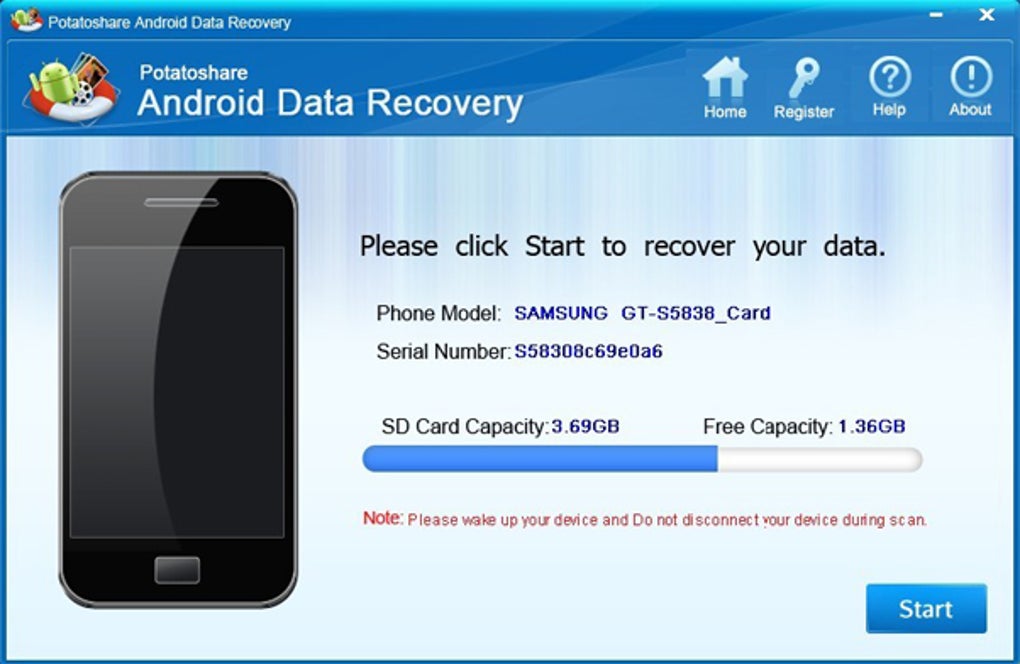
The software’s interface is designed with user-friendliness in mind. The intuitive design and straightforward options ensure that even individuals with limited technical expertise can navigate the recovery process smoothly. This simple design, combined with the one-touch access to key functions, makes the recovery process quick and efficient, minimizing the time and effort required to retrieve lost data. The software’s capability to display critical system information, such as the operating system version, manufacturer details, available storage space, and occupied space by applications, can help users diagnose potential issues like slow system performance due to low memory. This diagnostic feature can be an added advantage beyond its primary data recovery function.
Data Recovery Capabilities and Supported File Types
Potatoshare Android Data Recovery is designed to handle a wide range of data loss scenarios. Whether files were accidentally deleted, lost due to formatting issues, or corrupted because of a system crash, the software attempts to retrieve these files. The software excels in recovering various file types, including but not limited to:
- Images: Recovers photos in various formats like JPEG, PNG, GIF, and more, preserving memories and important visual data.
- Videos: Retrieves video files in different formats such as MP4, MOV, AVI, and others, allowing users to recover lost videos and movies.
- Audio Files: Recovers audio files including MP3, WAV, AAC, and other audio formats, ensuring that precious music and sound recordings are retrievable.
- Documents: Supports recovery of numerous document file types, including but not limited to DOC, DOCX, PDF, TXT, XLS, XLSX, PPT, and PPTX. This feature is especially crucial for recovering important work documents or personal files.
- Archives: Recovers compressed files in formats like ZIP, RAR, 7Z, and others, making it possible to retrieve entire sets of files bundled together.
This extensive file type support ensures that Potatoshare caters to a diverse range of user needs and data recovery requirements. The ability to handle both common and less-common file formats sets it apart from some simpler data recovery tools.
Advantages and Disadvantages of Potatoshare Android Data Recovery
While Potatoshare offers significant advantages, it’s crucial to acknowledge its limitations. A balanced perspective is necessary to determine its suitability for specific user needs.
Advantages:
- Broad Android Compatibility: Works with various Android OS versions, eliminating the need for version-specific recovery software.
- User-Friendly Interface: Simple and intuitive design makes the recovery process accessible to users of all technical skill levels.
- Quick and Efficient Recovery: One-touch access to key functions streamlines the data recovery process.
- Multiple File Type Support: Recovers a wide range of file types, including images, videos, audio, documents, and archives.
- System Information Display: Provides system information that can help diagnose performance issues.
Disadvantages:
- Limited Virus Recovery: Unable to repair files damaged by viruses. This is a significant limitation, as malware damage can cause irreversible data loss.
- Paid Advanced Options: Access to advanced features and options often requires a paid upgrade, restricting functionality for free users.
- Trial Version Limitations: The trial version might have restrictions on the number of recoverable files or the file size limits.
The need for a paid upgrade to access more advanced functionalities might be a deterrent for some users. The inability to recover files damaged by viruses is a substantial limitation, highlighting the importance of robust antivirus protection alongside data recovery software.
Comparing Potatoshare to Alternative Android Data Recovery Solutions
The market offers numerous Android data recovery software options. Comparing Potatoshare to alternatives helps ascertain its competitive edge and identify areas where it might fall short. While specific features and performance may vary depending on the software and the specific data loss scenario, here’s a generalized comparison:
- Ease of Use: Many competitors offer similar user-friendly interfaces, making Potatoshare’s advantage in this area less pronounced.
- File Type Support: The range of supported file types is comparable across many competitors, although specific formats might differ slightly.
- Recovery Success Rate: The actual recovery success rate can fluctuate depending on the extent of data damage and other factors. It is difficult to definitively compare this aspect without extensive testing across multiple software options.
- Price and Licensing: Many alternatives offer similar pricing structures, including free versions with limited features and paid versions with advanced functionalities.
- System Requirements: System requirements are generally comparable across different software solutions, with most compatible with various versions of Windows.
It is crucial to note that the effectiveness of data recovery software can also be influenced by factors beyond the software itself, including the nature and extent of data loss, the device’s health, and the user’s actions after data loss.
Conclusion: Is Potatoshare Android Data Recovery Right for You?
Potatoshare Android Data Recovery provides a convenient and user-friendly approach to recovering lost or damaged Android data. Its broad Android OS compatibility and straightforward interface are significant advantages. However, its limitations, specifically its inability to recover virus-damaged files and the necessity of a paid upgrade for advanced features, should be considered.
The decision to utilize Potatoshare depends on individual needs and priorities. If simple data recovery from accidental deletion is the primary concern, and the user is comfortable with the limitations of the free version or willing to pay for advanced features, then it can be a suitable option. However, if the user anticipates needing advanced features or recovering data damaged by malware, exploring alternative options might be more beneficial. Ultimately, a careful evaluation of individual needs and a thorough comparison with other data recovery software options will guide users towards the most effective solution for their specific circumstances. Remember to always back up important data regularly to minimize the risk of data loss.
File Information
- License: “Trial version”
- Latest update: “July 15, 2022”
- Platform: “Windows”
- OS: “Windows 7”
- Language: “English”
- Downloads: “54.7K”
- Size: “3.47 MB”


