
Power Automate Desktop (PAD) is a free, powerful utility from Microsoft designed for task and process automation on your desktop. Leveraging Robotic Process Automation (RPA), PAD allows users to connect disparate applications and services, creating automated workflows that significantly boost productivity. Its intuitive interface and extensive feature set make it accessible to both technical experts and novice users, facilitating the creation of custom automation solutions tailored to individual needs.
Understanding Power Automate Desktop’s Capabilities
PAD acts as a sophisticated macro recorder, but with vastly enhanced capabilities. It goes beyond simple recording by offering a robust set of tools and functionalities for building complex automated workflows. This empowers users to automate repetitive, time-consuming tasks, freeing up valuable time and reducing the risk of human error. At its core, PAD operates on the principle of actions and events, allowing users to define specific actions triggered by pre-defined events within the workflow.
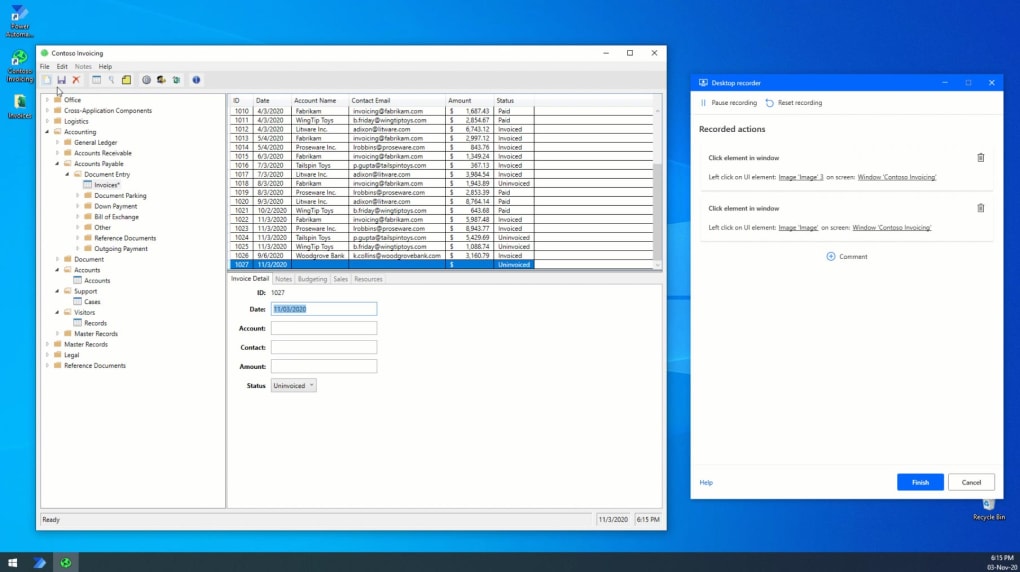
The power of PAD lies in its flexibility and extensive integration capabilities. It boasts over 370 pre-built actions and a wide array of connectors, facilitating seamless integration with a large number of popular applications and services. This extensive library includes native support for Microsoft 365 and Bing services, along with compatibility with numerous third-party applications such as Gmail and Skype. The extensive range of supported apps and services allows for the creation of highly customized and integrated automation solutions that streamline diverse workflows across various applications.
Furthermore, PAD provides the ability to create custom scripts using various scripting languages, enabling users to extend the software’s capabilities beyond pre-built actions and handle more complex automation scenarios. This granular control over automation processes enables power users to craft bespoke solutions for even the most intricate tasks. The ability to combine pre-built actions with custom scripting provides a flexible and powerful approach to desktop automation.
How to Use Power Automate Desktop: A Step-by-Step Approach
While PAD offers a user-friendly interface, a degree of learning is still required to fully harness its potential. However, numerous online tutorials, guides, and community forums provide ample support for users of all skill levels. The learning curve, though present, is generally considered manageable and well worth the investment considering the productivity gains.
The core workflow in PAD revolves around designing and executing flows. A flow is essentially a sequence of actions that are executed in a specific order, often triggered by events or schedules. Creating a flow involves selecting actions from the extensive library, configuring their parameters, and defining the relationships between them. The visual workflow designer allows for an intuitive drag-and-drop approach, making the process of constructing even complex flows surprisingly straightforward.
Once a flow is constructed, it can be tested and debugged using the built-in tools. This iterative process allows users to refine their workflows, ensuring they function correctly and efficiently before deploying them for regular use. PAD’s debugging capabilities enable users to identify and rectify errors swiftly, significantly reducing the time required to finalize a functional automation solution. The debugging tools provide step-by-step execution analysis, helping pinpoint problematic actions and allowing for targeted adjustments.
After thorough testing and debugging, the flow can be scheduled to run automatically at predetermined intervals or triggered manually as needed. This automated execution is a key benefit of PAD, allowing users to automate repetitive tasks without manual intervention, significantly enhancing efficiency and productivity. Scheduling options range from simple time-based triggers to more sophisticated event-driven triggers, enabling users to customize the execution of their automated workflows to meet the specifics of their task requirements.
Advantages and Limitations of Power Automate Desktop
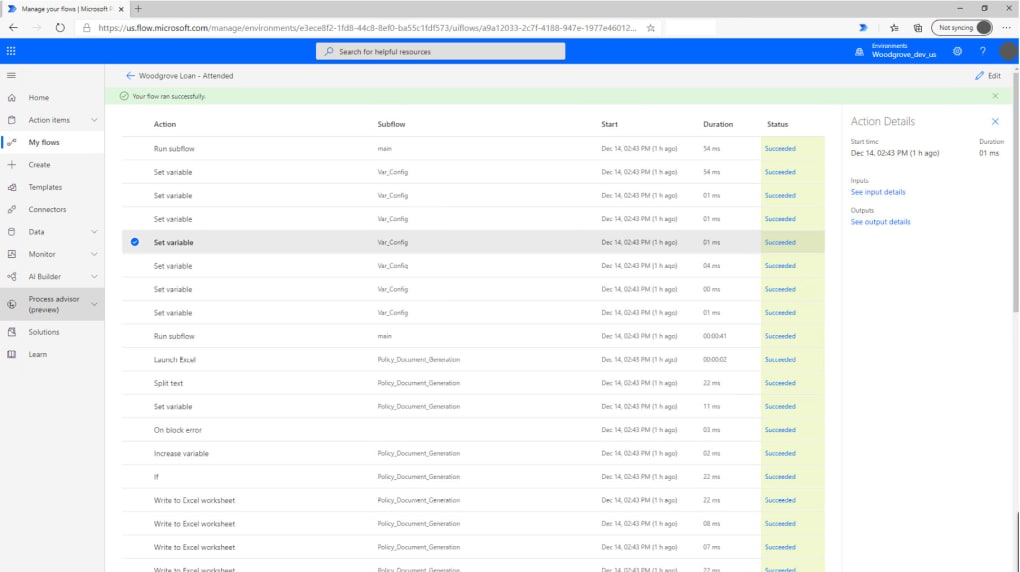
PAD presents numerous advantages, making it a compelling choice for desktop automation:
- Comprehensive Task and Process Automation: PAD allows for automation of a vast range of tasks and processes, from simple data entry to complex multi-application workflows. Its ability to integrate with various applications and services enables broad applicability across diverse organizational contexts.
-
Extensive Pre-built Actions: The library of over 370 pre-built actions dramatically simplifies the creation of automation flows, eliminating the need to write custom code for common tasks. This significantly reduces development time and allows for faster deployment of automation solutions.
-
Wide Range of Supported Apps and Services: PAD’s compatibility with numerous applications and services, both Microsoft-centric and third-party, broadens its applicability to a wide range of scenarios. This interoperability is crucial for creating integrated automation solutions that span different applications and platforms.
-
Custom Scripting Capabilities: The option to create custom scripts provides the flexibility needed to address complex automation challenges that exceed the capabilities of pre-built actions. This empowers users to develop unique and specialized automation solutions.
-
Robotic Process Automation (RPA) Foundation: PAD’s foundation in RPA simplifies the automation of processes that traditionally require manual intervention across different software applications. This is especially beneficial for repetitive and rule-based tasks.
However, PAD is not without some limitations:
-
Learning Curve: While user-friendly, a degree of learning is still required to master PAD’s functionality. However, the abundance of online resources mitigates this challenge significantly.
-
Limited Connector Availability (Potentially): While the number of connectors is extensive, there might be specific applications or services not yet supported. This could necessitate the use of custom scripting to integrate such applications. However, Microsoft continues to expand its connector library, addressing this limitation over time.
- System Resource Consumption: Running automated flows can consume system resources, particularly for complex or resource-intensive processes. Careful workflow design and optimization are crucial to minimize this impact.
Power Automate Desktop in the Broader Automation Landscape
PAD sits comfortably within the broader landscape of desktop automation tools. While it offers a compelling combination of ease of use and powerful features, other tools might better suit specific needs or preferences. Some users might find alternative tools more intuitive, while others might prefer tools with more specialized capabilities for specific tasks. The optimal choice depends on individual requirements and priorities.
Nevertheless, PAD’s strengths lie in its accessibility, comprehensive feature set, and strong integration with the Microsoft ecosystem. This makes it a particularly attractive option for organizations heavily invested in Microsoft products and services. For businesses seeking a versatile and powerful desktop automation solution, PAD offers a compelling blend of capabilities that make it a strong contender in the market. Its free accessibility further enhances its attractiveness for both individual users and organizations alike. Ultimately, the decision of whether PAD is the right choice hinges on a careful assessment of individual automation needs and preferences, alongside considerations for integration with existing systems and workflows.
File Information
- License: “Free”
- Latest update: “May 12, 2025”
- Platform: “Windows”
- OS: “Windows 11”
- Language: “English”
- Downloads: “9.6K”
- Size: “474.92 MB”


